ABS is coming on? - Brake pedal judder?

2010 CHEVROLET SILVERADO
63,000 MILES • 4.8L • V8 • 4WD • AUTOMATIC
Avatar
RGC01
  • MEMBER
  • 2 POSTS
I was doing what I thought was a routine brake job on my truck when finished I took a drive and there was a judder where the pedal pulsates and vibration can be felt in the steering wheel.
On the front end new rotors and new pads were installed, and on the rear only brake shoes as the drums did not look that worn.
In an attempt to correct it I replaced the rotors and pads again on the front with no change.
Later I tried using the e brake and it juddered that way so I thought due to the front brakes not being used it must be the rear brakes causing the problem. So, in attempt to correct that I installed new drums on the back with no change in the juddering condition.
A family member, whom is a mechanic told me to try to change the drums again and if that did not work that I might have a bent axle which is probably unlikely I hope since I have never hit anything that hard that I can recall and the truck it not used for plowing.
The pads are supposed to be OE equivalent premium grade from NAPA and the drums are from Autozone if it makes a difference.
Also, no fluid appears to be leaking from the cylinders in the rear, all the hardware seems good and moving freely.
Any ideas would be helpful.

Thanks
Sep 8, 2015 at 11:09 PM

Advertisement
Avatar
CARADIODOC
  • CERTIFIED EXPERT
  • 34,306 POSTS
First lets start with the basics. Be sure the rear shoes toward the front have the shorter linings and the rear shoes toward the rear have the longer linings. Next, if there was any grease or other contaminants on the linings or drums, that has to be washed off with brake parts cleaner before they go through the first heat cycle. Once the drums and linings get hot from normal braking, those contaminants seep into the linings and the drums or rotors, which are porous, and will never come out. That will cause chattering, and the only way to solve it at that point is to replace the linings and drums.

Check out this video to help get the codes

https://youtu.be/rTtAnsOlZU4

and

https://youtu.be/Pb6nXV-iamI

It sounds like your parking brake system is working okay, but nevertheless, look at the tops of all four shoe frames and be sure they're hitting the large anchor pins at the top of the backing plates. If they aren't touching that pin, the parking brake is partially applied due to a sticking cable. Next, use your thumb to push the parking brake strut bar forward against the pressure of the anti-rattle spring. That bar should have a good 1/8" of free play. If it is tight, the parking brake is stuck partially-applied. That will cause that brake to grab and possibly lock up under light brake pedal pressure.

New linings can be bonded slightly off-center relative to the old ones. That will cause them to ride on the ridge of rust near the outer edge of the drums or on the rust on the inner edge. We cut that rust off when we machine drums for reuse. You would assume that isn't a problem when you install new drums, but it's not uncommon for those to be warped a little. A light machining will take care of that. If they're egg-shaped, you'll get a pulsing brake pedal and a sensation of stopping, then not stopping, twice per wheel revolution. You won't feel that in the steering wheel.

You aren't going to bend a rear axle, but it's easy to get the same feeling if there's debris stuck between the flange and drum. This is common on front rotors that slide onto the bearing assembly. There are access holes in those flanges, and water sprays through them and forms rust spots on the backside of the rotors and drums. Those rust spots have to be scraped off before the part is mounted on the brake lathe, otherwise a warp will be machined into it. If the part isn't machined, it can be installed in a different orientation than it was before, and that puts that rust spot in between the flange and drum. You'll see that by watching the wheel as it rotates while you run the vehicle in gear and raised off the ground. We use a dial indicator to measure "lateral run out" at the wheel's lip where the weights go. .045" run out is excessive and is enough to cause a noticeable vibration, but if there's rust or other debris stuck on the mounting flange, you'll find a lot more run out than that.

Another common cause of warped parts is failure to use a click-type torque wrench when tightening the lug nuts. Guessing leaves the nuts tightened to different amounts with uneven clamping forces. One heat cycle or one splash of rain water on a hot rotor or drum will cause warping. This was never a problem up to the '70s, but it's real important on light front-wheel-drive cars and any other vehicles that have slide-on rotors.

I like to put new drums and rotors on the brake lathe and give them a light cut. Every once in a while we run into a part that was handled roughly in shipping, but another issue to be aware of is with Chinese parts. There is nothing wrong with their quality, but when we make parts out of cast iron, we set them aside to age for 90 days before they get their final machining. The Chinese cast 'em, pack 'em, and ship 'em, then they age on your vehicle. It's common for them to warp a little after a few months. One light machining will take care of that when it occurs.

It's important to use high-temperature brake grease on the six "lands" on each backing plate that the shoes ride on. This is especially important on GM vehicles because they are one of the few that don't have little tabs bent over to form a sliding surface. They just let the edge of the shoe frames grind on those lands, and before long grooves form in them. Those grooves can cause a shoe to catch and not apply under light pedal pressure, and in some cases, not release immediately. That usually shows up when new shoes are installed since the linings are thicker than on those that were removed, so the shoes are readjusted to accommodate that. That sets the shoe frames in a different location relative to those grooves.
Sep 9, 2015 at 12:44 AM
Avatar
RGC01
  • MEMBER
  • 2 POSTS
I rechecked everything I did, and the items you had outlined. The only thing I did not do that you mentioned was to put grease on the lands which I did and that did not change anything much. So, today I had the drums resurfaced, readjusted the shoes, and put everything back on. Then I took it for a drive and everything seems to be fine now with no chattering/juddering. The shop I took the drums to, said that they are resurfacing new drums and rotors very often these days. From now on I guess when I get new rotors or drums I will just have them lightly resurfaced to save time. Although, the rotors are Bendix and the ended up being fine, but the drums were Duralast and they were the issue.

Thanks a lot


Sep 11, 2015 at 11:12 AM
Advertisement
Avatar
CARADIODOC
  • CERTIFIED EXPERT
  • 34,306 POSTS
Dandy. Happy to hear it's solved. Remember that if a pulsation comes back in the next few months, don't replace the drums or rotors. Just have a light cut taken on them. You should only have to do that once.
Sep 11, 2015 at 6:52 PM
Avatar
2CP-ARCHIVES
  • MEMBER
  • 4,540 POSTS
My anti lock brakes are kicking in when they shouldnt be mostly when I come to a slow stop they kick in at the end of my braking.My ABS light is not on, I have replaced the master cylinder and front and rear brakes and still no change.
Aug 31, 2020 at 11:09 AM (Merged)
Avatar
WRENCHTECH
  • CERTIFIED EXPERT
  • 20,761 POSTS
You have an ABS speed sensor that is not reading accurately at low speeds. It's a common problem with those truck. It is incorporated into the hub bearing assembly and the whole unit has to be replaced. The bearing is often the cause anyway.
Aug 31, 2020 at 11:09 AM (Merged)
Avatar
BERNARDNALEPKA
  • MEMBER
  • 1 POST
sometimes when coming to a stop the brakes feel like you are crunching under your feet and the truck does not stop
Aug 31, 2020 at 11:09 AM (Merged)
Avatar
WRENCHTECH
  • CERTIFIED EXPERT
  • 20,761 POSTS
That is the ABS activating because one of the wheel speed sensors is not reading accurately at low speeds and the computer reads that as a brake locking up. This is a pretty common problem on these trucks and there are a number of TSBs on the subject noting various causes like bad wheel bearings, damaged or rusted tone rings or bad sensors. It can even be a mismatch in tire size. It needs to be diagnosed by a knowledgeable technician.
Aug 31, 2020 at 11:09 AM (Merged)
Avatar
WILS12
  • MEMBER
  • 3 POSTS
When coming to a slow stop, almost to a complete stop, my ABS system seems to be engaging when I am not sliding. This happens more often when I am turning and braking.

Both front and rear brakes have been replaced, and I also replaced all brake lines on the truck. Problem stayed the same. Any ideas?
Aug 31, 2020 at 11:09 AM (Merged)
Avatar
CARADIODOC
  • CERTIFIED EXPERT
  • 34,306 POSTS
Extremely common problem on GM trucks. This is called "false activation". Due to their design, the wheel speed sensors develop rather wimpy signals, and since relative speed between the sensor's coil and the disturbed magnetic field affects signal strength, at lower speeds the signal drops too low for the computer to be able to read it. It sees that as that wheel has locked up, so it tries to modulate brake fluid pressure in a misguided attempt at getting that wheel rotating again.

Another variable in the strength of the signal is the air gap between the tip of the sensor's magnet and the rotating toothed tone ring. The problem you're experiencing is caused by rust build-up under the sensor that pushes it outward, away from the tone ring. Add in the weaker signal as wheel speed slows down, and the signal drops too low before the truck comes to a stop.

You could solve the problem by replacing both front wheel bearing assemblies, but it is faster and just as effective to remove the sensors and scrape off the rust.

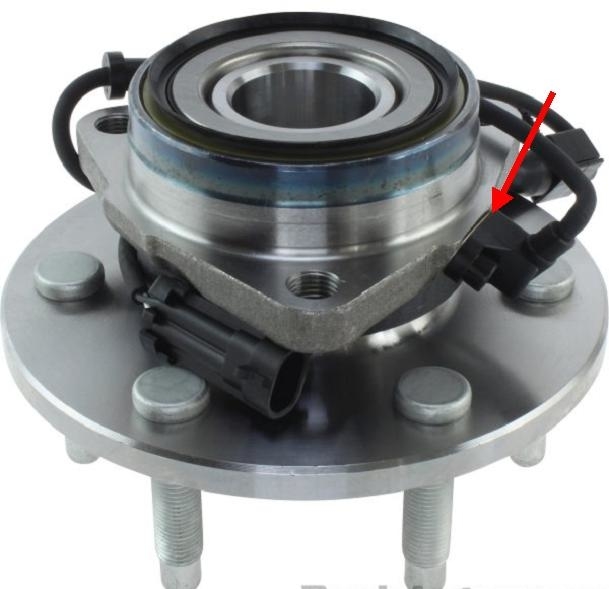
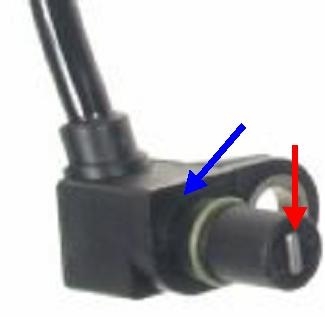
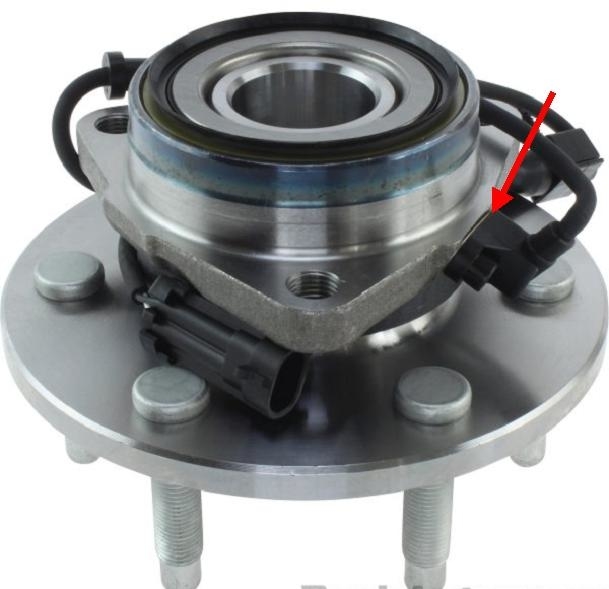
The first photo shows the bearing assembly as you'd pull it out of a box. The second one is of the sensor unbolted and pulled out. The blue arrow shows where the rust develops that pushes the sensor away from the tone ring. As long as it is removed, clean off any rust or metal filings that are clinging to the magnet at the red arrow. That can also lower the strength of the signal.

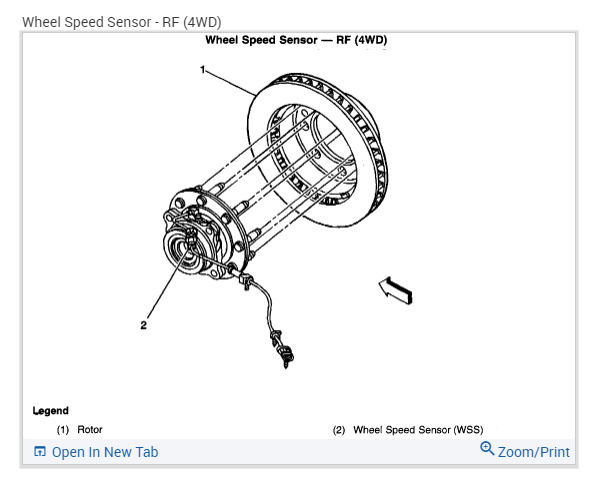
If you want to do this yourself, start with this article, but it's the video at the end that pertains to this service. You'll see how to start the process of removing the wheel bearing assembly, but you don't have to go that far. Use this to see how to get down to the wheel speed sensor.

Even better, check out this video:

https://youtu.be/ZgiPRG6jffc
Aug 31, 2020 at 11:09 AM (Merged)
Avatar
MIKE1961
  • MEMBER
  • 24 POSTS
My ABS kicks in sometimes when I come to a slow stop. The roads are normal and dry, no rain or snow. I have flushed my brake fluid a few years ago. It is very clean.
Aug 31, 2020 at 11:09 AM (Merged)
Avatar
KASEKENNY
  • CERTIFIED EXPERT
  • 18,907 POSTS
Hi,

More than likely you have speed sensor that is not reading properly. So when you slow down it is telling the ABS that one is moving faster or slower than the others and the ABS thinks is it slipping and activates the ABS event.

We need to check for codes and then monitor the wheel speed and vehicle speed sensor and look for which is different. You will need a scan tool to do this. If you don't have one, just have a parts store check for codes and we can go from there. Thanks
Aug 31, 2020 at 11:10 AM (Merged)
Avatar
CARADIODOC
  • CERTIFIED EXPERT
  • 34,306 POSTS
This is a real common occurrence with GM trucks. It's called "false activation", meaning the ABS is kicking in when it isn't needed. Most commonly this is caused by rust build-up under the front wheel speed sensors. These sensors develop real wimpy signals to start with, then, as the rust pushes the sensor away from the tone ring, the signal gets even weaker, to the point the computer can't see it, and it interprets that as that wheel is locking up.

When a voltage is developed mechanically, you need a coil of wire, a magnet, and most importantly, movement between them. As the movement, or speed, slows down, the strength of the voltage gets weaker. That's why this problem occurs at relatively low speeds.

Start by removing the front sensors and looking for rust under them and on the bearing housing. My nifty red arrow in the photo is pointing to where that rust builds up.
Aug 31, 2020 at 11:10 AM (Merged)
Avatar
MIKE1961
  • MEMBER
  • 24 POSTS
Thanks very much! Your reply has been the most specific and hopefully the most helpful. I have a strong suspicion this is exactly what’s wrong. I’ll let you know when I pull them all apart.
Aug 31, 2020 at 11:10 AM (Merged)
Avatar
KASEKENNY
  • CERTIFIED EXPERT
  • 18,907 POSTS
Sounds great. Thanks CARADIODOC, I bet you are exactly right.

Let us know what you find. Thanks
Aug 31, 2020 at 11:10 AM (Merged)
Avatar
ESTABON 68
  • MEMBER
  • 1 POST
Stopping at low speed (under 10 mph) ABS engages. No service lights come on. I was told to clean my wheel speed sensors. What's that ?
Aug 31, 2020 at 11:10 AM (Merged)
Avatar
BLACKOP555
  • CERTIFIED EXPERT
  • 10,386 POSTS
wheel speed sesnor are the sensors at each wheel. they are a magnet and they detect how fast the wheels are turning by measuring the gaps in a moving tone ring. that tells the computer how fast each wheel is turning and if one is locking up. they are easy to find. look for the wires goign to each wheel what the attach to is the sensor
Aug 31, 2020 at 11:10 AM (Merged)
Avatar
CARADIODOC
  • CERTIFIED EXPERT
  • 34,306 POSTS
I hope so. I only know three things, and that is one of them!
Aug 31, 2020 at 11:10 AM (Merged)
Avatar
HARLEY1997
  • MEMBER
  • 1 POST
when coming to a slow stop the anti lock brakes are coming on. What might be causing this?
Aug 31, 2020 at 11:10 AM (Merged)
Avatar
JESSE.TYLER.24
  • MEMBER
  • 6 POSTS
I had a 00' Z-71 that did the same thing. I had a diagnostic ran on it since there were no thrown codes. In my case it was a faulty abs sensor telling the system the truck was in a skid. Not cheap...hope this is helpful.
Aug 31, 2020 at 11:10 AM (Merged)
Avatar
FARMERJOE
  • MEMBER
  • 15 POSTS
ABS light was on, replaced wheel bearing with new after market unit now sometimes the brakes do weird things. when the light is out shutter, vibrate, and acts like there are no brakes, but as soon as the ABS light comes back on brakes act normal again. we replaced the passenger side wheel bearing last year. Any advice would be helpful.
Aug 31, 2020 at 11:10 AM (Merged)
Avatar
STRAILER
  • CERTIFIED EXPERT
  • 53,854 POSTS
It sounds like one of the sensors has gone out.

Here is a guide to help you test and then replace the sensor if it is found to be bad:

https://www.2carpros.com/articles/abs-wheel-speed-sensor-test

and

https://www.2carpros.com/articles/how-to-replace-an-abs-wheel-speed-sensor

Please let us know what happens and upload pictures or videos of the problem.

Cheers, Ken
Aug 31, 2020 at 11:10 AM (Merged)
Avatar
FARMERJOE
  • MEMBER
  • 15 POSTS
New info when the light is on it is throwing a co267 code and a co226 code whats this all mean Joe
Aug 31, 2020 at 11:10 AM (Merged)
Avatar
STRAILER
  • CERTIFIED EXPERT
  • 53,854 POSTS
This looks like the ABS control module is going out because both of these codes are pointing toward that.

Here is a guide to give you an idea of what you are in for when doing the job

https://www.2carpros.com/articles/how-to-replace-a-abs-controller

Please let us know what you find.

Cheers, Ken
Aug 31, 2020 at 11:10 AM (Merged)
Avatar
WDR58
  • MEMBER
  • 1 POST
the ABS energizes everytime the truck is almost stopped. 5mph or so. really would like to disable the abs but everything seems to turn on the ABS light.
I suspect it is probably one of the sensors on the front wheels but have no way to check them. unplugging them only turns on the trouble code (light). the parts stores do not have these available. any suggestions would be greatly appreciated
Aug 31, 2020 at 11:10 AM (Merged)
Avatar
DENNYP
  • CERTIFIED EXPERT
  • 1,824 POSTS
remove the abs sensors from the hub assemblies. Clean the mounting surface with a wire brush. Reinstall the sensors to the hubs. Test drive the vehicle. If this doesn't work, replace the sensors. They are available at your local dealership.
Aug 31, 2020 at 11:10 AM (Merged)
Avatar
GARYMMANCINI
  • MEMBER
  • 1 POST
the brakes work great until i almost come to a complete stop then the brake pedal pushes back up and makes a groaning nose and i have to push extremely hard on the pedal to get it move back down to stop. how this only does this when im going very slow and need to stop and it doesnt do it al the time, but i can play with it in my drive way and can make my pedal hang up almost every time.a chevy mechanic told me to change the master cylinder but that was futile. im thinking something to do with the abs. thanks for the help
Aug 31, 2020 at 11:10 AM (Merged)
Avatar
JACOBANDNICKOLAS
  • CERTIFIED EXPERT
  • 110,175 POSTS
Check the ABS sensors. Chances are they are dirty, have oil on them and the sensor thinks the stator has stopped. As a result, it turns on the abs.

Let me know what you find.

Joe
Aug 31, 2020 at 11:10 AM (Merged)
Avatar
CHEVYMAN54173
  • MEMBER
  • 9 POSTS
My abs brake kick in at low speeds while applying the brakes. I originally thought it was a speed sensor. I wasn't positive so I took it to a GM dealership and had them take a look at it. They told me I need a new brake switch. According to them its a $20.99 part. However when I searchd online for it I only found brake light switch. I highly duobt this is what I'm looking for. I am still thinking its a speed sensor. Would I get a abs code for my problem? How do I get abs codes? I have a scanner that detects OBD2 codes but not sure if it picks up abs codes.
Aug 31, 2020 at 11:11 AM (Merged)
Avatar
JACOBANDNICKOLAS
  • CERTIFIED EXPERT
  • 110,175 POSTS
You can get ABS codes, but your scanner needs to be able to read them. If you have a basic scanner, it is most likely designed to read engine codes only. Chances are it is a sensor on one of the wheels that is bad.
Aug 31, 2020 at 11:11 AM (Merged)
Avatar
CHEVYMAN54173
  • MEMBER
  • 9 POSTS
You are talking speed sensor right? How would I know which one? Or should I just replace both? Where is this sensor located and can I replace it myself?
Aug 31, 2020 at 11:11 AM (Merged)
Avatar
JACOBANDNICKOLAS
  • CERTIFIED EXPERT
  • 110,175 POSTS
It is a speed sensor, however, they are ABS sensors. If you have 4 wheel ABS, each wheel will have a sensor. If the light is on, have the computer scanned to identify where the problem is coming from. Most parts stores will do it for free.
Aug 31, 2020 at 11:11 AM (Merged)
Avatar
CHEVYMAN54173
  • MEMBER
  • 9 POSTS
I don't have a light on. I wish I did cause it would make this much easier. And I'm not sure if I have 4 wheel ABS.
Aug 31, 2020 at 11:11 AM (Merged)
Avatar
JACOBANDNICKOLAS
  • CERTIFIED EXPERT
  • 110,175 POSTS
I believe you do. Check behind the front backing plates (behind rotors) for wiring. Make sure nothing is damaged to the sensors. Wiring can get damaged. Also, make sure the stater isn't overly dirty.
Aug 31, 2020 at 11:11 AM (Merged)
Avatar
CHEVYMAN54173
  • MEMBER
  • 9 POSTS
Are these sensors easy to get at? I'm not sure where they are.
Aug 31, 2020 at 11:11 AM (Merged)
Avatar
BUD MARTIN
  • MEMBER
  • 1 POST
abs comes on during normal opp
Aug 31, 2020 at 11:11 AM (Merged)
Avatar
JACOBANDNICKOLAS
  • CERTIFIED EXPERT
  • 110,175 POSTS
Is it happening only at slow speeds? If so, check the sensors at each wheel and clean them off. I have found that if they get dirty, they loose contact with the reluctor on the axle at slow speeds and actuate the ABS.

Let me know if this helps.

Joe
Aug 31, 2020 at 11:11 AM (Merged)
Avatar
DIVLOVE2FISH
  • MEMBER
  • 1 POST
When I break on dry roads my ABS system is kicking in 5 out of 10 times. I am wondering what might be causing this.
Aug 31, 2020 at 11:11 AM (Merged)
Avatar
CARADIODOC
  • CERTIFIED EXPERT
  • 34,306 POSTS
The computer thinks a wheel is locking up, typically due to the signal from a wheel speed sensor dropping out. The fastest way to figure out which one is to watch them with a scanner during a test drive.
Aug 31, 2020 at 11:11 AM (Merged)
Avatar
FRANZENGREG
  • MEMBER
  • 1 POST
At low speeds, less than 5mph, the ABS activates but the vehicle does not stop. I have to literally stand on the brakes and over power the ABS to stop the truck. Someone suggested the wheel speed sensor was bad, some suggested hooking it up to a computer to check the solenoid system. Have you heard of this, what do you guys suggest? Thank you.
Aug 31, 2020 at 11:11 AM (Merged)
Avatar
BRIAN 1
  • CERTIFIED EXPERT
  • 1,030 POSTS
this is actually a very common problem on these trucks,from 97-05 was most common.check for a loose wheel bearing,if there tight follow this,Antilock Brake (ABS) Activation At Low Speeds (Clean Wheel Speed Sensor Mounting Surface)

Models:
1999-2000 Cadillac Escalade
1995-1999 Chevrolet Silverado (Old Style)
1995-2000 Chevrolet Suburban, Tahoe (Old Style)
1995-2003 Chevrolet Astro Van, Blazer, S10
1995-1999 GMC Sierra (Old Style)
1995-2000 GMC Yukon, Yukon XL (Old Style)
1995-2001 GMC Envoy, Jimmy
1995-2003 GMC Safari Van, Sonoma
1995-2001 Oldsmobile Bravada

Supercede:

This bulletin is being revised to update the correction and warranty information. Please discard Corporate Bulletin Number 02-05-25-006A (Section 05 - Brakes).

Condition

Some customers may comment on ABS activation at low speeds, usually below 8 km/h (5 mph). Upon investigation, the technician will find no DTCs set.

Cause

The cause of this condition may be an increased air gap between the wheel speed sensor and the hub reluctor ring due to rust and debris built up on the sensor mounting surface.

Correction

Measure AC voltage and clean wheel speed sensor mounting surfaces.

1. Raise the vehicle on a hoist.

2. Disconnect both the front wheel speed sensor harness connectors.

3. Place a DVM across the terminals of each sensor connector.

4. Rotate the wheel with hand speed and measure the ACmV's. The reading should be at least 350 ACmV's.

5. If the reading is between 200 and 350 ACmV's, remove the wheel, caliper and rotor in order to gain access to the speed sensor.

6. Remove the wheel speed sensor and plug the hole to prevent debris from falling into the hub during service.

7. Clean the wheel speed sensor mounting surface using a wire brush, sand paper, emery cloth, ScotchBrite(TM) or other suitable material. Be sure to thoroughly clean the wheel speed sensor surface. There should be no rust or corrosion.

8. Check the sensor head to determine if it has been warped/distorted due to the corrosion build up or other causes. Check the mounting surface on the sensor head for flatness by placing it on the edge of a metal machinists scale or other suitable straight edge to measure the flatness. Check the sensor for flatness in multiple (minimum 3) positions/directions. If the sensor head is distorted, replace the sensor.

9. Apply (spray) two thin coats of the specified rust penetrating lubricant (corrosion inhibitor) to the complete sensor mounting surface on the bearing hub. Allow to dry for 3-5 minutes between coats. Use ONLY Rust Penetrating Lubricant, P/N 89022217 (Canadian P/N 89022218).

10. When the corrosion inhibitor is dry to the touch (about 10 minutes), apply a thin layer of bearing grease to the hub surface and sensor 0-ring prior to sensor installation. Use ONLY Wheel Bearing Lubricant, P/N 01051344 (Canadian P/N 993037).

11. Install either the original sensor or a new one in the hub and secure the sensor. Ensure that the sensor is seated flush against the hub.

12. Install the rotor, the caliper and the wheel.

13. Place the DVM across the sensor terminals and recheck the voltage while rotating the wheel by hand. The voltage should now read at least 350 ACmV's. post back with what you find.
Aug 31, 2020 at 11:12 AM (Merged)