1998 Chrysler Concorde Auto Temp Control

1998 CHRYSLER CONCORDE
128,000 MILES • 6 CYL • FWD • AUTOMATIC
Avatar
LGB BILL
  • MEMBER
  • 53 POSTS
For the last several years, my automatic temperature control has slowly been losing the ability to maintain temperature.

It started with erratic fan speed. With everything working correctly, temp at 73 degrees, all of a sudden the fan would go to full speed and the temp would go full hot or full cold. Sometimes it would only be a temporary problem and then work fine for another few weeks.

Eventually, it became so much of a hassle that I just started using the manual mode for operation.

A few days ago, the fan went immediately to full speed and hasn't responded to any manual attempts to adjust the speed. Even with the system selected to "Off", the fan runs at full speed.

I've had the car to the dealer twice, a general automotive repair shop once, and to two A/C shops. Each time, they say that they can't find anything wrong with the system, meaning that the system is not setting any fault codes.

I've tried the process of resetting the A/C system using the buttons on the temp controller with no luck.

I know that the components of the A/C system are actually controlled by the Body Control Module, with input from the temp controller. I really don't want to just start "shotgunning" the process by replacing parts until I stumble into what is wrong.

Suggestions...???

Thanks,
Bill
Oct 8, 2008 at 3:54 PM
Advertisement
Avatar
IMPALASS
  • CERTIFIED EXPERT
  • 3,112 POSTS
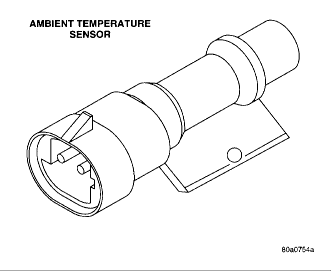
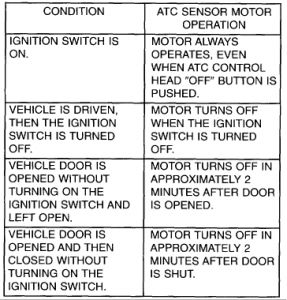
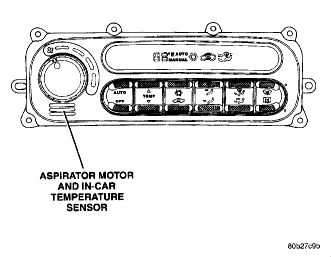
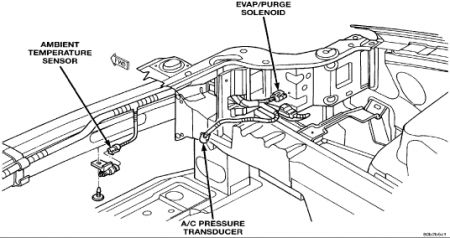
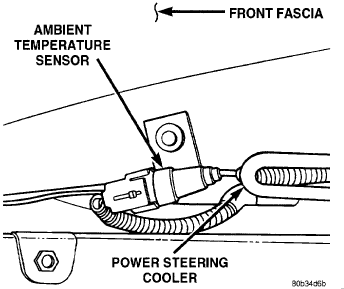
Hello - just a couple of things you might check/try. First read the info on ATC In-Car Temperature Sensor and Ambient Air Temperature Sensor. Me I would first do the check on the sensor motor fan, I have attached that. I don't believe it is the thermistor in the ATC only because it says it should be throwing a code. You said the dealer/shops don't see a code. I would next, go ahead and replace the Ambient Air Temperature Sensor (I have attached the pics where it is) mainly because if the sensor motor fan inside the car is working after the test, the thermistor appears to be working (no codes) the Ambient Air Temperature Sensor "...is used by the ATC system to adjust blower speed, temperature offsets, evaporator temperatures and mode control." This seems more like what you are saying. Plus it is only about $17.00 by my info at the dealer, part number 4688204. You might check Auto Zone, O'Reilly's etc also. Good luck and be safe. ATC In-Car Temperature Sensor The Automatic Temperature Control (ATC In-Car Temperature Sensor returns electrical signals to the Body Control Module (BCM). The In-Car Temperature Sensor is used on ATC equipped vehicles only. The In-Car Temperature Sensor is made up of two parts. One part is the in-car sensor motor fan assembly and the second part is a temperature thermistor. The in-car sensor motor fan assembly attaches to the back of the ATC Control head. This assembly has a small fan and a motor which draws air through the intake on the front of the ATC control. The in-car sensor thermistor is located inside of the ATC Control Head. Air drawn from the passenger compartment by the in-car sensor motor-fan assembly, flows over the thermistor. The in-car sensor thermistor changes resistance with air temperature. The BCM measures this resistance and calculates the temperature of the air drawn into the ATC Control. The ATC system then makes adjustments to maintain the optimum passenger compartment comfort. Refer to the ATC Sensor Motor-Fan Operation table for when the ATC Sensor is operating. The in-car sensor motor is a separate serviceable part connected to the ATC Control Head. See Diagnosis and Testing for proper check of airflow. The in-Car Sensor Thermistor is part of the ATC Control Head and not a separate serviceable part. One must replace the ATC Control if the ATC self-diagnostics indicates a fault code. Ambient Air Temperature Sensor The ambient air temperature sensor is located on the inside of the right front bumper beam. This sensor will inform the ATC system of the ambient temperature outside the vehicle. This sensor is used by the ATC system to adjust blower speed, temperature offsets. evaporator temperatures and mode control. The ambient sensor is not serviceable and must be replaced if found to be defective. The ambient temperature sensor is used on all LH vehicles with or without ATC systems. In-car sensor motor fan test 1. Perform air flow test to check motor/fan assembly. a. Turn ignition to the ON position and push the OFF button to stop the ATC system airflow. This will make it easier to observe paper in the step Step b. Place a small piece of newspaper in front of the sensor/motor opening on the ATC control. If the paper sticks to the opening, the In-Car sensor/motor is operating properly. The piece of paper should be only large enough to cover the grille opening. 2. Check if the electrical connection and connector are OK. 3. Check for the two foam seals and their condition, it is absolutely necessary for proper sensor operation. a. Seal on the inside surface directly behind the nameplate. b. Seal (strip) located directly to the right of the right center duct opening (instrument panels with trim bezels).


https://www.2carpros.com/forum/automotive_pictures/248015_Ambient_Sensor_1_1.gif


https://www.2carpros.com/forum/automotive_pictures/248015_Ambient_Sensor_2_1.gif


https://www.2carpros.com/forum/automotive_pictures/248015_ATC_Sensor_MotorFan_1_1.jpg


https://www.2carpros.com/forum/automotive_pictures/248015_ATC_Sensor_MotorFan_2_1.gif

Oct 8, 2008 at 6:26 PM
Avatar
LGB BILL
  • MEMBER
  • 53 POSTS
OUTSTANDING REPLY...!!!!

Very good analysis and suggestions. I'll be working on these over the next several days. Where the front end sustained major damage several years ago, I'm suspecting the ambient air temp sensor.

I'll let you know what I find.

Thanks for the great service...!!!

Bill
Oct 9, 2008 at 12:04 AM
Advertisement
Avatar
LGB BILL
  • MEMBER
  • 53 POSTS
So far, I've verified that the in car sensor motor and fan are drawing air in through the intake.

I'll take a look at the ambient temperature sensor as soon as I can crawl under the car and locate it. Is there any testing that can be done on the ambient sensor, such as resistance tests with varying temps...???

Is it possible to verify that the trim around the ATC head is only held in place with a few screws in the lower area...??? Once those are out, I'm guessing the trim should be easily removed and the ATC head can be worked on.

Thanks again for your help..!!

Bill
Oct 9, 2008 at 12:13 PM
Avatar
IMPALASS
  • CERTIFIED EXPERT
  • 3,112 POSTS
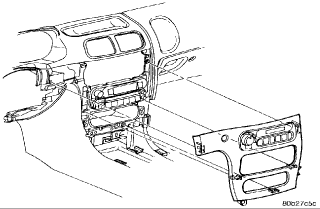
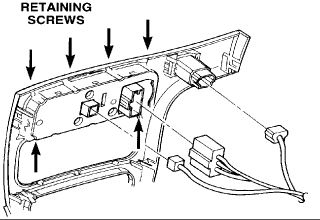
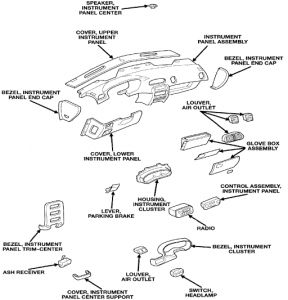
Hello Bill As for the trim, I have attached pics. It appears to be held in with clips. It always makes me nervous to pull on the plastic parts etc as it is hard to tell at times how it is held in. You might ease a flat tip screwdriver along side and gently pry. Not to small as it may chip. You might put a rag between the screwdriver and the dash to prevent any damage. Some are held in with screws once you remove the ash tray or other surrounding items. But if you look at the pic, it doesn't look like it. Then the next pic shows the back of the panel, removing the plugs. The screws hold the control unit in. You might consider calling the parts department and see if you have to order screws or clips for it. That would be a sure thing. Me, the less you remove the better. I would still just replace the sensor at the front of the car since it is inexpensive. I don't show a check for that though there may be one but if it is intermittent it may check good and then bad on the car. Again, it's the least expensive and so far your check of the ATC shows it is okay. Not sure if this helps........hope so. Good luck.


https://www.2carpros.com/forum/automotive_pictures/248015_ATC_Head_removal_1_1.gif


https://www.2carpros.com/forum/automotive_pictures/248015_ATC_Head_removal_2_1.gif

Oct 9, 2008 at 7:35 PM
Avatar
LGB BILL
  • MEMBER
  • 53 POSTS
I've located and removed the ambient temp sensor. Interestingly, that had no effect on the operation of the blower speed. That could indicate the sensor is open, resistance-wise. I haven't had the time to test it to see what resistance might be there.

I've also managed to remove the trim and look at the ATC head. All appears to be okay in that department. You were right; it IS scary pulling on the plastic. Once I got it out, I can see that it's not that big a deal for future work in that area.

Tomorrow I'ill buy the ambient temp sensor and replace it. With luck that will be the culprit....

Again, thanks for your excellent advise and guidance.

Bill
Oct 9, 2008 at 11:06 PM
Avatar
IMPALASS
  • CERTIFIED EXPERT
  • 3,112 POSTS
Bill - if you have time please let me know if that fixes the problem........also............me, since that part plays such a big part in the operation of your AC, even if you could get it from a parts distributor, I would get the OEM from the dealer especially since it is not that expensive. Good luck.
Oct 9, 2008 at 11:34 PM
Avatar
LGB BILL
  • MEMBER
  • 53 POSTS
Good afternoon....

Well, I purchased an OEM ambient temp sensor and replaced it. No change in the symptoms.

As part of trying to get it working, I started trying to use the "Auto" mode. I was able to get it into the auto mode for a while and could feel that it was regulating the temp to about what was set on the ATC head. But, it was still in the high speed mode for the blower, which I believe was causing it to "hunt" the temperature a little bit.

Subsequently, the ATC head dropped out of the auto mode all by itself. I now recall that the ATC head really doesn't want to work in auto at all. Most times, it ignores any attempt to select auto. Most components seem to be doing what they should, such as the temperature blending valve and the various distribution valves. The parts that are not cooperating are the blower (speed) and the auto temp operation. One indicator might be the failure of the selected temperature to be displayed most of the time.

I used to know how to run the self diagnosis on the ATC head, but have lost the procedure. Do you know how to do that test...???

I'm now quessing that the ATC head might be next in line for replacement. I've been told I can find one at a "Pick Your Part" lot for about $50.00.

Thoughts...???

Thanks for sticking this out with me...!!!

Bill
Oct 10, 2008 at 2:44 PM
Avatar
IMPALASS
  • CERTIFIED EXPERT
  • 3,112 POSTS
Hello Bill,
I see this wants to give us a hard time huh. I only have a few minutes right now but will check back later. If possible can you do this, first, let’s make sure we are with the right engine. I show two V6 choices. V6-2.7L VIN R and V6-3.2L VIN J. Which do you have?
Next, have you stopped by Auto Zone or O’Reilly’s and had them check for any codes? It’s free and that would tell us that is clear. Remember the ATC is supposed to throw a code if not working.

Last, if you haven’t driven the car since putting the sensor in, please do so about 3 miles at least. For that matter you will I guess to check the codes.

Let me know and I will check back shortly.

Bob
Oct 10, 2008 at 5:08 PM
Avatar
LGB BILL
  • MEMBER
  • 53 POSTS
Thanks for the quick response, Bob...

It's a 3.2L.

More info.... I actually removed the temp sensor last night in preparation for getting the replacement this morning. SURPRISE...!!! It really didn't like that... When I drove the car this am, I had a Check Engine light and the battery annunciator illuminated...???? In any case, as soon as I got to my first desination, I replaced the sensor and the battery annunciator went out. The check engine light stayed on until after leaving the second destination where I installed the new sensor.

I have a OBD II tester at home and will check for codes there.

Gotta run home... wife just told me her battery is dead.....

SHEESH...!!!!

Thanks,
Bill
Oct 10, 2008 at 5:19 PM
Avatar
LGB BILL
  • MEMBER
  • 53 POSTS
The saga continues....

The OBD II indicated a code for low voltage from the ambient/battery temp sensor. With the temp sensor removed yesterday, it set the code, but gave the battery annunciator. Cleared the code.

Researching other forums, it is looking more like multiple problems here. The blower running at max all the time is indicative of the blower moter solid state relay being failed (goes to high mode typically).

The ATC head is not going into the self test mode with the three right hand buttons pushed in. Also, the modes of the ATC head change erratically. i.e., the temperature display occasionally goes blank. The mode will either change from auto to manual or not go into auto at all. Some have had success by tapping the ATC head, which could indicate a poor electrical connection or solder joint somewhere in the unit.

Next step will be to replace the blower relay since it seems to be the most likely culprit for the immediate problem of the blower running at max all the time. If I can regain control of the blower speed, I can work on tracking down the issue with the ATC auto mode not working. Rebuilt ATC heads are available for $80 plus $10 shipping. Blower relays are $65 plus shipping.

Eating the elephant, one bite at a time.....
Oct 12, 2008 at 1:54 AM
Avatar
IMPALASS
  • CERTIFIED EXPERT
  • 3,112 POSTS
Bill - seems like you are on the right track and going the same direction I would and it appears others have gone. I will continue to review other items and let you know if I see something else, please keep me posted so I know how you are doing and I may be able to offer more. I agree....eating the elephant, one bite at a time.....Lord willing it is a baby elephant.............

Bob
Oct 12, 2008 at 2:05 AM
Avatar
LGB BILL
  • MEMBER
  • 53 POSTS
Hi Bob....

Just figured out the correct way to run the DTC for the ATC head. Was pushing wrong buttons earlier and not getting any results.

The DTC indicates a code of 51 - System Voltage Too Low For Door Calibration. Drat..!!! I wanted to see a code that said "ATC Head All Messed Up" or "Blown Fuse" or something simple. Never my luck.

I'm not sure what to do with this code 51. This almost sounds like a wiring problem. I'm thinking I'll still head over to Pick Your Part tomorrow and get myself a replacement blower relay for starters.

FYI... I went ahead and subscribed to the Mitchell1 repair manual. I figure this will help with figuring out how to disassemble the beast if it comes down to it...

Too be continued.....

Bill
Oct 12, 2008 at 2:26 AM
Avatar
IMPALASS
  • CERTIFIED EXPERT
  • 3,112 POSTS
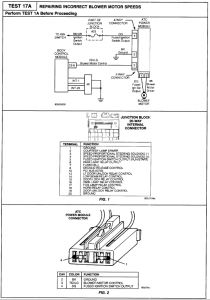
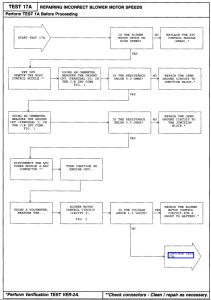
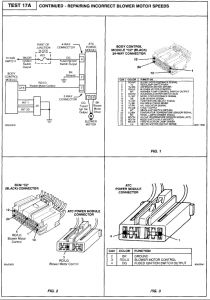
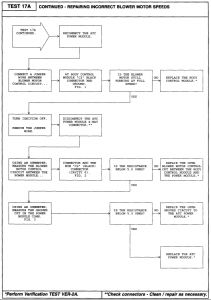
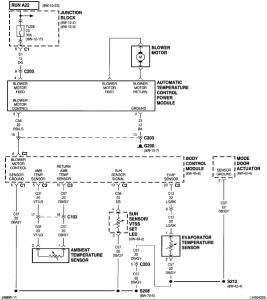
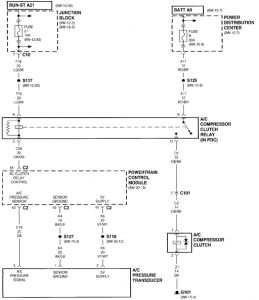
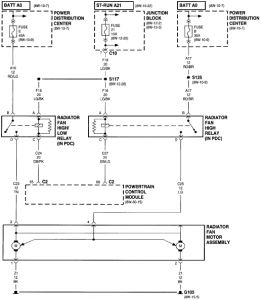
Good morning Bill - glad to see you got the shop manual....it does help. The erratic/stuck on high fan - here is a troubleshooting chart for that. Still might be that relay....I will check into that and the code 51 for you....gotta run but wanted to get this to you. I'll check more shortly. Bob


https://www.2carpros.com/forum/automotive_pictures/248015_Fan_Speed_1_1.jpg


https://www.2carpros.com/forum/automotive_pictures/248015_Fan_Speed_2_1.jpg


https://www.2carpros.com/forum/automotive_pictures/248015_Fan_Speed_3_1.jpg


https://www.2carpros.com/forum/automotive_pictures/248015_Fan_Speed_4_1.jpg


https://www.2carpros.com/forum/automotive_pictures/248015_Fan_Speed_5_1.jpg


https://www.2carpros.com/forum/automotive_pictures/248015_Fan_Speed_6_1.jpg

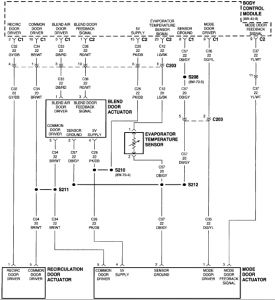
Blend Door Actuator Body Control Module Evaporator Temperature Sensor Mode Door Actuator Recirculation Door Actuator


https://www.2carpros.com/forum/automotive_pictures/248015_Fan_Speed_7_1.jpg

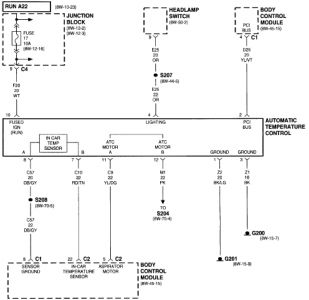
Automatic Temperature Control Body Control Module Fuse 17 (JB) G201 Headlamp Switch Junction Block


https://www.2carpros.com/forum/automotive_pictures/248015_Fan_Speed_8_1.jpg

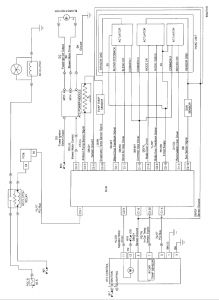
Ambient Temperature Sensor Automatic Temperature Control Power Module Blower Motor Body Control Module Evaporator Temperature Sensor Fuse 23 (JB) Junction Block Mode Door Actuator Sun Sensor/VTSS Set Led


https://www.2carpros.com/forum/automotive_pictures/248015_Fan_Speed_9_1.jpg

A/C Compressor Clutch A/C Compressor Clutch Relay A/C Pressure Transducer Fuse 21 (JB) Fuse B (PDC) G101 Junction Block Power Distribution Center Powertrain Control Module


https://www.2carpros.com/forum/automotive_pictures/248015_Fan_Speed_10_1.jpg

Fuse 21 (JB) Fuse B (PDC) Fuse E (PDC) G105 Junction Block Power Distribution Center Powertrain Control Module Radiator Fan High Relay Radiator Fan High/Low Relay Radiator Fan Motor Assembly
Oct 12, 2008 at 11:02 AM
Avatar
IMPALASS
  • CERTIFIED EXPERT
  • 3,112 POSTS
Bill - a couple of other notes...

Service Bulletin
NUMBER: 24-002-04 REV. A

GROUP: Heating & A/C

DATE: July 30, 2004

THIS BULLETIN SUPERSEDES TECHNICAL SERVICE BULLETIN 24-002-04, DATED MARCH 30, 2004, WHICH SHOULD BE REMOVED FROM YOUR FILES . ALL REVISIONS ARE HIGHLIGHTED WITH **ASTERISKS** AND INCLUDES ADDITIONAL MODEL YEAR.

SUBJECT:
A/C and Heater Performance

OVERVIEW:

This bulletin provides diagnostic information for A/C and heater performance complaints.

MODELS:

1998 - 2004 (LH) LHS/300M/Concorde/Intrepid

2001 - **2005** (JR) Sebring Convertible/Sebring Sedan/Stratus Sedan

NOTE :Perform Customer Satisfaction Notification no. 857, reprogram Powertrain Control Module (PCM), for 2000 model year LH-vehicles built prior to August 30, 1999 (MDH 0830XX).

SYMPTOM/CONDITION:

Erratic operation of the A/C and heater systems including:

^ Lack of cold air

^ Lack of hot air

^ Unrequested mode change - Automatic Temperature Control (ATC) only)

^ No control of mode or temperature control

^ Tapping noise from blend door


The above Symptoms may be accompanied by the following Diagnostic Trouble Codes (DTCs):

^ Blend door feedback

^ Blend door stall

^ A/C control mode door input shorted to battery

^ Mode door stall

^ In car temp sensor failure ATC messages not received


DIAGNOSIS:

^ Do not attempt to remove A/C control until after this entire Diagnosis and Repair Procedure has been performed.

^ Verify customer reported symptom(s) if possible.

^ Check for the presence of DTCs with the scan tool (DRBIII(R)) and record on the repair order. If a DRBIII(R) is not available reference the appropriate Service Manual - Heating and Air Conditioning "Self Diagnostics" procedure and record any present DTCs on the repair order. If Symptoms and/or DTCs other than those listed above are present, repair as necessary. If a Symptom(s) and/or DTC(s) listed above is present, perform the Repair Procedure.


REPAIR PROCEDURE:

1. With the vehicle at room temperature 10°- 27°C. (50°to 80°F.), remove the M-1 circuit fuse for ten minutes to erase DTCs.

2. Install the M-1 fuse and start the vehicle, this will initiate the HVAC system calibration. Allow approximately five minutes for the calibration to complete.

3. Operate the vehicle and HVAC system to verify that Symptoms and/or DTCs are gone. If tapping noise or Blend Stall/Feedback DTCs re-occur, additional diagnosis will be required.

POLICY:
Reimbursable within the provisions of the warranty.


TIME ALLOWANCE:

FAILURE CODE:

Disclaimer :This bulletin is supplied as technical information only and is not an authorization for repair.

I started going over the info, I just don't see this Blower Motor Relay.......can you send me what you have.


SYSTEM OPERATION
The blower motor power module is only used in vehicles equipped with Automatic Temperature Control (ATC) . it is located on the lower right side of the HVAC unit housing.

The power module receives pulse width modulated signals from the Body Control Module. The power module varies voltage to the blower motor for different blower speeds based on the ATC software. There are 14 speeds and a blower off signal.


I see the code 51 in the charts but it doesn't give any info about fix........still checking but wanted to get this to you.

Bob
Oct 12, 2008 at 11:25 AM
Avatar
LGB BILL
  • MEMBER
  • 53 POSTS
Hi Bob....

I'm sorry for the red herring about the "blower motor relay". It is properly called the blower motor power module. The "relay" came from some other on-line resources that referred to it as a "solid state relay" which is probably a technically correct description but not what is commonly used in the manuals.

I have found more codes.... I didn't figure out how to page from the first code to the rest until I sat in the car again and tried to figure out what they meant by "panel switch". "Panel" here refers to the A/C outlets in-dash......

The full complement of codes is now: 51 [System voltage too low for door calibration], 26 [ATC thermistor failure], and 35 [Evaporator sensor failure].

I don't know what the 51 is all about; I think it'll be on the back burner. Regarding the ATC thermistor, I'm leaning toward replacement of the ATC head on that one. And, regarding 35, again, it'll be back burner.

With the info you've provided I've got some more testing to do. I think it would be wise to erase the DTC codes via removal of the M-1 fuse and start with a clean slate to see what's real and what's not.

Will probably do some more later this evening and will post what I've found.

Thanks for all you're doing, Bob.... Way beyond what anyone might expect...!!!

Take care,
Bill
Oct 12, 2008 at 7:09 PM
Avatar
IMPALASS
  • CERTIFIED EXPERT
  • 3,112 POSTS
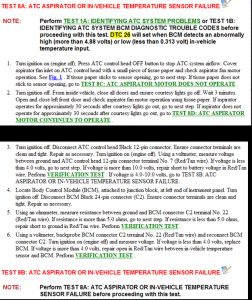
Bill - Okay, some more checks based off the codes. Code 26 NAME OF CODE In-Car Temperature Sensor Failure WHEN MONITORED With ignition on SET CONDITION BCM senses an abnormally high or low voltage in the in-car temperature input THEORY OF OPERATION The in-car temperature sensor is a thermistor for which the BCM provides a 5V pull-up. Under normal operating conditions (-40 to 85 °C) this voltage should be between 0.313V and 4.88V PROBABLE CAUSES "¢ Wiring open circuit "¢ Wiring short to ground "¢ Wiring short to battery "¢ Failed sensor "¢ Failed BCM


https://www.2carpros.com/forum/automotive_pictures/248015_Code_26_a_1.jpg


https://www.2carpros.com/forum/automotive_pictures/248015_Code_26_1.jpg

Oct 13, 2008 at 2:26 AM
Avatar
LGB BILL
  • MEMBER
  • 53 POSTS
Hi Bob....

Thanks again for your response. I'm guessing from the time-stamp on your response that: (1) You are recieving a really good salary to do this work and thereby motivated by the pay, or (2) you really do enjoy this kind of challenge and get a lot of satisfaction from seeing a job finished. Hmmm.... I'll put my money on # 2...!!

Where I'm back into the "work week" mode, I'll have a little less spare time to peck away at this beast. With the latest input and the previous post, I have some really good specific issues to check and can make the most of my time. My money would be on a defective in-car temp sensor just based on intuition and what is available from the symptoms.

As soon as I can run these latest tests, I'll let you know. I'm really hoping to find the ATC thermistor is defective because I really don't want to tackle tearing apart the dash to gain access to the BCM.

As soon as I have more to post, I'll do it.

FYI... I've made another small contribution to the web site. I feel a liitle guilty getting all of this help for the small donation I made earlier. Even with donations, I know that this is more than for just the money. Knowing that, I appreciate your help very much...!!

Later,
Bill
Oct 13, 2008 at 10:32 AM
Avatar
IMPALASS
  • CERTIFIED EXPERT
  • 3,112 POSTS
Hi Bill….
You can go with number 2. It does seem to be leaning to the thermistor……Before there were not codes, now there are which if I remember correctly that is what the troubleshooting chart pointed to replacing if there were codes.
The folks at 2CarPros appreciate the donation. Good folks there. Below may name is a area to “Give Feedback” Feel free to put something there if you would like. Also, I haven’t been with the 2CarPros folks too long, also feel free to drop Mike Cerjak a note about the service if you would like: [email protected] Glad to help…..when you are ready to tear back into it…..we’ll start eating the elephant again. Have a good week at work.

Bob
Oct 13, 2008 at 6:48 PM
Avatar
LGB BILL
  • MEMBER
  • 53 POSTS
Hi Bob.....

To make sure I wasn't chasing a phantom, I cleared the codes. After running the "In-vehicle Calibration and DTC Check", there are now no codes.

I keep coming back to the primary symptom of the blower speed being stuck at high. This takes me to the "TEST 17A: INCORRECT BLOWER MOTOR SPEEDS". Reading through this area, it appears the most likely culprit is the blower motor power module. The only way to be 100% certain though is to go through the entire set of tests that are listed in 17A. I'm really tempted to just buy a used power module and replace it rather than tear apart the dash to get the BCM out for testing. I know that's not the professional approach to this issue, but time-wise, it seems like it might be the easier route. Not having taken the BCM out yet, I'm just guessing that it is a chore. I might be wrong.

Another problem I have is that I bought an inexpensive DRB II code reader and everything I read in the manual indicates that the only way to really get the detailed info is to use a "scan tool" to test the many individual parts of the system.

It still seems like multiple problems, most likely being the blower motor power module, with the background issue being the ATC head.

Out of time tonight.....

Good night, Sir.....

Bill
Oct 14, 2008 at 1:37 AM
Avatar
LGB BILL
  • MEMBER
  • 53 POSTS
Sorry.... that was supposed to be OBD II code reader.

Brain dead last night.....
Oct 14, 2008 at 10:00 AM
Avatar
IMPALASS
  • CERTIFIED EXPERT
  • 3,112 POSTS
Well my friend, ……….you sound tired…..frustrated……..understand. I would be too. Based off what you said, cleared codes, ran test, no codes. Did you drive the car and then run the test? I would do that. Also, electrical stuff……..wow, you can chase gremlins forever. Now it’s bad, 2 minutes later it’s good. I would rather the part just explode than go back and forth.
For the Test 17A, since you are just testing connectors, I wonder if you can do this without removing the BCM? I would check that. Also, maybe run through the tests – eventually the last thing is replace the ATC.
Professional approach…..don’t be too ruff on yourself……sometimes that is the professional approach. Let’s review: If I remember correctly you stated, “I've had the car to the dealer twice, a general automotive repair shop once, and to two A/C shops. Each time, they say that they can't find anything wrong with the system, meaning that the system is not setting any fault codes.” Sounds like the professionals with all of the tools were having a hard time too. It is giving us all a hard time. Then also as you said needing a scan tool. To me Bill you have done a fantastic job keeping your sanity and doing all the checks you have at home. It is a lot harder for you since you don’t have all the tools, equipment, time, etc. One of the rules is, the less you take apart the better. Before long you have the entire car torn apart and the problem didn’t need it. I would have to agree…..sometimes changing the easiest part and working your way when you don’t have all of the resources is the best for time-money etc.
Maybe clear all codes unhook the battery and let it sit. Hook the battery back up and take it for a drive for some ice cream. From what I understand a large of anything like this helps cool the brain to think better. During the drive, run through the system, auto, manual, keep track of what is going on when. We may have missed something simple. Do all things with the AC first. Then all things with the heater. Then once home, check the codes. Let’s see what that does.

Bob
Oct 14, 2008 at 11:30 PM
Avatar
LGB BILL
  • MEMBER
  • 53 POSTS
Well, Bob, your kind words of encouragement have kept me from trading the beast in for a bicycle.....

I did not drive the car as part of the clear/read code process... I did drive it plenty today, so I'll check for codes 1st thing in the am before heading off to work.

I have a friend who works in the automotive repair field and I'm sure he has a scan tool. I hate to have to ask him a favor where this is his livelihood, but it might save a ton of time if he can run some of the tests called out in this section of the manual.

I understand the methodical process they are using in the manual. I was an aviation electrician for 20 years in the Marine Corps and this is all very familiar to me in how they break the system down into chunks and then eliminate each with specific tests, even down to checking for opens and shorts and specific levels of voltage.

I'm hoping it will be a simple blower motor power control and ATC head. These, of course, are easy to access and replace. I'm afraid it might be the BCM, though, because of all of the sporatic indications I'm seeing. I know that everything runs through the BCM and it could very well be the culprit. At some point, I'll do the tests and find out one way or the other.

I've got too much time invested in this and am too tired of the A/C system blowing full blast all the time to give in now.

Re the 17A tests.... to do the voltage and continuity checks, you have to remove the BCM from it's mount to verify several of the readings. If there was a way to do it without, I'd vote for that. But, I don't see that in the manual.

Thanks again for the encouragement. I'll track this puppy down, trust me......

Take care,
Bill
Oct 15, 2008 at 1:23 AM
Avatar
LGB BILL
  • MEMBER
  • 53 POSTS
Progress...!!!

I ran the ATC self diagnosis this am and it set only code 26, "ATC In-Vehicle Temperature Thermistor Failure".

Also, I've tracked down how to access and remove the BCM. According to the Technical Service Bulletin "AUTOMATIC TEMPERATURE CONTROL SYS. ERRATIC OPERATION", it only takes 0.4 hr to remove and replace the BCM..... They don't know me very well...... The reality is that this bulletin is very clearly written for accessing and removing the BCM. This will allow me to verify the operation of the Blower Motor Power Module via test 17A and eliminate that as a problem.

I did run across an interesting discussion in the above Tech Svc Bulletin indicating a possiblity that it could also be the BCM. I'm hoping not because of the cost of that beast.

At this point, my money is on:
1 - Blower Motor Power Module will test ok
2 - ATC head replacement has about an 80% chance of fixing problem.
3 - 20% chance of bad BCM.


Looks like my next chance to work on it will be Thursday night or Saturday. Saturday I also have to find out why it's taking our dryer over an hour to dry a load of clothes.... That'll be a piece of cake compared to this....

Take care, Sir.... More later....

Bill
Oct 15, 2008 at 4:07 PM
Avatar
IMPALASS
  • CERTIFIED EXPERT
  • 3,112 POSTS
Hello Bill,
Well, maybe not trade it in yet, but riding the bike still may burn off some frustration. Definitely using the scan tool will help. Marine, thanks for serving. Great on the progress. Back to the Temp Thermistor. I am in agreement with you. I think it is the ATC head also, (Lord willing) since that keeps coming up. Let me know what you find!
Your place seems like here………..now the dryer…………lent stuck in the exhaust, heating element out? Back to riding the bike for a while. Hang in there!
Oct 16, 2008 at 10:04 PM
Avatar
LGB BILL
  • MEMBER
  • 53 POSTS
Hey, Bob....

Re dryer... could be any of those... I've been working on dryers, washers, refers, etc since the early 60s when my parents had an appliance repair shop. The automotive side (had an auto parts store too...) was were I really felt at home. With luck it'll be something obvious and simple.

Have I mentioned I'm in the final stages of a bathroom remodel too......

Too many irons in the fire.

This Saturday, without fail, I will pin down what's going on with the car. That's a promise..!!

I commute too far for a bike ride these days. When I was younger, though, THAT would have been a different story. Used to ride 7 miles to hook up with friends in Santa Ana, then down to the beach, and then home at the end of the day. Did that several times and didn't think twice about it.

As soon as I have any more word on the car, I'll let you know.

Thanks for keeping the encouragement alive, Sir...

I DO appreciate it very much.

Take care,
Bill
Oct 16, 2008 at 10:15 PM
Avatar
IMPALASS
  • CERTIFIED EXPERT
  • 3,112 POSTS
Hello Bill,
Okay, I know where to go now for my appliance questions/problems. Well now that would make perfect sense having the bathroom going on too. Your place is like mine! I will be looking forward to an update on the car. Good luck on the bathroom and dryer. I believe it’s Sempra Fi……….yes?
Have a great evening……….
Bob
Oct 16, 2008 at 10:24 PM
Avatar
LGB BILL
  • MEMBER
  • 53 POSTS
3 for 3......

Hi Bob....

After looking behind the dryer, I decided that the exhaust hose was too kinked from the dryer being shoved back against the wall... Pulled it out to let the exhaust breath better. Will watch to see if results are acceptable.

Installed bathroom bifold door. Small trim project to finish off the window replacement to go...

Tore into the car. I followed the troubleshooting procedures as best as I could.
Here are some observations:

1 - Starting at 17A for the incorrect blower motor speed, it tells you to remove the BCM. However, the only way you'll ever find out how to do this is to stumble into the Technical Service Bulletin regarding the erratic operation of the ATC. In the bulletin, they have very clear instructions for removal of the BCM. If I've missed these instructions somewhere in the manual, I like my crow well done, thank you.....

2 - These instructions are simple enough and should be part of the repair manual. Each step along the way of troubleshooting in 17A, except # 2, has you run the verification test. This requires reassembly and reinstallation of the removed parts and then running a complete retest of the whole system. For 17A, this would result in several removal and installation cycles. From past experience, the more you do something like this, the more likely it is you'll bugger something up.

3 - Where the wiring is the least likely problem and the blower motor power module is most likely to be the problem, when the blower only operates in high, it is a waste of time and a hassle to mess with the BCM at the beginning of the process. The final steps in 17A , where you connect a jumper to the red/light green wire of the blower motor power module 4-pin connector cuts to the heart of the matter. If the connector is shorted to ground and the blower still runs in the high speed mode, IT'S TH E BLOWER MOTOR POWER MODULE...!!! If that test doesn't give the results you need, then work back toward the BCM.

When all was said and done, my fear of the BCM removal was based on ignorance of the actual process. If I had not stumbled into the Tech Service Bulletin, I'd probably still be standing in the driveway saying, " I don't really want to do this.... ............ "

I've been in touch with an outfit that refurbishes the blower motor power modules to confirm they have the correct version for my car and will order it as soon as I've received confirmation they do. I'm 99% certain this will take care of the blower motor speed issue. Once that's under control, I'll turn to the ATC head. I'm certain that will just be a straight out replacement due to code 26 that keeps coming back.

I'm off on a business trip for three days. So I won't have anything to add to my saga until I get back and receive the replacement part for the blower.

I appreciate the help, the encouragement, and the just generally "being there" with me through this ordeal. I plan to add some nice, appropriate words as soon as the 2carpros forum calculates I have enough points to be allowed to do so. I tried last time and with only 0.9 points and it "chastised" me for only giving less than one point..... :-(

I also plan to kick in some more to the "kitty" before I sign off for from this project. This has been worth every penny I've donated so far.

Take care sir....

And, yes, I do consult on dryer questions..... ;-)

Bill
Oct 19, 2008 at 2:19 AM
Avatar
IMPALASS
  • CERTIFIED EXPERT
  • 3,112 POSTS
Bill!
Looks like progress in all the areas. Dryer fixed, bathroom almost done, the car soon to be….what will you do with all that spare time?
Sounds logical about the blower motor part then the ATC head……. I don’t know about you but sometimes I would like to see on the troubleshooting chart: Still doesn’t work – no – remove all valuable parts – set car on fire – did it burn completely – no – restart fire and test again – did it burn complete - yes – call fire department to put out what’s left - call the insurance company and collect money for new car – car problem fixed. Now that would be a good troubleshoot sometimes.
We truly appreciate the donations - and I may take you up on those appliance Q&A!
Have a safe trip.
Bob
Oct 19, 2008 at 7:36 PM
Avatar
LGB BILL
  • MEMBER
  • 53 POSTS
One down; one to go..!!!!

Hi Bob....

I replaced the blower motor control and now have control of the blower speed again.

The ATC head is still setting code 26, so I plan on ordering a rebuilt unit. The gent who runs the company that I ordered the blower motor control from also rebuilds the A/C heads. I ordered the blower motor control Tuesday and it arrived today. $10 shipping and handling anywhere in the U.S. is a good deal when you're anxious to get the part and get the job done...!!!

I'll let you know how the next stage goes. I have a trip next week to Tucson so I probably won't get to replace the ATC head until next Friday.

Take care,
Bill
Oct 23, 2008 at 11:04 PM
Avatar
IMPALASS
  • CERTIFIED EXPERT
  • 3,112 POSTS
Bill – that is fantastic!!
Lord willing once your R&R that ATC head it will be working fine. Thanks for keeping me updated. Be careful on your trip next week!
Thanks for the vote – I appreciate it!
Looking forward to the update
Bob
Oct 23, 2008 at 11:21 PM
Avatar
LGB BILL
  • MEMBER
  • 53 POSTS
Not good...........

Hi Bob....

The ATC head arrived while I was away on my trip this week. When I got home last night, I installed the new one and it makes no difference in the operation. Basically, I'm where I was before the blower speed control failed.

I talked with the gent who supplied the replacement ATC head and we discussed the various possibilities. He thought there might be other temperature sensors, such as the sun load sensor (I think that's what it's called) up on the dash that could be driving the system nuts.

I mentioned that I thought the BCM might be an issue because of other things that are going on as well, such as interior lights going on and off randomly and the trunk release button not working. Another potential problem is a bad ground in the system somewhere. I shudder to think of a bad ground and trying to track that down.

I guess I'll try checking the bonding of the various parts of the car to see if there are any bad ones. The car does have a history of significant front end damage several years ago that could be the root of the problem. Push comes to shove, I may just order a replacement BCM to see if that helps at all....

I'll let you know how it goes....

Have a good weekend.....

Bill
Oct 31, 2008 at 2:38 PM
Avatar
IMPALASS
  • CERTIFIED EXPERT
  • 3,112 POSTS
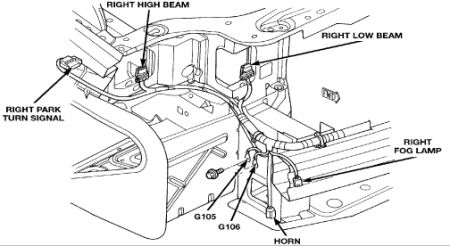
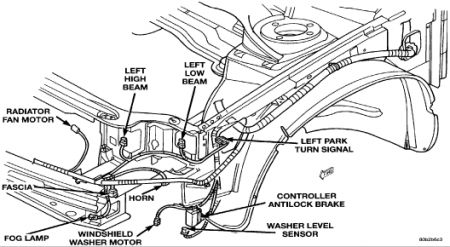
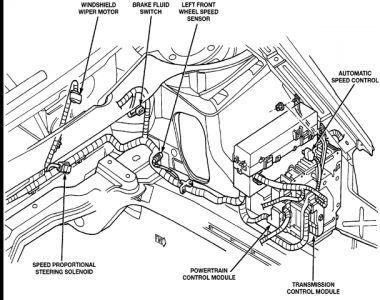
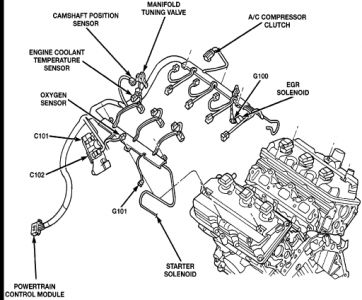
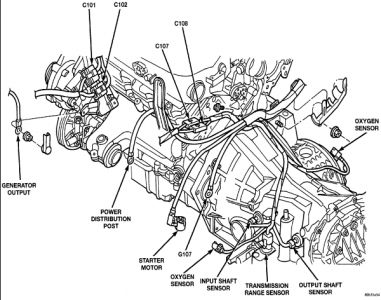
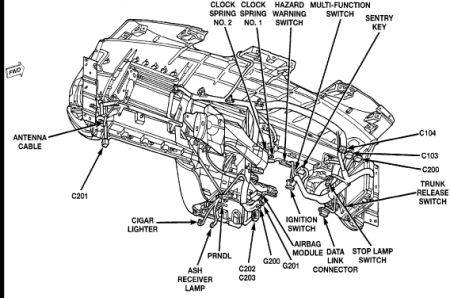
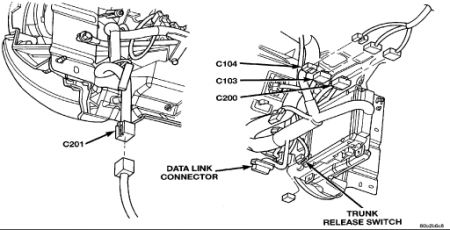
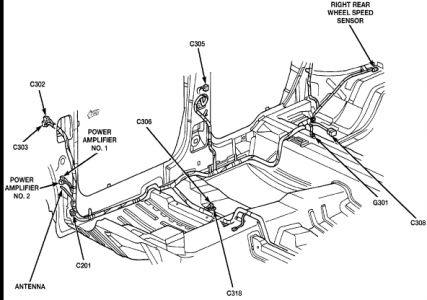
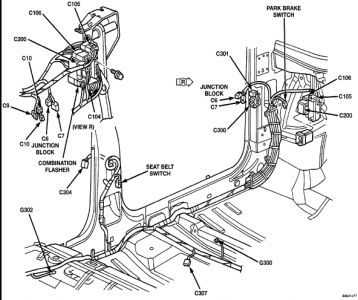
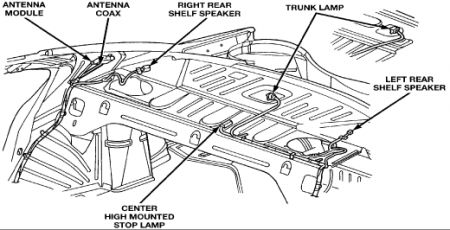
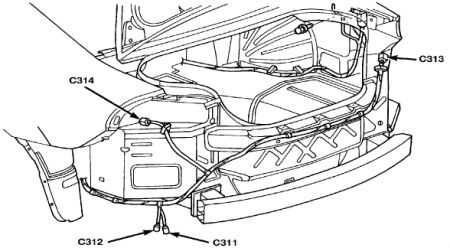
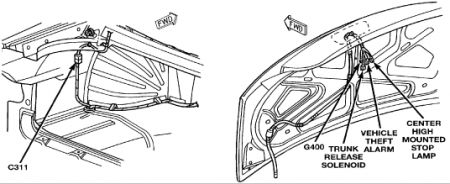
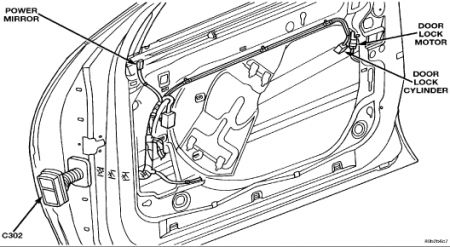
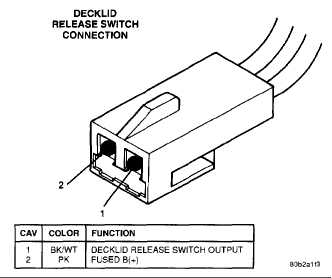
Hello - Bill Sorry about the ATC but sure glad to hear from you. Hope your trip went well.....really sorry about the ATC. Well, that's a downer but let's take another shot before the BCM. Based off what you said I have attached all the info figures on grounding points. Hope that helps. Next, the sensor's I show is the ambient temp sensor; you replaced that on the front and the Cabin one that is on the ATC. There is a solar sensor, looks like about $40. The only check I could find is for the plug. I will give you what I got on that. What about taking a wire and grounding the ATC directly, to a good surface inside the car? For the trunk release....the last pick is the connector. Are you sure the button just isn't working? I would jump the connector at the button to see if it works at the trunk. Also, this should be the connector at the trunk. Have someone press the button and check for voltage at the plug. Another idea. Clear the codes. Go for a drive, I suggest ice cream again. When you get home review the ops checks you have accomplished from the start and run through those and maybe it will show us something different. Okay, I am sure you are tire after the trip. After a good night sleep, time with the family and a god cup of coffee in the morning maybe this won't looks so bad. Let me know if I can help.


https://www.2carpros.com/forum/automotive_pictures/248015_f1_1.jpg


https://www.2carpros.com/forum/automotive_pictures/248015_f2_1.jpg


https://www.2carpros.com/forum/automotive_pictures/248015_f3_1.jpg


https://www.2carpros.com/forum/automotive_pictures/248015_f4_1.jpg


https://www.2carpros.com/forum/automotive_pictures/248015_f6_1.jpg


https://www.2carpros.com/forum/automotive_pictures/248015_f7_1.jpg


https://www.2carpros.com/forum/automotive_pictures/248015_f8_1.jpg


https://www.2carpros.com/forum/automotive_pictures/248015_f9_1.jpg


https://www.2carpros.com/forum/automotive_pictures/248015_f10_1.jpg


https://www.2carpros.com/forum/automotive_pictures/248015_f11_1.jpg


https://www.2carpros.com/forum/automotive_pictures/248015_f12_1.jpg


https://www.2carpros.com/forum/automotive_pictures/248015_f13_1.jpg


https://www.2carpros.com/forum/automotive_pictures/248015_f14_1.jpg


https://www.2carpros.com/forum/automotive_pictures/248015_f15_1.jpg

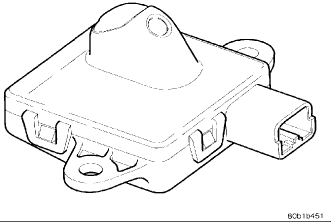
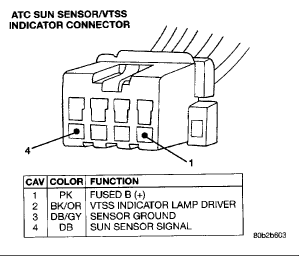
SYSTEM OPERATION The sun sensor is only used on vehicles equipped with Automatic Temperature Control (ATC) . The sensor is mounted on the top of the instrument panel below the instrument panel top cover. This is not a thermistor type sensor but rather a photo diode. For this reason the sun sensor responds to sun light intensity rather than temperature. It is used to aid in determining proper mode door position, temperature door position and blower speed. The sun sensor is also used to sense day/night conditions for automatic headlight control if so equipped, and has an LED indicator for the vehicle security system. The sun sensor is not serviceable and must be replaced if found to be defective. The sun sensor is located so the sun hits the sensor in the same way that it hits the driver and the passenger. It is important that the area in front of the sensor be unobstructed. Check that the following items are not in the way of the sun sensor. Windshield wipers that are adjusted too high. Stickers on the windshield that are directly in front of the sensor. Top cover which is not properly installed. The sun sensor should be 1/4 inch . above the top cover. Caps or papers which might cover the sensor. Removal of Solar Sensor Open hood and disconnect the negative battery cable remote terminal from the remote battery post.


https://www.2carpros.com/forum/automotive_pictures/248015_Solor_1_1.jpg

Remove the instrument top cover. Remove tile two sun sensor mounting screws.


https://www.2carpros.com/forum/automotive_pictures/248015_Solor_2_1.gif

Disconnect the wire connector and remove the sensor. INSTALLATION For installation, reverse the above procedures


https://www.2carpros.com/forum/automotive_pictures/248015_Solor_3_1.gif

Trunk connector


https://www.2carpros.com/forum/automotive_pictures/248015_Trunk_1.gif

Oct 31, 2008 at 10:23 PM
Avatar
LGB BILL
  • MEMBER
  • 53 POSTS
Update.....

Hi Bob....

Because I don't have a lift to get the car into a reasonable working position, the concept of going for grounding points all over the engine compartment and the front end just didn't make my socks go up and down yesterday. I did, though confirm continuity from C2 pin 8 to dash ground and from the dash to the body of the car. I'm certain the BCM itself has a good ground.

Instead, I decided to take a look at one of the peripheral issues - the trunk release button inop. I tracked down the issue in the maintenance manual and printed out the troubleshooting procedure. The trunk releases just fine with the remote on the keychain but not from the release button in the dash. I've shorted the pins of the trunk release button connector to simulate the button being depressed with no results. I've measured the resistance across the button contacts and the button appears to be working fine. I went through procedure 12A for the Power Door Lock Test - Inoperative Decklid Release. The wiring continuity is fine from the button to the BCM and, obviously, from the BCM to the truck release itself. I didn't remove the BCM and short between pins 7 & 8 of the BCM 20 pin connector because I know the BCM is using that circuit to release the decklid when I use the remote on the key. That only leaves the BCM from what I see. Now, trust me, I wouldn't replace the BCM just because the trunk release button isn't working. I just see this as further confirmation of my suspicion that the BCM is not working correctly.

I just can't shake the feeling that the BCM is the root cause of all of these issues: ATC head not working correctly; interior lights going on and off by themselves concurrent with dimming/brightening of the dash/panel instruments and indicators; and trunk release not working. I'd love to be able to just plug in a new BCM just to see if it fixes these problems. Realistically, I know I can't afford that much just on a whim. On the other hand, I probably can justify one from a salvage yard, but that would be a pig-in-a-poke itself.

Tomorrow evening I might have a chance to talk with a friend who is a professional mechanic and ask if he may have one of the diagnostic tools that can query all of the various parts of the car. My OBD II just isn't designed to do the diagnosis I need for this issue...

I wish I still had my `64 Chevy.....

I appreciate you continuing to monitor my saga and give me encouragement and suggestions.
Nov 2, 2008 at 5:39 PM
Avatar
IMPALASS
  • CERTIFIED EXPERT
  • 3,112 POSTS
Bill

Well…….mmmmmmm….wow, my only concern with one from a salvage yard is it is an electrical item. How long has it been there, was it having problems before the car made it to the salvage yard? Maybe the car is in the salvage yard because someone got tired of chasing a problem like this and parked it on the railroad tracks.

I suppose looking for a Concord parked at the airport on a Monday so you know the car will be there for a while isn’t’ the right thing to do either.

Let’s do a price check……if you would, can you give me your vin number and did you say this is a Concord LX or LXI. Not sure if I can help here but will do some checking. I show a part number of 4759534AJ. Is that what you have for one?

If you can ensure I have the correct part number and provide the other couple of things, I can check parts and see what I can do……can not promise anything but worth a try………what do you think?

Bob
Nov 2, 2008 at 6:29 PM
Avatar
LGB BILL
  • MEMBER
  • 53 POSTS
True, True, TRUE...!!!

The issue with a used BCM has been nagging me also..... Before I'd buy one from a salvage yard, I'd have to have some kind of assurance that if I found problems with the used part, I could return it. I know for parts of this sort, that might be a tall order.....

VIN - 2C3HD46J3WH259914

The Chrysler part number of the existing BCM is P04759532AK.

I've been told that numbers ending in either 32 or 34 would work. I've also seen in various forums, etc that years of 98 to 2000 for Chrysler Concordes, LSHs, 300Ms and Dodge Intrepids are compatible. Apparently, there is a difference between those with ATC and manual A/C control systems. The latter, I'm not positive about....

Here in SoCal, there are a couple of Pick-a-Part lots not too far away. They indicate that the cars are grouped by mfr so it wouldn't be too hard to find out if they have a model that might work. I've become fairly proficient in getting the BCM out so that's not a hindrance now.....

It'll be interesting to see what kind of prices you find. One on-line source on the East coast is quoting from $100 to $150 plus shipping.

Take care, Sir.....

Bill
Nov 2, 2008 at 7:41 PM
Avatar
IMPALASS
  • CERTIFIED EXPERT
  • 3,112 POSTS
Bill

What City and State are you locate in and is this a LX or LXI Concord?

Thanks

Bob
Nov 2, 2008 at 9:02 PM
Avatar
IMPALASS
  • CERTIFIED EXPERT
  • 3,112 POSTS
Bill

If you can, please provide me with what City and State are you locate in and is this a LX or LXI Concord? This way during my search on cost I can try to figure shipping etc to let you know to see if it is a better deal for you.

Thanks

Bob
Nov 5, 2008 at 6:48 PM
Avatar
LGB BILL
  • MEMBER
  • 53 POSTS
Sure was quiet this week.......

I don't have a clue why, but I never saw your two posts asking City/State info....

We're located in Santa Ana, CA and the beast is an Lxi....

I talked with my friend who is the professional mechanic and found out he's more of a mechanical systems guy, like brakes, air conditioning, engine, etc than an electronics or electrical guy.

He thought there might be a possibility that the BCM may have a software issue that could be corrected by reloading the firmware. I don't know if this is that style of computer or not. Could also be the software is loaded on a PROM. I haven't seen any indication in any of the troubleshooting sessions that talk about reloading the firmware, so I'm guessing it's using a PROM.

If the weather is cooperative, I think I'll make a run by Pick-a-Part tomorrow just to see if they have any cars in my year/model range that might work. If I can access the BCMs without removing them, I'll write down numbers to see if they are compatible or not. The trip has a secondary objective of locating a replacement center arm rest. My hinge and hardware crapped out a while back and I've been casually trying to figure out the best way to replace it. This will be two birds for one rock tomorrow.....

Again, I'm sorry about missing your messages. I've been relying on email notifications from the web site but I guess I'll have to do a routine check for any new posts.

I'm still amazed that you're hanging in here on this project. Thanks again...!!!

Take care,
Bill
Nov 9, 2008 at 1:12 AM
Avatar
LGB BILL
  • MEMBER
  • 53 POSTS
We have options....

Hi Bob....

The trip to Pick-Your_Part was educational. For $2.00, I got to wander around and check out the various Chrysler products that fit the date range I'm looking for as a replacement for the BCM. I wrote down the model/year/VIN for each car at two different yards. All cars had the BCMs installed which is interesting..... Seems no one wants or needs them, or at least not the used ones. The good news is they have a 30 day free exchange warranty.

I struck out on the arm rest which didn't surprise me. I think I'll try a traditional salvage yard where they have access to the computer network and can get input from many locations.

Any idea if there is such a thing as a cross-reference for the BCMs to see if several versions of cars are using the same part number...???

Take care,
Bill
Nov 12, 2008 at 12:51 AM
Avatar
IMPALASS
  • CERTIFIED EXPERT
  • 3,112 POSTS
Bill

Glad to hear from you. I don’t have access to the info you need……however the parts department may. I would check with them to see if they could provide you with various models and most important, the part number.

I did send off a parts request/price quote to about 10 different places there in CA. No results back as of yet. My plan was to see what the cost would be from the various places, let you know then if it is in the price you are looking for then all you have to do is contact them.

I do like the 30 day return. I guess the only question I would have there is if it didn’t work how would you know if it the car or the used part? Even if you swapped with the next one……again, the car or the part?

I will let you know what I hear. I haven’t tried this before with these folks so not sure if they will give me a big smile and a no-go on the parts quote. I picked every place in CA figuring it would be cheaper to ship from there if you did decide you wanted it.

Will talk to you soon……..oh, the arm rest…….what about an upholstery shop to repair that????

Bob
Nov 12, 2008 at 11:04 PM