windows not working

2011 FORD F-150
70,000 MILES • V8 • 4WD • AUTOMATIC
Avatar
DALE PIKE
  • MEMBER
  • 6 POSTS
drivers side window and two back windows wont work. The only one that works is the passenger side front. When you press the window button the door ajar light flashes. Just started happening.
Aug 18, 2016 at 7:14 AM
Advertisement
Avatar
HMAC300
  • CERTIFIED EXPERT
  • 48,601 POSTS
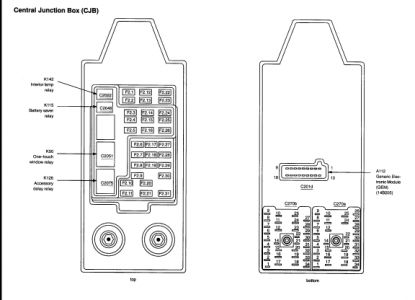
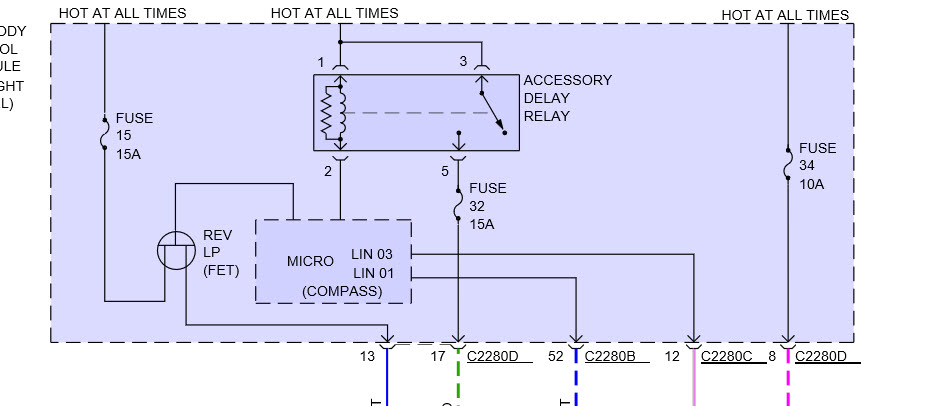
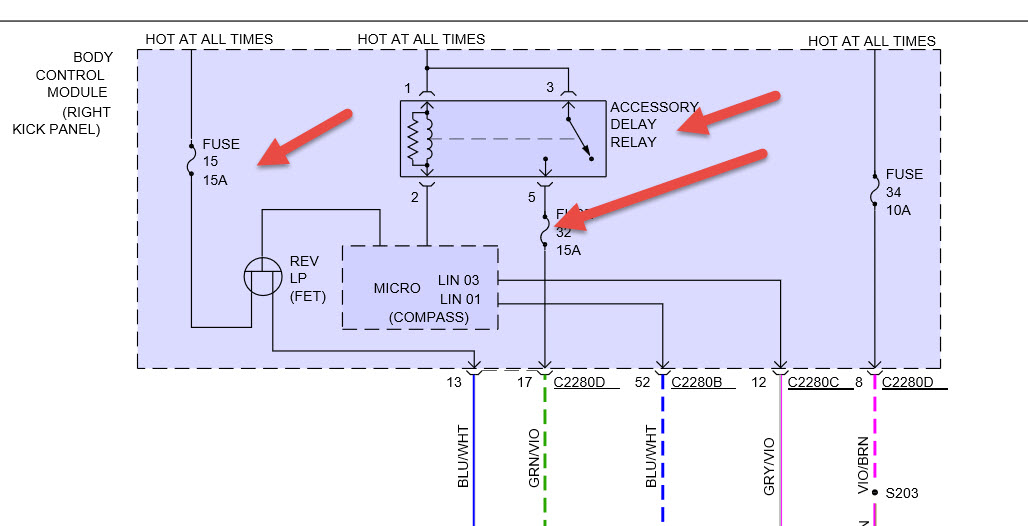
have a mechanic scan for codes it may be a body module problem there are two fuses and a circuit breaker in them and they may be internal it is in right kick panel. it may be accessory delay relay as well.
Aug 18, 2016 at 9:24 AM
Avatar
DALE PIKE
  • MEMBER
  • 6 POSTS
Thanks, I will give it a try and let you know.
Aug 18, 2016 at 12:01 PM
Advertisement
Avatar
DALE PIKE
  • MEMBER
  • 6 POSTS
Just noticed last night my lighted mirrors quit working also, signal light on them still works though.
Aug 19, 2016 at 6:38 AM
Avatar
HMAC300
  • CERTIFIED EXPERT
  • 48,601 POSTS
check fuses which are in body module along with accessory delay relay but they may be internal as well so will probably need scanning by a mechanic if you can't see them
Aug 19, 2016 at 6:51 AM
Avatar
DALE PIKE
  • MEMBER
  • 6 POSTS
We found the big black ground wire in the boot on the door was broke. But why would the passenger side window work?
Aug 23, 2016 at 6:59 AM
Avatar
HMAC300
  • CERTIFIED EXPERT
  • 48,601 POSTS
because it grounds on other side of car.
Aug 23, 2016 at 7:14 AM
Avatar
DALE PIKE
  • MEMBER
  • 6 POSTS
Thanks for the help!!
Aug 23, 2016 at 7:31 AM
Avatar
DALE PIKE
  • MEMBER
  • 6 POSTS
Ok fixed the wire and windows are all working. Lighted mirrors still not working, could it be a fuse?
Aug 24, 2016 at 1:33 PM
Avatar
HMAC300
  • CERTIFIED EXPERT
  • 48,601 POSTS
I assumed you checked the fuse alreadycheck these in body module as well as relay. However these may be internal and cannot be checked which means you'll have to see a mechanic so he can scan it to see if it's the problem or something else.
Aug 24, 2016 at 3:36 PM
Avatar
DALTON TAM
  • MEMBER
  • 1 POST
Okay, so a while back the passenger side window decided to stop working
and not roll down. I finally decided to fix it. I went straight to replacing the power window motor and regulator and had no luck. So I thought it may be a switch. I have tested brand new switches on the passenger side as well as the driver side main power window switch with no luck. I got a test light out and checked to see is I am getting power to the window motor from the switch on the passenger's side. I have power all the way to the motor for up and down on using the passenger's side switch. I can hear the motor engage in when i press up but nothing when I press down. So i thought, well maybe I bought a faulty new motor. I bought another motor and regulator and hooked it up before installing it and had no luck, which tells me that the window is not just stuck in the window jam. So now I am lost.

Note: when using a test light to check power where the connector meets the motor (while using the driver's side switch), I get power from both terminals when pressing down but nothing when i press up in either terminal.

This is mind boggling.
Mar 26, 2019 at 4:35 PM (Merged)
Avatar
HMAC300
  • CERTIFIED EXPERT
  • 48,601 POSTS
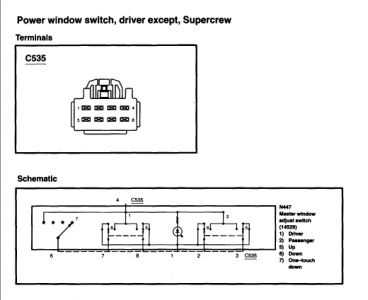
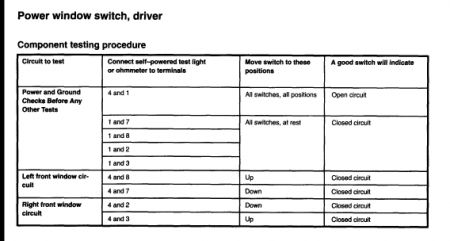
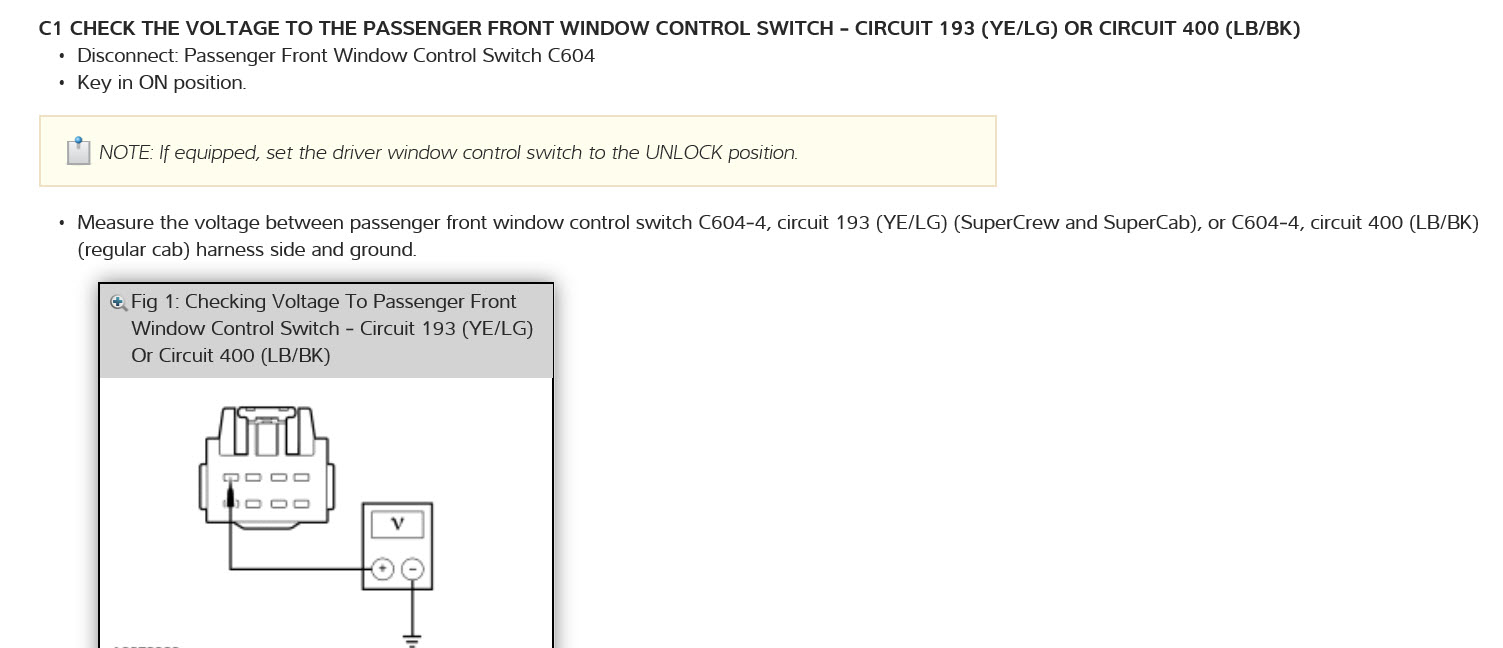
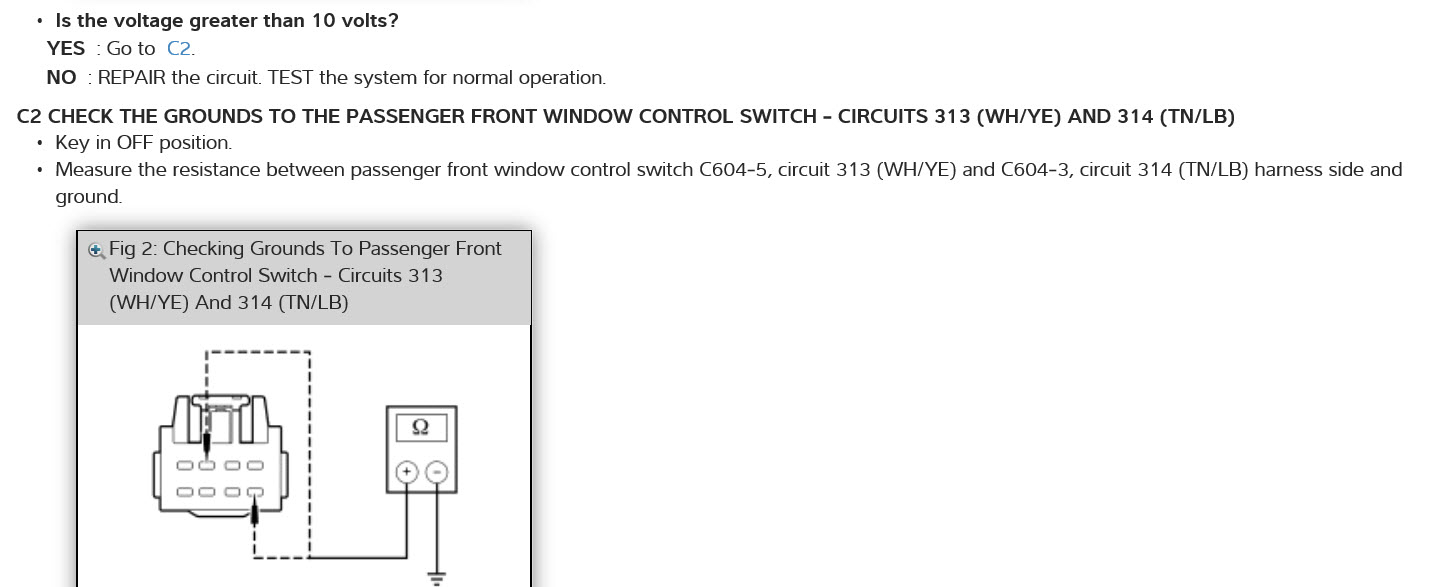
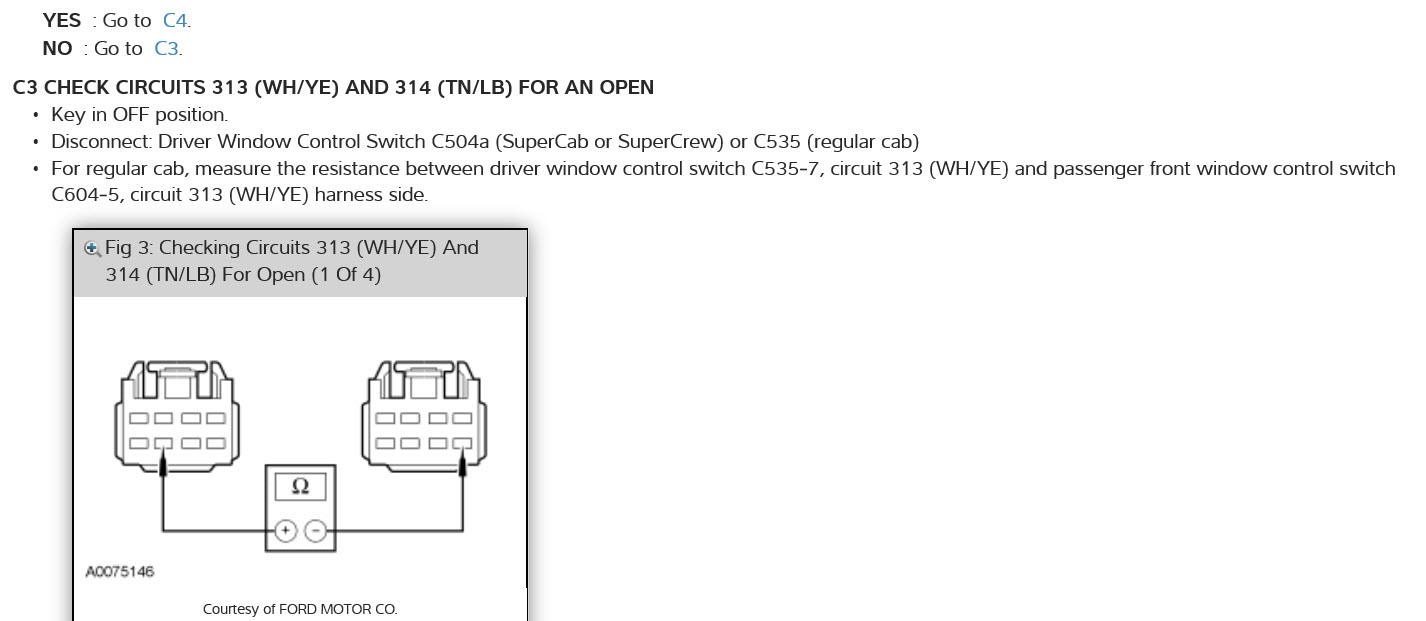
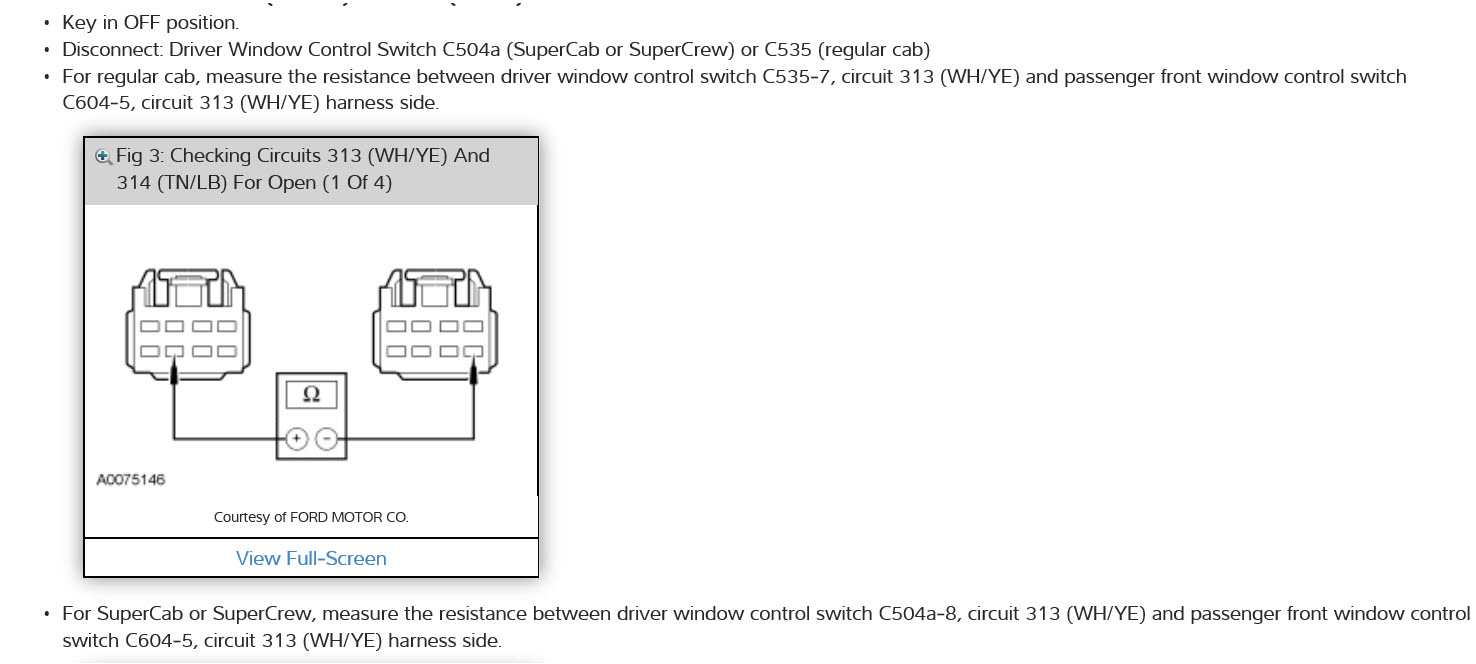
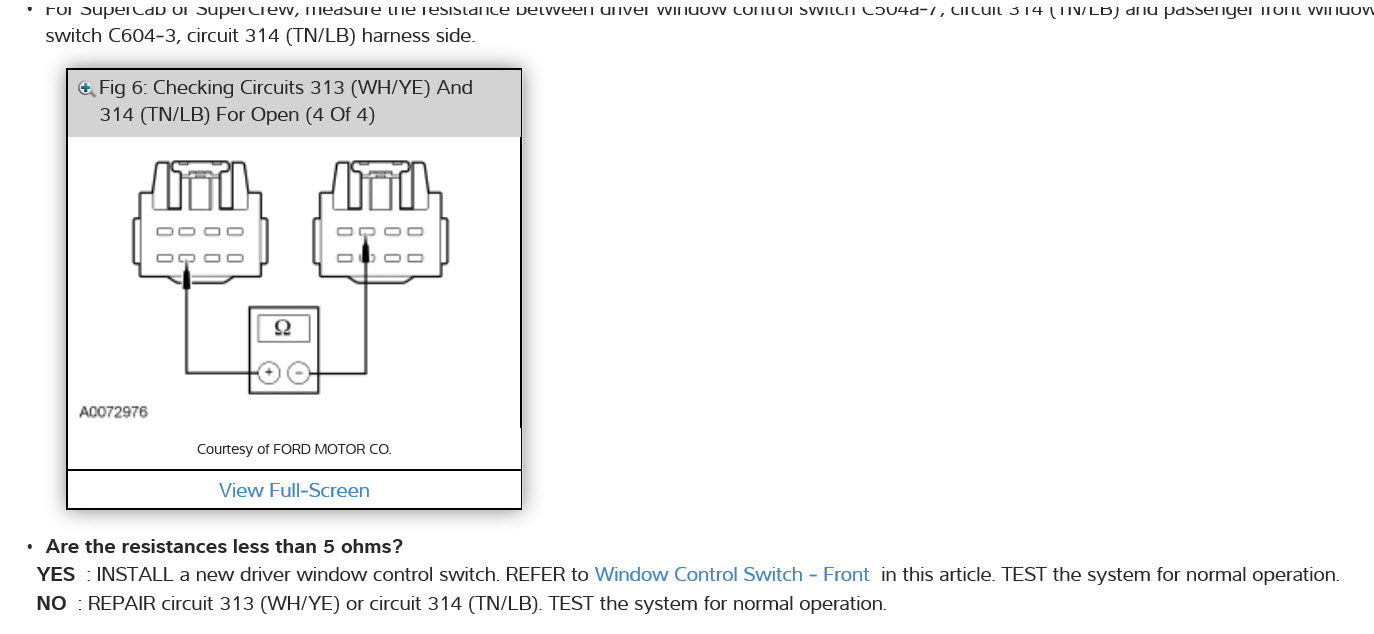
Do the checks in pictures it may be a bad drivers door/master switch. Here is a guide as well.

https://www.2carpros.com/articles/electric-window-repair

Check out the diagrams (Below). Please let us know what you find. We are interested to see what it is.
Mar 26, 2019 at 4:35 PM (Merged)
Avatar
LORD_DEANO40
  • MEMBER
  • 7 POSTS
1. Power windows do not work. Rear power slide window works.
2. When I turn of engine radio would run until I opened the door. Now when I open the driver side door it stays on. If I open the passenger side it goes off.
3. I think there is a switch or sensor that lets the vehicle know when the door is opened. I think that drivers side door sensor is not working so it thinks that the door is open all the time. So it wont allow you to open the window or lock the doors. I think the other windows wont open cause the window lock was on when it stopped working correctly.

What do I need to do? Cant find anything that states there is such a switch or sensor. Please help.
Mar 26, 2019 at 4:35 PM (Merged)
Avatar
RIVERMIKERAT
  • CERTIFIED EXPERT
  • 6,110 POSTS
There's a door pin switch inside the door frame. The courtesy light should stay lit if it's malfunctioning and making the system think the door is open.

Have you checked fuses and relays yet?
Mar 26, 2019 at 4:35 PM (Merged)
Avatar
LORD_DEANO40
  • MEMBER
  • 7 POSTS
the courtesy light doesnt stay on. I have checked the fuse for the windows. I need to check the relay. When checking the relay how do you tell if it is bad? or do you just replace and see if it works.
Mar 26, 2019 at 4:35 PM (Merged)
Avatar
RIVERMIKERAT
  • CERTIFIED EXPERT
  • 6,110 POSTS
Check to see if it is receiving primary power ( a larger wire) and switching power ( smaller wire). When the key is on and the window is activated, you should hear and feel a small click from the relay.
Mar 26, 2019 at 4:35 PM (Merged)
Avatar
LORD_DEANO40
  • MEMBER
  • 7 POSTS
I will check as soon as I get home. Thanks
Mar 26, 2019 at 4:35 PM (Merged)
Avatar
RIVERMIKERAT
  • CERTIFIED EXPERT
  • 6,110 POSTS
No problem. Let me know what you find out.
Mar 26, 2019 at 4:35 PM (Merged)
Avatar
SPIDERPIG209
  • MEMBER
  • 1 POST
2001 Ford F150 V8 Four Wheel Drive Automatic
----------------------------------------------------------------
i was wondering if u could tell me bout the stock alarm on my 2001 ford f150. ok first i can set my alarm with my window down but when i reach in to unlock it by hand and open the door my alarm dont go off is there neway i can reset the stock alarm on my truck or do i have to buy a new alarm for it?
Mar 26, 2019 at 4:35 PM (Merged)
Avatar
FLEXY5
  • CERTIFIED EXPERT
  • 512 POSTS
First let me explain what you are refering to as stock alarm. I suspect that you believe you have one based on the horn that honks when you lock your doors. That is only a signal to identify that the vehicle has been locked. Ford offers different levels of remote keyless entry and most do not have the alarm feature. They do however have the Passive anti-theft system. This is a keycode that is programmed into the computer. And it does not allow the vehicle to start whithout the proper coded key. If your vehicle is locked and it does not sound an alarm when you open the locked door, there is no alarm feature on the vehicle. That is why it is refered to as a "passive" anti-theft. To doublecheck this, you can take the VIN into the dealership and they can look up on Fords website under a category HVBOM and tell you everything about your car. They may not want to, but they can.
Mar 26, 2019 at 4:35 PM (Merged)
Avatar
LORD_DEANO40
  • MEMBER
  • 7 POSTS
Not getting anything from the relay. Power locks work on all doors except for the drivers door. But the key Fob and the key-less entry work. The only thing that appears to be affected is the buttons that are on the Drivers door arm rest to include the power mirrors.
Mar 26, 2019 at 4:35 PM (Merged)
Avatar
RIVERMIKERAT
  • CERTIFIED EXPERT
  • 6,110 POSTS
Ok. Now we're getting somewhere. That sounds to me like the main wiring connector into the door came loose or the wires broke. You'll need to remove the left kick panel cover and probably the door cover to check. How about the speaker in that door, if there is one?
Mar 26, 2019 at 4:35 PM (Merged)
Avatar
LORD_DEANO40
  • MEMBER
  • 7 POSTS
I think the speaker is working. I will have to check that when I get home. Thanks and I will keep you updated.
Mar 26, 2019 at 4:35 PM (Merged)
Avatar
RIVERMIKERAT
  • CERTIFIED EXPERT
  • 6,110 POSTS
Be careful when removing the door panel. Look closely around the edge for screws. Also in the armrest.
Mar 26, 2019 at 4:35 PM (Merged)
Avatar
LORD_DEANO40
  • MEMBER
  • 7 POSTS
The speaker is working. Either Friday or Saturday morning I will take the door panel off and check all connections and wires. I think there is 4 different connectors with in the door panel five with the power mirror. I appreciate the assistance and I will let you know what I find. Thank You.
Mar 26, 2019 at 4:35 PM (Merged)
Avatar
RIVERMIKERAT
  • CERTIFIED EXPERT
  • 6,110 POSTS
Before you go all out with the door panel, check the door switches for power and proper function (opening and closing of the circuit when the switch is moved.).
Mar 26, 2019 at 4:35 PM (Merged)
Avatar
CRAB51
  • MEMBER
  • 5 POSTS
2004 ford f-150, power window on passenger side is binding when closing but works fine when opening. Is there a procedure for removing the door panel?
Mar 26, 2019 at 4:35 PM (Merged)
Avatar
SATURNTECH9
  • CERTIFIED EXPERT
  • 30,869 POSTS
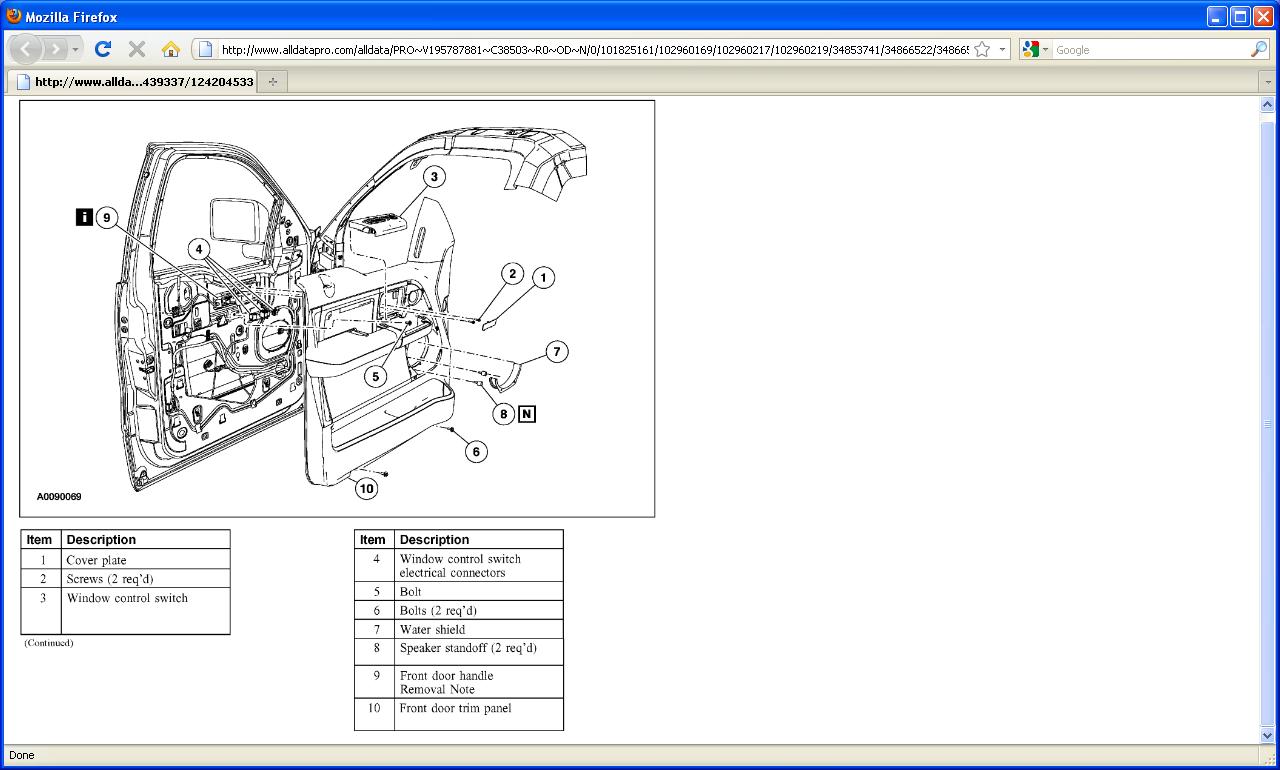
FRONT DOOR TRIM PANEL

REMOVAL

NOTE: LH side is shown. RH side is similar.

1. Remove the front door speaker.


2. If equipped, remove the window regulator handle.

1 Separate the handle cover from the handle.
2 Remove the screw.
3 Remove the window regulator handle.
4 Remove the spacer.


3. Remove the parts in the order indicated in the given table.

Item 9: Front Door Handle Removal Note

1. Guide the door handle through the opening in the trim panel.

INSTALLATION

1. To install, reverse the removal procedure.
Mar 26, 2019 at 4:35 PM (Merged)
Avatar
LORD_DEANO40
  • MEMBER
  • 7 POSTS
will do. Thanks
Mar 26, 2019 at 4:35 PM (Merged)
Avatar
RIVERMIKERAT
  • CERTIFIED EXPERT
  • 6,110 POSTS
No problem.
Mar 26, 2019 at 4:35 PM (Merged)
Avatar
PHILMER
  • MEMBER
  • 2 POSTS
Electrical problem
2005 Ford F150 Four Wheel Drive 51,000 miles

My power windows have stopped working. I've checked the 401 fuse and it has continuity. I think it may be a bad ground. All four windows are open and the individual door windows switches do not work.
How do I repair ithem?
Mar 26, 2019 at 4:35 PM (Merged)
Avatar
BLUELIGHTNIN6
  • CERTIFIED EXPERT
  • 16,542 POSTS
possible causes for all power windows to be inoperative are :

fuse

circuitry ( instrument cluster module [ ICM ] )

accessory delay relay (located in central junction box)

driver window control switch


since you have already checked fuse the next step would be to inspect the relay.
Mar 26, 2019 at 4:35 PM (Merged)
Avatar
PHILMER
  • MEMBER
  • 2 POSTS
I took off the driver side master switch and checked the power to it. I had power and was able to bypass the switch raising all 4 windows on at a time eliminating the other possiblities. I've ordered the new master switch.

Thanks for your help.
Mar 26, 2019 at 4:35 PM (Merged)
Avatar
RLLAWRE
  • MEMBER
  • 1 POST
Drivers window quit working about half way up. Tried all windows none worked.It would alarm when trying to operate saying door open. I replaced the window circuit breaker on passenger side fuse box. I got the drivers window up but now nothing g works again on any window. I did toggle the safety override button back and xforth on drivers arm rest. Nothing changed.
Mar 26, 2019 at 4:36 PM (Merged)
Avatar
HMAC300
  • CERTIFIED EXPERT
  • 48,601 POSTS
check fuses underhood and accessory delay relay then seei fmotor is getting power or not
Mar 26, 2019 at 4:36 PM (Merged)
Avatar
BIKERSWIFE
  • MEMBER
  • 1 POST
I can operate all power windows from the main panel on the drivers door, however, the windows will not operate from the switches on the other 3 doors.

We tried a new "power window module" however, it did not fix the problem.

What else should we try.
Mar 26, 2019 at 4:36 PM (Merged)
Avatar
JACOBANDNICKOLAS
  • CERTIFIED EXPERT
  • 110,175 POSTS
The power to the other windows originates from the driver's side. Check wiring from there over to the other windows. Also, make sure there is power from the switch.
Mar 26, 2019 at 4:36 PM (Merged)
Avatar
TOMMY4366
  • MEMBER
  • 1 POST
Hello,
Passenger side power window has stopped working, in the up position. Help? 2007 F150
Thanks, Barb
Mar 26, 2019 at 4:36 PM (Merged)
Avatar
JACOBANDNICKOLAS
  • CERTIFIED EXPERT
  • 110,175 POSTS
Barb, you need to remove the inner door panel to check for power to the motor. Either the motor is bad or the switch or there is no power to the door. If you need directions on how to check the motor, refer to our homepage under the DIY section for directions.
Mar 26, 2019 at 4:36 PM (Merged)
Avatar
DAVIDSON
  • MEMBER
  • 3 POSTS
No power to windows , Dash lights dont work when lights are in automatic , Cruse control doesn't work, put in new main power switch , Window motors are ok , Fuses are good
Mar 26, 2019 at 4:37 PM (Merged)
Avatar
IMPALASS
  • CERTIFIED EXPERT
  • 3,112 POSTS
Hello I have attached the troubleshooting chart for the windows. Also, I have attached how to check the window relay. I am not sure how you are checking your fuses, but instead of a visual I would use an ohm meter to ensure.
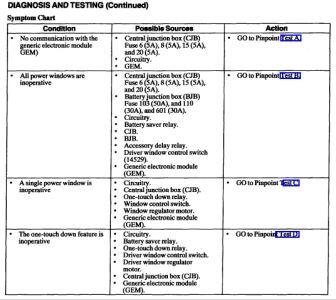
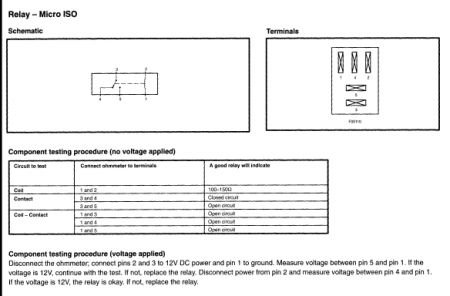
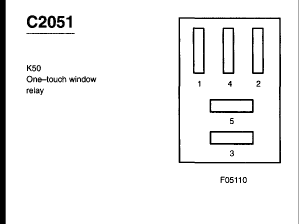
https://www.2carpros.com/forum/automotive_pictures/248015_z1_2.jpg


https://www.2carpros.com/forum/automotive_pictures/248015_z2_2.jpg


https://www.2carpros.com/forum/automotive_pictures/248015_z3_1.gif


https://www.2carpros.com/forum/automotive_pictures/248015_z4_2.jpg

You said you replaced the main power switch so I attached how to check the window switch.
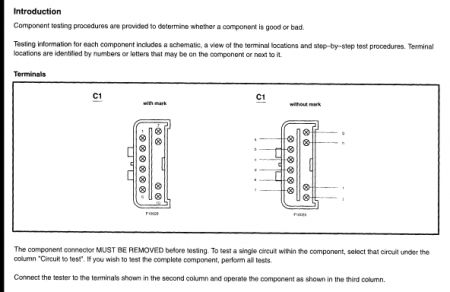

https://www.2carpros.com/forum/automotive_pictures/248015_z5_2.jpg


https://www.2carpros.com/forum/automotive_pictures/248015_z6_1.jpg


https://www.2carpros.com/forum/automotive_pictures/248015_z7_1.jpg

The windows go through a Generic Electroonic Module (GEM) You will need to see if there are any codes to check this out. You can go to Auto Zone or O'Reilly's and they can check to see if your car has any DTC codes for free. Make sure if it does and you don't fix it and you need to get back with us you tell us the code number and what they said the code meant. Also while there have them pull their tester out and for free they can check your battery, alternator and starter. This is what the GEM does. NOTE: Each vehicle has either a Generic Electronic Module (GEM) or Central Timer Module (CTM) depending on option content. Upon installation of a new GEM, the module must be reconfigured. Refer to Module Communications Network (Information Bus). The following is list of GEM/CTM controlled functions: wipers/washers (front/rear) warning chimes battery saver illuminated entry and courtesy lamps accessory delay driver power window (GEM only) The generic electronic module (GEM) constantly monitors its subsystems for concerns. If a concern is found in one of the subsystems, the GEM will record the concern in the form of a Diagnostic Trouble Code (DTC) . The ignition switch position is very important to the GEM function. Often times, erratic or unexpected GEM function can be traced to concerns with ignition switch inputs. Ignition Switch Positions The position of the ignition switch is very important to correct GEM operation. The following is a brief description of five ignition switch positions. When the ignition switch is in the RUN position, battery voltage should be present at the GEM RUN and RUN/ACC input terminals. When the ignition switch is in the ACC position, battery voltage should be present at the GEM RUN/ACC input terminal only. When the ignition switch is in the START position, battery voltage should be present at the GEM start/clutch depressed input. The GEM module does not have an OFF or LOCK switch state input. The GEM will assume the OFF or LOCK position when there are no RUN, ACC, or START signals present. CAUTION: Prior to removal of the GEM, it is necessary to upload module configuration information to a diagnostic tool. This information needs to be downloaded into the new module once installed. Once the new GEM is installed, it is necessary to download the module configuration information from the diagnostic tool into the new module
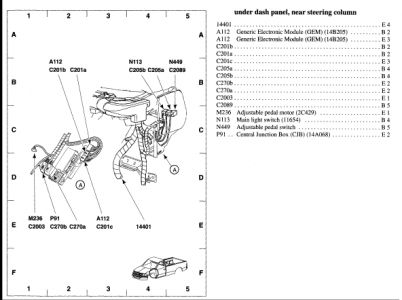

https://www.2carpros.com/forum/automotive_pictures/248015_z8_1.jpg

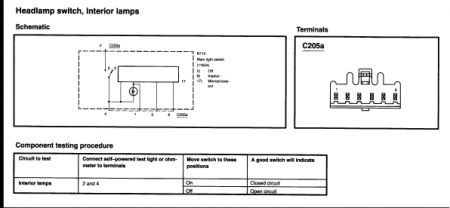
If I understand your question, the dash lighting is controlled by the headlamp switch. Testing the headlamp switch
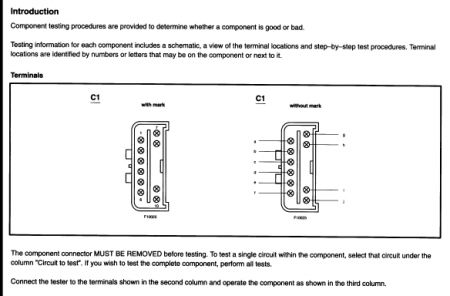

https://www.2carpros.com/forum/automotive_pictures/248015_z9_1.jpg


https://www.2carpros.com/forum/automotive_pictures/248015_z10_1.jpg

I think after your checks it is possible that the headlamp switch may be defective for your dash lights. I think your GEM is affecting your windows. For your cruise control First you have 3 recalls you need to check with the dealer with your VIN number to see if you are okay. First recall: 05S28S14 01/28/2008 Recall - Speed Control Deactivation Switch Defects Second recall: NHTSA07V336000 08/02/2007 Recall 07V336000: Cruise Control Fire Hazard Third recall: NHTSA05V388000 09/07/2005 Recall 05V388000: Cruise Control Switch Replacement As before - I would have the codes checked on the car. I have attached the troubleshooting charts for the Cruise. You do need the attached special tools to check. But I would go through all the fuses with the ohm meter and start there. Then get back with us if you don't find anything.
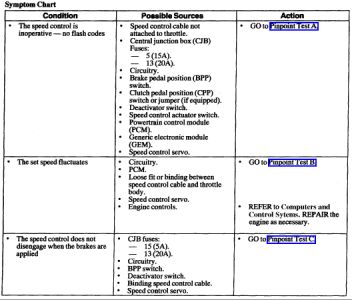
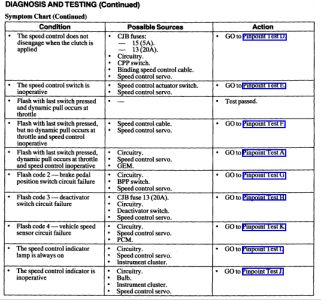
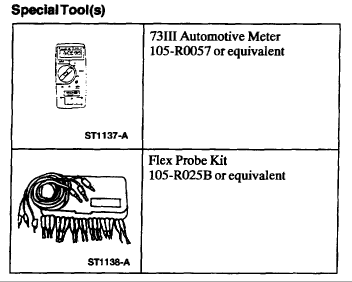
https://www.2carpros.com/forum/automotive_pictures/248015_z11_1.jpg


https://www.2carpros.com/forum/automotive_pictures/248015_z12_1.jpg


https://www.2carpros.com/forum/automotive_pictures/248015_z13_1.gif

Information on your car can be found at: https://www.2carpros.com/kpages/auto_repair_manuals.htm
Mar 26, 2019 at 4:37 PM (Merged)