Hello .. thanks for the donation .. much appreciated
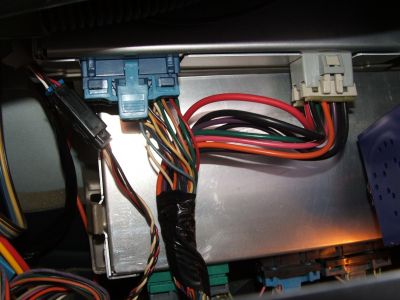
PCM 3.1L (VIN M) Located Behind right side of dash.
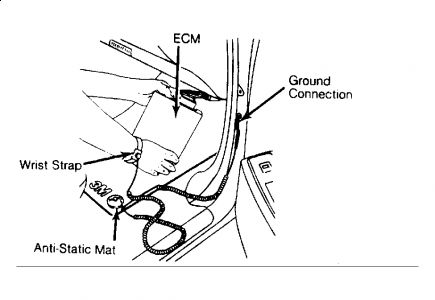
CAUTION:DO NOT remove part from packaging until ready to install. Ground any static-proof package before opening. DO NOT touch electrical terminals of components unless properly grounded. DO NOT lay electrical components on car seat, carpeting or dashboard. Use electrostatic protection mat and ground strap whenever possible. See Fig. 1 .
Fig. 1: Servicing ECM/PCM Using 3M Anti-Static Mat
Courtesy of GENERAL MOTORS CORP.
NOTE:Before replacing ECM/PCM, carefully inspect all wiring and control components. Failure to test for short circuits may result in repeated ECM/PCM failure due to grounds and Quad-Driver failure. To prevent internal damage to ECM/PCM, ensure ignition switch is in OFF position when disconnecting or reconnecting ECM/PCM connectors or 12-volt components.
NOTE:When replacing defective ECM/PCM, remove knock sensor module or PROM from defective ECM/PCM. New ECM/PCM does not come equipped with knock sensor module or PROM (if applicable). Install knock sensor module or PROM into new ECM/PCM.
Removal
Ensure ignition switch is in OFF position. Disconnect negative battery cable. Remove electrical connectors from ECM/PCM. Remove ECM/PCM from vehicle. Remove access cover and remove knock sensor module or PROM (if applicable) from ECM/PCM.
Installation
Install knock sensor module or PROM (if applicable) in new ECM/PCM. Install access cover. Install ECM/PCM into vehicle. Connect electrical connectors to ECM/PCM. Reconnect negative battery cable to battery.
Hope this helps

Jan 3, 2010 at 7:07 AM