2002 Oldsmobile Bravada exterior sensor for interior temp

2002 OLDSMOBILE BRAVADA
60,000 MILES • 6 CYL • AWD • AUTOMATIC
Avatar
SUNSHINE77
  • MEMBER
  • 5 POSTS
My Bravada has a temperature read-out that tells me the outside temperature. This seems to have an affect the air conditioner. For example, the temperature outdoors today was 95. The outdoor reading in my car said 40. My AC starting blowing warm air. Where is the location of the sensor that gives that outdoor reading?
Aug 11, 2009 at 10:13 AM

Advertisement
Avatar
BLUELIGHTNIN6
  • CERTIFIED EXPERT
  • 16,542 POSTS
Hello and thanks for the donation!


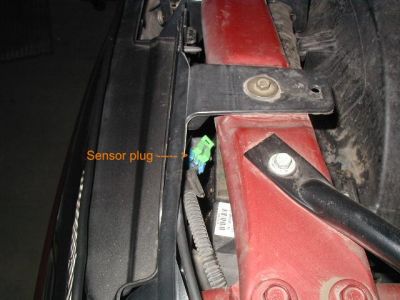
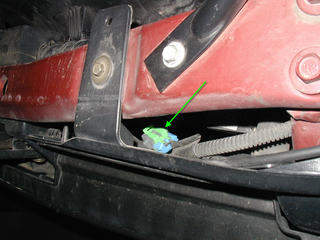
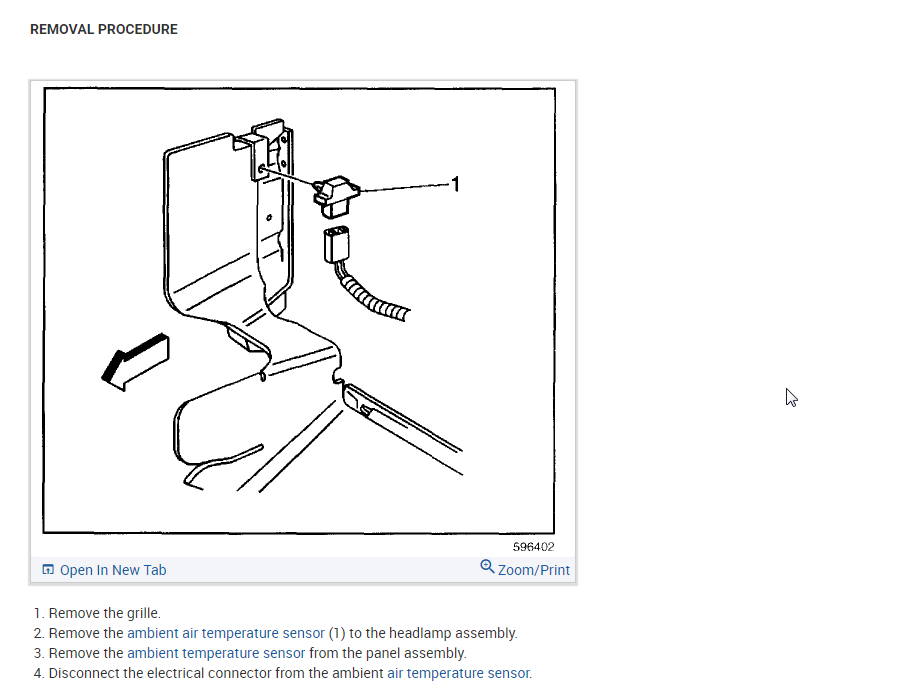
Your vehicle's ambient air temperature sensor is located on the left center of radiator support.
Aug 11, 2009 at 1:01 PM
Avatar
SUNSHINE77
  • MEMBER
  • 5 POSTS
[quote:ee196e0167="bluelightnin6"]Hello and thanks for the donation!


Your vehicle's ambient air temperature sensor is located on the left center of radiator support.[/quote:ee196e0167]

I assume the sensor is on the left upright support, and toward the front and not toward the engine.If you could elaborate as to the access it would be a big help.
Thanks
Aug 12, 2009 at 2:15 PM
Advertisement
Avatar
BLUELIGHTNIN6
  • CERTIFIED EXPERT
  • 16,542 POSTS
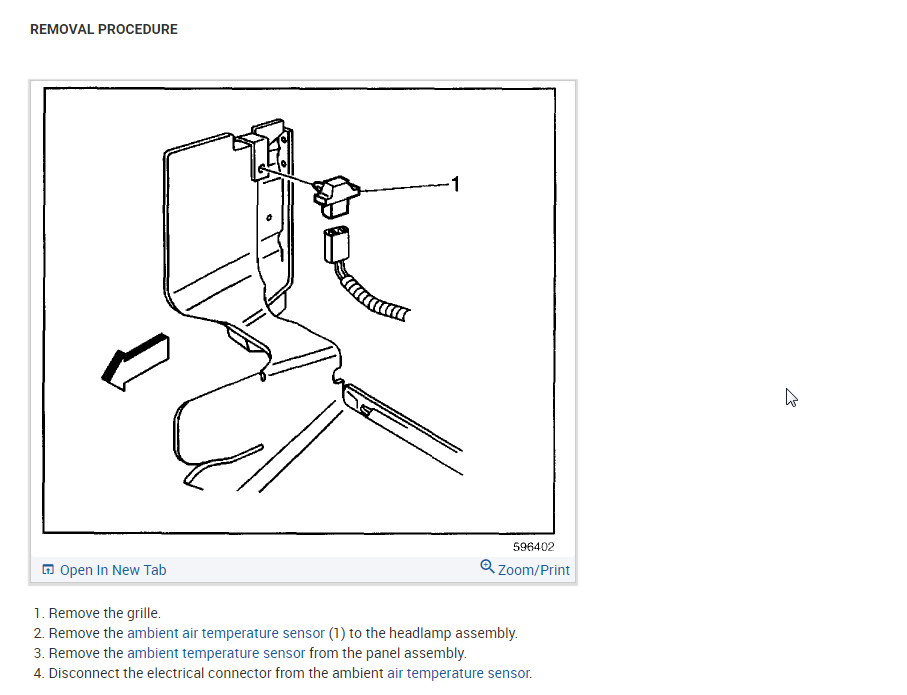
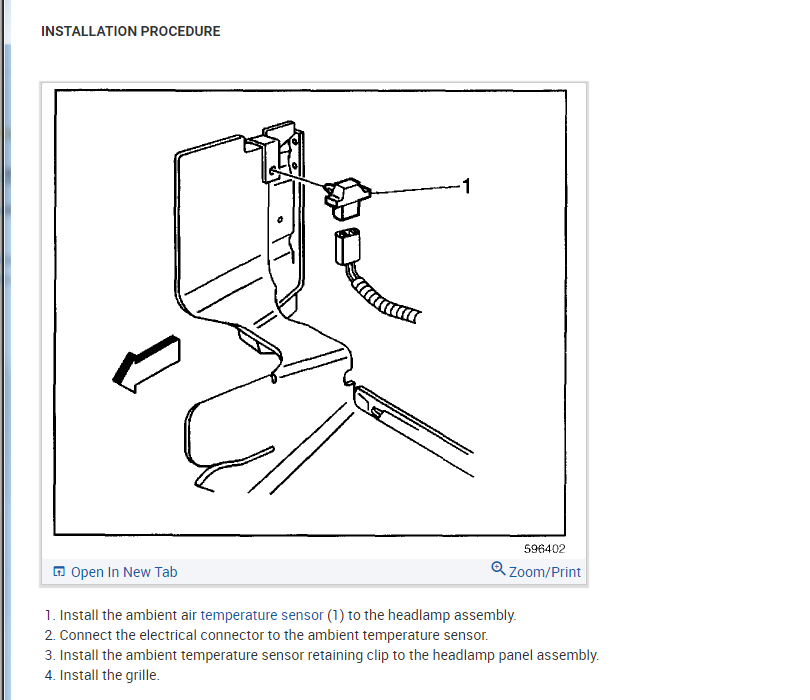
Sure. Just remove the front grille and you should be able to see the sensor and panel assembly. Disconnect the electrical connector from the sensor.
Aug 12, 2009 at 2:31 PM
Avatar
SUNSHINE77
  • MEMBER
  • 5 POSTS
I've removed both head lights and pulled grill out to expose radiator supports on right and left sides and found everything that is attached to the radiator supports and firewall, but no sensor found in this area. I bought an auto parts house manual on the Bravada and it doesn't address the sensor either. I assume the sensor would have to be in an area where heat from the engine or radiator wouldn'd effect it and have exposed what I would think are all likely spots, unless it's stuffed up under the bumper somewhere.
Can you give a little more detail on it's location and what else needs to be done to expose it? Can you send a sketch?
Aug 25, 2009 at 8:35 AM
Avatar
BLUELIGHTNIN6
  • CERTIFIED EXPERT
  • 16,542 POSTS
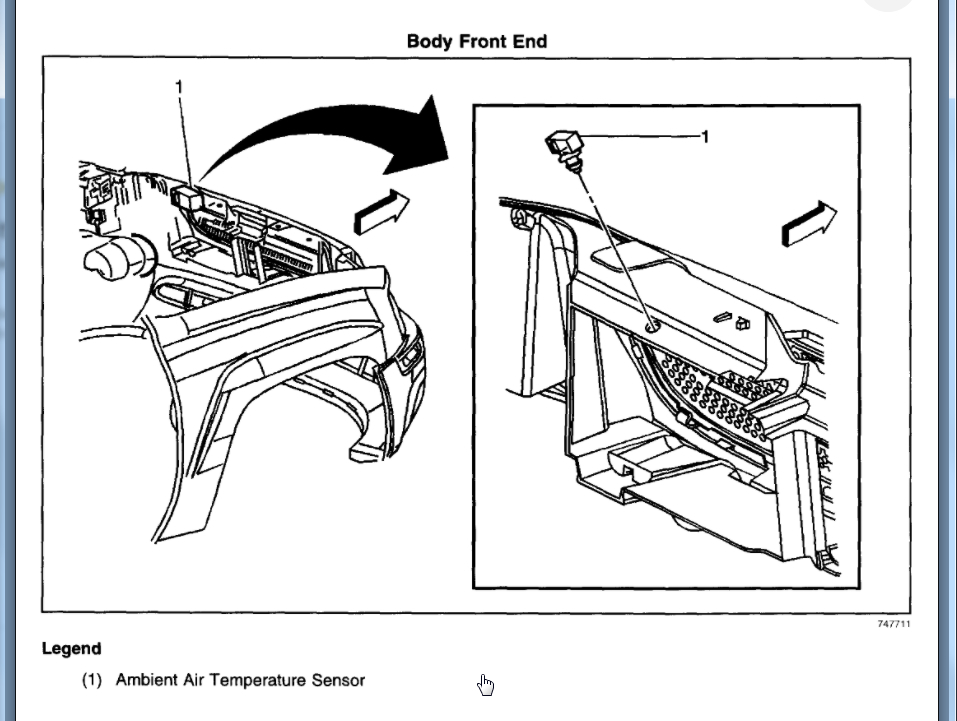
see if these pics help you locate it..


https://www.2carpros.com/forum/automotive_pictures/261618_tempsens_1.jpg


https://www.2carpros.com/forum/automotive_pictures/261618_ambientsensorzj8_1.jpg

Aug 25, 2009 at 12:39 PM
Avatar
SUNSHINE77
  • MEMBER
  • 5 POSTS
Found it. Thanks
Tried to make something hard out of something very simple. For your information and to show you how much you really help, I got an estimate to have this repaired. It would cost only $235. What a bargain. With your help there was no labor cost. Took about five minutes. The part cost $5.95. Thanks for your time and all the money you saved me.
Aug 25, 2009 at 5:43 PM
Avatar
JIMMYPAGE
  • MEMBER
  • 40 POSTS
My external temperature reads “50” all the time. Mercer changes. How do I fix that? Unplug and plug the sensor back in?
Nov 18, 2020 at 8:41 PM
Avatar
KASEKENNY
  • CERTIFIED EXPERT
  • 18,907 POSTS
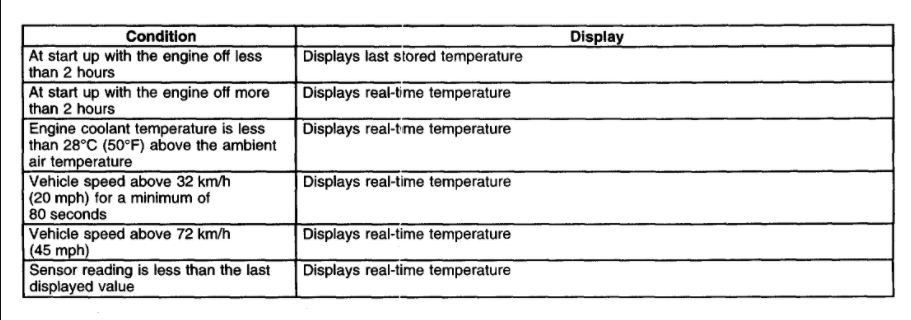
This sounds like the temperature sensor is not operating so you can try unplugging it just to make sure the display is changed. However, you will need to drive the vehicle to find out if the display changes because it doesn't always change when sitting still. The first attachment shows when it is updated.

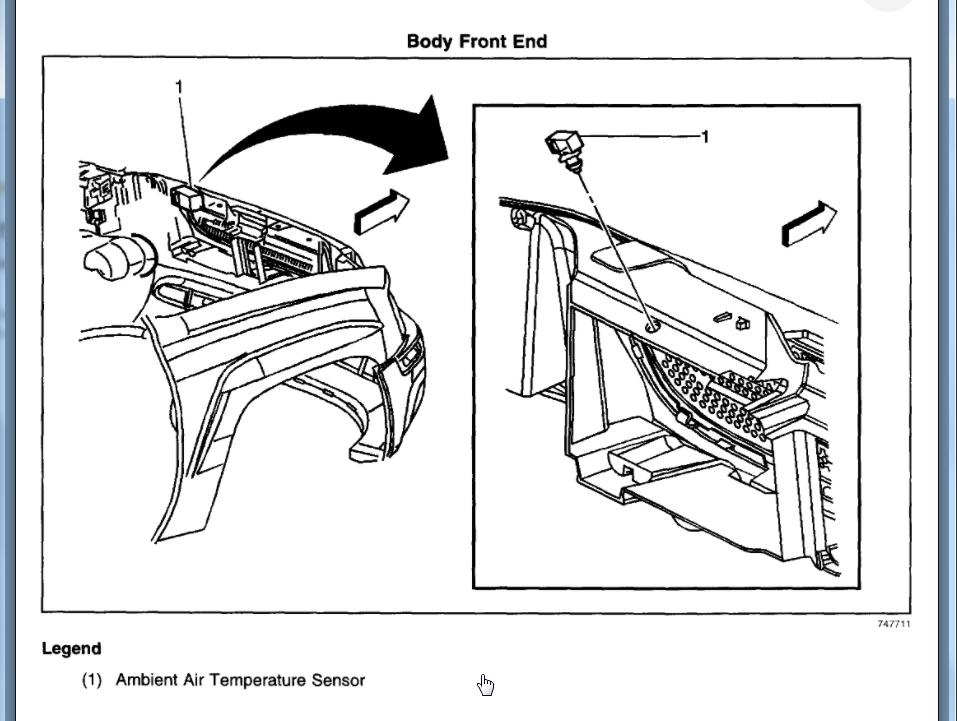
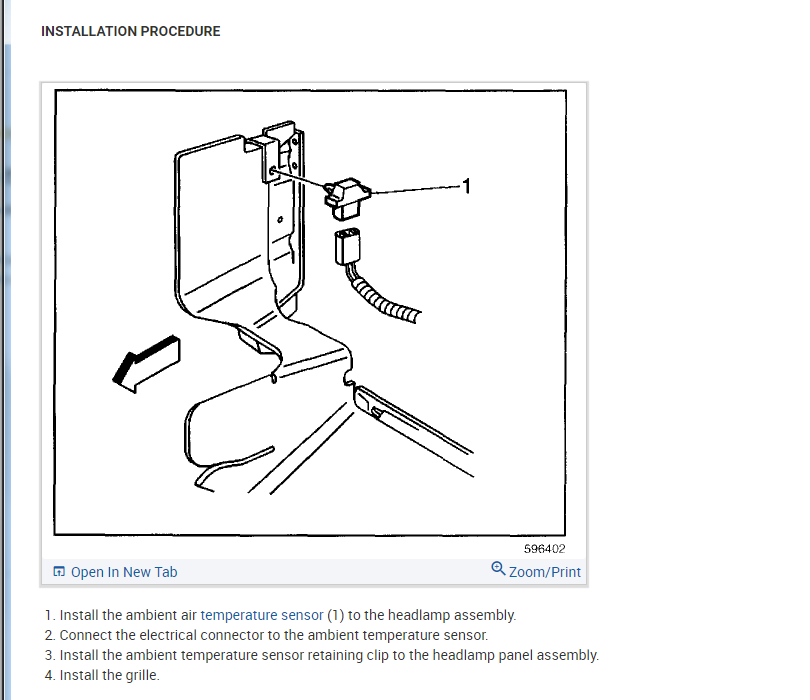
I suspect the sensor is the issue so we may need to replace it so I attached the process.
Nov 19, 2020 at 6:51 AM
Avatar
JIMMYPAGE
  • MEMBER
  • 40 POSTS
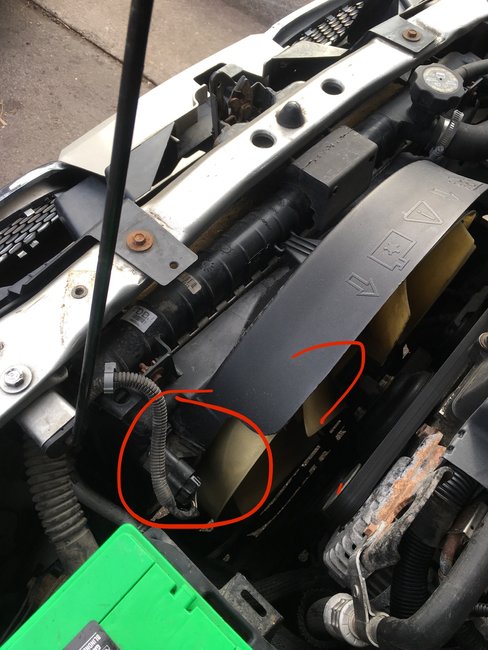
I don’t think I see the exact depiction in your drawing. But I’ve enclosed a photo.
Nov 19, 2020 at 7:48 AM
Avatar
KASEKENNY
  • CERTIFIED EXPERT
  • 18,907 POSTS
Yeah. That looks like it. However, I pulled this off the vehicle description from the original post. Can you provide your vehicle model, year, and engine and I will get that info for this sensor?
Nov 19, 2020 at 5:33 PM
Avatar
JIMMYPAGE
  • MEMBER
  • 40 POSTS
2002 Oldsmobile Bravada. 4.2L.
Nov 21, 2020 at 5:29 AM
Avatar
JIMMYPAGE
  • MEMBER
  • 40 POSTS
I think I found it. It’s got a bright green tap. I’ve unplugged it drove for 20 minutes. The display inside the car has not changed it still says 50°.
Nov 21, 2020 at 11:07 AM
Avatar
KASEKENNY
  • CERTIFIED EXPERT
  • 18,907 POSTS
okay . That points to a faulty sensor. If there is no difference between it plugged in and not, I would replace that first. It is pretty cheap and easy. If that is not it then we need to start testing wiring or worse yet it is a module or cluster issue. These are more rare so if it were me, I would replace the sensor using the attached instructions if you need them.
Nov 22, 2020 at 4:30 PM
Avatar
JIMMYPAGE
  • MEMBER
  • 40 POSTS
okay, thanks. I put a different one in from the junkyard. Still says 50. Is there a reset or recalibration that needs to happen?
Nov 22, 2020 at 4:51 PM
Avatar
KASEKENNY
  • CERTIFIED EXPERT
  • 18,907 POSTS
Try the attached procedure. This will update the ambient temperature to the HVAC module which controls the display.

If this doesn't work then I suspect the module is the issue but we will need a scan tool to confirm that because we will need to see what the module is seeing as the temperature. I suspect it is correct in the module but it is displaying 50 due to an internal issue.
Nov 23, 2020 at 7:05 PM
Avatar
JIMMYPAGE
  • MEMBER
  • 40 POSTS
Thanks. After sitting overnight, it now works. Is there any reason to reset or re-calibrate it? The new sensor is from a Chevrolet Trailblazer.
Nov 24, 2020 at 11:07 AM
Avatar
KASEKENNY
  • CERTIFIED EXPERT
  • 18,907 POSTS
If it works don't worry about it. More then likely the HVAC module had to go through what is called a sleep cycle to relearn it from the new sensor.

Thanks for the update and thanks for using 2CarPros.
Nov 24, 2020 at 7:02 PM