OBD2 Scan not communicating with car

2011 HONDA CRV
80,000 MILES • 2.4L • 4 CYL • 4WD • AUTOMATIC
Avatar
BIGG MAN
  • MEMBER
  • 8 POSTS
My scanner (which works on another car) powers up, runs through the different data types (CAN etc.) but cannot communicate.

I have checked all the fuses and, given the scanner powers up, know that the OBD2 port is powered.

What are the next steps to take to diagnose the communication issue?

Thanks
G
Sep 24, 2019 at 3:33 PM

Advertisement
Avatar
KASEKENNY
  • CERTIFIED EXPERT
  • 18,907 POSTS
Hi,

This could be a compatibility issue on the scan tools part or there could be an issue with the vehicle's communication network. Looks like you proved out the DLC portion of it but the easiest way that I have found to test this is to use another scan tool to see if it can communicate. Especially, if the vehicle runs ok.

I understand a shop may have a number of different tools but individuals don't so the best thing to do is stop by a parts store and ask them to try to pull codes or communicate with the vehicle. If they can't then you have a problem with the vehicle. If they can, your tool is not compatible with the vehicle.

Let me know and we can go from there. Thanks
Sep 24, 2019 at 7:38 PM
Avatar
BIGG MAN
  • MEMBER
  • 8 POSTS
Thank you for the response. The manufacturer of the reader has confirmed that it is compatible with the vehicle so it seems to be a communication system problem. What next?

G
Sep 24, 2019 at 7:57 PM
Advertisement
Avatar
KASEKENNY
  • CERTIFIED EXPERT
  • 18,907 POSTS
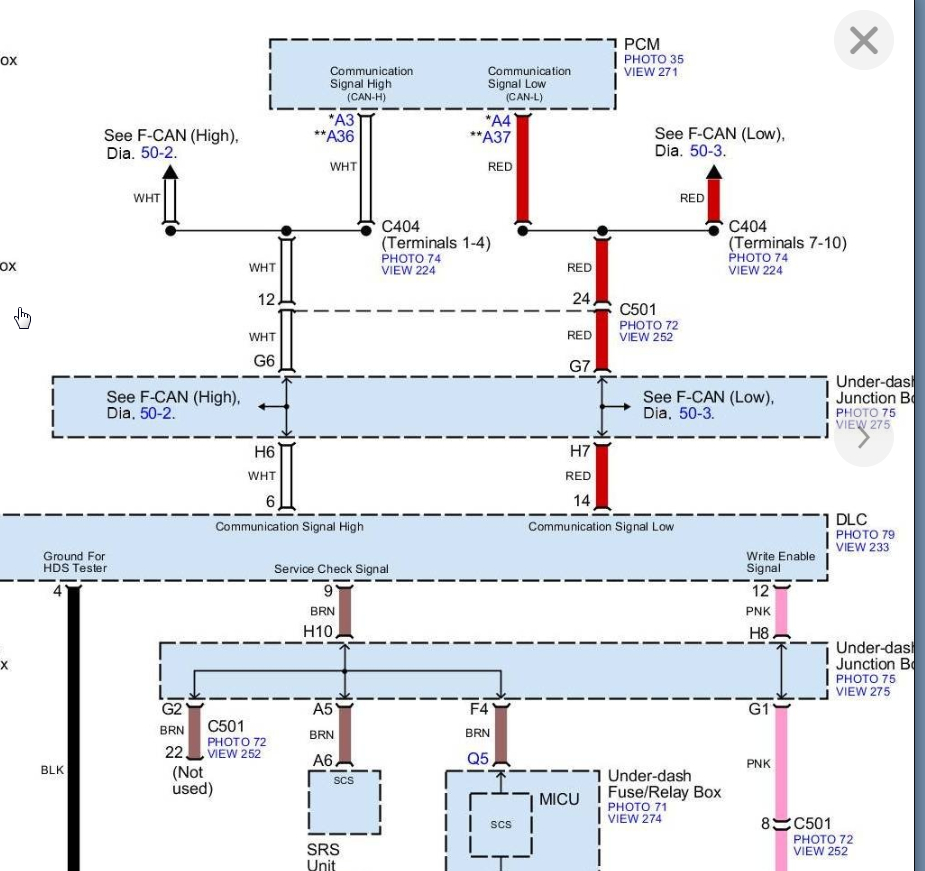
Ok, Go to your DLC and tell me what the voltage is on Pin 6 and then Pin 14. These are your bus communication lines. If the voltage is not correct then you will not be able to communicate with the PCM.

Just to be clear, measure pin 6 with the red lead of the meter and black on ground and then red on 14 and black on ground. Do this with the key on and let me know.

The fact that your scan tool turns on shows the DLC has power as you stated but we need to see what is on these other circuits and go from there. Thanks
Sep 24, 2019 at 8:10 PM
Avatar
BIGG MAN
  • MEMBER
  • 8 POSTS
Hi, I get 0 volts for both pin 6 and 14.
Sep 26, 2019 at 12:08 AM
Avatar
BIGG MAN
  • MEMBER
  • 8 POSTS
Actually, it seems pin 6 is 0, pin 14 fluctuates at low voltage (2-4).
Sep 26, 2019 at 12:16 AM
Avatar
BIGG MAN
  • MEMBER
  • 8 POSTS
I need to unclip port and test further.
Sep 26, 2019 at 12:25 AM
Avatar
BIGG MAN
  • MEMBER
  • 8 POSTS
Removed.
Sep 26, 2019 at 12:29 AM
Avatar
BIGG MAN
  • MEMBER
  • 8 POSTS
Okay, number of multi-meter tests done. Pins 6 & 14, no voltage. Ohms between 6 & 14, 60 Ohms. Voltage to pin 16, 12.25v.
Sep 26, 2019 at 2:03 AM
Avatar
KASEKENNY
  • CERTIFIED EXPERT
  • 18,907 POSTS
Okay. Just to clarify.

1. Did you have 0 volts on 6 and 14 when you had the leads on both of these and ground or when you were measuring voltage between 6 and 14?

Meaning did you have the red lead on 6 and the black on ground and you had 0 volts. Then you had the red on 14 and black on ground and you had 0 volts?

Or did you have one lead on 6 and one lead on 14 at the same time?

2. Then did you have the key on?

3. Then when you measured resistance was the battery disconnected?

4. Pin 16 is your power so that is good.

Just clarify that for me and we can go from there. Thanks
Sep 26, 2019 at 7:12 PM
Avatar
BIGG MAN
  • MEMBER
  • 8 POSTS
1. Volts on 6 and 14 were tested to ground, key off.

2. Then did you have the key on? Yes, tried with key on, no change.

3. Then when you measured resistance was the battery disconnected? No.

4. Pin 16 is your power so that is good.
Sep 26, 2019 at 7:54 PM
Avatar
KASEKENNY
  • CERTIFIED EXPERT
  • 18,907 POSTS
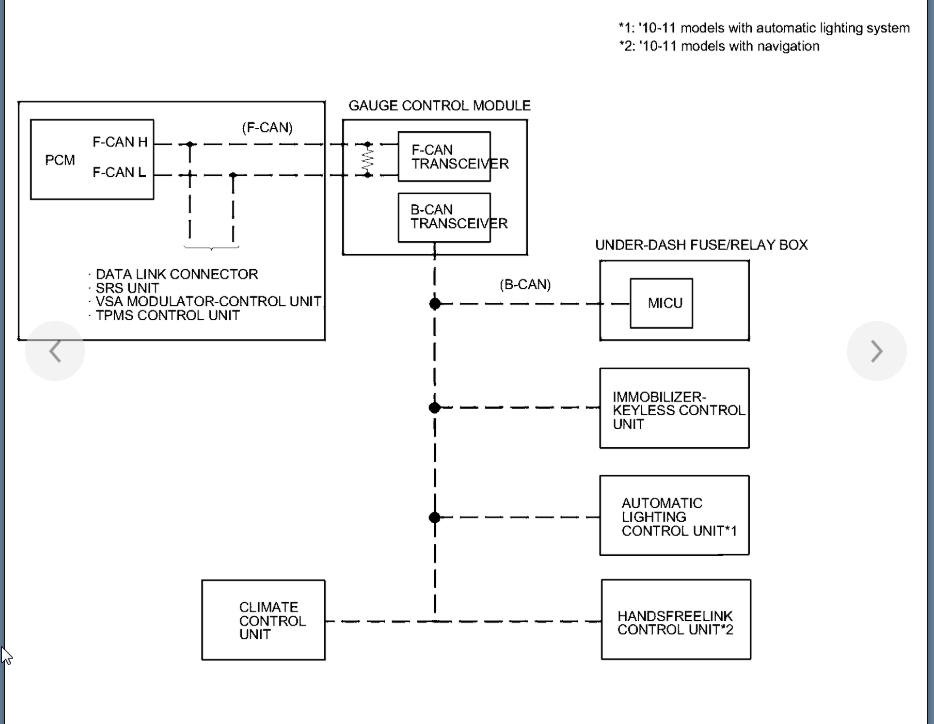
Okay. Does the vehicle start and run? We either have a wiring issue to from the DLC to the PCM or the PCM is offline.

In order for the scan tool to communicate with the PCM it needs to have the proper voltage on those lines.

Let me know if there are any other issues with the vehicle and we can take the appropriate action after that.
Sep 27, 2019 at 7:12 PM