No electric power in the dash

2011 LINCOLN NAVIGATOR
200,000 MILES • 5.4L • V8 • 4WD • AUTOMATIC
Avatar
  • MEMBER
  • 12 POSTS
I have recently bought the truck from auction. It has no power in the dash when I insert the key in the ignition no lights nothing. But the wipers work when I put the key. There is power in the cigarette lighter and the tilt steering function works and the brake and accelerator height adjustment system works. I have checked fuse boxes and relays with multimeter they seem fine. When truck is in park and the battery connected key doesn't come out of ignition it only comes out when I disconnect the battery.
Nov 6, 2020 at 6:22 PM

Advertisement
Avatar
KASEKENNY
  • CERTIFIED EXPERT
  • 18,907 POSTS
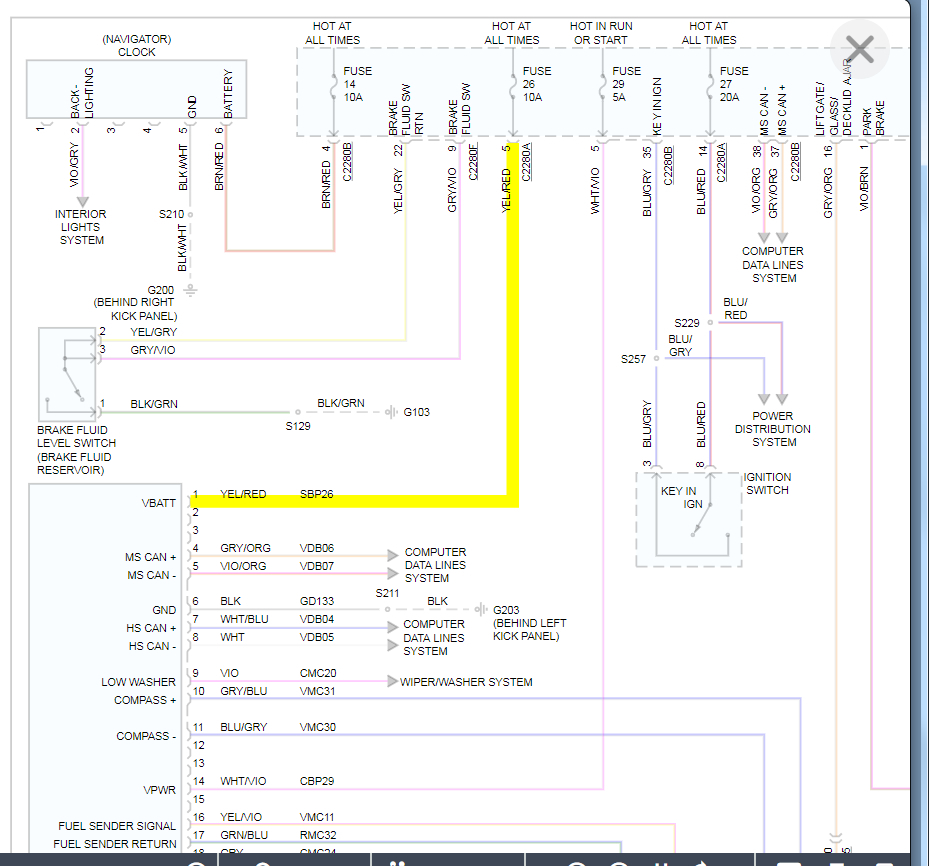
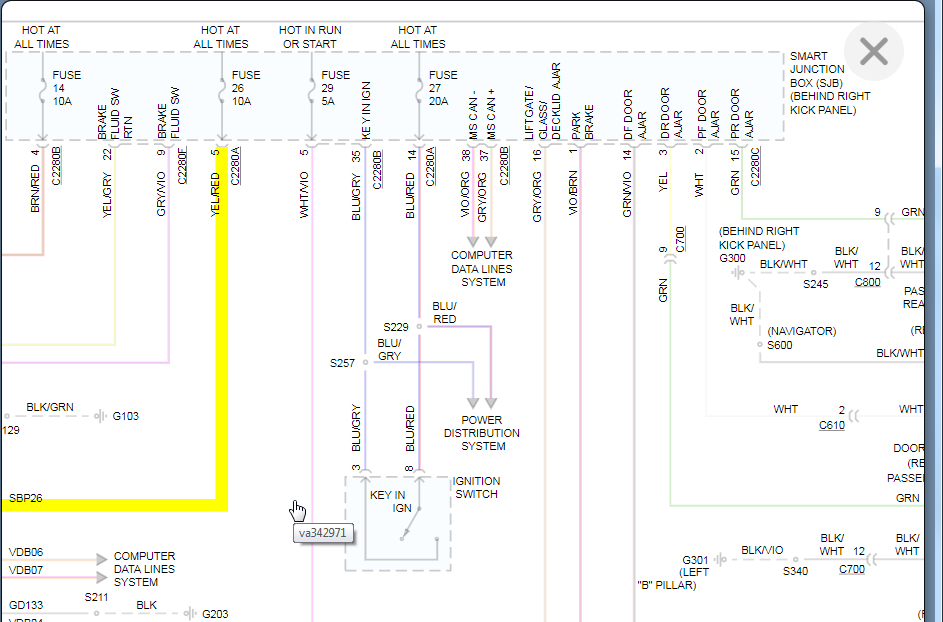
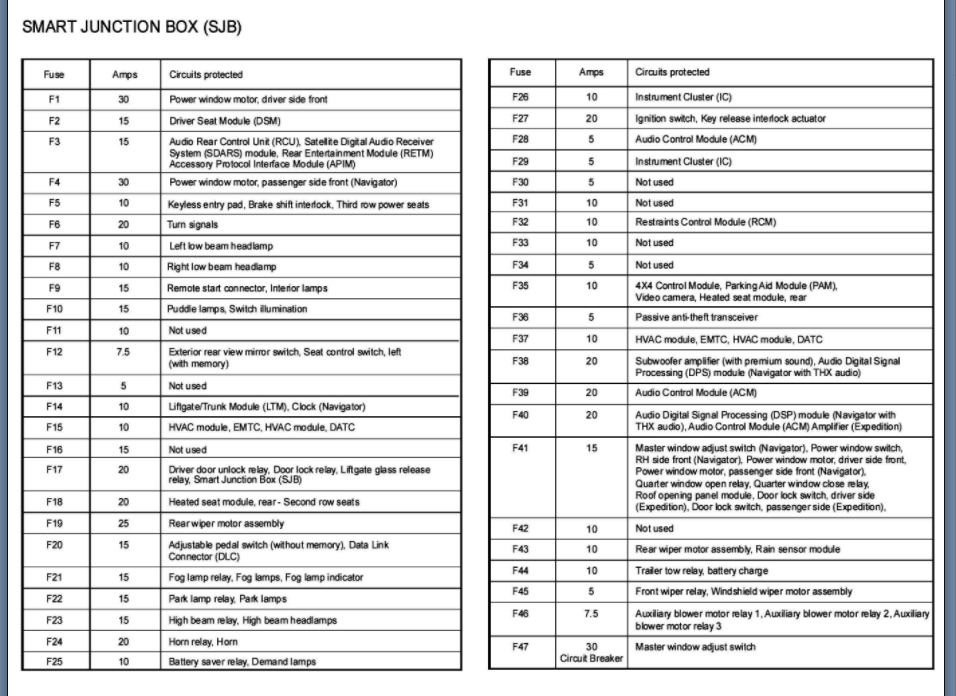
I understand you checked fuses but we need to double check fuse 26 and 29 in the smart junction box. These are what feed the cluster so if the fuses are fine, we need to check power on these two wires at the cluster.

You should have 12 volts when the key on. However, I am thinking the SJB is the issue with the key not coming out as well.

Let's start with this before you replace the SJB because we need a little more proof first.

https://www.2carpros.com/articles/how-to-check-wiring
Nov 6, 2020 at 6:48 PM
Avatar
  • MEMBER
  • 12 POSTS
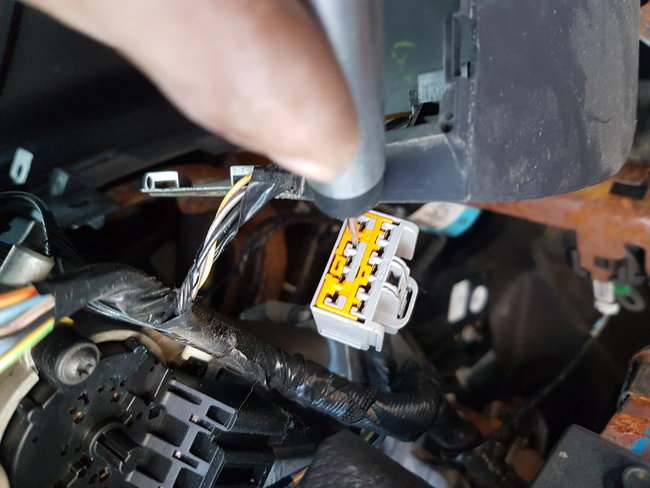
I did check the fuses 26 , 29 they are good. I have opened ignition panels and took out the connector that goes to the ignition lock and there is power in 2 of the points. I will attach the picture. I will need further assistance.
Apr 6, 2021 at 10:22 PM
Advertisement
Avatar
KASEKENNY
  • CERTIFIED EXPERT
  • 18,907 POSTS
I am not sure I understand why you are checking power at the ignition. Is the ignition switch operating? I thought the issue was just all these other components were not operating. If they are not, then we need to go to something that is not working and check power. I suspect you will not have power and if not, then we need to trace it back to find where there is power or to the SJB.

I still think there is an issue with this as it is what supplies the power to these components. Let me know what you find with one of these things that is not working or let me know if I am not understanding the issue. Thanks.
Apr 7, 2021 at 7:03 PM
Avatar
  • MEMBER
  • 12 POSTS
Thank you for replying back to me. Ignition switch doesn't work. Key in the ignition turning it nothing happens. I checked the fuse 26 and 29 they are good. Do you want me to get sjb?
Apr 7, 2021 at 11:23 PM
Avatar
KASEKENNY
  • CERTIFIED EXPERT
  • 18,907 POSTS
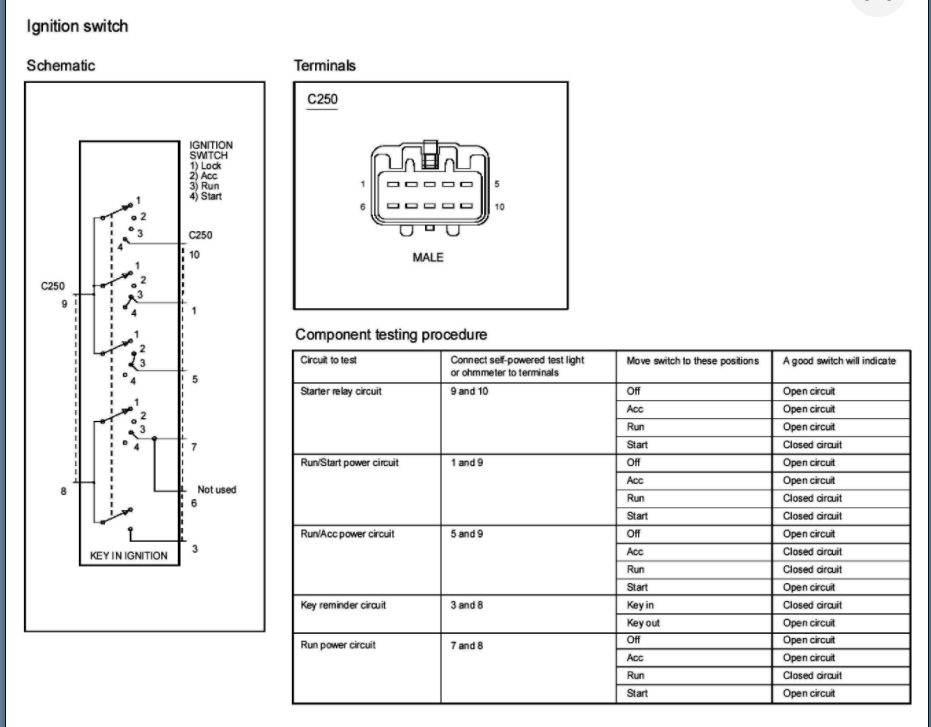
Not if you have power to it. The SJB would be if all these items did not have power but if you checked power and it is there at the ignition switch then we need to do this testing. Please see the attached. Basically you are putting your test meter or test light in these pins and putting the key in each position. The light should light or have resistance (ohms) when the chart says closed circuit. All open circuit rows on the chart the light should be off or your meter should say OL.
Apr 8, 2021 at 6:05 PM
Avatar
  • MEMBER
  • 12 POSTS
Hello,

I was able to put my blue driver in the code reader and so many codes popped up. Can I send you pdf please let me know.
Thank you,
Kay mann
Apr 20, 2021 at 6:58 PM
Avatar
  • MEMBER
  • 12 POSTS
Hi,

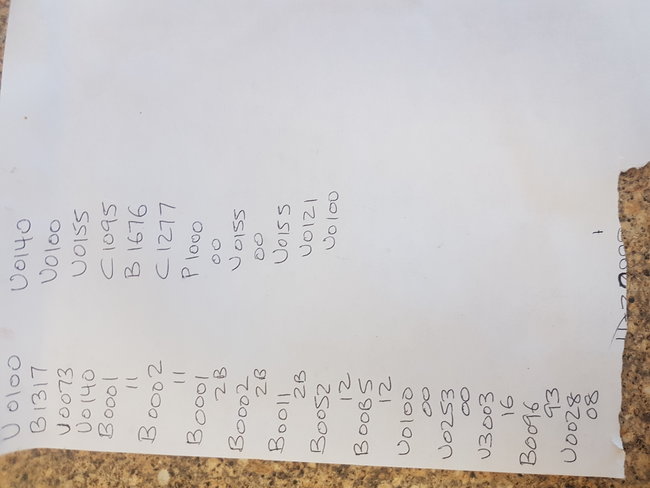
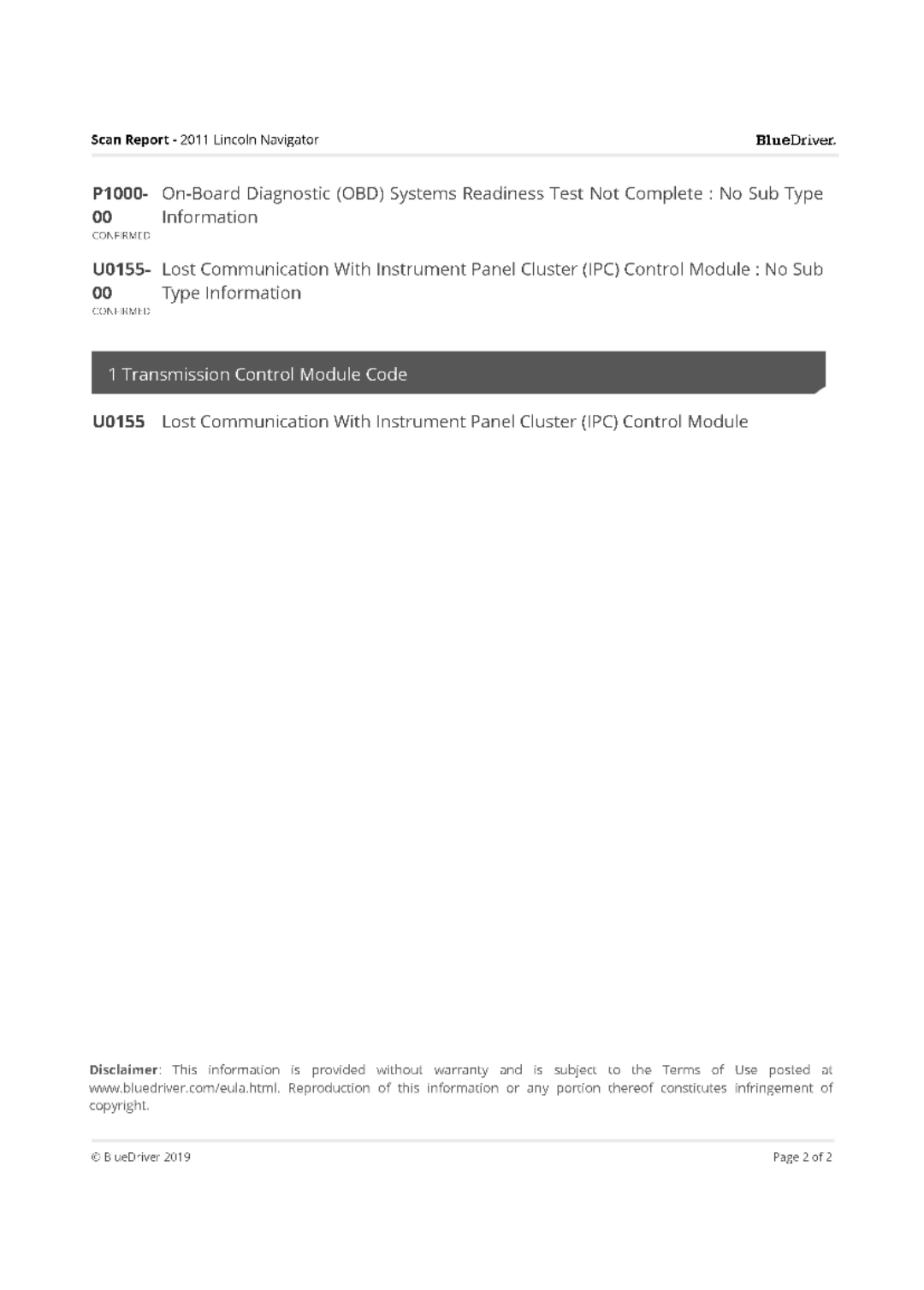
I am attaching list of the codes I got while scanning it.

Thanks
Apr 21, 2021 at 1:46 PM
Avatar
KASEKENNY
  • CERTIFIED EXPERT
  • 18,907 POSTS
Okay. Those are all pointing towards a loss of communication issue. However, that many codes may be due to unhooking some connectors for testing.

It appears this issue happens enough that I would suggest clearing all the codes and then getting it to act up again just to see which of these codes come back. The reason is, you have airbag codes in there as well and that is most likely a wiring issue but would make more sense as they set when you had some connectors unhooked.

Let us know and we can go from there. Thanks
Apr 22, 2021 at 7:29 PM
Avatar
  • MEMBER
  • 12 POSTS
Thank you for replying back. I am going to be working on it on Tuesday because that's the only day I get off . I will do as you instructed and let you know what happens afterwards.

Thank you
Apr 22, 2021 at 7:37 PM
Avatar
KASEKENNY
  • CERTIFIED EXPERT
  • 18,907 POSTS
Sounds great. Thanks for the update. We will wait to hear back. Thanks
Apr 23, 2021 at 7:05 PM
Avatar
  • MEMBER
  • 12 POSTS
Hi.

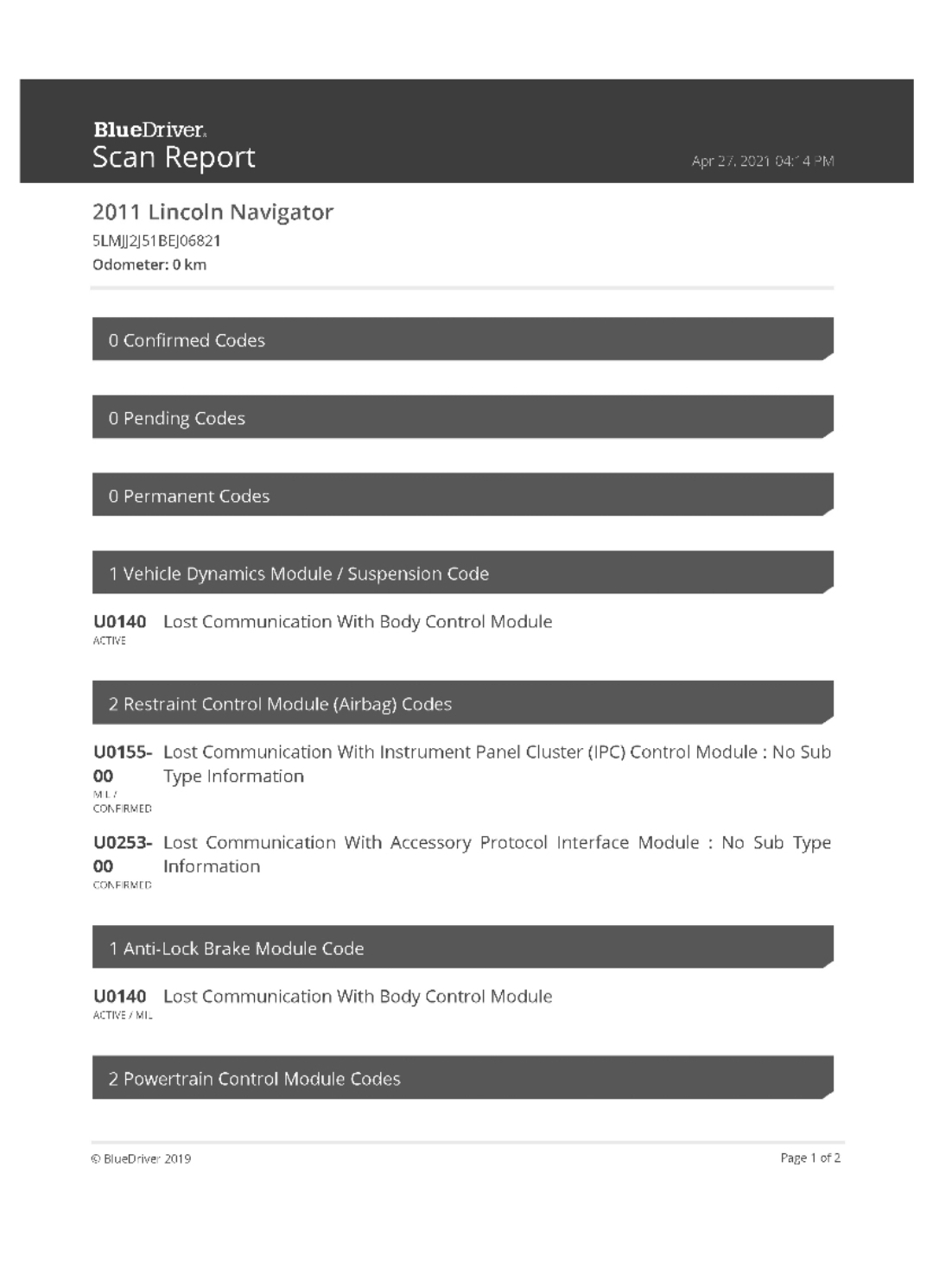
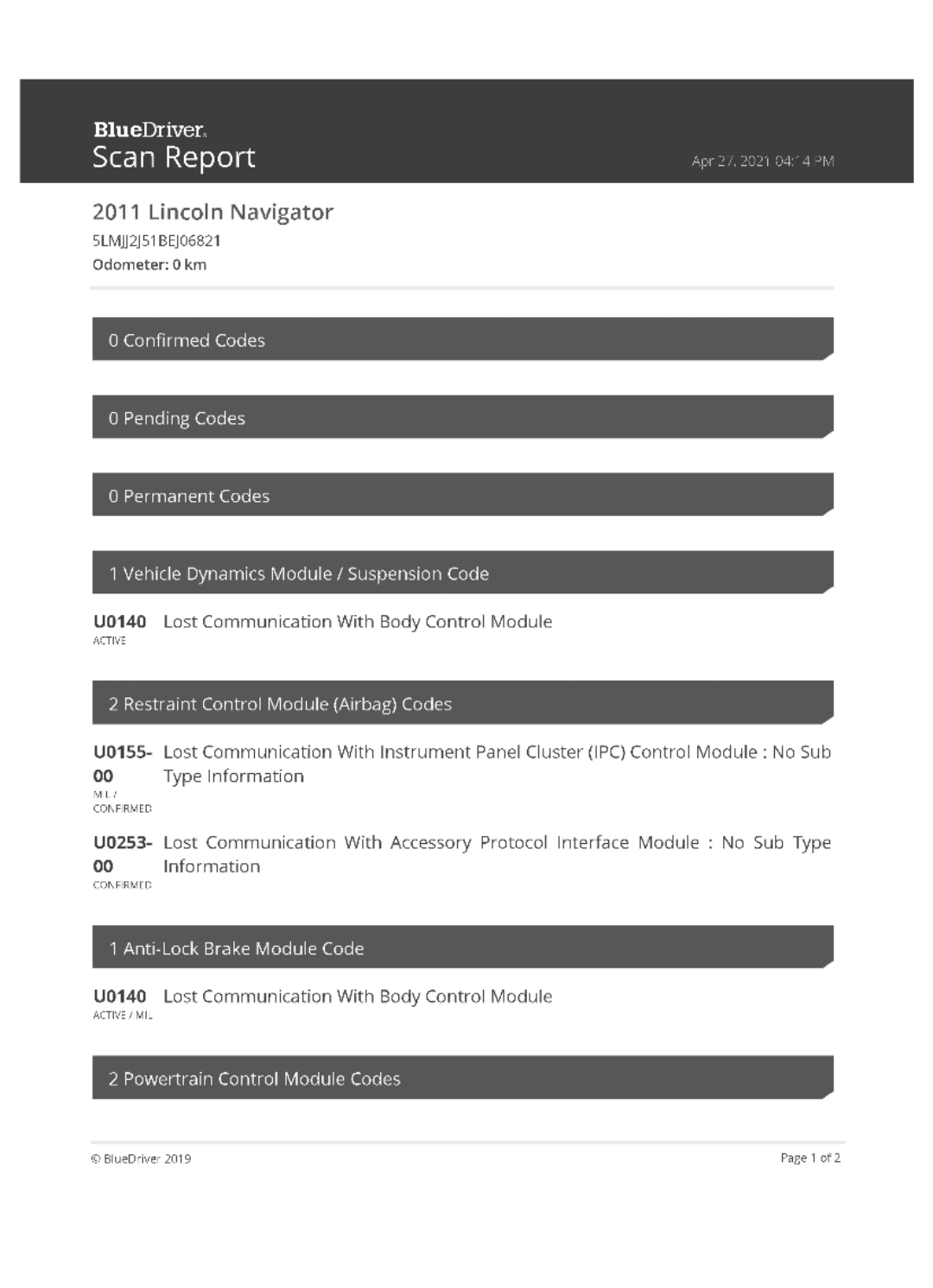
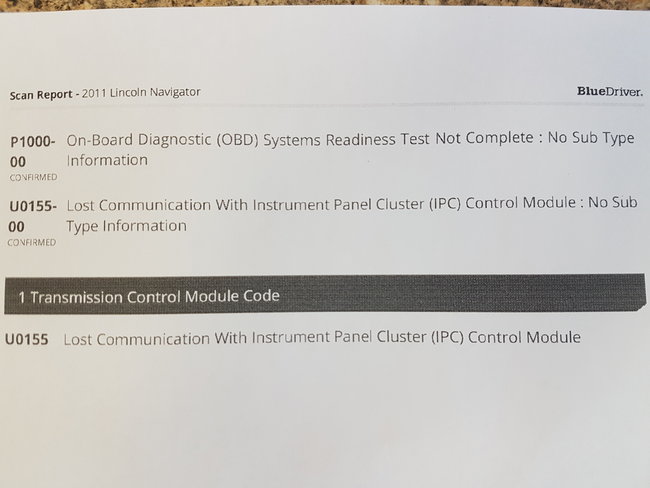
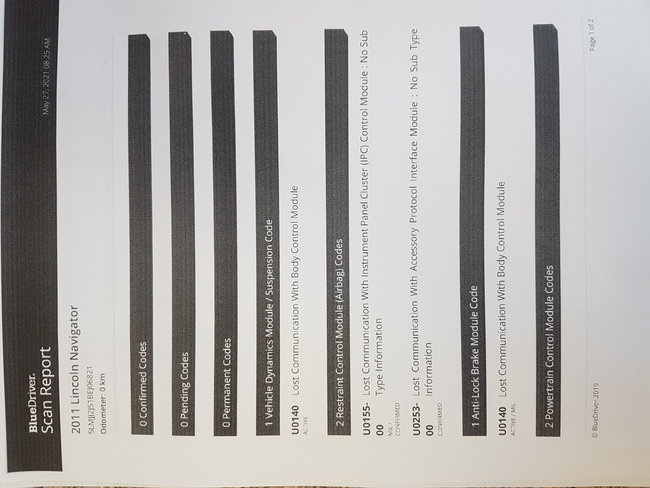
I have cleared the codes and scanning it afterwards it showed few codes and I will be attaching the pictures with this message. Please advise me the next steps. Thank you for your guidance.
Apr 27, 2021 at 9:06 PM
Avatar
  • MEMBER
  • 12 POSTS
Hi,

I have cleared the codes and scanning it afterwards it showed few codes and I will be attaching the pictures with this message. Please advise me the next steps. Thank you for your guidance.
Apr 27, 2021 at 9:06 PM
Avatar
  • MEMBER
  • 12 POSTS
Next image
Apr 27, 2021 at 9:08 PM
Avatar
KASEKENNY
  • CERTIFIED EXPERT
  • 18,907 POSTS
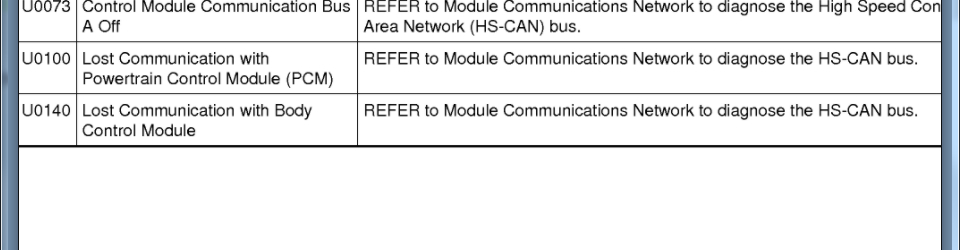
This is a network issue as I suggested above. Here is a guide that talks about this:

https://www.2carpros.com/articles/can-scan-controller-area-network-easy

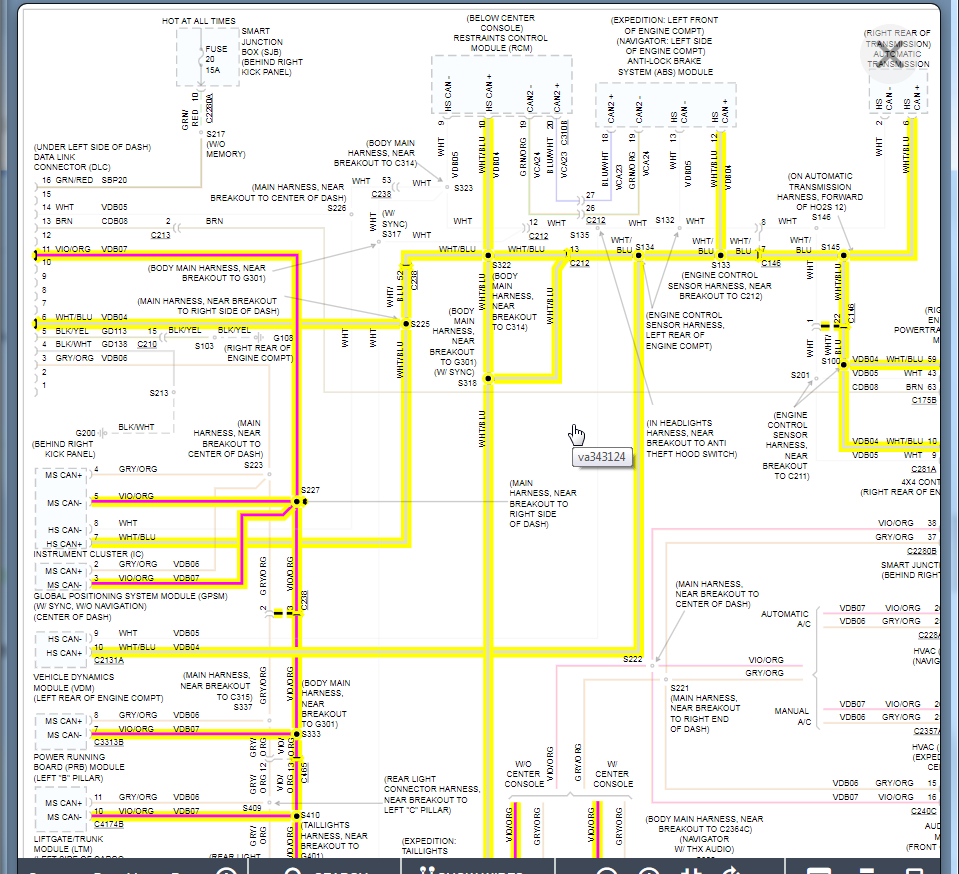
These are very difficult to figure out but we need to start with checking voltage at the DLC on pin 6 and 11. This is the high speed network and it has two legs. When those voltages are added together they should be 5 volts. However, they are split and will be around 2.7 and 2.3 volts.

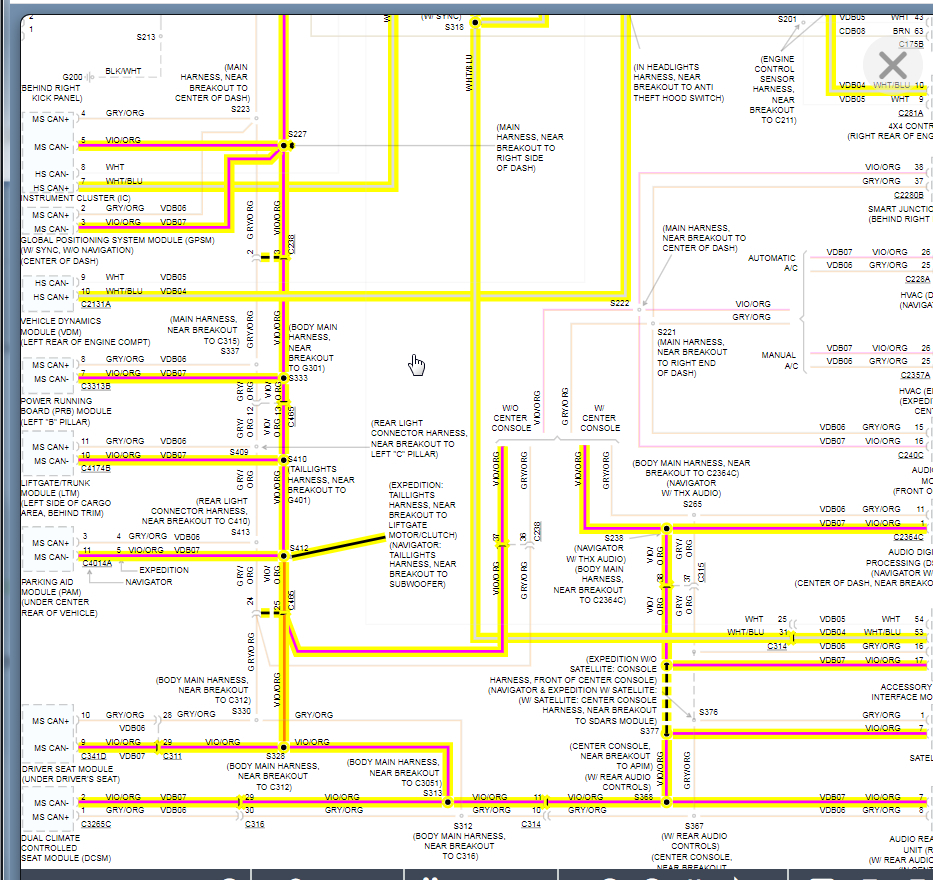
I attached the wiring diagram for this. Depending on the voltages we will need to remove each of these modules one at a time until the voltage returns to normal but let start with finding out what they are.

Thanks
Apr 28, 2021 at 6:00 PM
Avatar
KULJIT SINGH MANN
  • MEMBER
  • 11 POSTS
Hi,

If I am not mistaken you mean if I have a can bus scanner it will be easier to pinpoint the fault. I have a mechanic friend and I believe he has a better scanning tool than my obd reader which is Bluedriver. Let me know otherwise I will follow what you have suggested.
Thank you
Apr 29, 2021 at 1:35 PM
Avatar
KASEKENNY
  • CERTIFIED EXPERT
  • 18,907 POSTS
You can but it is not going to give you these voltage readings. Here is a video on how to do that but again, once you start to get into diagnosing this, you are going to have to get the voltages:

https://www.youtube.com/watch?v=InIlnsjOVFA

So I would do this scan if he has a tool but either way I think we need to get the voltages and go from there. Thanks
Apr 30, 2021 at 8:14 PM
Avatar
KULJIT SINGH MANN
  • MEMBER
  • 11 POSTS
Hello,

I checked the pins on dlc below are the volts multimeter showed
Pin 6 0.01 or 0.00
Pin 11 1.52 or 1.53
With kzyee super probe
Pin 6 0.00 volts
Pin 11 1.3 volts
May 1, 2021 at 8:03 AM
Avatar
KULJIT SINGH MANN
  • MEMBER
  • 11 POSTS
I have also noticed when I hooked the battery no key in the ignition the vents on the roof were blowing air.
May 1, 2021 at 11:03 AM
Avatar
KASEKENNY
  • CERTIFIED EXPERT
  • 18,907 POSTS
Unfortunately it appears the CAN + is shorted to ground and that would explain most all your issues.

These voltages need to be 2.7 and 2.3 volts so in order to find the short we need to prove that out first.

These for continuity to ground. You do this by taking your meter and putting it on resistance (ohms) or if you have a continuity selection then that is what we need to test. This will tell us if this circuit has a path to ground. It should not have continuity or any resistance. Just let me know what this measurement is and we can try to narrow it down but it is not going to be easy.
May 2, 2021 at 6:11 PM
Avatar
KULJIT SINGH MANN
  • MEMBER
  • 11 POSTS
Do I check continuing in the same pins?
May 2, 2021 at 6:30 PM
Avatar
KASEKENNY
  • CERTIFIED EXPERT
  • 18,907 POSTS
Yes. Same pins but I just want to be sure, you touch one lead to the pin and the other to a known good ground. If you have continuity or resistance then you have a short to ground. Then do the same to the other pin.
May 3, 2021 at 8:05 PM
Avatar
KULJIT SINGH MANN
  • MEMBER
  • 11 POSTS
Hello Kenny,

I have checked the DLC at pin 6 and 11 for continuity below are the results.

Key off
Pin 6
13.6 than 6.7k keeps changing between these numbers
Pin 11
23.4, 23.5

Keys on
Pin6
Starts from 57k keeps changing upto 103

Pin 11
26.o k but changes sometimes between 22k to 28 k
May 14, 2021 at 8:31 AM
Avatar
KASEKENNY
  • CERTIFIED EXPERT
  • 18,907 POSTS
I am sorry. I was not clear. I want you to check each pin, 6 and 11, for continuity to ground.

Meaning touch one lead to pin 6 and the other lead to a known good ground.

Then touch the lead to pin 11 and the other to a known good ground. You should not have continuity. It should read OL on your meter. If you have resistance then you have a short to ground on that circuit.

Hopefully that makes sense. Thanks
May 15, 2021 at 5:11 PM
Avatar
KULJIT SINGH MANN
  • MEMBER
  • 11 POSTS
Hi,

I have checked both pins 6 and 11 for continuity and both have resistance in them and the show the values of 6.0k on pin 6 and 28.6 k on pin 11.
May 24, 2021 at 8:16 AM
Avatar
KASEKENNY
  • CERTIFIED EXPERT
  • 18,907 POSTS
Okay. It looks fine. That is the ground through the modules so it is not shorted to ground.

Can you recap where you are currently? Do you still have the U codes that you had prior?

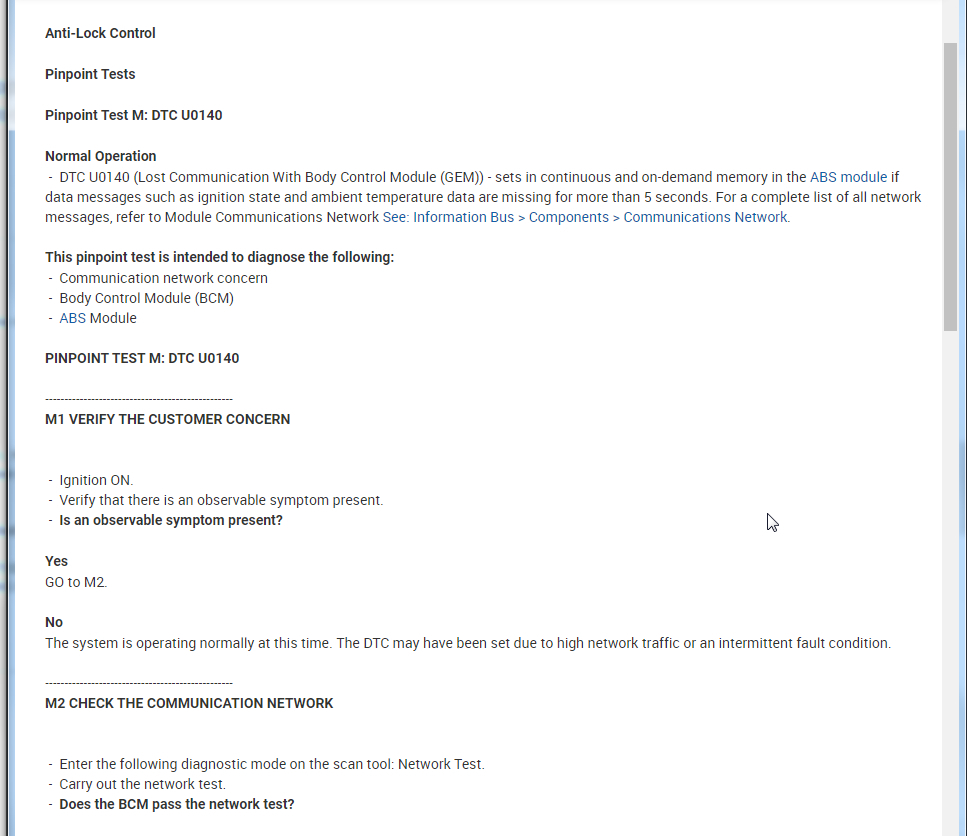
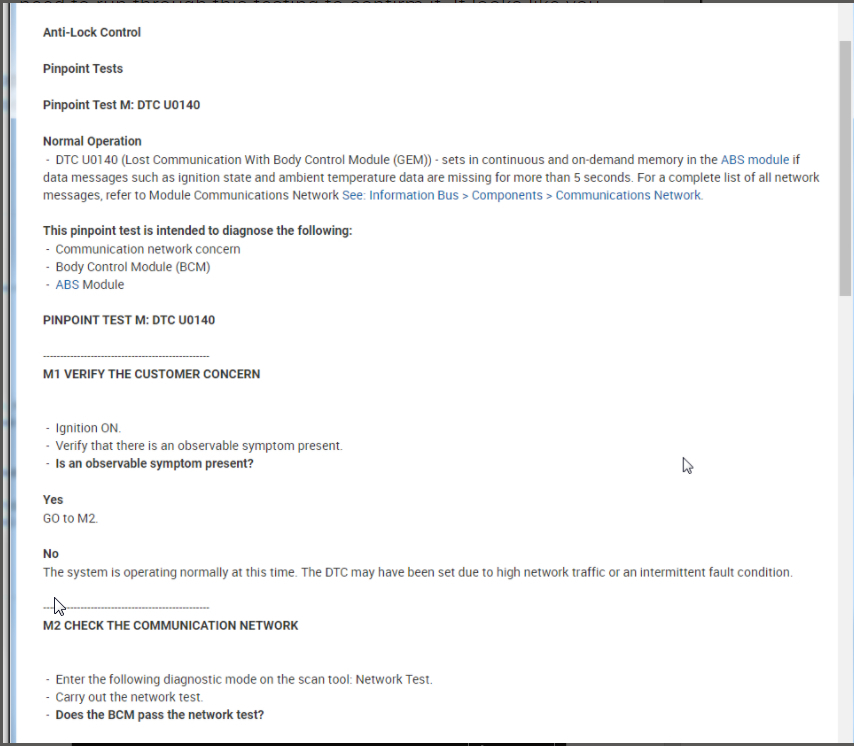
I suspect there is an issue with the BCM at this point but we need to run through this testing to confirm it. It looks like you are going to need to run a network test but take a look at this info and let me know what you think.

Thanks
May 25, 2021 at 6:27 PM
Avatar
KULJIT SINGH MANN
  • MEMBER
  • 11 POSTS
I did a scan again and I am going to attach the results. The attachments you sent does make a sense about BCM . Let me know about the network tests you want me to do . Seems interesting something new to learn.
May 27, 2021 at 3:42 PM
Avatar
KASEKENNY
  • CERTIFIED EXPERT
  • 18,907 POSTS
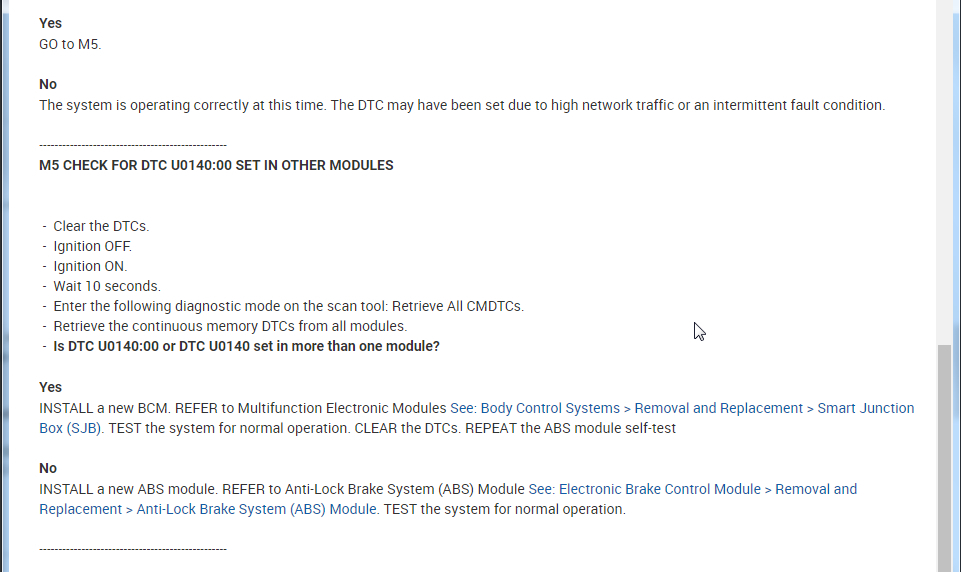
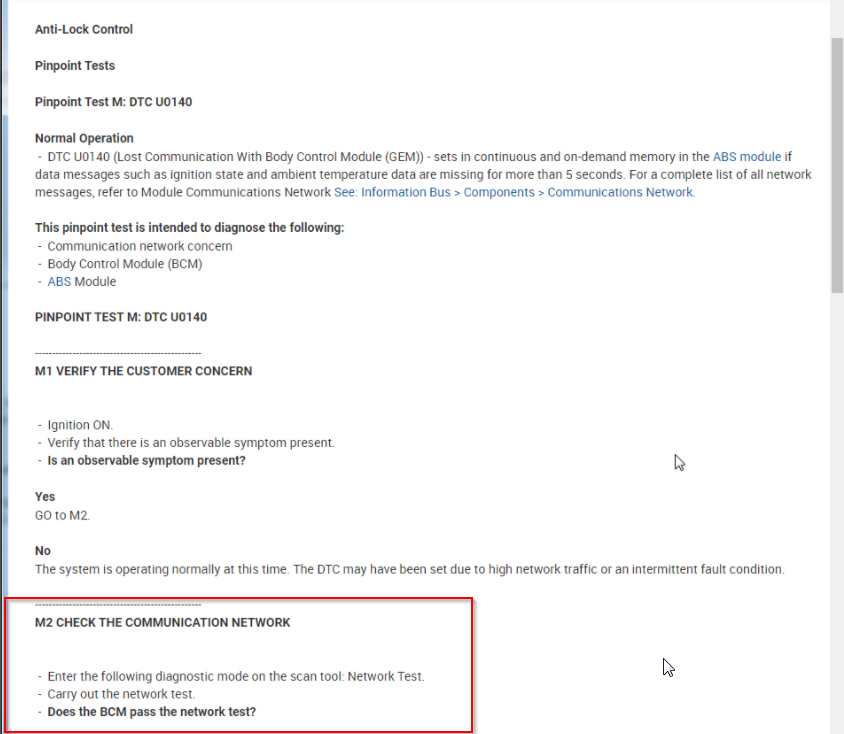
Okay. That is good that it is the same codes. So the network test is not something that we can do. It is a scan tool function but it is not something that the generic scan tools will do. This is an OEM or equivalent tool.

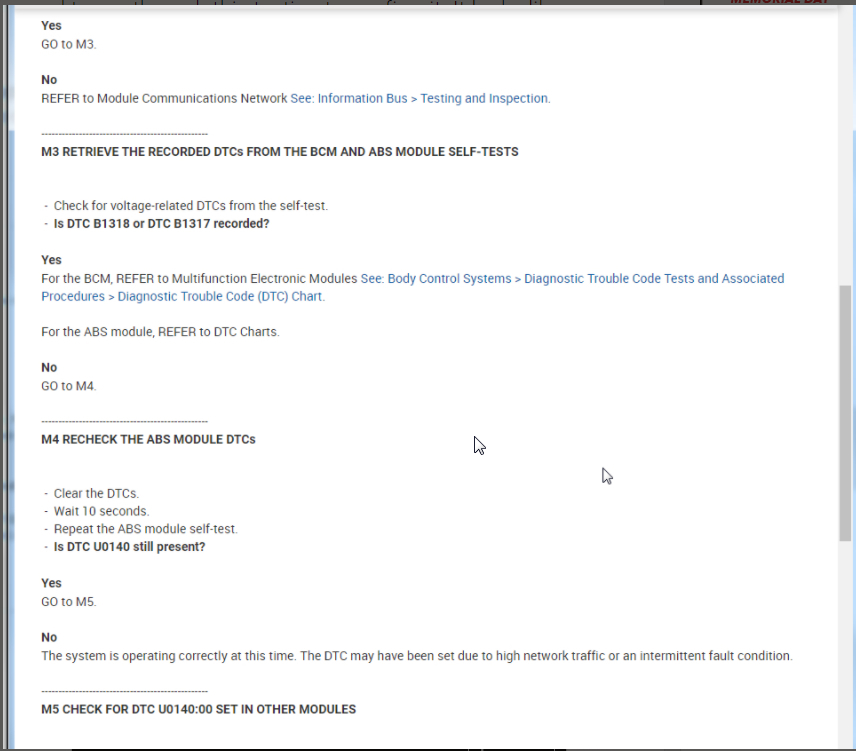
Take a look at the attachment below and it is M2 that talks about it. What I would do is just check around for a shop that has a tool that can do it and just have them run through this testing and pay the diag charge rather then buying the tool. Unless you are going to be doing this type of diagnostic work more frequently it really is not worth buying. They are normally a few hundred dollars at a minimum and you will pay less to have a shop do it as you will likely not need to do it again.

If you want to purchase one, then just make sure it is capable of running CAN network testing. You may want to call the company and ask just to make sure.

Let me know if you have questions on this.
May 28, 2021 at 7:13 PM
Avatar
KULJIT SINGH MANN
  • MEMBER
  • 11 POSTS
Do you have any brand or model that you can reccomend? I will compare the cost between buying and getting it diagnosed. I am factoring in tow costs as well.
Thanks
May 29, 2021 at 2:55 PM
Avatar
KASEKENNY
  • CERTIFIED EXPERT
  • 18,907 POSTS
We actually have a video on this. Here is a link:

https://www.youtube.com/watch?v=InIlnsjOVFA

However, based on your codes, I am not sure you need it. Basically what the U0140 in the ABS is saying is that it is not getting the proper message from the BCM.

This could be due to the communication network, the BCM, or the ABS module.

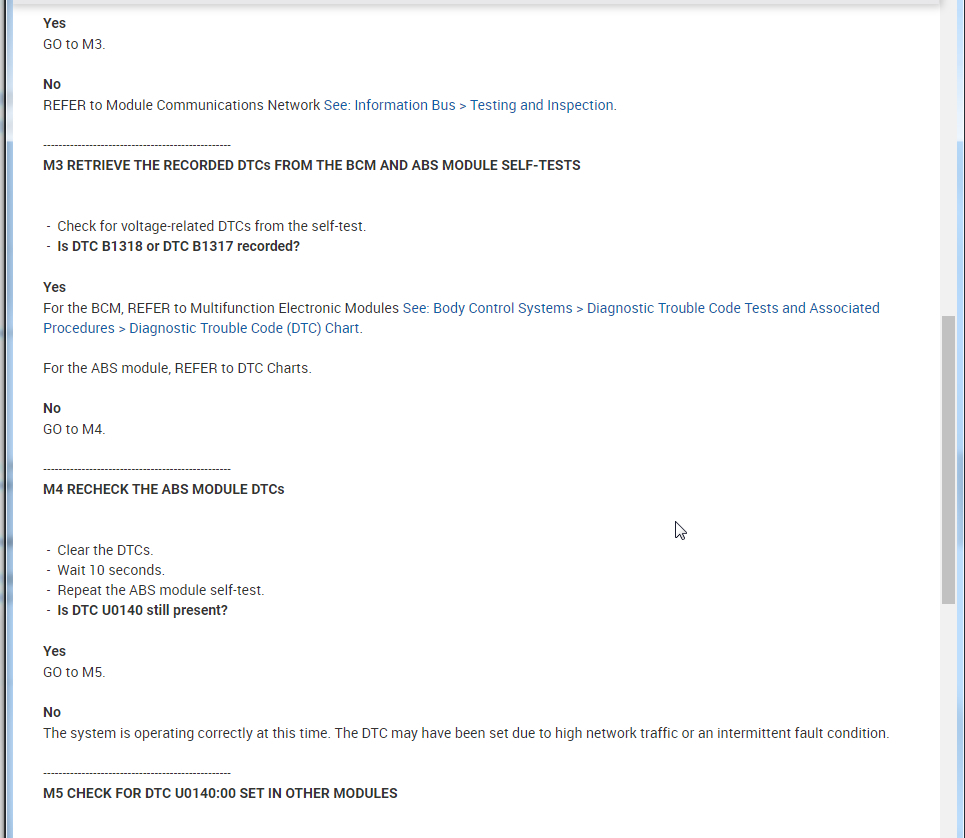
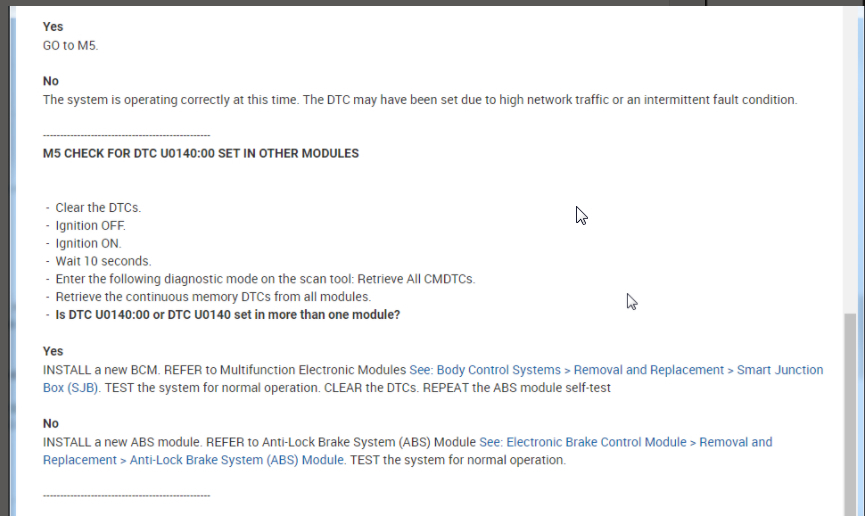
If you read through the test and make the assumption that the BCM will pass the network test which means it is not a wiring issue or other network issue then it leads you to replacing the BCM after you answer the remaining questions.

So you can get this tool as it does a lot but replacing the BCM may be the solution to these codes. Depending on the price of the BCM, I may just go with that rather than a scan tool that you may not sure all the time.

Run through the testing and confirm you are seeing the same thing.
May 30, 2021 at 7:16 PM
Avatar
KULJIT SINGH MANN
  • MEMBER
  • 11 POSTS
Hi,

I am thinking of just changing the BCM . I have called dealership they are about $250.00 plus taxes and couple of hundred bucks for tow. Any thoughts where should I source BCM from and getting it programmed? Thank you for your help.
Jun 13, 2021 at 1:37 PM
Avatar
KASEKENNY
  • CERTIFIED EXPERT
  • 18,907 POSTS
Unfortunately there is no one source so what I would do is just do an internet search because I suspect you will find a company that can send it to you already programmed. This is pretty common for these BCMs and PCMs as they are pretty commonly replaced.

Please let me know if you can't find anything and we can take another course of action.
Jun 14, 2021 at 8:11 PM
Avatar
  • MEMBER
  • 12 POSTS
Hello,

I did a search on car-part.com for a used BCM and it doesn't specifically point to BCM . Under computer for non engine there's so many options. Could you please let me what to look under or what will be the part number? I called lincoln and they gave me a part# BL1Z15604B. please let me know is the part number we are looking for? Also please let me know the location of BCM in the car. There are 2 computers on the driver side and 1 in the passenger side kick box . Please let me know which one i should be looking for. I asked one local company who program the BCM and they said they need 2 keys to program is that true. I called Lincoln they said its not actually programming they take information from the old BCM and put it into new one. Little confused.

Thank you
Jun 17, 2021 at 1:59 PM
Avatar
KULJIT SINGH MANN
  • MEMBER
  • 11 POSTS
I called one wrecker and provided with the part no# Lincoln gave me and they said it is a Theft-locking, remote keyless entry&alarm computer
Jun 17, 2021 at 2:37 PM
Avatar
KASEKENNY
  • CERTIFIED EXPERT
  • 18,907 POSTS
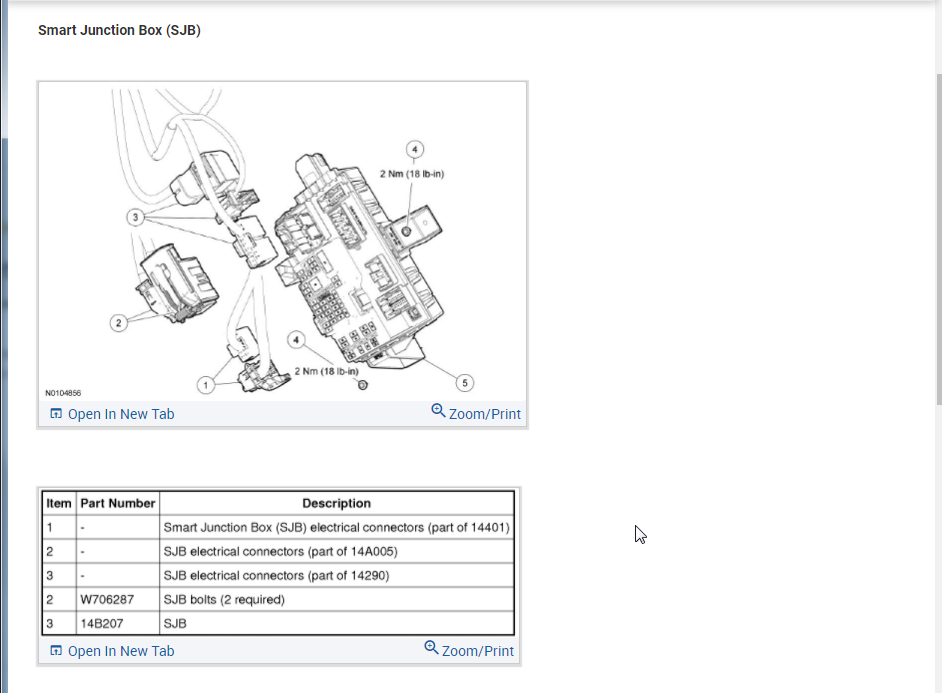
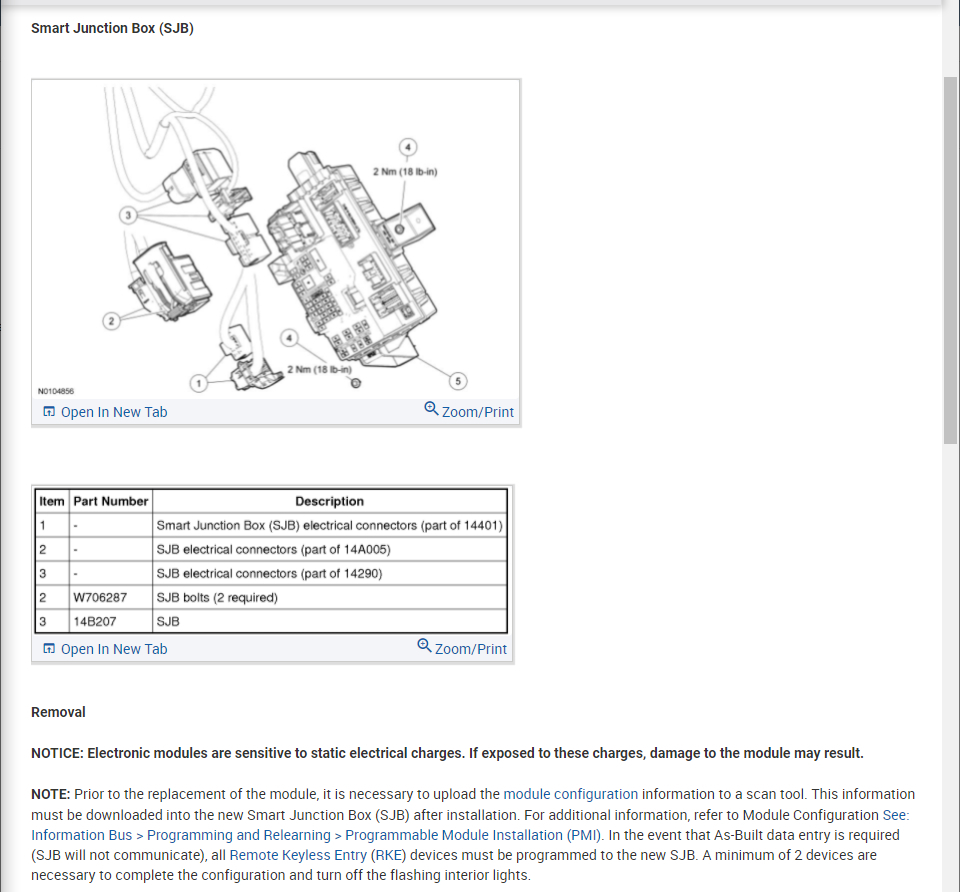
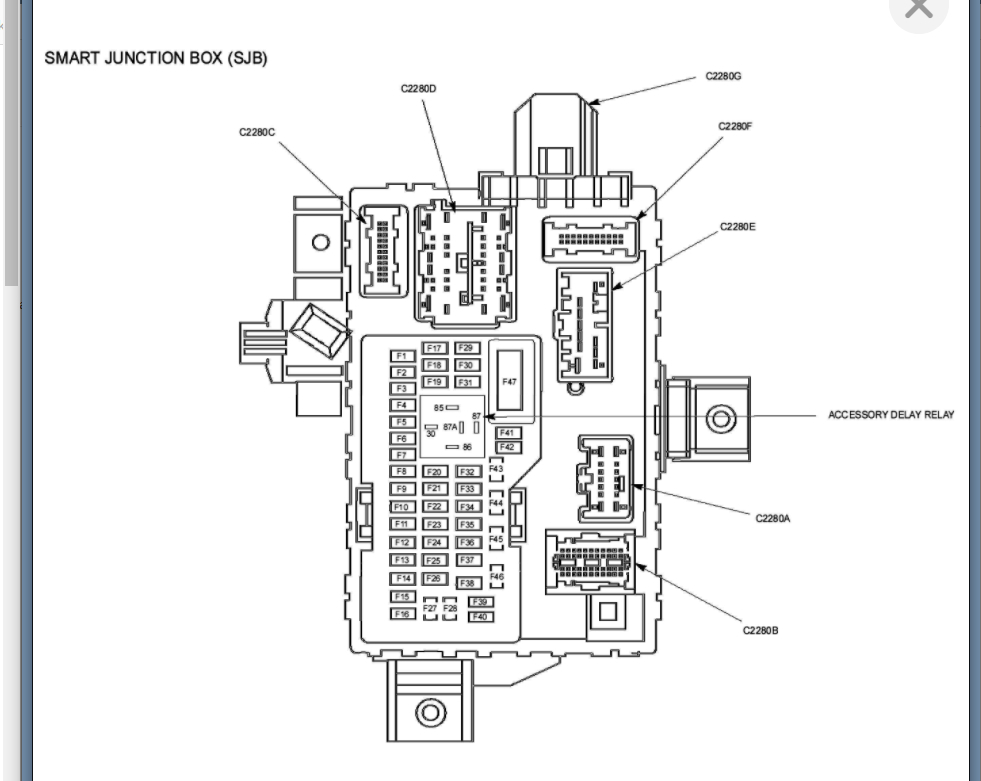
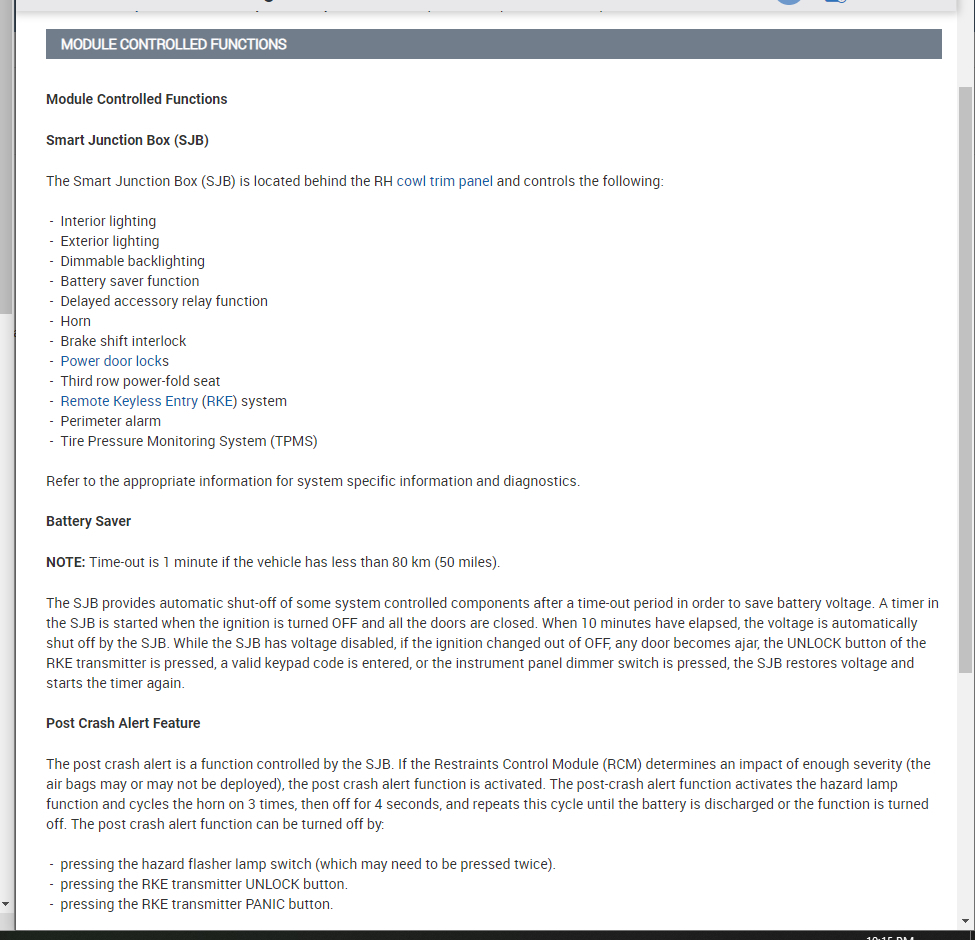
I think the issue you are having is the body control module is a pretty generic term. On your vehicle it is called the smart junction box.

Take a look at the info attached that gives more detail on this.
Jun 18, 2021 at 7:18 PM
Avatar
  • MEMBER
  • 12 POSTS
Hi,
I went to dealer with my VIN and the VIN of the vehicle the wrecker gave to ask if the parts are interchangeable between these 2 VINs and told that i am planning to buy SJB for my vehicle and they gave me a part number BL1Z 15604-B and told me parts are interchangeable between them and the part number is same on both. When i took out the kick panel fuse box which i assume is called SJB the part number is different on it which is BL1T 15604 AA. I will take the fuse box to the dealer to show them the part number on it. Just wanted to confirm with you that the kick panel fuse box is the SJB unless i am missing something. Please advise me.
Thank you.
Jun 24, 2021 at 1:30 PM
Avatar
KASEKENNY
  • CERTIFIED EXPERT
  • 18,907 POSTS
Those are not identical part numbers but more than likely there was change made to the part and when that happens they change the part number slightly.

I suspect they are correct that they are interchangable. However, they should be able to confirm that by checking that part number.

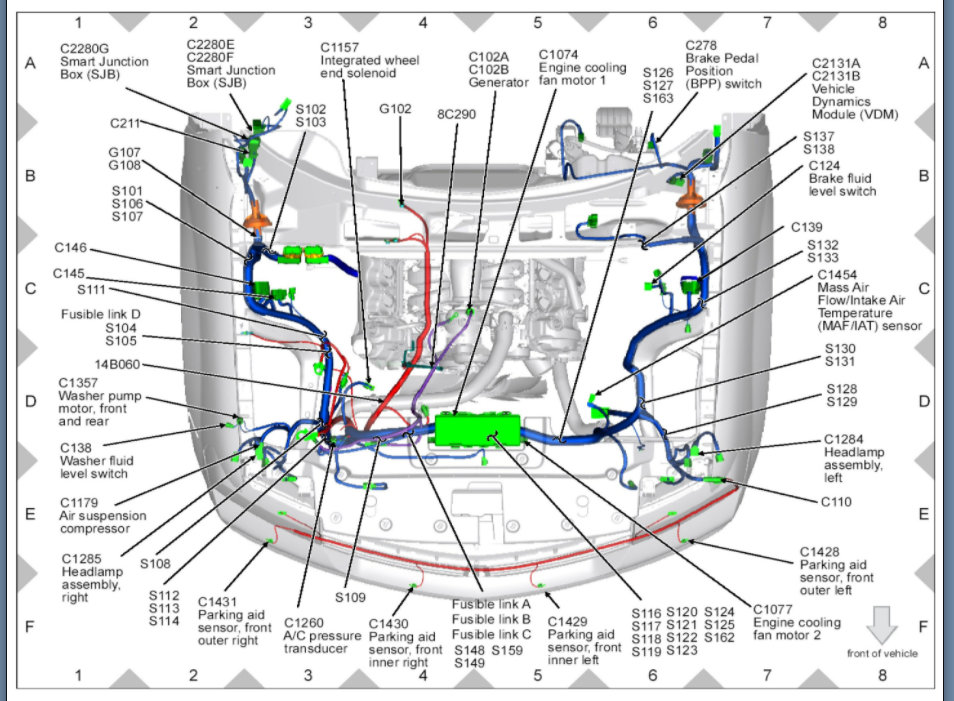
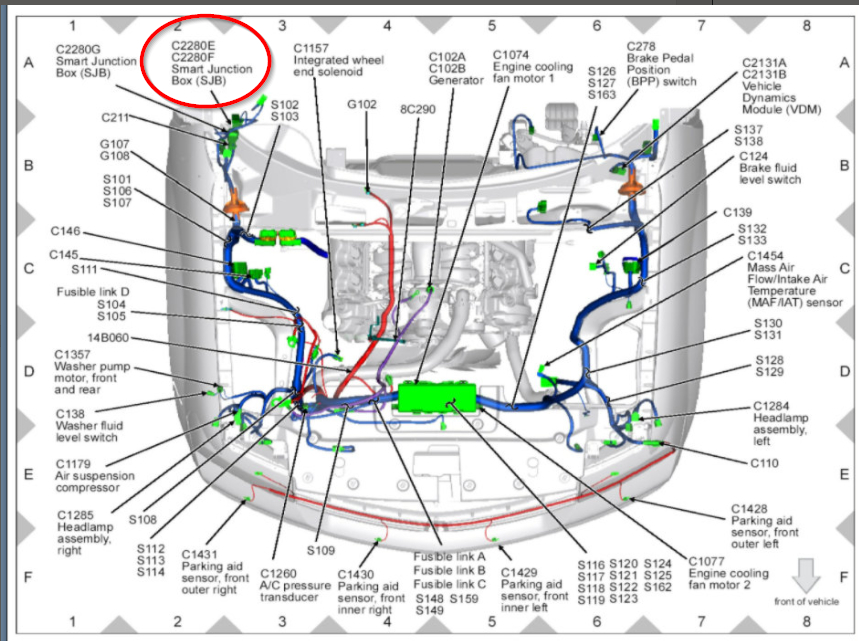
Take a look at the diagram for the location of this. Thanks
Jun 24, 2021 at 8:05 PM
Avatar
  • MEMBER
  • 12 POSTS
Hi,

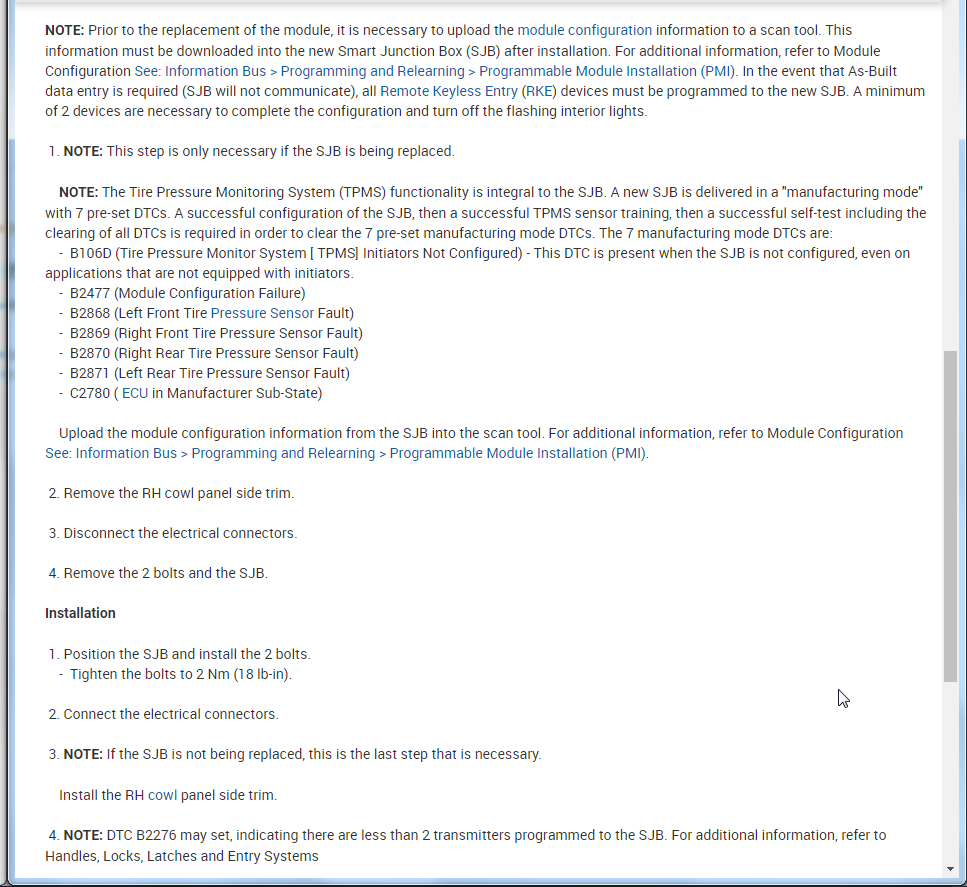
I just bought brand new SJB . Is it complicated to copy data from old SJB and transfer to new SJB? What kind of equipment do I need to do it?
Thank you
Jul 6, 2021 at 5:58 PM
Avatar
KASEKENNY
  • CERTIFIED EXPERT
  • 18,907 POSTS
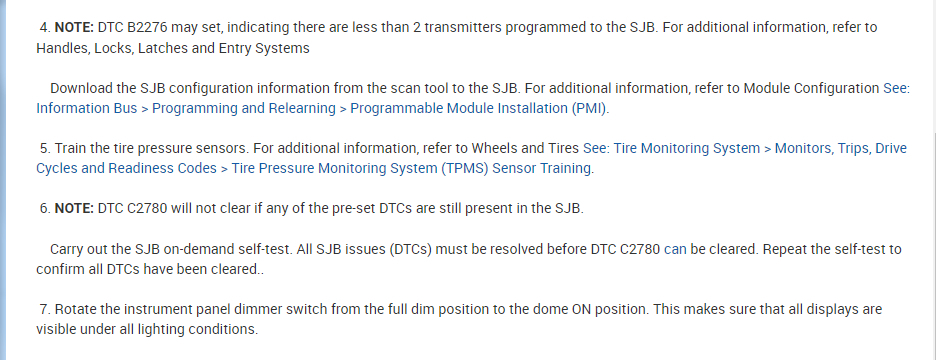
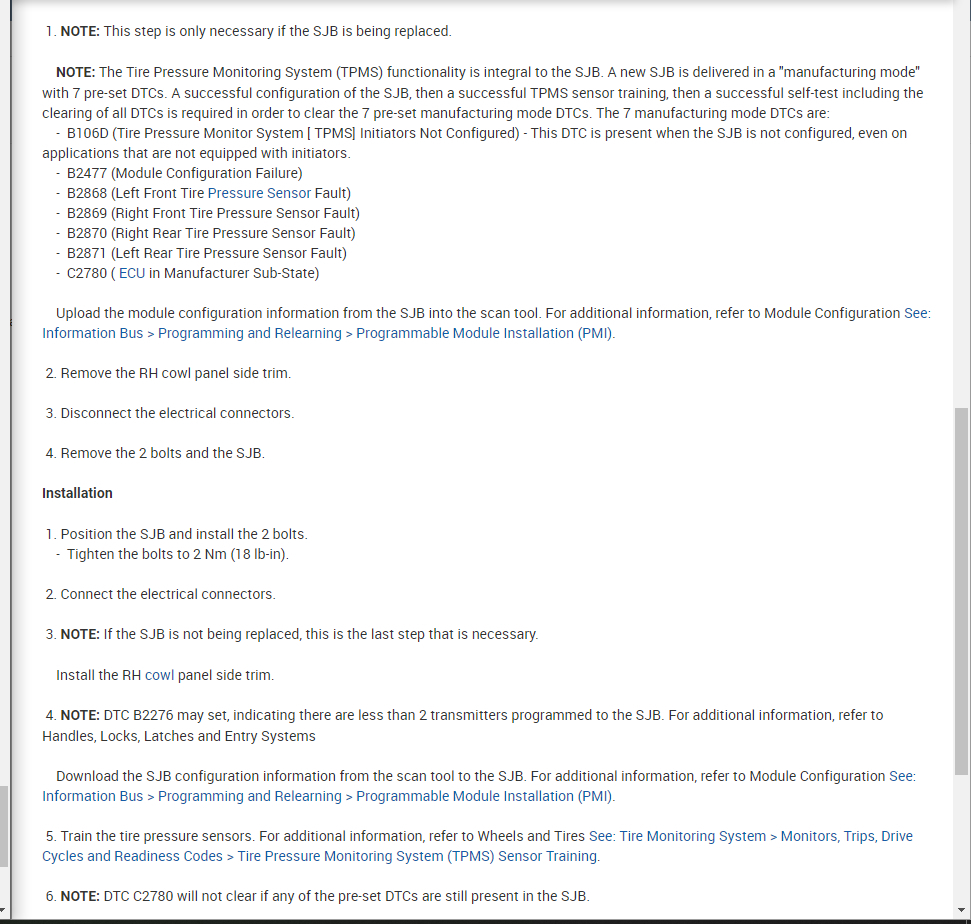
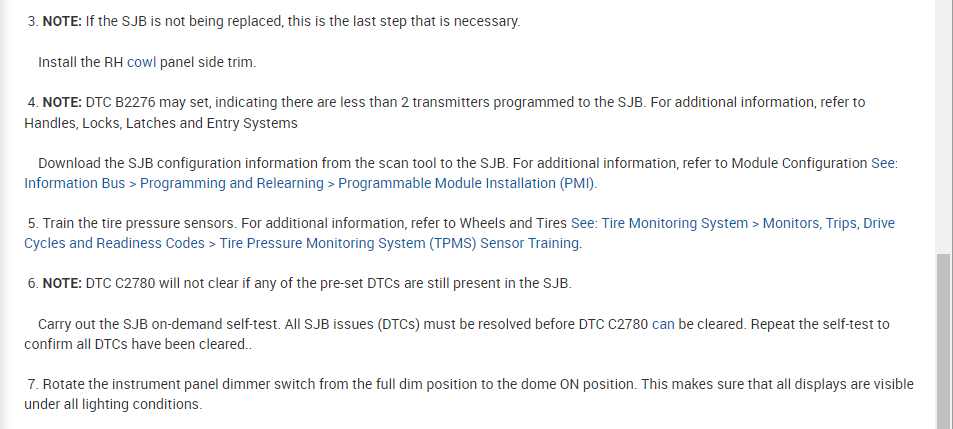
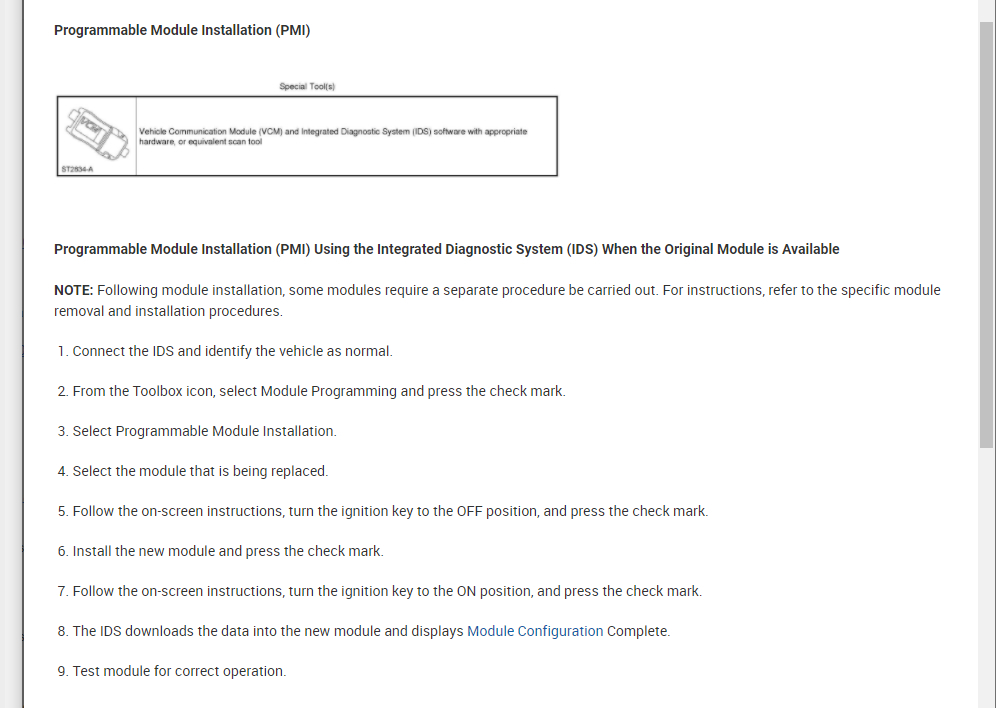
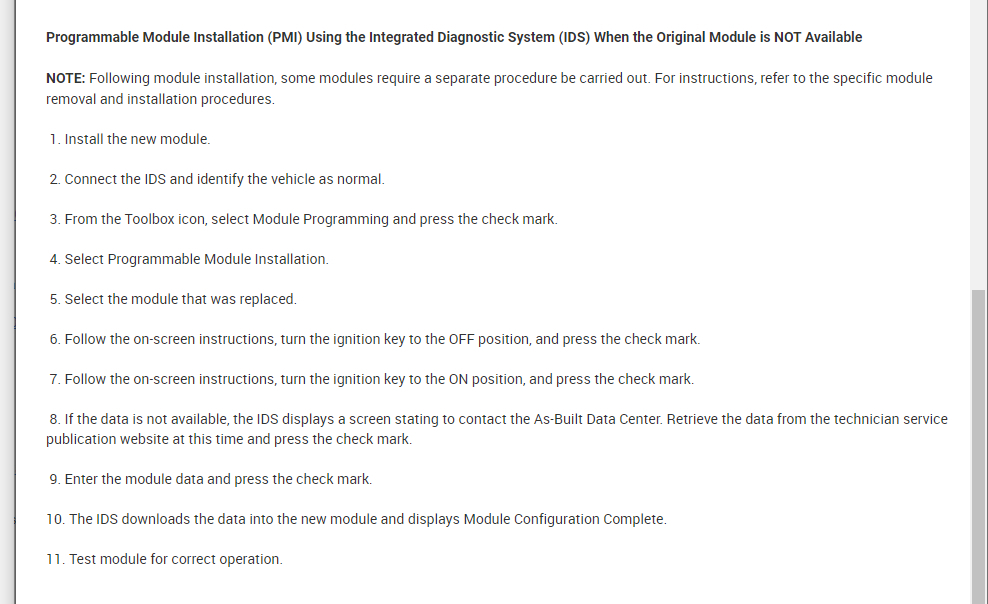
There is a process. You need to upload the current SJB info and then put it into the new one. You can do it when without uploading the info but either way it requires a scan tool that is capable of performing this function.

Attached is the process that you will need to follow. If you don't have a scan tool then we will need to find a shop that can perform this for you.
Jul 7, 2021 at 5:39 PM