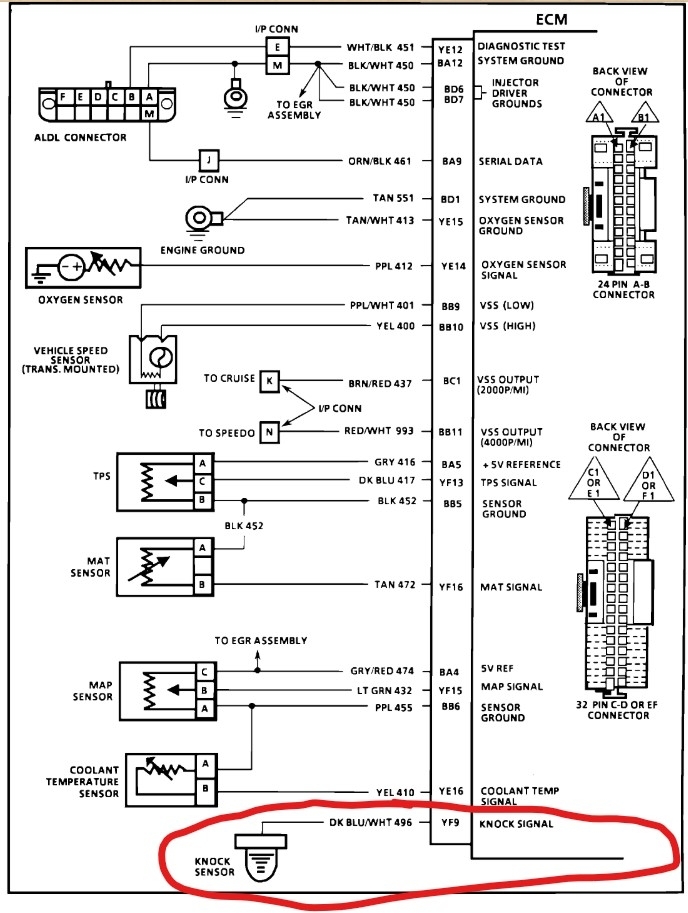
Need to know which wire connector on the ecm controls the knock sensor data.

1989 OLDSMOBILE CIERA
15,500,198 MILES • 2.8L • V6 • 2WD • AUTOMATIC
Avatar
CUT213
  • MEMBER
  • 25 POSTS
Code 43 issue. After several months of failing to resolve this issue, recently came across info that resulted in a discovery as to the actual cause of this issue. In need to probe the wires at the ECM connection in order to check for a possible short to power of the actual Knock Sensor wire. It strongly suggest that the knock sensor wire is getting a power spike from another source only while the engine is running. Key off test indicate normal function of the knock sensor functions, but when the engine is actually running the circuit is actually spiking in excess of 6.875 volts. This is the problem for the code 43 light staying on, the ECM relates this to a "DETONATION KNOCK". This means one of two things, A short to power in the wire circuit or faulty mem-cal. So I need to which connector on the ECM module holds the Knock sensor wire. I need to conduct a continuity on this circuit and see if I can determine which other wire might also be connect to this circuit. If I can not find the source of the fault this way then I will cut the knock sensor loose close to the main wire connector and add a new wire directly to the knock sensor and retest the results to see if this removes the power spike to the knock sensor circuit. I need to know which connector and which pin and the wire color on that connector. Thanks!
Dec 14, 2025 at 10:35 AM

Advertisement
Avatar
STEVE W.
  • CERTIFIED EXPERT
  • 15,113 POSTS
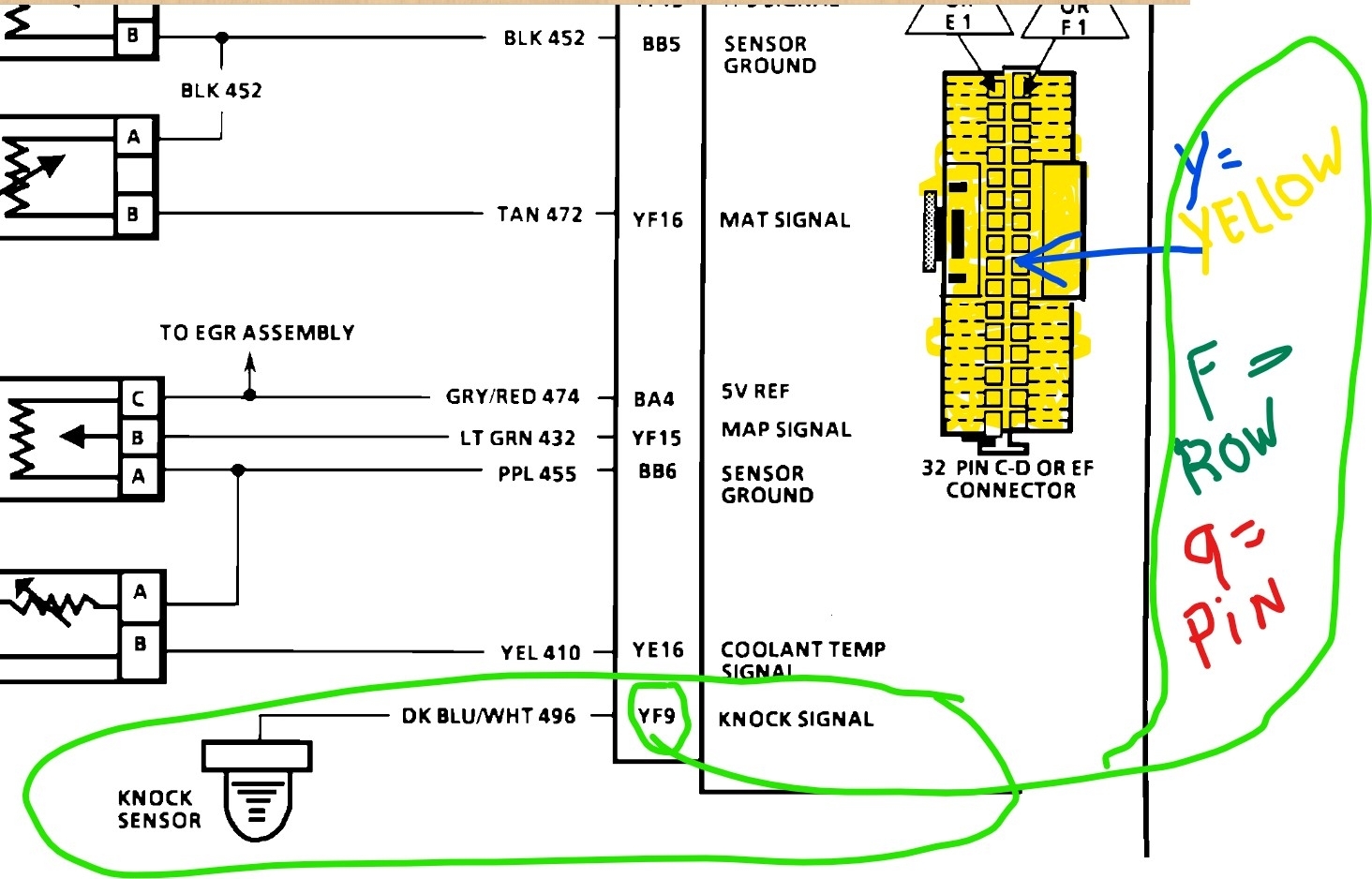
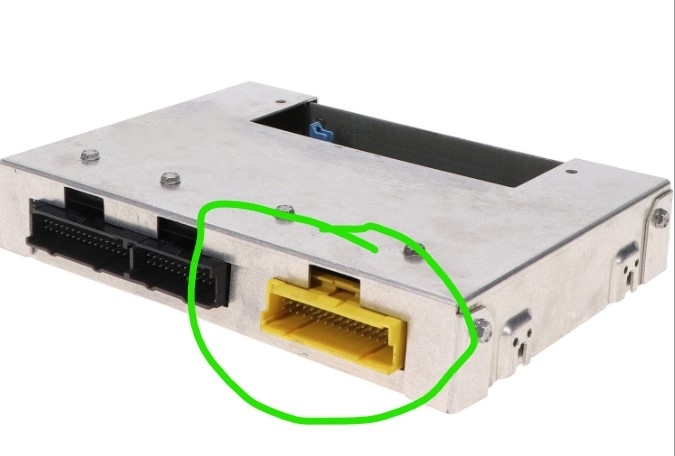
On an 89 I'd suspect the ECM over a short but Here is the connector info. You are looking for a Dark Blue wire w white trace on terminal 9, row F, in the yellow 32 pin connector. Unplug it, de-pin the connection and plug it back in. Start the car, any voltage on the wire with it disconnected? Yes, run an overlay. No - check the ECM pin, does it show high voltage? Yes - bad ECU.
Dec 14, 2025 at 1:20 PM
Avatar
CUT213
  • MEMBER
  • 25 POSTS
How come ALL my previous questions and replies are blocked??????? And I see another reply was added to this question and I can not see that reply or added image.....WHY???????
Dec 16, 2025 at 8:20 AM
Advertisement
Avatar
STEVE W.
  • CERTIFIED EXPERT
  • 15,113 POSTS
I don't know the answer to that. Did you log in with the same account as your earlier posts? I know the site had a bunch of issues for a while thanks to a google mess but beyond that I just log in and see the questions that don't have replies or answers and try to assist. I'm sorry you have had problems. I see my reply and three images that I added. Is that what you see?
Dec 16, 2025 at 12:08 PM
Avatar
CUT213
  • MEMBER
  • 25 POSTS
Yep.....normal login. Go to my questions. Pick ANY question including this thread we are speaking about. Touch the Blue Highlight to go to what ever post is mine, new screen pops up, at top it said " About Blank: BLOCKED" . Screen stays white and blank. The only way I can open the screen is to go to my Email, find the link and click on it. New screen opens but only to this current post. Can not access any other of my post. Can not see any of the past post. If I just login and go to my questions or my replies, I can see the topics of all my post including this post but, can not access ANY of the post from the login screen....none!!
OHHhhh.... by the way , Thanks for the info. That should get me to where I get this issue resolved after two years and almost 6000 miles driving with code 43 light and retarded timing and awful gas mileage. I got to clear the work shop so I can get this car back inside out of the weather, so I can teardown, test the wires and determine what is at fault. Been a looooong battle on this one. Hard to find solid info on the OBD1 vehicles. Thank you so much!!!
Dec 16, 2025 at 5:16 PM
Avatar
CUT213
  • MEMBER
  • 25 POSTS
If I just simply login, as you normally do, I can see all kinds of post and questions, but I can not access or open ANY of the answers or post. All content is blocked completely. The ONLY way I can see this current is to use the link in my email. But that only allows access to the current on going question for replies. Nothing else is accessible!!!
By the way "Thank You" for your response to my question Steve. With this info I should now be able to bring this problem to a closed issue after 2 years of battling with this car.
I got to clear a space in my shop to get it out of the weather so I can crawl over and around the vehicle and stay dry and warm!
Dec 16, 2025 at 5:38 PM
Avatar
STEVE W.
  • CERTIFIED EXPERT
  • 15,113 POSTS
OK, I'll forward the issue to my boss thank you for the description of the problem.
Dec 16, 2025 at 8:14 PM
Avatar
CUT213
  • MEMBER
  • 25 POSTS
How come I CAN NOT accessmy replys???????????????????????????
Dec 25, 2025 at 1:44 PM
Avatar
STRAILER
  • CERTIFIED EXPERT
  • 53,854 POSTS
Try clearing your cookies?
Dec 26, 2025 at 9:22 AM
Avatar
CUT213
  • MEMBER
  • 25 POSTS
That did nothing. I login, I can go to "MY QUESTIONS", I can see them but....I can not access them or anything else on this web site. Only reply I get is "about:blank#blocked" and a blank screen. I have several 'Questions" that have been posted that I wanted to access for info that was done to the car and some images of graphs and wiring schematics. I can't open and view ANYTHING AT ALL. I just get a blank screen with the above message, and now I can't even access the late reply's.
Dec 26, 2025 at 12:05 PM
Avatar
STEVE W.
  • CERTIFIED EXPERT
  • 15,113 POSTS
What browser are you using and on a pc or phone? When did this start? Do you run an adblocker? Just trying to figure out what it might be.
I've seen that a couple of times on other websites after a browser update (thanks google chrome....) For those it turned out to be some new security feature that was active in the browser to block "suspicious websites" went in and whitelisted them and they suddenly worked. Commonly it's a security issue where it doesn't recognize something security related. You might try changing your password. Or if you have a different browser available. log out with the one you are using and see if you can log in from the other one. OH another possibility if you are using chrome, look on the address bar at the right side, if you see a padlock, right click and select Allow.
Dec 26, 2025 at 3:26 PM
Avatar
CUT213
  • MEMBER
  • 25 POSTS
I just found a message notice it reads as follows: "MEMBERS AREA you do not have access."
What's wrong. When I login it recognizes me by name because it actually has my name in the upper left corner of the page.
Dec 26, 2025 at 3:33 PM
Avatar
CUT213
  • MEMBER
  • 25 POSTS
Well not actually MY name.....my login name is displayed up there. But the login name is incorrect!!! It has been shorten by three letters. But again.... it does recognize the login.
Dec 26, 2025 at 3:42 PM
Avatar
STEVE W.
  • CERTIFIED EXPERT
  • 15,113 POSTS
I've seen that one a few times, it was usually a glitch in the way the browser sent the password to the site, resolved itself after I logged out and back in. Wish I had a better answer for you.
Dec 26, 2025 at 3:47 PM
Avatar
STEVE W.
  • CERTIFIED EXPERT
  • 15,113 POSTS
I see CUT213 is that correct, be careful if you use anything that appears profane or derogatory, that can cause issues. Maybe log out and use the shorter name you see??
Dec 26, 2025 at 3:50 PM
Avatar
CUT213
  • MEMBER
  • 25 POSTS
Should read: cutter213
Dec 26, 2025 at 4:15 PM
Avatar
CUT213
  • MEMBER
  • 25 POSTS
Tried 4 different browsers one desktop and an android phone and still can't access the questions or open the reply with out using your supplied link, but, that only works once or twice. I can reply to you only. Can not see anything else useful to me. I'll try again on my wife's laptop. We will see if that works.
Dec 26, 2025 at 4:38 PM
Avatar
STEVE W.
  • CERTIFIED EXPERT
  • 15,113 POSTS
Is that what it says in your settings area on the site? What happens if you log in with cut213?
Dec 26, 2025 at 4:39 PM
Avatar
CUT213
  • MEMBER
  • 25 POSTS
My actual login name is my actual email address. That CUT213 isn't the login name.
Dec 26, 2025 at 4:44 PM
Avatar
CUT213
  • MEMBER
  • 25 POSTS
Earlier I saw a message that read as follows: Member Area you do not have access.
Dec 26, 2025 at 4:46 PM
Avatar
CUT213
  • MEMBER
  • 25 POSTS
I just tried to use the "CUT213"
It said:"Invalid e-mail address"
Dec 26, 2025 at 4:53 PM
Avatar
STEVE W.
  • CERTIFIED EXPERT
  • 15,113 POSTS
And when you use the cutter log in it works? It sounds like an earlier login may have been different and that is why you are locked out of those posts. Not sure how that would happen though. You didn't log in under the other account, or when the site had issues? Not sure how the user name was changed though as I don't work behind the scenes here.
Dec 26, 2025 at 5:43 PM
Avatar
CUT213
  • MEMBER
  • 25 POSTS
Well crap!!! I opened a new login. I knew I would not have access to MY Questions & replies.
I still can not access ANYTHING on this site. I do get a message as follows: Members Area you do not have access! So far I have tried to access on a desktop, a laptop, three different phones and still can not look at any real info. I can see hundreds of inquiries but can not access NONE of them while logined in or as a guest. What gives with this???? Unfortunately for me, this website has almost become completely useless to me now. The only way that I can get to this reply screen is though the vey last email link you fellows have sent me and that will like quit work too in a couple days.
Dec 27, 2025 at 9:42 AM
Avatar
CUT213
  • MEMBER
  • 25 POSTS
Could it be that windows 10 is no longer supported???? My desktop can't upgrade to windows 11, and I have yet to upgrade my wife's laptop. One of the phones is now, so far, able to get access on my original login !!!!!
Dec 27, 2025 at 10:04 AM
Avatar
STEVE W.
  • CERTIFIED EXPERT
  • 15,113 POSTS
It could be that the browser you are using on W10 has a security issue that won't allow it access, but I've run machines with win XP that worked OK on the site. What browser are you using? I've used Firefox, Edge, Chrome, Brave and Opera on a Win 10 machine without a problem.
OK, I just tried setting up a new account on a Win 10 machine running brave and it seems to work just fine. Perhaps log in using a different browser then if it works go to the regular browser, sign out and then go find the log in information and saved passwords and delete those, then try to log in with the original account. See if flushing the info cleans it up.
Dec 27, 2025 at 6:21 PM
Avatar
CUT213
  • MEMBER
  • 25 POSTS
I used Firefox, Brave, Edge, and AvgSecure on W10 and none worked
I tried my wife's iPod which is running W11. No problem I got right in on the old login. I did the W11 update on wife's laptop and tried again. I got in and could see and access many issues. When I login I could no longer access anything.same as before. The last Link you just sent open and let me read your reply but it would not allow me to reply back to you. I have one of my old phones that allows me to login. I can see and access everything. That's why I can now reply back. Weird stuff man. The old phone is W11 and so far it is allowing me to access and reply on the old login. So I have a iPod and a android phone that can operate normally on your website and a laptop that works only when not login.and two phones and a desktop that won't access anything. That's some crazy stuff there man. Hopefully I can move forward again with the old phone!!!
Dec 27, 2025 at 7:05 PM
Avatar
STEVE W.
  • CERTIFIED EXPERT
  • 15,113 POSTS
OK that is very strange. Maybe look at your account on the phone that works and copy that account info and send it to one of the other machines, then copy paste and see if it works. I've done that with other sites and had it work, usually because some character used a different address in the code. Sort of like an 0 and O can look similar but are different.
Beyond that I cannot think of something that could block you. However I also cannot access your old replies to me, I can click on your username and see that you have questions and answers but cannot see anything other than this particular question thread.
Dec 27, 2025 at 7:48 PM
Avatar
CUT213
  • MEMBER
  • 25 POSTS
Okay.........the car is now completely FIXED!!!! For anybody that wants to track the full repairs just look at this cars history. See all the things that were done and replaced. Most was a waste of time and money. There were actually 3 real issues that were problems.
#1 Stalling out and not restarting quickly and overtime each stall it took longer to recover to start again. Cause: 1 Faulty fuel injector on each side of the engine. #1 & #2 injectors were out of spec on OHM's. This caused the ECM to become confused and shut off the injectors all together. Once the injectors were replaced the stalling out stopped completely and the car was drivable and reliable. It never stalled again.
#2 Engine running rough and stumbling under light engine loads and poor fuel mileage, full throttle was good. Cause: Cracked or broken plastic vacuum tubes on the engine. The fuel pressure regulator on the 2.8 Multi port FI is controlled by vacuum. Loss of vacuum would not let the regulator open as fuel demand lightly increased, full throttle quickly over came the problem but only under 3/4 throttle or more, once you let up to cruise the rough running and stumbling returned. Replaced all the plastic tubes and rubber hoses in the engine compartment. This restore normal running and fuel mileage
#3 The worse problem: Code 43 Knock sensor issue. Code 43 retards engine timing as much as 14 degrees. Massive amount of time and money was wasted here. ACTUAL CAUSE: Faulty memcal or prom chip. Chip was corrupt and sending false voltage spikes that the ECM thought were " Detonation Knocks" even at idle, which can not happen. I tracked it down the the memcal chip. Once the chip was replaced the timing was restored and the engine returned to completely normal function. If you have any of these issues you might want to track this cars history to see the long drawn out repair attempts. Make sure the replacement memcal chip has the same code as the one in your car or it may not work correctly and might damage other components.
Jan 16, 2026 at 3:04 PM
Avatar
STEVE W.
  • CERTIFIED EXPERT
  • 15,113 POSTS
Great to hear, I only wish we could have gotten things straightened out on your account to make it easier. Only the admins can actually see the history for a particular vehicle or username. One of the items I'd like to see changed.
Jan 16, 2026 at 4:08 PM
Avatar
CUT213
  • MEMBER
  • 25 POSTS
Well maybe it could be useful information for you guys. I have seen many inquiries about several issues like mine. The stalling problems, the code 43 issues, the rough running issues, lots of parts thrown at these problems with out positive outcomes. I've been down the trail on this one and I learned a lot about how this old system works. Once you truly understand it, and actually see real on going, positive repair results, it really opens your eyes and mind. The code 43 is one of the toughest things to chase down. It does not scare me now. I know where to look and what I looking for now. To me, knowing what I now know, it's a simple task to test and repair. The hard part is finding the correct outdated parts, like the
memcal chip. They don't make them any more, but there are people who make it a habit to remove and save these older chips knowing someone like me is looking for them. Ebay is a good place start. Each chip has a 4 letter code and a number code. Just type in the 4 letter code for a medical or prom chip. Some vendor have a few and others may have many chips. If you don't see it today don't give up. That's how I found three vendors that had the correct chip with same code as mine. It was a massive learning curve but I got it done. What peppy and sassy little car it is now.
Jan 16, 2026 at 4:49 PM
Avatar
STEVE W.
  • CERTIFIED EXPERT
  • 15,113 POSTS
True, I started out long before cars had codes at all. The lack of parts support is unfortunately common even with newer electronics in the vehicles. Thanks for the follow up.
Jan 16, 2026 at 6:49 PM
Avatar
CUT213
  • MEMBER
  • 25 POSTS
Well you fellows help me along early on and even towards the final repairs. I tip my hat to you each and everyone who became involved in my desire to save this vehicle from a final trip to the scrape yards. It was a long process, not that I worked on it everyday, but I studied and evaluated what I seen against what I learned and the light buld in my head came on and I began to put the facts together that lead to a successful repair, some of it was dumb luck that I just stumbled upon a simple repair. But I will take it anyway I could get it to save the car. Again " THANKS" for you assistance with this undertaking. It was long and hard, folks tell me that "I have the patience of a buzzard, I can wait for something to die". I clearly have that patience!!!!
Jan 16, 2026 at 11:43 PM
Avatar
STRAILER
  • CERTIFIED EXPERT
  • 53,854 POSTS
Nice work hanging in there, nothing wrong with a little luck to help out :) Glad you could get it fixed, thanks for letting us know. Please use 2CarPros anytime we are here to help.
Jan 17, 2026 at 9:34 AM
Avatar
CUT213
  • MEMBER
  • 25 POSTS
Steve W. I just checked access to my login......it's now working normally. I did nothing to try to resolve this issue, it just corrected itself!!! Happy days again!!!! All computers and phones are now able tp access this site and login!!! Go figure???
Jan 30, 2026 at 1:04 PM
Avatar
STEVE W.
  • CERTIFIED EXPERT
  • 15,113 POSTS
Good to hear the folks behind the scene got it working.
Jan 30, 2026 at 8:08 PM
Avatar
CUT213
  • MEMBER
  • 25 POSTS
Yep...that was a good thing too!! Tell them boys that I appreciate there efforts too. Good job from all there!!!
Jan 31, 2026 at 1:18 PM