Low power until PCM reser

1993 LEXUS ES 300
269,000 MILES • 3.0L • V6 • 2WD • MANUAL
Avatar
BENJAMINTHERERRIBLE
  • MEMBER
  • 58 POSTS
My car has very low engine power most of the time, and cant reach over about 4,500 rpm, and peak power is probably around 2,800-3,000 rpm. That is, until I disconnect the battery for a few minutes, and when I reconnect it and drive right away, it will run perfectly fine for anywhere from two to twenty minutes. What could be causing this?
Mar 20, 2019 at 1:16 AM
Advertisement
Avatar
ASEMASTER6371
  • CERTIFIED EXPERT
  • 52,796 POSTS
Good morning,

Is the check engine light on? If it is, do you know the codes for the light?

https://www.2carpros.com/articles/engine-has-low-power-output

Roy
Mar 20, 2019 at 5:13 AM
Avatar
BENJAMINTHERERRIBLE
  • MEMBER
  • 58 POSTS
No, there is no check engine light.
Mar 20, 2019 at 5:47 AM
Advertisement
Avatar
ASEMASTER6371
  • CERTIFIED EXPERT
  • 52,796 POSTS
Got it.

Can you communicate with the ECM? Do you have the equipment for this?

It could be the ECM but it needs to be confirmed while monitoring the system when this happens.

Roy
Mar 20, 2019 at 5:54 AM
Avatar
BENJAMINTHERERRIBLE
  • MEMBER
  • 58 POSTS
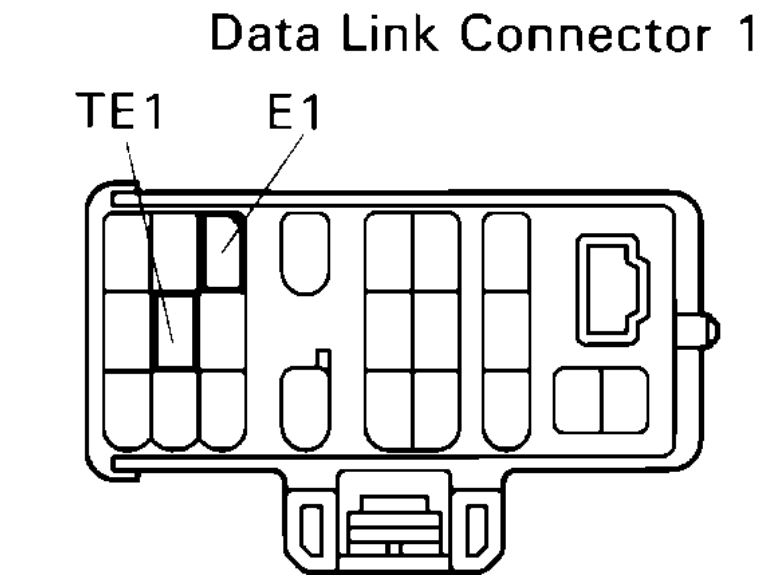
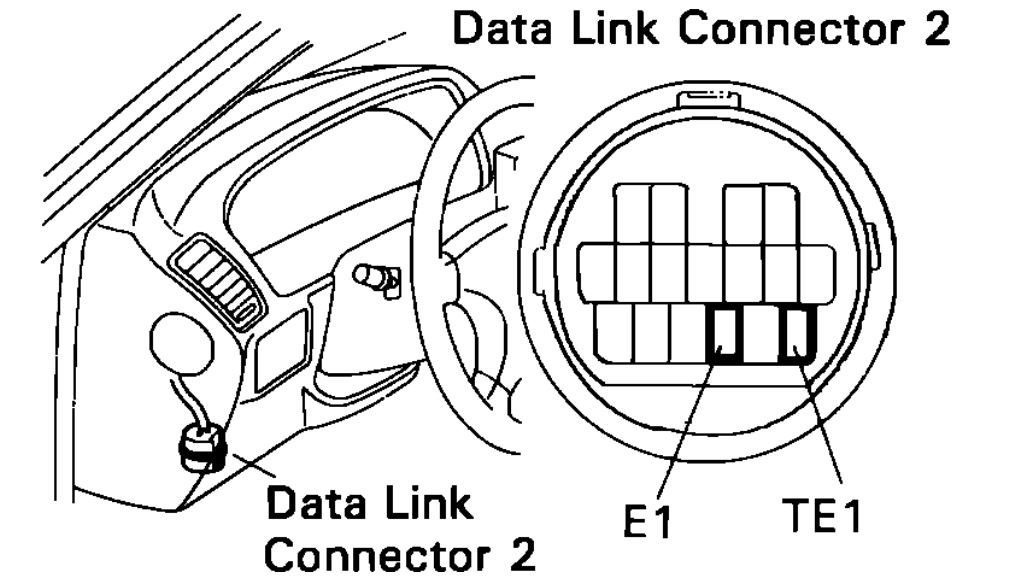
I don't, I only have one for obd2. I've heard that jumping a couple of the pins is one way to get codes without a reader. Is that true, and if so which pins?
Mar 21, 2019 at 5:11 PM
Avatar
ASEMASTER6371
  • CERTIFIED EXPERT
  • 52,796 POSTS
Yes it is but I am asking about viewing actual live data. That is why you need a scan tool that can read OBD1.

You stated there is no check engine light so there are no codes.

Roy

Procedure

DIAGNOSTIC TROUBLE CODE CHECK

1. Turn ignition switch on.

2. Using a jumper wire, connect terminals between TE1 and E1 of Data link connector 2 or 1.


3. Read the diagnostic trouble code from Malfunction Indicator Lamp.

HINT: If a diagnostic trouble code is not output, check the TE1 terminal circuit.


Code
imageOpen In New TabZoom/Print

Codes 12 And 31
imageOpen In New TabZoom/Print


As an example, the blinking patterns for codes; normal, 12 and 31 are as shown on the illustration.

4. Check the details of the malfunction using the diagnostic trouble code table.

5. After completing the check, disconnect terminals TE1 and E1, and turn off the display.

HINT: In the event of 2 or more malfunction codes, indication will begin from the smaller numbered code and continue in order to the larger.
Mar 21, 2019 at 5:18 PM