The problem is that one day the low beam lights came on by themselves and will not go out?

2002 FORD F-250
82,000 MILES • V12 • 4WD • AUTOMATIC
Avatar
VAN14DEE
  • MEMBER
  • 13 POSTS
Note: It is a Triton V10 but there was no selection for that engine size.

The problem is that one day the low beam lights came on by themselves and will not go out. The only way I can extingquish them is to disconnect the battery or take out the bulbs.

I have checked to make sure the automatic light feature is off. I can take out the left or right 10amp low beam fuze and the right light will go off, but the left light remains on regardless of what fuze is removed. I would think that when I take out the left fuze that the left light would go off, but no, the left one goes off.

I can remove the low beam relay, and the low beams stay on. One mechanic suggested that it could be the multifunction switch, which I have not checked yet.

Any ideas?
Dec 7, 2008 at 1:28 AM
Advertisement
Avatar
BLUELIGHTNIN6
  • CERTIFIED EXPERT
  • 16,542 POSTS
Do the hi-beams come on when you switch to them? If not, then it is a faulty multi-function switch.

You said you already tested the day time running light unit, correct?
Dec 7, 2008 at 1:54 AM
Avatar
VAN14DEE
  • MEMBER
  • 13 POSTS
I believe I have checked the hi beams and they worked, but I will have to check again.

I have not actually checked the day time running light unit per se. All I know is the switch you can turn on to have the lights go off automatically seems to work properly ( not real sure what the switch actually does, because I never use it).
Dec 7, 2008 at 4:07 AM
Advertisement
Avatar
BLUELIGHTNIN6
  • CERTIFIED EXPERT
  • 16,542 POSTS
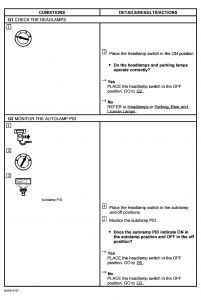
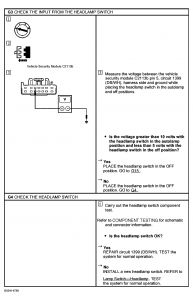
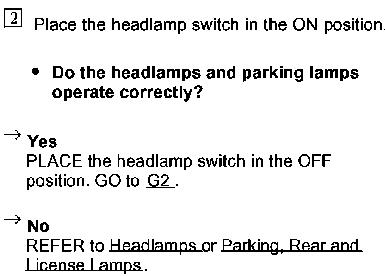
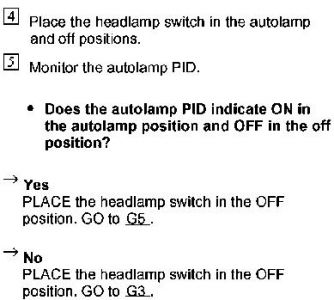
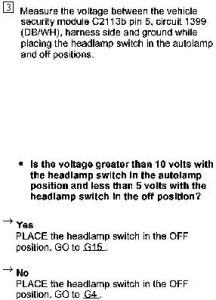
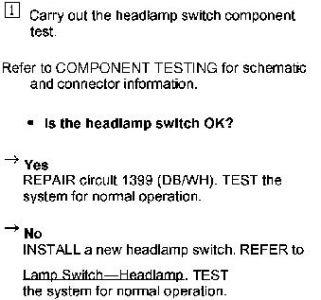
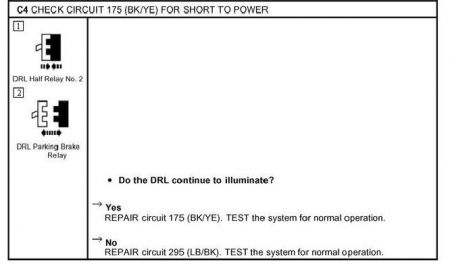
I believe we are talking about two different things here, hehe. The day time running light unit is probably faulty, which is causing the lights to stay on. Your switch that you are talking about is the one that enables the lights to stay on for a brief amount of time after leaving vehicle, correct? In any event, here are four tests to do to check for faulty unit. Post your results and I will have more tests to do if the problem is not fixed. Before doing these, check all of your fuses and relays, inside the cab and also under the hood. Make sure all of the wiring is good and not loose or melted looking. Make sure fuses are not blown and power is getting to them. Fuse 19 (5 amp) and DRL Full Relay No.1 are the main two that need checked.


https://www.2carpros.com/forum/automotive_pictures/261618_Graphic_15.jpg


https://www.2carpros.com/forum/automotive_pictures/261618_Graphic2_1.jpg

You may need to save graphics to your PC then resize them to better read the small print.
Dec 7, 2008 at 4:17 AM
Avatar
VAN14DEE
  • MEMBER
  • 13 POSTS
You are correct about talking about two things.

I will check things out as you suggest either this afternoon or tomorrow and let you know.

Thanks
Dec 7, 2008 at 6:18 AM
Avatar
VAN14DEE
  • MEMBER
  • 13 POSTS
I've have tried all I can to get the graphics readable and just can't. When you save and enlarge, they just get blurry. Is there any other way they can be sent.

Thanks
Dec 7, 2008 at 6:32 AM
Avatar
BLUELIGHTNIN6
  • CERTIFIED EXPERT
  • 16,542 POSTS
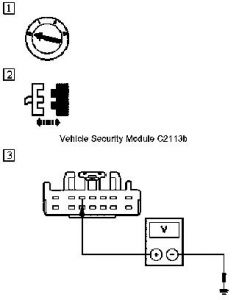
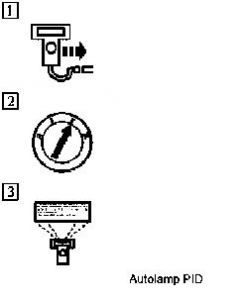
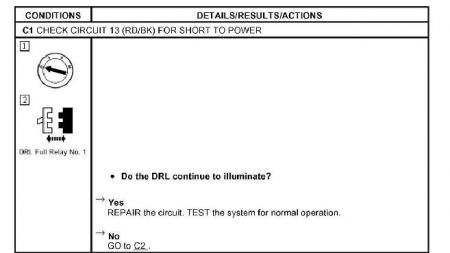
Okay. Lets try this. I have posted the first four steps along with the figures that go along to help you out. I had to separate them to enlarge them so let me know if this helps. If one of the steps lead you into another test or step 5 or beyond let me know, as I only have first 4 steps posted. FIRST STEP FIGURE


https://www.2carpros.com/forum/automotive_pictures/261618_6_1.jpg

SECOND STEP FIGURES


https://www.2carpros.com/forum/automotive_pictures/261618_5_1.jpg

THIRD/FOURTH STEP FIGURES


https://www.2carpros.com/forum/automotive_pictures/261618_7_1.jpg

STEP 1


https://www.2carpros.com/forum/automotive_pictures/261618_Noname_17.jpg

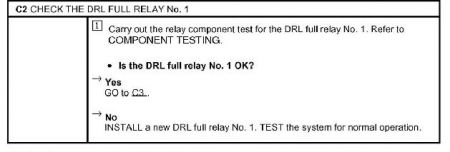
STEP 2


https://www.2carpros.com/forum/automotive_pictures/261618_Noname2_4.jpg

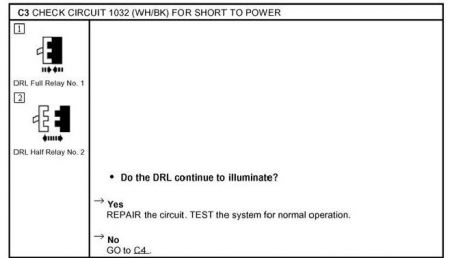
STEP 3


https://www.2carpros.com/forum/automotive_pictures/261618_Noname3_2.jpg

STEP 4


https://www.2carpros.com/forum/automotive_pictures/261618_Noname4_1.jpg

Dec 7, 2008 at 10:33 AM
Avatar
VAN14DEE
  • MEMBER
  • 13 POSTS
Sir,

I have made a bit of progress. I can now tell you that I believe the real problem is the Day Time Running lights are staying on, not the low beams. How do I know? When testing the autolamp, which worked as advertised, the healights that were already on, brightened a bit. When I went to high beam, they brightened some more. when the auto lamp timed out, the parking lights went out and the headlamps lost a bit of brightness, leading me to conclude that what is really staying on is the day time running lights.

Also, I don't really know what PID means when you referred to the autolamp (Position indicator Display???). I did not see any light on the dash other that the normal lights come on. But, I believe the autolamp is working as it should.

By the way, I have not donated yet, so I appreciate your time greatly. I did this once with another "help on line" and was not satisfied with the results at all, so that is why I am trying this free for right now. Again much thanks.

I hope you can continue to help me track this down.
Dec 7, 2008 at 4:06 PM
Avatar
BLUELIGHTNIN6
  • CERTIFIED EXPERT
  • 16,542 POSTS
Okay, it sounds like there is a short somewhere in the wiring for the daytime running lights. Sooo, here is what we check now.


https://www.2carpros.com/forum/automotive_pictures/261618_3243_1.jpg


https://www.2carpros.com/forum/automotive_pictures/261618_Noname_18.jpg


https://www.2carpros.com/forum/automotive_pictures/261618_Noname2_5.jpg

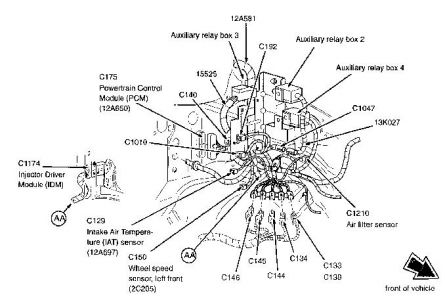
TEST RELAY BY SIMPLY SUBSTITING ANOTHER RELAY INTO IT'S SPOT. YOU CAN ALSO HAVE AN AUTOPART STORE TEST IT FOR YOU. LOCATION OF DRL RELAYS:


https://www.2carpros.com/forum/automotive_pictures/261618_Noname_19.jpg


https://www.2carpros.com/forum/automotive_pictures/261618_re_1.jpg


https://www.2carpros.com/forum/automotive_pictures/261618_Noname3_3.jpg


https://www.2carpros.com/forum/automotive_pictures/261618_Noname4_2.jpg

Oh and by the way, donations are not mandatory, just very much appreciated. The small donations we receive and word of mouth are the only two things that enable us to help others. I certainly hope we resolve the issues here without you having to spend a fortune at a dealer. Just post your results of these tests and I will follow up. Don't worry, I won't leave you hanging. I will stick it out 'til the end until we fix it.
Dec 7, 2008 at 4:30 PM
Avatar
VAN14DEE
  • MEMBER
  • 13 POSTS
Thanks. I will not be able to test this until Monday. Will make sure and get with you as soon as I find out something.

I do have one question. I have a hard time locating all the relays. I do have Chiltons on line and am looking for K370 DRL relay 1 now.

I am a bit shy of repair shops now. I just had to pay $914.00 for a fuel pump in a 1996 Chevy S-10 (I wish I knew how to diagnose that one). They told me I needed new rear U joint as well. I installed both rear and front myself instead of paying them another arm and leg. All it cost was the cost of the u joints, a few hours ( I needed to buy a 12 ton Hyd Jack at Harbor Freight to break loose 12 year old u joints from the drive shaft. Small price to pay, especially I have wanted an hydrauic jack for some years.)
Dec 7, 2008 at 4:57 PM
Avatar
BLUELIGHTNIN6
  • CERTIFIED EXPERT
  • 16,542 POSTS
Sorry , that was my mistake. Please re-read my previous post. I edited it and now have the locations of relay and how to test it for you.
Dec 7, 2008 at 4:57 PM
Avatar
VAN14DEE
  • MEMBER
  • 13 POSTS
Thanks for the Relay location diagram. I did find it in Chiltons too, but I used yours.

I did do step 1, removing DRL relay 1. Lights stayed on.

By the way, I know in the past I have set the parking brake and the DRL stayed on then too.

Since in check 1 it says I now need to repair the circuit. Is that true. Is that something I can do?
Dec 7, 2008 at 5:49 PM
Avatar
BLUELIGHTNIN6
  • CERTIFIED EXPERT
  • 16,542 POSTS
Step 1 is to Check Circuit 13 (red/black wire) for short power.

You removed the relay and the lights STILL stay on? ?

Remove BOTH of the DRL relays. Lights shouldn't be able to stay on without the relays..


There is a DRL Parking brake relay that may need to be checked..hmm.

I tell you what, if removing these 3 relays still allows the lights to remain on, I am going to say that you have stumped me. But I will go ahead and invite one of the techs with more experience with electrical issues into this posting so we can get this fixed. If you don't care go ahead and remove BOTH of the DRL relays and the Park Brake relay which is also located in the auxiliary relay box No. 2
Dec 7, 2008 at 6:05 PM
Avatar
VAN14DEE
  • MEMBER
  • 13 POSTS
I have removed all three. Lights stay on. Strange isn't it. There should be no way for these to be on that I can see.

As I first mentioned, They just came on by themselves one morning. My wife went out to take care of the dogs, and the lights were off. My son went out about 20 minutes later and they were on, and won't go off.

Also, I can remove either fuze 46 or 47 and the right light goes out. I can remove either or both and the left light stays on.

I have removed fuze 14 in the past, and the lights stay on.
Dec 7, 2008 at 6:54 PM
Avatar
IMPALASS
  • CERTIFIED EXPERT
  • 3,112 POSTS
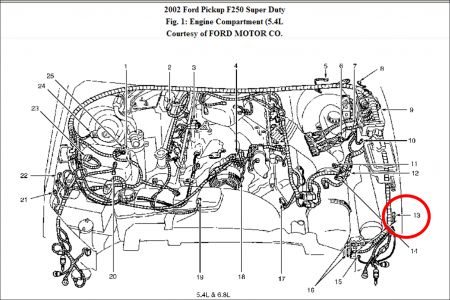
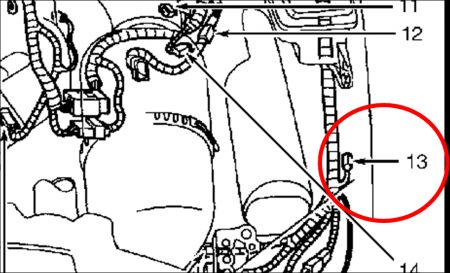
Hello - bluelightnin6 and I have been discussing this and we have decided to see if you would check connector C196.....it is the daytime running lamps resistor located in the engine compartment, front, LH side. Item 13 on the two pics I have attached. I gave you one with a far out shot showing the approximate location and then a blown up one for more detail If you would, disconnect that and see if the lamp goes out. Meanwhile we will do some more looking and discussing.....please let us know what happens.


https://www.2carpros.com/forum/automotive_pictures/248015_1_105.jpg


https://www.2carpros.com/forum/automotive_pictures/248015_2_69.jpg

Dec 7, 2008 at 7:45 PM
Avatar
RASMATAZ
  • CERTIFIED EXPERT
  • 75,992 POSTS
Remove fuse no. 30 15amp and tell me if the L/lamp still lit- I viewed your headlamps electrical circuitry and its a mess to deal with w/o electrical background do you have experience ? If not bring it in to the pros-this one here can be a nightmare to remember w/o experience.

BTW I was asked to assist in this matter by Mr. Blue
Dec 7, 2008 at 7:47 PM
Avatar
IMPALASS
  • CERTIFIED EXPERT
  • 3,112 POSTS
One last thing……….if disconnecting the resistor plug did nothing and if removing fuse 30 as rasmataz suggested did, I would also look at removing fuse 7 to see if that made it go out. Then we can track from either fuse 7 or 30.
Dec 7, 2008 at 8:47 PM
Avatar
VAN14DEE
  • MEMBER
  • 13 POSTS
Lights stayed on after fuse 30 removed.

The Left DRL has 12 volts going to it regardless of what I disconnect. I either have to remove the left bulb or disconnect the battery to get it to go off. The right has 12 volts going to it at all times except when I remove fuse 46 or 47. Removing either of those causes the right light to go out. Question? Why would a fuse (46) that is supposed to be for the left light affect the right one, while nothing at all affects the left. Without knowing much, I would suspect a short somewhere in that area.

Well, I have to stop for tonight. It is about 10:00PM and around 25degrees outside. Getting very difficult.

No, I would say I am fairly inexperienced with electrical. Oh sure, I can do some house wiring, but getting around a car is difficult. Hard to even locate things. I do believe I located the DRL lamps resistor. Again kind of dark and cold right now. What kind of tool do I need to disconnect that thing, a small screwdriver? I tend to break plastic things.

Question - Is it possible for me to take a picture and annotate what I think I am looking at and have you confirm it?

Thanks - be with you Monday.
Dec 7, 2008 at 9:03 PM
Avatar
IMPALASS
  • CERTIFIED EXPERT
  • 3,112 POSTS
Hello –

Well the question on fuse 46…..that is what we are trying to understand. You have about 3 folks looking at this….

Electrical things are extremely hard to work over a PC…..not to discourage…..but we may not be able to figure it out since we are over the PC and we are looking at diagrams of the way it is supposed to be…..but that doesn’t mean that is the way it is…..BUT……I think you clearly see all the work that bluelightnin6 has provided and then has been discussing it with two others. So, we try our best anyway.

You may be correct on the short…..understand it is late and cold outside……..

The resistor should just be a connector…..

Please don’t forget to pull fuse 7 also……

We are trying to see what direction it is getting power……

Let us know these last results……

Have a good evening….
Dec 7, 2008 at 9:36 PM
Avatar
VAN14DEE
  • MEMBER
  • 13 POSTS
Good morning.

So far this morning I have disconnected C196. At least I believe it was C196 (YE/BK and OG/LG wires). Lights stayed on. I then removed all the fuses (7, 30, 14)(one at a time then all at once) and lights remained on. I then removed Relays again. Lights stayed on.

Is it time to throw in the towel? I know if I have to take it to the dealer I will probably be looking at $800 -$1000, since that what it seems it takes to get anything analyzed and fixed these days.

I sure hope you can help, but will understand if we need to stop. I have today and Tuesday I can spend time on it then I am back on shift until next Tuesday.
Dec 8, 2008 at 9:52 AM
Avatar
IMPALASS
  • CERTIFIED EXPERT
  • 3,112 POSTS
Hello –

You may have to take it somewhere.

Just a couple of other things before we stop.

One, I just want to make sure……When you say the lights remain on. Does that mean you are turning the light switch on, or the key on?

My understanding is with all the power off, keys out, light switch off……that left light stays on.

If this is so, then just pull fuse 7, 14 and 27 and see if it goes out at all. The other lights are already off……so nothing is turned on…..just pull those fuses and see if it goes out.

If it does….then plug the others in until you narrow down the fuse that it comes on with.

Now I may be confused on what you are saying and you don’t turn the light switch on. But as I was thinking about what you were saying it seemed like you were turning the lights on, and as you pulled fuses you watched the other lights go out but the left stayed on.

I am not wanting anything turned on and that left light should still be on….then pull those fuses.
Dec 8, 2008 at 7:10 PM
Avatar
VAN14DEE
  • MEMBER
  • 13 POSTS
Here is how it started. One day the truck was just sitting and one minute all lights were off, then all of a sudden, without input, they came on (just the DRL, no other lights). I thought it was the low beams, but after checking things the other day, it appears to be the DRL.

The lights are on with no switches or lights turned on. No input whatsoever.

I can get the right DRL off by taking out fuses 46 or 47. The left DRL will not go out until I disconnect the battery or take out the bulb.

I removed fuse 7, 14, and 27 with no result. The lights stayed on.
Dec 8, 2008 at 8:47 PM
Avatar
IMPALASS
  • CERTIFIED EXPERT
  • 3,112 POSTS
Hello –

Alright…..pull fuse 43 and see, then 45 and see, then the Fog Lamp Relay….

If that doesn’t work…....it may sound crazy…..but will you swap the bulbs………….

That still doesn’t say why there are both on…..but just want to see if it moves….

Still looking at the wiring diagram to see what is there.

Let me know.
Dec 8, 2008 at 9:59 PM
Avatar
VAN14DEE
  • MEMBER
  • 13 POSTS
I removed F43 and F45. I see that f43 feeds the Fog lamp relay, but have to be honest and tell you I could not actually find the Fog lamp relay k26.

When F43 and F45 were removed, the DRL stayed on. Seems there was some difference in intensity of the light when I removed the fuses (got brighter).

I did cahnge the light bulbs, left to tirght. Lights stayed on. Then something very interesting happened: The left bulb was removed; F46 was removed so I could put the right bulb in place (rmoving f46 is the way I get the right DRL off); I inserted the right bulb and put it back in its socket; then I put f46 back in (usually this is when the DRL would come back on); This time though, the DRL did not come on. I inserted the left bulb; the DRL still did not come on; In other words all was fine; Then to test things I started the truck and turned the lights on; All lights came on, but when I shut everything off, the DRLs remained on (the same problem).

I tried to duplicate, but it did not work a second time.

THis thing is really messed up (I think)
Dec 9, 2008 at 12:29 PM
Avatar
IMPALASS
  • CERTIFIED EXPERT
  • 3,112 POSTS
Hello –

Well, my main program is not working right now so I am kind of at a stand still since I can not view the wiring diagram.

However, it does look like something is going on there.

Okay, look those connectors and sockets over really good for any burnt, bare wires, chaffing, corrosion, anything. You are getting power from something….that is specific to the left but not the right……I say this because you can pull the fuses and the right go out but the left does not.

Sorry, I don’t show where that Fog lamp relay is right now….you could contact the parts department and see if they can tell you. My thought is that that relay may be acting up since so many things run through it. I think, (I don’t have the wiring diagram right now) but I think it has a separate wire that goes to the left lamp. So that is what I am trying to get to.

The other fuses take out the right….but if the relay is bad it may still be getting power and feeding the left lamp. BUT, if I remember correctly fuse 43 and 45 feed the fog relay………so might the others though………….

Okay, try pulling one fuse at a time and see what happens and leave them out as you go. 7, 14, 19, 43, 45, 46, 47, 30.

If they go out, then turn the light on……then back off. Then plug in one fuse at a time in reverse order and the second they come on make note of that fuse. Then, do it again to ensure it is at the same spot.

Then pull all the fuses and then go from the top down….7, 14 etc. So, if say you put in fuse, 30, 47, 46 , 45 and the lights come on, remove them and do it again.

Then with all removed put in 7, 14, 19, 43, 45 and the lights come on…..then we know whatever is going through 45 is the problem………..maybe.
Dec 9, 2008 at 10:47 PM
Avatar
VAN14DEE
  • MEMBER
  • 13 POSTS
Thanks.

I will try this Thursday afternoon. I am working right now and won't have a chance to check things till then. WIll get back with you Thursday PM.
Dec 10, 2008 at 5:34 AM