2007 Ford F150 Dash Removal

2007 FORD F-150
Avatar
RISK32
  • MEMBER
  • 1 POST
Interior problem
2007 Ford F150 6 cyl Two Wheel Drive Automatic

I have a 2007 F-150 that I recently purchased. I'm trying to replace the factory AM/FM radio with an aftermarket CD player, but I haven't been able to find any documentation on how to remove the dash.
I would like to have instructions on how to do it, instead of just guessing along the way. Is there any documentation available for this?
Jul 30, 2009 at 10:02 AM
Advertisement
Avatar
IMPALASS
  • CERTIFIED EXPERT
  • 3,112 POSTS
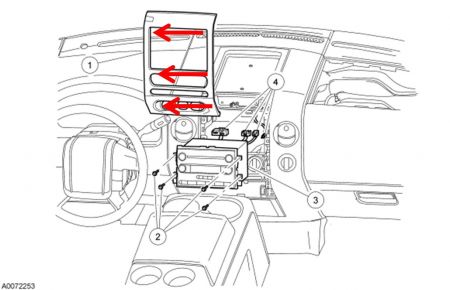
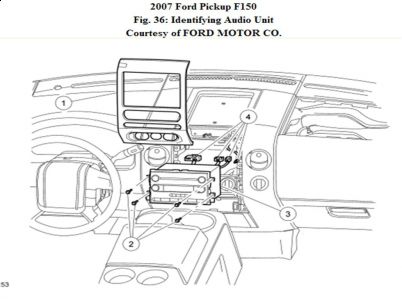
Hello - Normally the instrument panel (#1) snaps in and is held with clips. You can take a flat tip screw driver....wide one and start on the edge and gently pry it. PLEASE remember that it can chip very easy. Many times I grab the different areas that the arrows are pointing to with one hand and pull at the same time using the screw driver or a wide tip scraper. Again, the problem is these things can chip easy so you want as much as possible on the flat part....not just a small little piece.


https://www.2carpros.com/forum/automotive_pictures/248015_Picture2_58.jpg


https://www.2carpros.com/forum/automotive_pictures/248015_Picture1_82.jpg

To verify it has clips you can check with your Ford parts department and you should be able to purchase replacement clips. They can give you a print out of the pic with the clips. Then you know exactly each spot a clip is. Again, this pops out, then there are screws that hold the radio in. REMOVAL AND INSTALLATION NOTE: If installing a new navigation audio unit, remove the navigation digital versatile disc (DVD) if possible, before sending the audio unit to an authorized audio system repair facility. 1. Remove the instrument panel center finish panel. "¢ Disconnect the electrical connectors. 2. Remove the 4 screws and the audio unit. "¢ Disconnect the electrical connectors and the antenna cable. 3. To install, reverse the removal procedure.
Jul 30, 2009 at 11:37 PM
Avatar
IMPALASS
  • CERTIFIED EXPERT
  • 3,112 POSTS
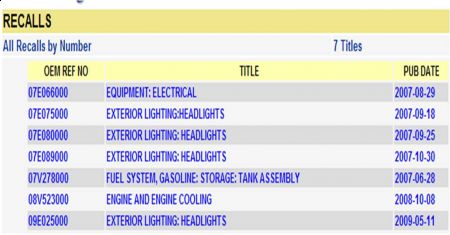
Hello - Also, it looks like you may have some recalls on your vehicle. The dealer may fix these for free. Please contact the dealer service department, give them the VIN number of your car and have them check on these to see if they apply to you.


https://www.2carpros.com/forum/automotive_pictures/248015_Recalls_35.jpg

Jul 30, 2009 at 11:39 PM
Advertisement