2000 Ford Expedition How to remove front brake rotors

2000 FORD EXPEDITION
90,000 MILES • V8 • 4WD • MANUAL
Avatar
DARRENK
  • MEMBER
  • 7 POSTS
I need to replace the fromt brake rotors. I have removed the brake caliper and the caliper mounting bracket from the backing plate. The rotor seems to be rusted on the hub and wont come off. I have tried WD40 and applying heat to try to dislodge, then using a hammer on the back side of the rotor to try loosen it up.....with no luck. It does not seem that the rotor is pressed on the hub.....
Jan 27, 2009 at 11:56 PM

Advertisement
Avatar
DAVE H
  • CERTIFIED EXPERT
  • 13,384 POSTS
A little more force is all that is needed !

Removal & Installation (4WD Models - Except Excursion & Super Duty Pickup)
Raise and support vehicle. Remove wheel. Remove anchor plate and caliper assembly. Remove rotor.
To install, reverse removal procedure. Tighten bolts and nuts. See TORQUE SPECIFICATIONS.
Removal (Excursion & Super Duty Pickup - 4WD)
Raise and support vehicle. Remove wheel. Remove anchor plate and caliper assembly. See DISK BRAKE CALIPERS & PADS. On models with single rear wheels, remove rotor. On models with dual rear wheels, remove hub plate extender nuts, and remove hub extender plate. Remove rotor.
NOTE:If excessive force is used when removing rotor, it should be checked for lateral runout prior to installation. See ROTOR under OVERHAUL.
Jan 28, 2009 at 6:15 AM
Avatar
DARRENK
  • MEMBER
  • 7 POSTS
Thanks...Now I know the rotors are not pressed in and require a puller to remove just a hammer...

NOTE:If excessive force is used when removing rotor, it should be checked for lateral runout prior to installation. See ROTOR under OVERHAUL

Please advise what "lateral runout" is ?

Thanks
Jan 28, 2009 at 10:36 AM
Advertisement
Avatar
DAVE H
  • CERTIFIED EXPERT
  • 13,384 POSTS
Lateral Runout (Front & Rear Disc)
On front disc brakes, tighten wheel bearing adjusting nut to eliminate bearing end play. Ensure rotor can be rotated by hand. When checking runout on Excursion and Super Duty Pickup rear disc brakes, make sure rear axle bearings are adjusted properly.
Once adjusted, DO NOT change rear bearing setting. Attach dial indicator to suspension, with indicator tip set 1" from outer edge of rotor face. Set dial indicator to zero, and slowly turn rotor. Take reading within a 6.00" (152.4 mm) radius on rotor. Runout must not exceed specification. See DISC BRAKE SPECIFICATIONS table. Resurface or replace rotor as required.
Jan 28, 2009 at 11:04 AM
Avatar
DARRENK
  • MEMBER
  • 7 POSTS
Is it possible that the rotor and hub on this (4WD) truck is a one piece assembly. Not sure if the brakes or rotor on this truck has ever been changed. I have been taking a slede hammer to the back of the rotor to try to free it from the hub but without success. The caliper and caliper braket have been removed.....Help! Thanks
Jan 28, 2009 at 7:44 PM
Avatar
DAVE H
  • CERTIFIED EXPERT
  • 13,384 POSTS
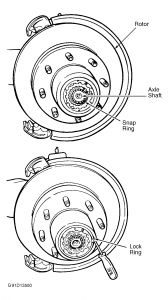
Does the vehicle have dual rear wheels .. this is the only other description I have ? Removal (Excursion & Super Duty Pickup - 4WD) Raise and support vehicle. Remove wheel. Remove anchor plate and caliper assembly. See DISK BRAKE CALIPERS & PADS. On models with single rear wheels, remove rotor.****** On models with dual rear wheels, remove hub plate extender nuts, and remove hub extender plate. See Fig. 8. Remove rotor.****** NOTE:If excessive force is used when removing rotor, it should be checked for lateral runout prior to installation. See ROTOR under OVERHAUL. Fig. 8: View Of Front Hub & Rotor Assembly (Super Duty Pickup - 4WD With Dual Rear Wheels)


https://www.2carpros.com/forum/automotive_pictures/266999_exp_2.jpg

Jan 28, 2009 at 8:31 PM