Door Ajar on dash does not turn off?

2003 FORD F-250
80,000 MILES • 5.4L • V8 • 2WD • AUTOMATIC
Avatar
FRANKN209
  • MEMBER
  • 3 POSTS
Hello,

I have a crew cab truck listed above. The door ajar light on the dash won't go off and the dome light also. I've been spraying WD40 on all the latches. The top and bottom latches on the rear doors. The radio doesn't stay on when I shut the key off. With the doors closed and the radio on, I shut the key off and it shuts the radio off instantly.

I have to take off the negative cable to the battery to shut the dome light off.

Any help would be appreciated.
Sep 18, 2024 at 6:27 PM

Advertisement
Avatar
JACOBANDNICKOLAS
  • CERTIFIED EXPERT
  • 110,175 POSTS
Hi,

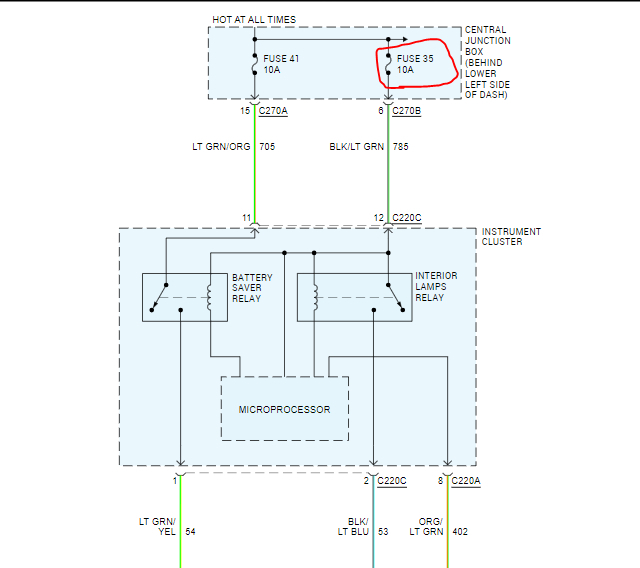
I suspect one of the door ajar switches are bad. If you want to eliminate disconnecting the battery each night until we resolve this, remove fuse 35 in the central junction box under the dash. That should shut the dome lights down.

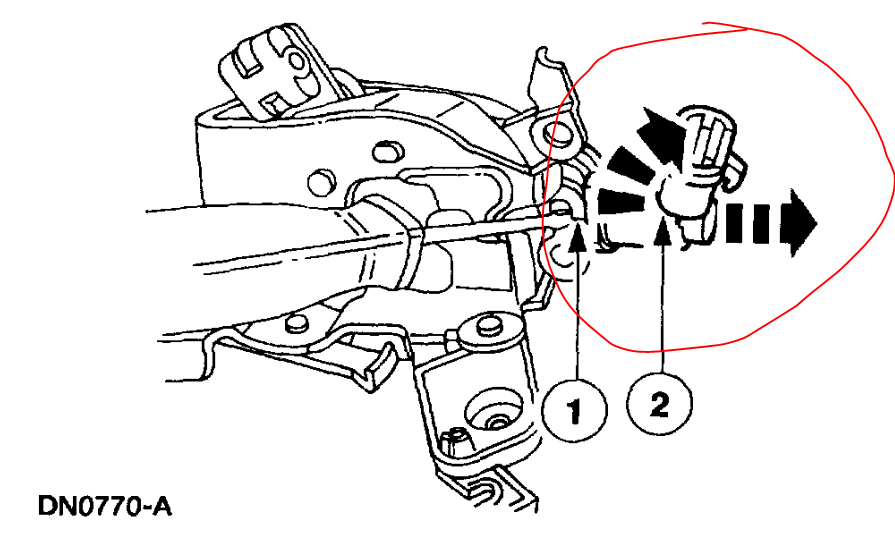
Next, at each door latch is a switch that is used to turn the lights on inside and indicate a door is open. If you look below at pic 2, I circled what to look for at each door. If you disconnect the connector, one at a time, it should open the circuit and turn the lights off. If you do one at a time, it should lead you to the problem switch/door.

Let me know if this is something you are comfortable performing.

Take care,

Joe

See pics below.
Sep 18, 2024 at 8:29 PM
Avatar
FRANKN209
  • MEMBER
  • 3 POSTS
I really appreciate this, Joe. I'll take the fuse out for one and check each door and disconnect each one until I find the problem. Do I have to remove the door panels in order to disconnect this switch?

Regards,
Sep 18, 2024 at 9:05 PM
Advertisement
Avatar
FRANKN209
  • MEMBER
  • 3 POSTS
I took the door panel off the passenger side and when I wiggled the door ajar switch, the light would turn off on the dash. I was able to push the switch enough to turn it off completely until I'm able to change it. Thanks for the help.
Sep 19, 2024 at 9:42 AM
Avatar
JACOBANDNICKOLAS
  • CERTIFIED EXPERT
  • 110,175 POSTS
Hi,

Thanks for the update. I'm glad you found the issue. If you have any questions when it comes time to replace it, let me know.

Take care,

Joe
Sep 19, 2024 at 6:32 PM