security system disable?

2001 FORD F-150
150,000 MILES • 4.6L • V8 • 4WD • AUTOMATIC
Avatar
A0195466
  • MEMBER
  • 1 POST
engine will turn over (cranks), but will not start (run). it has randomly started once or twice. I have good fuel pressure. Changed both the crank and cam sensors. Upon connecting my scan tool it will scan all modules by itself, and the only code it shows is P1000. incomplete monitoring more or less. now when I self test the modules by their self I get one DTC that I cannot clear, B1845, ignition tamper CKT fail in the Central Security module. when I run a live data stream I have a "IGNTAMSEN" that shows out of range. I would think the two related. I am unsure what exactly IGNTAMSEN is and its location. Also, I would think the "theft" light would be flashing with those two items and the theft light does not. I have also programmed two new keys to the truck after it quit running. Further information: I have No injector pulse or spark. The cop's have power to them but no GND pulse. Theft light comes on when key is turned to run. Goes out after 3 seconds and stays out. Flashes every 2 seconds when key is off. any ideas or direction to go with would be great.
Jan 28, 2017 at 12:12 PM
Advertisement
Avatar
KASEKENNY
  • CERTIFIED EXPERT
  • 18,907 POSTS
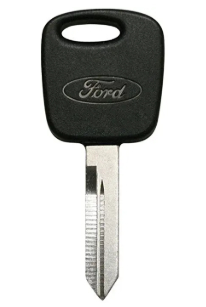
The keys that you are using, are they actual Ford keys with the Ford Logo on them?

This seems like it is the key issue. Basically it is not in theft mode which is why the theft light is operating normally. It doesn't enter theft mode when an incorrect key or (improperly programmed key) is inserted. It just doesn't allow the start and sets the B code that you are getting.

I have seen this exact issue a number of times when using a Walmart key or some other OEM. The Central Security Module does not like anything but OEM Ford keys. I would suggest getting one from Ford or atleast one that is a known OEM key and seeing what happens. Because the no spark and no fuel is the PCM not allowing the pulse or spark due to the key not being good. This doesn't mean you programmed it wrong, but if it is an aftermarket key then it is just a product that the module doesn't recognize.
Jan 18, 2021 at 5:48 PM
Avatar
  • MEMBER
  • 2 POSTS
Computer problem
2001 Ford F150 V8 Two Wheel Drive Automatic

My truck stopped and the anit theft light kept blinking.
if you let it set for about 10 nin. it would start.
They replaced the PCM module and ran all kind of test on the engine theft system with no codes. We replaced the module that lets the computer read the keys and it still will quit. When it does the theft liight keeps blinking and will not start. We put a brand new computer module in the truck and still have this problem of quitting or not starting until the computer resets. What could be the problem we are stumped.
When we ran test it gives no errors.
thanks in advanced.
Jan 18, 2021 at 6:09 PM (Merged)
Advertisement
Avatar
JACOBANDNICKOLAS
  • CERTIFIED EXPERT
  • 110,175 POSTS
WHen you let the key in the run position for 10+ minutes, it should over ride the system. That is why it will start for you. Have you had it checked at a dealer? They are the only ones that have the proper test equipment to check this part of the system.
Jan 18, 2021 at 6:09 PM (Merged)
Avatar
JMAALIKI
  • MEMBER
  • 1 POST
hi i have f 150 2001 icame home for lunch when i was ready to back to work the would not start the theft light came on then went away then when i try crank the theft light start blinking
Jan 18, 2021 at 6:09 PM (Merged)
Avatar
JACOBANDNICKOLAS
  • CERTIFIED EXPERT
  • 110,175 POSTS
Hi:
I hate to say it but the problem lies in the anti theft system. This guide can help us

https://www.2carpros.com/articles/how-to-reset-a-security-system

Please run down this guide and report back.
Jan 18, 2021 at 6:10 PM (Merged)
Avatar
TYCO0008
  • MEMBER
  • 1 POST
The theft light is flashing, got a new PATS key but still does not work. Is there a way to reset it? Also, the door locks are not power.
Jan 18, 2021 at 6:10 PM (Merged)
Avatar
KASEKENNY
  • CERTIFIED EXPERT
  • 18,907 POSTS
Here is a guide that will help with that:

https://www.2carpros.com/articles/how-to-reset-a-security-system

If this does not solve the issue then we are going to have to scan for codes just to find out what it is telling us.

https://www.2carpros.com/articles/checking-a-service-engine-soon-or-check-engine-light-on-or-flashing

We will know what better direction to go because the flashing light is indicating that there is an active theft issue. So the vehicle thinks it is being stolen and we need to find out what the computer is telling us as to why.

Thanks
Jan 18, 2021 at 6:10 PM (Merged)
Avatar
ADENSDAD10
  • MEMBER
  • 2 POSTS
I have a 2001 Ford F-150. When I turn my key from the 3 to 4 position my anti-theft light does not turn off. It starts blinking rapidly. A locksmith told me that those keys do not often lose there programming. I went to a salvage yard and bought a 2002(f150) anti theft transceiver and put it on. It still does not disable the blinking light. Could this be do to the part being a 2002 part for a 2001? I used the same wires and plug to the part that were for my original anti theft transceiver. I have the cable (wire+) for the new one as well.
Jan 18, 2021 at 6:10 PM (Merged)
Avatar
WRENCHTECH
  • CERTIFIED EXPERT
  • 20,761 POSTS
You can't just plug used parts into that system. Everything has to be programmed with a factory scan tool.
Jan 18, 2021 at 6:10 PM (Merged)
Avatar
ADENSDAD10
  • MEMBER
  • 2 POSTS
My dealership tells my my vehicle is to old for them to have the equipment to fix it. Would a regular mechanic shop have the tools necessary to do this.
Jan 18, 2021 at 6:10 PM (Merged)
Avatar
1 BOBCAT
  • MEMBER
  • 2 POSTS
Started my truck last night and the theft light came on for a matter of seconds, then went out for a matter of seconds, then came back on and stayed on. Truck runs like normal. Bought the truck with 28000 miles on it in 2002. The theft light blinked like normal until a few years ago, when it stopped blinking at all. I figured it had just given out, cause of the age of truck. Don't know if there is any relation, but the mileage indicator comes on and off, whenever it feels like it. Any idea how I can remedy this situation? Also, will this cause my engine to shut off?
Jan 18, 2021 at 6:11 PM (Merged)
Avatar
BMDOUBLE
  • CERTIFIED EXPERT
  • 1,139 POSTS
The PATS system in your ford will not kill the engine after it has started, the system is active only until the vehicle starts. You will need to retrieve the codes from the HEC module and more than likely will get a code for indicator failure. The odometer problem is caused by a faulty solder joint in the cluster and can be repaired or sent out to a repair facility for usually 100 bucks or So, avery common problem.
Jan 18, 2021 at 6:11 PM (Merged)
Avatar
1 BOBCAT
  • MEMBER
  • 2 POSTS
I think we're on to something now, cause I started it this morning and the light went out. When I cut it off, it came back on. Did this several times. Same thing every time. It's a $100.00 to have it scanned at a shop. Will one of the inexpensive scanners from the auto parts store, tell me what I need to know?
Jan 18, 2021 at 6:11 PM (Merged)
Avatar
DFTOWTRUCK
  • MEMBER
  • 1 POST
The keys were lost to my truck, security was active, so replaced the column. Do I need to put back on or replace the ring in the ignition to make it start? It turns over but will not start.
Jan 18, 2021 at 6:11 PM (Merged)
Avatar
DANNY L
  • CERTIFIED EXPERT
  • 5,648 POSTS
Hello, I am Danny.

I have attached a tutorial showing an Anti-Theft relearn procedure. Hope this helps and let us know if this works and get back to us. Thanks for using 2CarPros.
Danny-

https://www.2carpros.com/articles/how-to-reset-a-security-system
Jan 18, 2021 at 6:11 PM (Merged)
Avatar
GREG HARPER
  • MEMBER
  • 3 POSTS
theft light flashes continuously after turning off ignition. Vehicle starts and drives fine however can't seem to reprogram remote lock fobs. Is this normal? No check engine codes and have found nothing in manual or on google about this one way or the other
Jan 18, 2021 at 6:11 PM (Merged)
Avatar
DAVE H
  • CERTIFIED EXPERT
  • 13,384 POSTS
the only way to programme fobs or diagnose faults on the PATS system is via ford's diagnostic computer or equivalent
Jan 18, 2021 at 6:11 PM (Merged)
Avatar
GREG HARPER
  • MEMBER
  • 3 POSTS
Thanks for the reply. I'm trying to program the door lock remote--it is not responding under the method by ford and the usual on-of eight times to access program mode is not working. I'm not trying to access the PATSII system but I'm afraid that it's causing the problem.
Jan 18, 2021 at 6:11 PM (Merged)
Avatar
DAVE H
  • CERTIFIED EXPERT
  • 13,384 POSTS
Is this the same was as you are trying .. you have to follow it step by step to the letter or it will fail to reprogramme .. and you MUST wait the 5 minutes at the end !!

PROGRAMMING
REMOTE TRANSMITTER
Cycle ignition key 8 times within 10 seconds and end in RUN position to enter program mode. Doors should lock and unlock to confirm program mode has been entered. Press any button on transmitter(s). Doors will lock, then unlock to confirm being programmed. If doors do not respond, press button again (3 times maximum) with same transmitter. If doors still won't lock, go to SYSTEM TESTS. Repeat procedure for additional transmitters (4 maximum). If equipped with memory seats, ensure transmitter(s) are programmed in order according to numbers on back of transmitter(s). Turn ignition off or wait 5 minutes for system to exit program mode. All doors should lock, then unlock. Recheck system operation.
Jan 18, 2021 at 6:11 PM (Merged)
Avatar
DAVE H
  • CERTIFIED EXPERT
  • 13,384 POSTS
TEST C: DOORS DO NOT LOCK OR UNLOCK WITH REMOTE TRANSMITTER
NOTE:If vehicle is within 1/2 mile from radio or television towers, remote transmitter operating range may be reduced.

Turn ignition off. Ensure doors are locked. Press transmitter UNLOCK button. Driver door should unlock. Press UNLOCK button again within 5 seconds. Remaining doors should unlock. Verify doors are unlocked. Press LOCK button. All doors should lock. If system operates properly, system is okay. If all doors do not lock and unlock properly, go to step 17). If all doors do not lock properly, go to step 10). If all doors do not unlock properly, go to next step. If driver door unlocks properly, but other doors do not unlock properly, go to step 9). If driver door does not unlock properly, but other doors do unlock properly, go to step 6).
Connect New Generation Star (NGS) tester following manufacturers instructions. Retrieve continuous DTCs. Clear DTCs. Perform RAP module self-test. If no DTCs are retrieved, go to step 21). If DTC B1309 is retrieved, go to next step. If DTC 2425 is retrieved, go to step 29).
Select RAP PID DD_LOCK. If display does not read LOCK, replace RAP module. Retest system. If display reads LOCK, go to next step.
Disconnect RAP module 22-pin connector C257. Remove all lock relay from lock relay block behind right side of dash. Disconnect left and right power door lock switch connectors. Measure resistance between ground and Pink/Yellow wire terminal of all lock relay connector. If resistance is more than 10 k/ohms, go to next step. If resistance is less than 10 k/ohms, repair short to ground in Pink/Yellow wire. Retest system.
Check power door lock switches. See COMPONENT TESTS in POWER DOOR LOCKS article. If door lock switches are okay, replace RAP module. Retest system. If a door lock switch is faulty, replace switch. Retest system.
Disconnect RAP module 26-pin connector C256 located behind left side of instrument panel. Connect a fused jumper wire between ground and RAP module 26-pin connector terminal No. 1 (Purple/Light Blue wire). See Fig. 3 . If driver door unlocks, replace RAP module. Clear DTCs. Retest system. If driver door does not unlock, remove jumper wire and go to next step.
Remove driver unlock relay from lock relay block behind right side of dash. Measure resistance between driver unlock relay connector Purple/Light Blue wire terminal and RAP module connector C256 terminal No. 1 (Purple/Light Blue wire). See Fig. 3 . If resistance is less than 5 ohms, go to next step. If resistance is more than 5 ohms, repair open in Purple/Light Blue wire. Retest system.
Measure voltage between ground and Black/White wire terminals of driver unlock relay connector. If more than 10 volts exists, replace driver unlock relay. Retest system. If 10 volts or less exists, repair Black/White wire. Clear DTCs. Retest system.
Disconnect RAP module 22-pin connector C257. Verify all doors are locked. Connect a jumper wire between ground and RAP module connector C257 terminal No. 11 (Pink/Light Green wire). See Fig. 1 . If all doors unlock, replace RAP module. Clear DTCs. Retest system. If all doors do not unlock, remove jumper wire. Repair Pink/Light Green wire. Retest system.
Connect New Generation Star (NGS) tester following manufacturer's instructions. Retrieve continuous DTCs. Clear DTCs. Perform RAP self-test. If no DTCs are retrieved, go to step 14). If DTC B1341 is retrieved, go to next step.
Turn ignition off. Using NGS tester, Select RAP PID DD_LOCK. If display does not read UNLOCK, replace RAP module. Clear DTCs. Retest system. If display reads UNLOCK, go to next step.
Disconnect RAP module 22-pin connector C257. Disconnect all unlock relay from behind right side of dash. Measure resistance between ground and Pink/Light Green wire terminal of all unlock relay connector. If resistance is more than 10 k/ohms, go to next step. If resistance is less than 10 k/ohms, repair short to ground in Pink/Light Green wire. Clear DTCs. Retest system.
Check power door lock switches. See appropriate COMPONENT TESTS in POWER DOOR LOCKS article. If door lock switches are okay, replace RAP module. Clear DTCs. Retest system. If a door lock switch is faulty, replace switch. Clear DTCs. Retest system.
Disconnect RAP module 22-pin connector C257. Verify all doors are unlocked. Connect a fused jumper wire between ground and RAP module connector C257 terminal No. 22 (Pink/Yellow wire). See Fig. 1 . If all doors lock, remove jumper wire. Reconnect RAP module connector C257. Go to step 21). If all doors do not lock, remove jumper wire. Go to next step.
Remove all lock relay from lock relay block behind right side of dash. Measure resistance of Pink/Yellow wire between all lock relay connector and 22-pin C257 connector terminal No. 22. If resistance is less than 5 ohms, go to next step. If resistance is more than 5 ohms, repair open in Pink/Yellow wire. Clear DTCs. Retest system.
Remove driver unlock relay from lock relay block behind right side of dash. Disconnect RAP module 26-pin connector C256. Measure resistance between ground and Purple/Light Blue wire terminal of driver unlock relay connector. If resistance is more than 10 k/ohms, replace driver unlock relay. Clear DTCs. Retest system. If resistance is less than 10 k/ohms, repair short to ground in Pink/Light Blue wire. Clear DTCs. Retest system.
Connect New Generation Star (NGS) tester. Turn ignition switch to RUN position. Select RAP PID DD_LOCK. If display does not read SHORT, go to step 19). If display reads SHORT, go to next step.
Turn ignition off. Disconnect RAP module 22-pin connector C257. Remove all lock and all unlock relays from behind right side of dash. Measure voltage between ground and RAP module connector C257 terminals No. 11 (Pink/Light Green wire) and 22 (Pink/Yellow wire). See Fig. 1 . If any voltage exists, repair short to power in Pink/Yellow and/or Pink/Light Green wire. Retest system. If no voltage exists, replace RAP module. Clear DTCs. Retest system.
Turn ignition off. Using NGS tester, monitor RAP PID DD_LOCK. Press LOCK button on remote transmitter. If display changes from OFF to LOCK to OFF, go to next step. If display does not change from OFF to LOCK to OFF, go to step 21).
Select RAP PID DD_LOCK. Press UNLOCK button on remote transmitter. If display changes from OFF to UNLOCK to OFF, replace RAP module. Clear DTCs. Retest system. If display does not change from OFF to UNLOCK to OFF, go to next step.
Check remote transmitter functions while standing 10 feet from vehicle. If remote transmitter functions do not operate, go to next step. If remote transmitter functions operate, system is operating properly at this time.
Connect NGS tester following manufacturers instructions. Turn ignition on. Enter RAP and FUNCTION TESTS. Select TRANSMITTER TIC/DATA. When display comes up, different 8-digit letter or number codes should appear to right of TIC 1 and TIC 2 symbols. TIC 1 is stored for transmitter No. 1. TIC 2 is stored for transmitter No. 2. If one transmitter is stored and displayed next to TIC 1, go to next step. If one transmitter is not stored and displayed next to TIC 1, turn ignition off. Reprogram all remote transmitters. See REMOTE TRANSMITTER under PROGRAMMING. After reprogramming, check system operation.
With ignition off, press and release UNLOCK button on transmitter several times. Transmission received contains TIC for transmitter being operated and DATA for which button has been pressed. If an 8-digit letter or number code does not appear under LAST TIC RECEIVED, and UNLOCK does not appear under LAST DATA RECEIVED, go to next step. If an 8-digit letter or number code appears under LAST TIC RECEIVED, and UNLOCK appears under LAST DATA RECEIVED, go to step 26).
Using other remote transmitter, repeat step 23). If an 8-digit letter or number code appears under LAST TIC RECEIVED, and UNLOCK appears under LAST DATA RECEIVED, go to next step. If an 8-digit letter or number code does not appear under LAST TIC RECEIVED, and UNLOCK does not appear under LAST DATA RECEIVED, go to step 27).
Switch batteries from known-good transmitter to malfunctioning transmitter. Repeat steps 23) and 24). If an 8-digit letter or number code appears under LAST TIC RECEIVED, and UNLOCK appears under LAST DATA RECEIVED, install NEW batteries into malfunctioning transmitter, then retest system. If an 8-digit letter or number code does not appear under LAST TIC RECEIVED, and UNLOCK does not appear under LAST DATA RECEIVED, replace transmitter. Retest system.
Using NGS tester, monitor RAP TRANSMITTER TIC/DATA. If TIC under LAST TIC RECEIVED agrees with TIC 1 or TIC 2, go to next step. If TIC under LAST TIC RECEIVED does not agree with TIC 1 or TIC 2. Reprogram all remote transmitters. See REMOTE TRANSMITTER under PROGRAMMING. Retest system.
Monitor RAP TRANSMITTER TIC/DATA. If all buttons pressed for each transmitter agrees with LAST DATA RECEIVED output, replace RAP module. Clear DTCs. Retest system. If all buttons pressed for each transmitter does not agrees with LAST DATA RECEIVED output. If one transmitter is not operating properly, reprogram all transmitters. See REMOTE TRANSMITTER under PROGRAMMING. Retest system. If problem still exists, replace transmitter. If both transmitters are not operating properly, reprogram all transmitters. If problem still exists, go to next step.
Disconnect RAP module 26-pin connector C256. Turn ignition switch to RUN position. Measure voltage between ground and RAP module connector C256 terminal No. 25 (Black/Pink wire). See Fig. 3 . If any voltage exists, repair short to power in Black/Pink wire. Retest system. If no voltage exists, replace RAP module. Clear DTCs. Retest system
Press any button on remote transmitter 4 times consecutively. If transmitter operates properly, clear DTC and retest system. If transmitter does not operate properly, go to next step.
Check if another remote transmitter works with the vehicle. If another transmitter works, go to next step. If another transmitter does not work, go to step 32).
Press any button on known-good remote transmitter. Within 30 seconds, press any button on suspect transmitter. If suspect transmitter operates, clear DTC and retest system. If suspect transmitter does not operate, go to next step.
Reprogram suspect transmitter(s). See REMOTE TRANSMITTER under PROGRAMMING. Retest system. If problem still exists, go back to step 17) and repeat procedures. If transmitter operates correctly, clear DTC. Reprogram all transmitters at the same time. Retest system.
Jan 18, 2021 at 6:11 PM (Merged)

Avatar
GREG HARPER
  • MEMBER
  • 3 POSTS
Thanks Dave,
I'll try the sequence tomorrow. I'm not at the truck now so I'll have to wait. The only thing I see different was the previous instruction I was following stated to hit the unlock button in the vehicle first then start the on-off sequence to access programming mode. I never got to programming mode so that may be why.
I'll let you know what happens.
Thanks again---you've been more than helpful
Jan 18, 2021 at 6:11 PM (Merged)
Avatar
JAMESBURROW
  • MEMBER
  • 46 POSTS
How do i bypass Theft Protection on my 2001 truck listed above.
Jan 18, 2021 at 6:11 PM (Merged)
Avatar
KASEKENNY
  • CERTIFIED EXPERT
  • 18,907 POSTS
Unfortunately you are not able to bypass it. The system was built to not be able to be bypassed or someone would be able to easily steal your vehicle.

So that leaves us with two options. First, we can figure out what the issue is with your system and fix it.

Or you can find a company that offers a system delete module. Basically the PCM has the system deleted from it so that it does not wait for the authorization to start from the theft system. I have not had success with these modules as others have used them and then need help fixing them but others have said they work fine.

I would suggest we start with scanning for codes and finding out what the issue is and go from there unless you already know what is wrong and do not want to fix it.

https://www.2carpros.com/articles/checking-a-service-engine-soon-or-check-engine-light-on-or-flashing

Let us know and we can go from there. Thanks
Jan 18, 2021 at 6:11 PM (Merged)
Avatar
JAMESBURROW
  • MEMBER
  • 46 POSTS
I don't have the key for the truck so i used a screw driver to try and start it. all i am trying to do is make sure the engine runs because I need to take it out and put it in my truck.
Jan 18, 2021 at 6:11 PM (Merged)
Avatar
KASEKENNY
  • CERTIFIED EXPERT
  • 18,907 POSTS
Okay. So you are just looking to use the engine out of this truck? If that is the case then you don't need to worry about the theft system on this truck because all that will stay with the truck. The engine moving over will be wired to its new truck and that security system will have to authorize the security system to start the truck.

Or are you trying to get it started in this truck to make sure it runs before you put it in the other truck? If that is the case, I am not sure that is going to work. You need the PCM to fire the injectors and plugs and that will not be unlocked unless you get past the security system and that is not going to happen without the key. There are a lot of people online that say it can be done but I never found any that don't have a scantool that can wipe the keys or us a kit to bypass it which is what I was talking about earlier.

So if you are trying to do this, I guess we could try and get it to run as if it were on an engine stand.

Let me know your needs and we can try and figure something out.
Jan 18, 2021 at 6:11 PM (Merged)

Avatar
JAMESBURROW
  • MEMBER
  • 46 POSTS
Yeah, i just wanted to make sure it runs before I go through all the trouble of pulling it out. how would you do it as if it was on a engine stand?
Jan 18, 2021 at 6:11 PM (Merged)
Avatar
KASEKENNY
  • CERTIFIED EXPERT
  • 18,907 POSTS
The more I look through this, we just have to get the PCM unlocked through the security system because even if we put power to the PCM it is not going to fire the injectors or coils unless they are unlocked.

I think the easiest thing would be to get a key cut and programmed to the truck. Unfortunately there is just no way that we can run this on a stand without getting that PCM unlocked so that PATs system is going to be included in it or we need a PCM that doesn't require that system which is something you would have to buy and a key is much cheaper.
Jan 18, 2021 at 6:11 PM (Merged)
Avatar
JAMESBURROW
  • MEMBER
  • 46 POSTS
What if I took the PCM and the sensor that is in the steering column and key out of my truck and put it in the other truck?
Jan 18, 2021 at 6:11 PM (Merged)
Avatar
KASEKENNY
  • CERTIFIED EXPERT
  • 18,907 POSTS
I suspect once you get the engine in the other vehicle that you are going to have use the PCM as the one in the older truck is not going to run this new engine as they are different. So the more that I think through this entire process rather then just getting this engine running, the more I think you are opening a can of worms.

It can be done but this is going to be extensive. You are going to have to move over the wiring harness, sensors on the 5.4L, PCM, and theft system. So most people that do this, don't mess with the theft system because it is not the easiest to move over so they get an unlocked PCM for the vehicle that does not require the theft system.

So I don't want to tell you to get that PCM just to test this engine to get it to fire to see if you are going to use it but I don't see any other way given these circumstances.
Jan 18, 2021 at 6:11 PM (Merged)
Avatar
JO_LAVENDER
  • MEMBER
  • 2 POSTS
Recently while attempting to start my truck to go to work the engine would turn over, the theft light would flash and the motor would never start. I have 2 key and it happens with both. Do I need to replace the ignition? :?:
Jan 18, 2021 at 6:12 PM (Merged)
Avatar
LSUSSEL
  • CERTIFIED EXPERT
  • 252 POSTS
Do you think someone attempted to break into your truck? sometimes if for some reason the truck belives it was an attempted theft it will shut everything down and you will have to put in a certian code to get it running again.
Jan 18, 2021 at 6:12 PM (Merged)
Avatar
JO_LAVENDER
  • MEMBER
  • 2 POSTS
[quote:07bebe9484="lsussel"]Do you think someone attempted to break into your truck? sometimes if for some reason the truck belives it was an attempted theft it will shut everything down and you will have to put in a certian code to get it running again.[/quote:07bebe9484]

Ford finally notified me of the problem although it took them 3 days to figure it out once I told them what I thoutht the problem was.. Turns out to be the computer chip (transcriber) in the ignition that is worn and has to be replaced. This is the chip that reads the keys chip. I thought that I would add this just incase anyone else comes up with this problem.

Thanks

Jolene
Jan 18, 2021 at 6:12 PM (Merged)
Avatar
LSUSSEL
  • CERTIFIED EXPERT
  • 252 POSTS
Thanks for your responce. good luck and dont forget to come back if you ever need anymore help!
Jan 18, 2021 at 6:12 PM (Merged)