Overheat message, no CEL error code

2005 BMW 745
155,000 MILES • V8 • 2WD • AUTOMATIC
Avatar
RAJDEEP
  • MEMBER
  • 20 POSTS
This is regarding the car listed above 745LI. I have recently changed coolant thermostat, upper and lower coolant sensor and radiator fan. I keep on getting Engine overheated at 107C. The Water pump is working fine as I can see a steady stream of coolant in coolant reservoir. The coolant is between Min and Max range (no coolant leak).

Upper radiator hose is hot and lower radiator hose is warm to touch.

I am able to drive for 30 minutes continuously and the message keeps on popping and disappears and this cycle continues.

Also the radiator fan does not come on when the overheating message pops up. Only when I start the A/C, the fan starts.

Any help is demystifying this issue is much appreciated.

Thank you.
Nov 17, 2020 at 10:55 AM

Advertisement
Avatar
KASEKENNY
  • CERTIFIED EXPERT
  • 18,907 POSTS
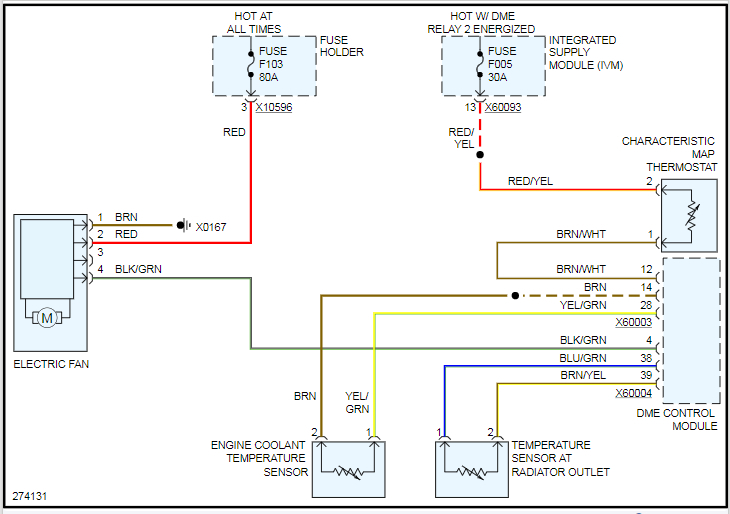
You only have one fan correct? From what I remember this was one large fan and not two smaller fans? If that is the case, we need to figure out why the fan is not coming on. If this message is coming on, that fan should be on high. So if we solve that then I suspect this message will stop coming on.

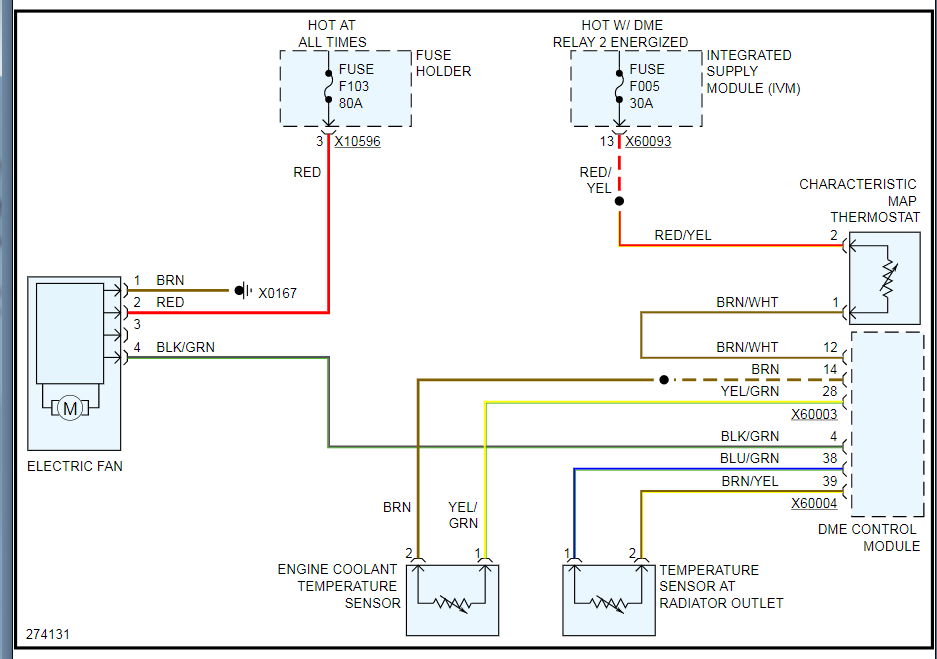
Do you have a scan tool that can monitor the DME module? We need to see what the module is seeing as temp on these sensors. Since they are new, and it is no change we can assume they are not the issue. So if the fan works when the AC is on then the fan is not the issue. If you replaced the thermostat as well, the only thing really left is the module but I would like to confirm this before we replace it.

Let me know and we can go from there. Thanks
Nov 17, 2020 at 12:40 PM
Avatar
RAJDEEP
  • MEMBER
  • 20 POSTS
Thanks for your prompt response. I do have Foxwell scanner not sure if it checks coolant temperature sensor readings. I will do some tests today. Also does the DME module is change as 1 piece or there fuses that can be replaced?
Nov 18, 2020 at 6:17 AM
Advertisement
Avatar
KASEKENNY
  • CERTIFIED EXPERT
  • 18,907 POSTS
Okay. Yeah that would be good if it does. If you want to get some screen shots of the info it has I can help if you are not sure.

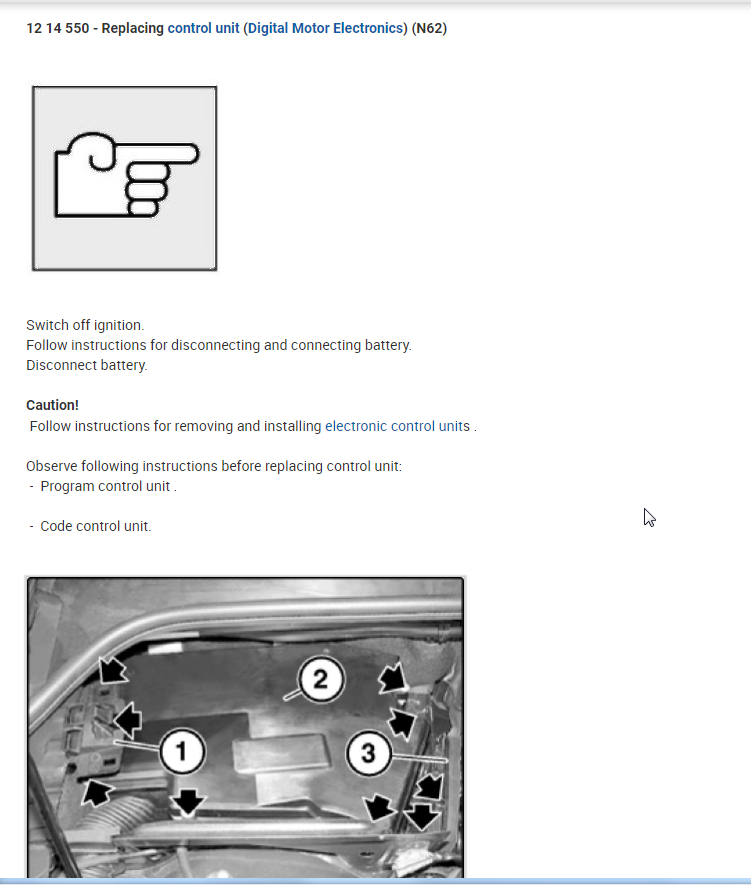
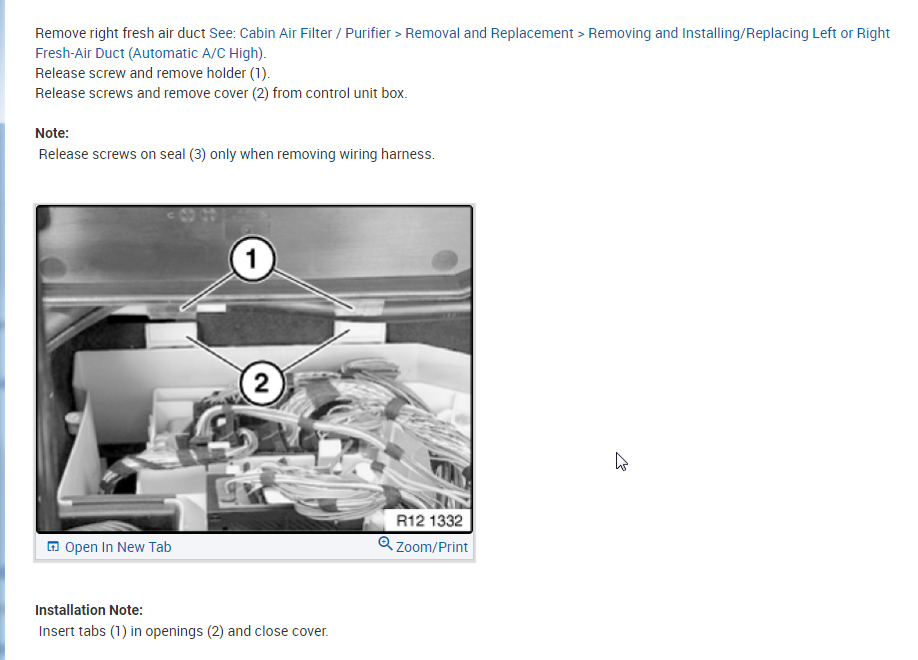
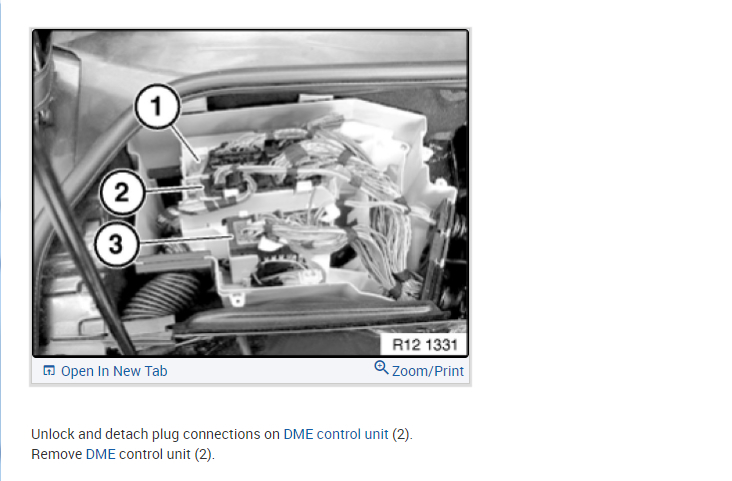
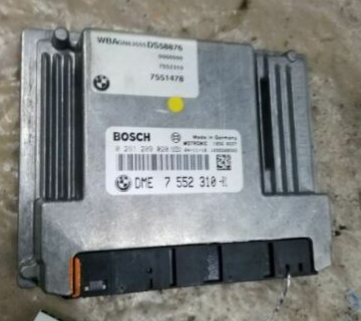
Also, I attached the picture of the DME and it is not something that has replaceable fuses or relays.
Nov 18, 2020 at 6:18 PM
Avatar
RAJDEEP
  • MEMBER
  • 20 POSTS
I used BMW INSTA app and the coolant temperature is 107 C and coolant temperature at radiator outlet is 75 C. It keeps falling then again goes up. The main coolant temperature is at 107 C at idle.
Nov 20, 2020 at 7:25 AM
Avatar
RAJDEEP
  • MEMBER
  • 20 POSTS
Triggered the electric fan at full speed from ISTA APP.
Nov 20, 2020 at 7:38 AM
Avatar
RAJDEEP
  • MEMBER
  • 20 POSTS
also, at idle the overheat message did not popup. The car was idling around half hour. I drove the car for around 20 minutes and the overheat message popped up.
Nov 20, 2020 at 8:07 AM
Avatar
KASEKENNY
  • CERTIFIED EXPERT
  • 18,907 POSTS
I think you have a restriction in the system. 107 C is a little high so I just want to confirm that the fan is coming on at this point? Or when you say it is triggered, that means you are commanding the fan on with the tool you are using?

If you command the fan on and it comes on but it is not coming on when it is reaching that temp then that is a concern as well.

So let's try and eliminate one of the two of these issues, restriction or fan issue. If you can command the fan on, can you drive the vehicle and see if the message pops up while the fan is running? If it does not then we have a fan issue. If it still comes on, then we have a restriction in the cooling system. The fact that it doesn't overheat while sitting still at idle actually points to both issues so we need to try and eliminate one.
Nov 21, 2020 at 6:53 AM
Avatar
RAJDEEP
  • MEMBER
  • 20 POSTS
The fan comes on only if I turn on the A/C or command it thru the BMW ISTA software. It does not come on otherwise. When temp is 107C and A/C is "off" the fan does not come "on".
Nov 23, 2020 at 3:53 AM
Avatar
KASEKENNY
  • CERTIFIED EXPERT
  • 18,907 POSTS
Okay. That is the issue we need to deal with first. You have two sensors that could prevent the DME from turning on the fan that is the upper and lower temperature sensors. If you have replaced these and the fan works when the A/C is on, then I would replace the DME. It just does not appear to be commanding it on so when you take its place with the scan tool, it turns on then the DME is not doing it and I would replace it.
Nov 23, 2020 at 7:49 PM
Avatar
RAJDEEP
  • MEMBER
  • 20 POSTS
Okay so if I get a exact model used DME, do i still have to program it? If so what are my options?
Nov 24, 2020 at 3:38 AM
Avatar
KASEKENNY
  • CERTIFIED EXPERT
  • 18,907 POSTS
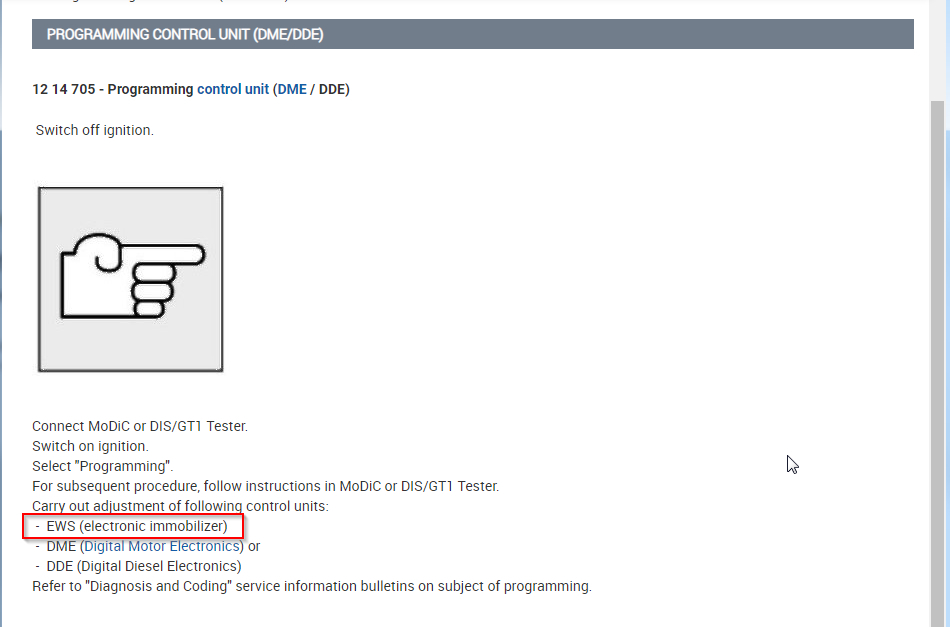
The manual does not specify what programming will do other then it needs to be programmed so I can't tell you for sure but it appears you cannot use a unit out of another vehicle. The reason is, part of the programming is for the immobilizer unit. This means you need to program the keys to it so that the security system does not prevent the start of the engine. This may just be a back up of the theft system and not matter but based on this, I would not try and use a used module.
Nov 24, 2020 at 6:26 PM
Avatar
RAJDEEP
  • MEMBER
  • 20 POSTS
I did change the thermostat, thermostat sensor, lower radiator coolant senor and radiator fan. But I haven't erased the error code. Is it a must to clear the error code or would the ECU automatically clear it? Would the pending error codes for thermostat sensor and lower radiator thermostat sensor throw overheating message?
Nov 25, 2020 at 8:44 AM
Avatar
RAJDEEP
  • MEMBER
  • 20 POSTS
So after clearing the code, I drove for an hour, and no overheat message. The coolant temp hovered between 105 and 107C. Is this normal?
Nov 26, 2020 at 3:07 AM
Avatar
KASEKENNY
  • CERTIFIED EXPERT
  • 18,907 POSTS
That is a little high for me, but if it operates and does not get higher then I suspect that is normal for this vehicle. I am finding a lot of indication that the normal operating temp is from 99 to 107 C so if you have no issues, codes, or warnings I would leave well enough alone.

This is great news. Keep us posted if anything changes. Thanks
Nov 26, 2020 at 7:52 PM
Avatar
RAJDEEP
  • MEMBER
  • 20 POSTS
Greatly appreciate your help. God Bless.
Nov 27, 2020 at 3:44 AM
Avatar
RAJDEEP
  • MEMBER
  • 20 POSTS
Day 2 no issue. Also the radiator fan has started on normally without A/C turned on. Very strange that error codes were turning on the heating message even though physically all components were doing their job. Will post a final update after the weekend if I am out of the woods.
Nov 27, 2020 at 9:29 AM
Avatar
KASEKENNY
  • CERTIFIED EXPERT
  • 18,907 POSTS
Sounds great. That is weird. Normally these modules don't have glitches like that but it appears that it did. Thanks again.
Nov 27, 2020 at 10:52 AM
Avatar
RAJDEEP
  • MEMBER
  • 20 POSTS
I spoke too soon, after around 100 miles of driving the engine has overheated message appeared again.

The coolant temperature stays around 107C. Absolutely no sign of overheating (no steam or leaks). Car drives fine (no loss of power or limp mode).

Please advise. Thanks
Nov 29, 2020 at 12:10 PM
Avatar
KASEKENNY
  • CERTIFIED EXPERT
  • 18,907 POSTS
Okay. We need to check the fan operation again. I think that is the issue. When the fan doesn't run this message comes on at 107. This temperature is the max temperature which is why the message is coming on and it will overheat if the temperature doesn't come back down. So this takes us back to the DME not commanding the fan on. So let's confirm the fan is not running again and we need to address that.
Nov 30, 2020 at 7:04 PM
Avatar
RAJDEEP
  • MEMBER
  • 20 POSTS
I was able to command the FAN to on via a BMW diagnostics OBD2 software called ISTA plus. I was able to trigger the fan to full speed for 30 seconds.
Dec 1, 2020 at 8:44 AM
Avatar
KASEKENNY
  • CERTIFIED EXPERT
  • 18,907 POSTS
So you are proving out the circuity from the DME to the fan and that the fan works. Also, you previously replaced the sensors and the only thing left is the DME. So if it were me, I would replace it. Clearly if you got a faulty temperature sensor out of the box that would throw a wrench in this but that is highly unlikely that you would have an issue and get another sensor that causes the exact same issue.
Dec 1, 2020 at 5:36 PM
Avatar
RAJDEEP
  • MEMBER
  • 20 POSTS
Can I get a used DME from eBay and replace it? Does it have to be reprogrammed?
Dec 2, 2020 at 3:33 AM
Avatar
KASEKENNY
  • CERTIFIED EXPERT
  • 18,907 POSTS
The manual does not state specifically what is done when you program the DME. It does need to be programmed but without the detail about what is done during the programming I can't answer that.

As you can see from the attachment the immobilizer system is part of the programming but this is normally just a back up of the information and does not require to be done in order to start the vehicle.

So to answer this question, I think you will need to call a dealer and ask one of the technicians this question. I have not replaced one of these with a used unit so I don't know for sure.

Sorry I can't answer that but I don't want to tell you that it can be used and then be wrong. Nor do I want to be on the safe side and say it can't be used and you spend more money then you need to.
Dec 3, 2020 at 12:11 PM
Avatar
RAJDEEP
  • MEMBER
  • 20 POSTS
Thanks for the update, I will inquire with dealer about DME programming.
Dec 4, 2020 at 7:14 AM
Avatar
KASEKENNY
  • CERTIFIED EXPERT
  • 18,907 POSTS
Sounds great. Let us know if you do. That is good info that will help others in the future not to mention me as well.
Dec 4, 2020 at 7:21 AM
Avatar
RAJDEEP
  • MEMBER
  • 20 POSTS
If the DME is bad would there be any additional symptoms I can experience or monitor? As no CEL code is thrown.
Dec 5, 2020 at 2:01 AM
Avatar
KASEKENNY
  • CERTIFIED EXPERT
  • 18,907 POSTS
Normally yes, but that is when the entire unit fails or something that effects other circuits like a 5 volt reference circuit. Unfortunately with this issue it is a single circuit on the board within the DME that is most likely open. This means it is a single contact that is used to send voltage to the fan and the DME is not doing it. Clearly the fan can work as you can command it on but the circuit within the DME that is supposed to do this is not. So if there were other things on this same circuit in the DME then it would not work either but unfortunately there is not, it is just the fan. There are no codes because there is no feedback signal from the fan that is telling the DME that it did not actually turn on. The signal that it is not working is the fact that the fan does not work. With no feedback circuit, the DME just turns the fan on and it has no clue if it does it or not. It only knows the temperature is too high so it displays the message on the cluster. It would be nice if it displayed "Overheat due to the fan not coming on and the DME is the issue" but it doesn't so we have to piece it together like this.
Dec 5, 2020 at 12:49 PM
Avatar
RAJDEEP
  • MEMBER
  • 20 POSTS
That was great explanation. Thank you.
Dec 5, 2020 at 6:39 PM