terrain management system light on?

2013 FORD EXPLORER
9,000 MILES
Avatar
ANONYMOUS
  • MEMBER
  • 1 POST
What are the causes for a Terrain Management Fault, Service Advance Trac; TMS know is not illuminated; Stuck in the Snow
without 4-wheel drive?
Dec 27, 2012 at 2:28 AM
Advertisement
Avatar
ASEMASTER6371
  • CERTIFIED EXPERT
  • 52,796 POSTS
Hello,

This light comes on when one of the wheel speed sensors goes out but to be sure here is a video on how to get the codes to see whats going on

https://youtu.be/rTtAnsOlZU4

Please run down this guide and report back.
Dec 27, 2012 at 2:43 AM
Avatar
SHARIQ
  • MEMBER
  • 1 POST
Had to get a new front bearing hub cost me $143.00 all set.
Dec 2, 2019 at 2:09 PM
Advertisement
Avatar
JRIEDEL
  • MEMBER
  • 3 POSTS
When I go to park my SUV after driving I get a signal flashes up that says 1) terrain management fault and then 2) service advance trac.

We took in to Ford dealership and they could not find anything and reset computer and hopefully fix the problem. Well, it did not it came up again today.

Any suggestions?

Thanks!
Julie Riedel
Sep 30, 2020 at 5:12 PM (Merged)
Avatar
JACOBANDNICKOLAS
  • CERTIFIED EXPERT
  • 110,175 POSTS
To start, I have seen this issue only a couple times. When checked, no trouble code seems recorded. What needs to be done is to run a vehicle health report when the lights are on and before they are cleared. It should show up then.

Just an FYI. There is a module in the steering column which is part of the processing unit. Replacement of that component has fixed similar issues. But again, you need to check codes to confirm.

Julie, I think this is becoming a common problem with this system. If the dealer does not find the problem, you should contact a Ford rep for your area and request help. I know for sure they are aware of this problem. If you look in your owner's manual, there should be numbers to contact. If you decide to do this, they will need the vehicle ID number (vin), mileage, the dealer's name you are dealing with.
Sep 30, 2020 at 5:12 PM (Merged)
Avatar
JRIEDEL
  • MEMBER
  • 3 POSTS
thanks!
julie
Sep 30, 2020 at 5:12 PM (Merged)
Avatar
JACOBANDNICKOLAS
  • CERTIFIED EXPERT
  • 110,175 POSTS
Glad to help. If you can, let me know how things work out for you. Like I mentioned, it seems to be becoming a more and more common issue, and I would love to know if it is the sensor I mentioned or something different for you.
Sep 30, 2020 at 5:12 PM (Merged)
Avatar
JRIEDEL
  • MEMBER
  • 3 POSTS
Hi, well, took back in and told about the sensor you recommended and they replaced it and so far (knock on wood) have not got the message anymore! Yay! So, I hope that was the problem!

Thanks a million!
Julie
Sep 30, 2020 at 5:12 PM (Merged)
Avatar
JACOBANDNICKOLAS
  • CERTIFIED EXPERT
  • 110,175 POSTS
Julie.

That is good to hear. I hope it continues working properly for you. Take care and let me know if I can help in the future.

Joe
Sep 30, 2020 at 5:12 PM (Merged)
Avatar
AUSTIN VELASQUEZ
  • MEMBER
  • 1 POST
Anyone know the part number of the module? Or exactly part number? I have the same problem about terrain management system fault.
Sep 30, 2020 at 5:12 PM (Merged)
Avatar
KELLIJANE1214
  • MEMBER
  • 1 POST
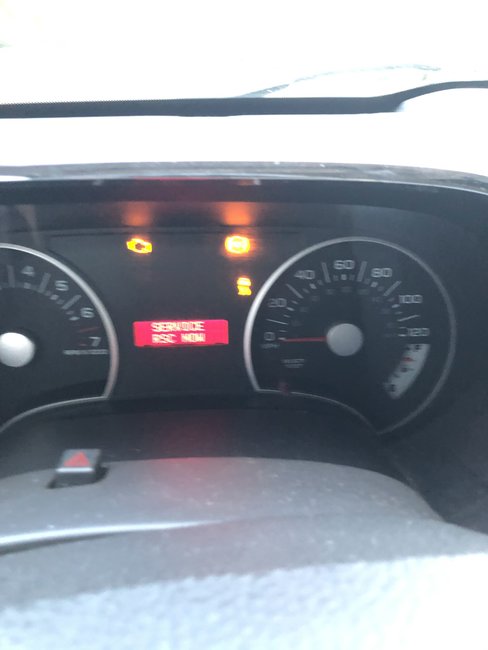
First the tire fault sensor went off then it said the tire fault monitor and i'ts only when i am on the interstate but it goes off then comes back on a week later RSC Service Now light came on every time i started the car but it would go back off. Well yesterday took a 150 mile trip and the RSC Service Now light came back on every 5 minutes with a chiming noise and then the ABS light and traction control light came on and will not turn off. it also locked up my front driver tire and is burning my brakes.
Sep 30, 2020 at 5:12 PM (Merged)
Avatar
STRAILER
  • CERTIFIED EXPERT
  • 53,854 POSTS
Hello,

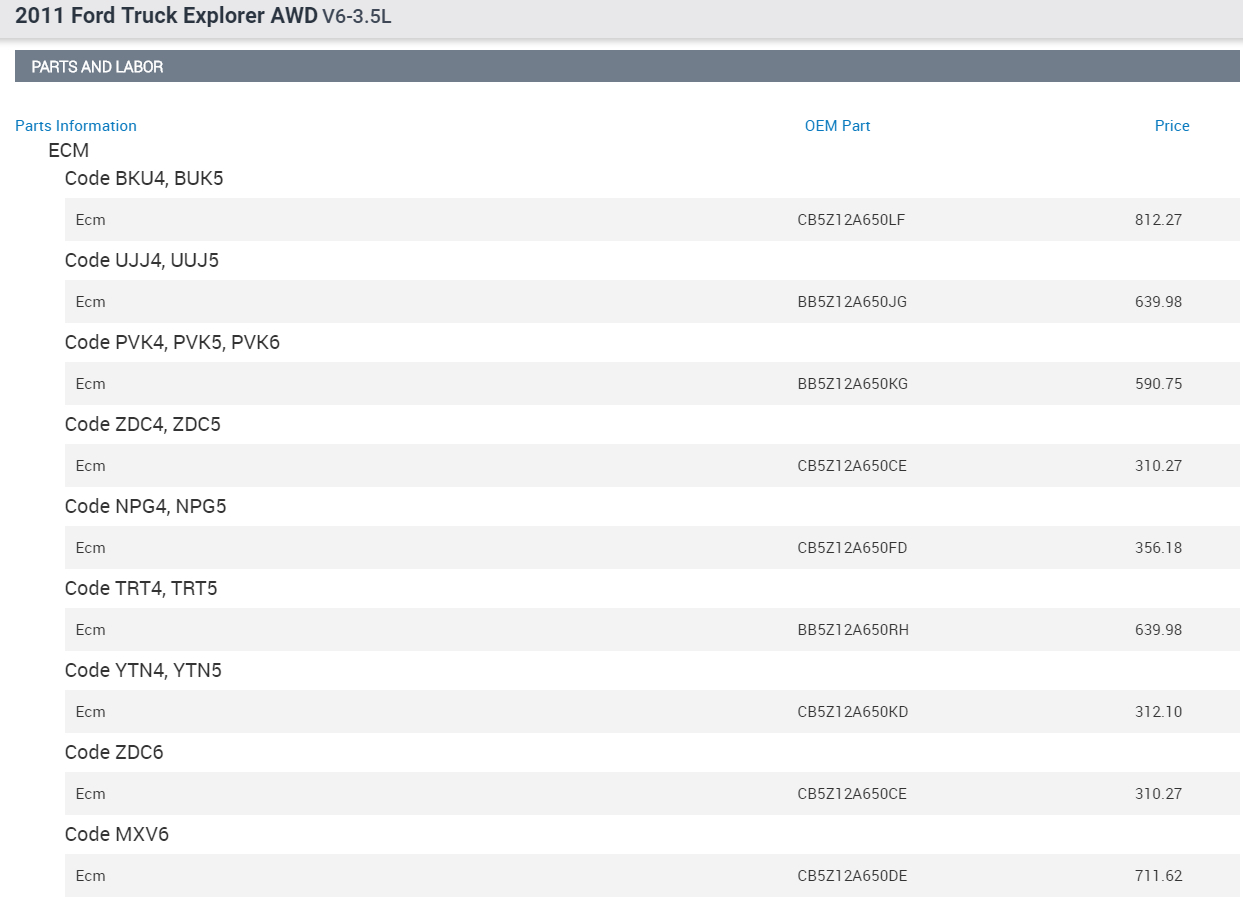
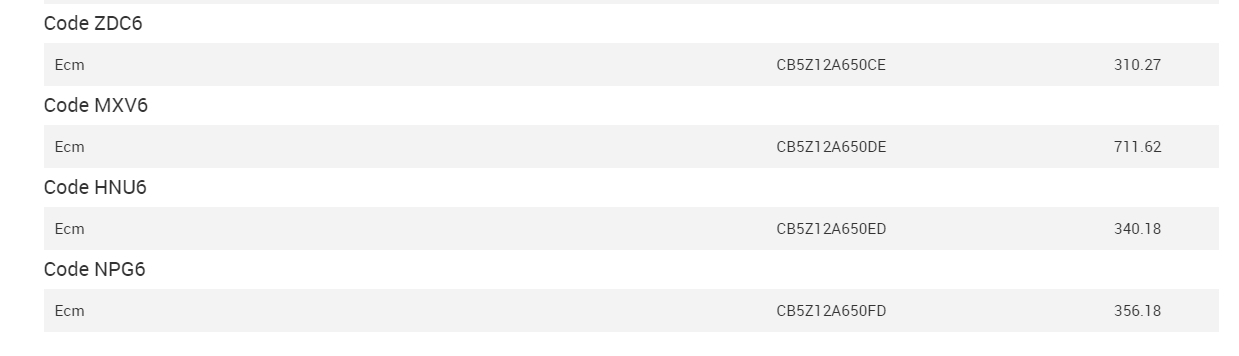
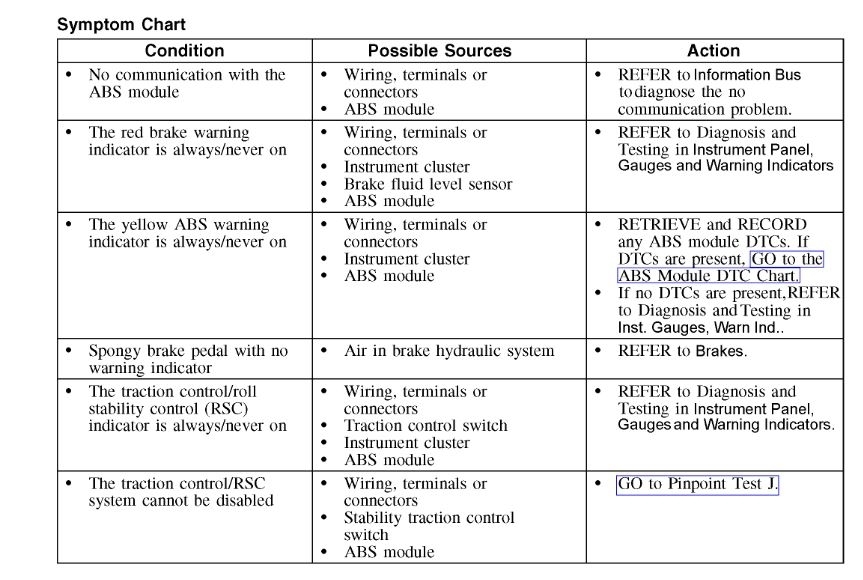
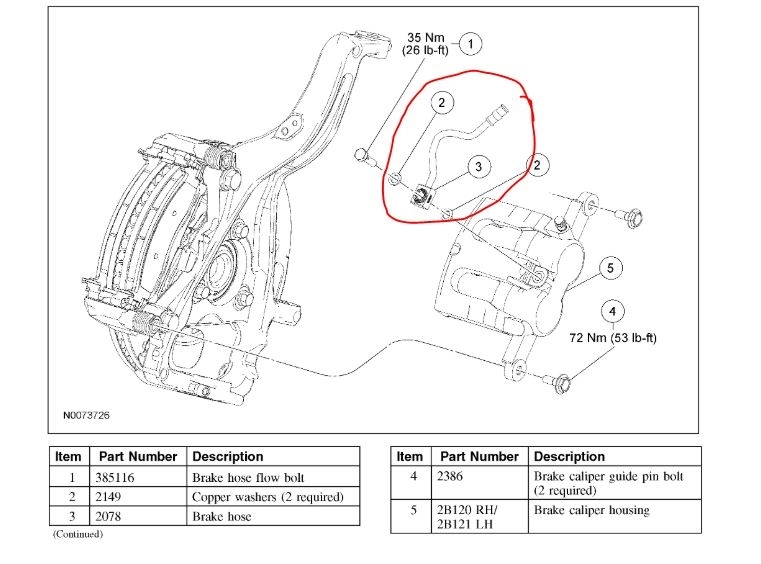
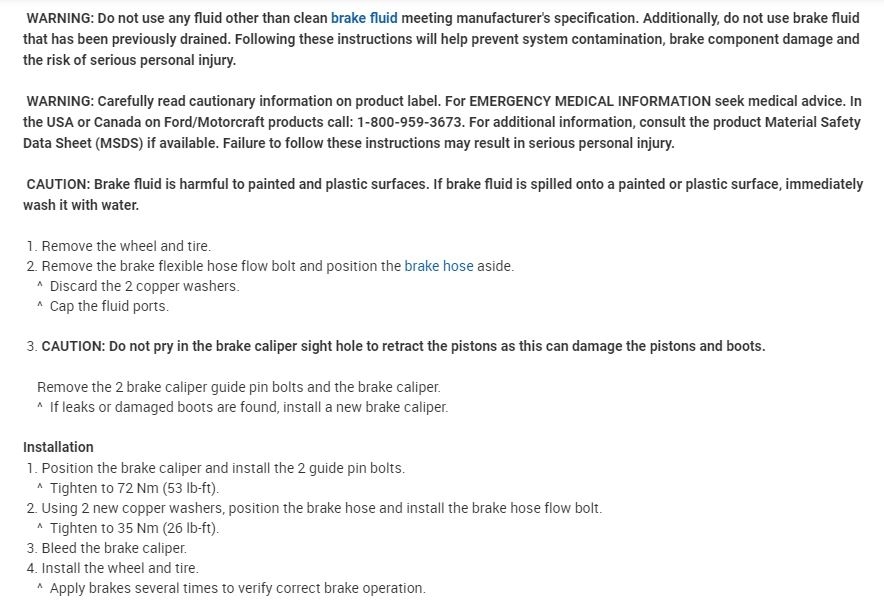
Here are the part numbers and pricing. Check out the diagrams (below). Please let us know if you need anything else to get the problem fixed.

Cheers, Ken
Sep 30, 2020 at 5:12 PM (Merged)
Avatar
ASEMASTER6371
  • CERTIFIED EXPERT
  • 52,796 POSTS
Good morning,

You have 2 issues here. One is for the ABS system that has a fault and the other is basic brakes that are locking up the wheel.

You need to give us the code that is set for the ABS so we can help with the lights. Once the ABS system is repaired, the other systems will come back online.

As far as the brakes, you may have a caliper or collapsed brake hose causing the brakes to hang up and overheat the wheel.

Roy
Sep 30, 2020 at 5:12 PM (Merged)
Avatar
TYPE85
  • MEMBER
  • 24 POSTS
About a week ago I started getting this warning, it goes off about every 5 minutes when driving.
I tried testing the two from ABS sensors with a voltmeter, but I couldn't get a reading out of either, meter was set to 2V a/c.
Drivers sensor has only about 10,000 miles on it. I have not tested the rear sensors.... could it possibly be the ABS module???
PS, check engine light was cleared, it was a different issue.
Sep 30, 2020 at 5:12 PM (Merged)
Avatar
JACOBANDNICKOLAS
  • CERTIFIED EXPERT
  • 110,175 POSTS
Hi,

RSC stands for roll stability control. As you may already be aware, the RSC system is integrated with the ABS and based on the condition's description, it sounds like you probably either have a wiring issue or least one of the wheel speed sensors is bad. However, it could be the module itself.

I would start by checking the rear sensors as well. Here is a link you may find helpful:


https://www.2carpros.com/articles/abs-wheel-speed-sensor-test

Let me know what you find.
Joe
Sep 30, 2020 at 5:12 PM (Merged)
Avatar
TYPE85
  • MEMBER
  • 24 POSTS
Update,
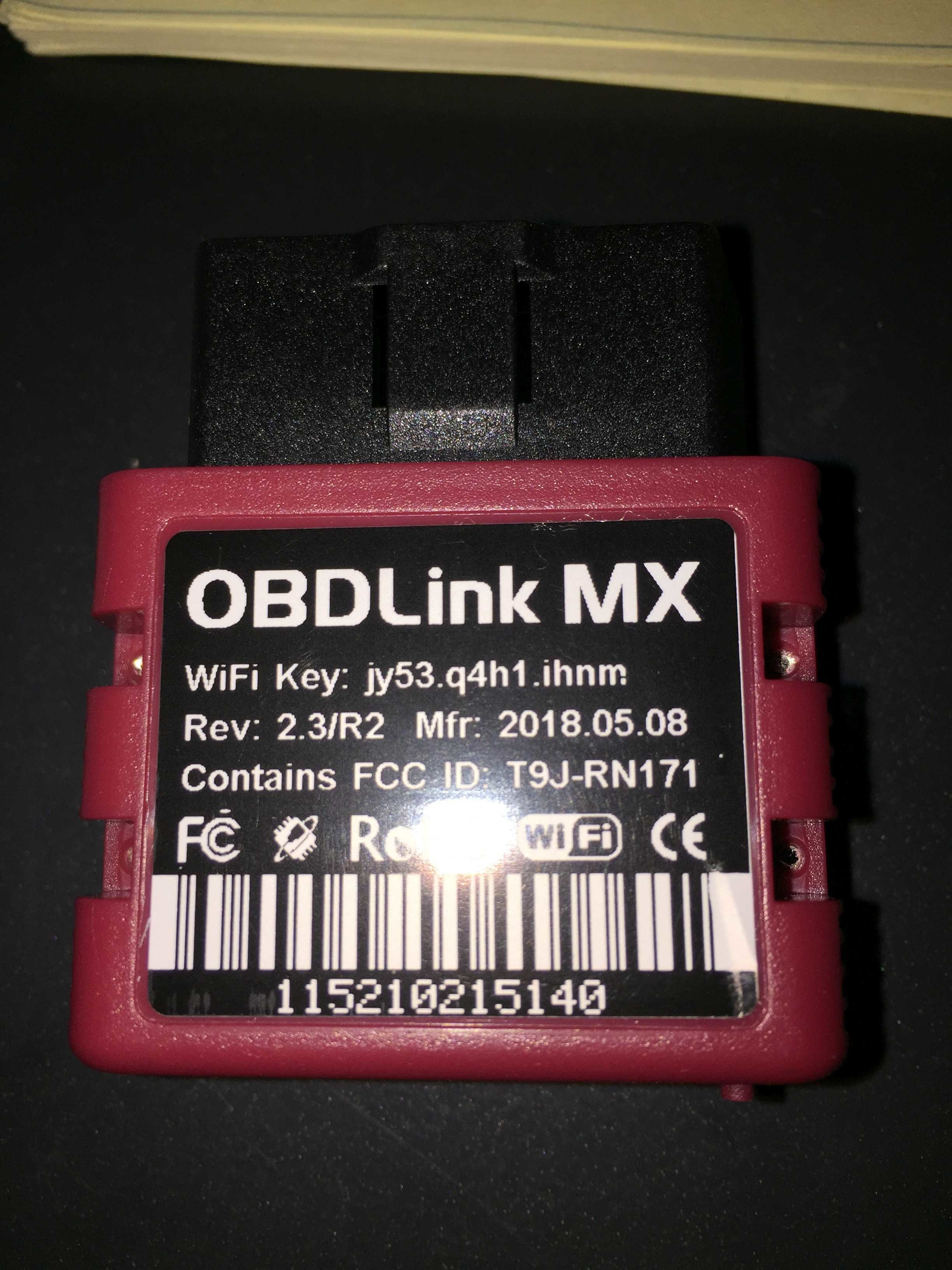
I added "wheel speed rate/mph" to my OBDII reader/display, I'm seeing consistent speed on all four wheels. so the ABS sensors must be working?
Sep 30, 2020 at 5:12 PM (Merged)

Avatar
JACOBANDNICKOLAS
  • CERTIFIED EXPERT
  • 110,175 POSTS
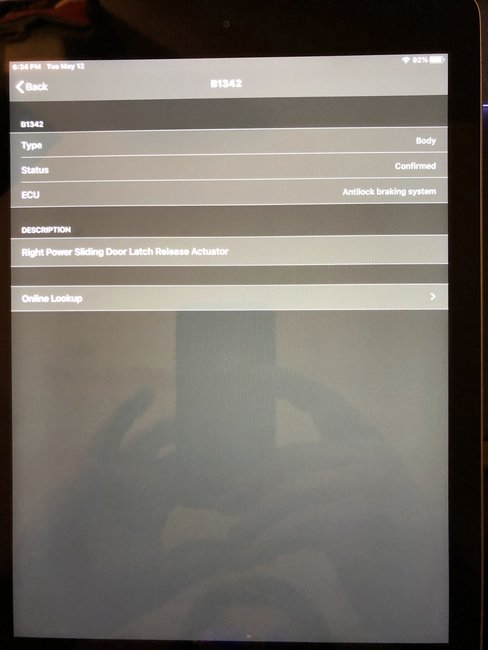
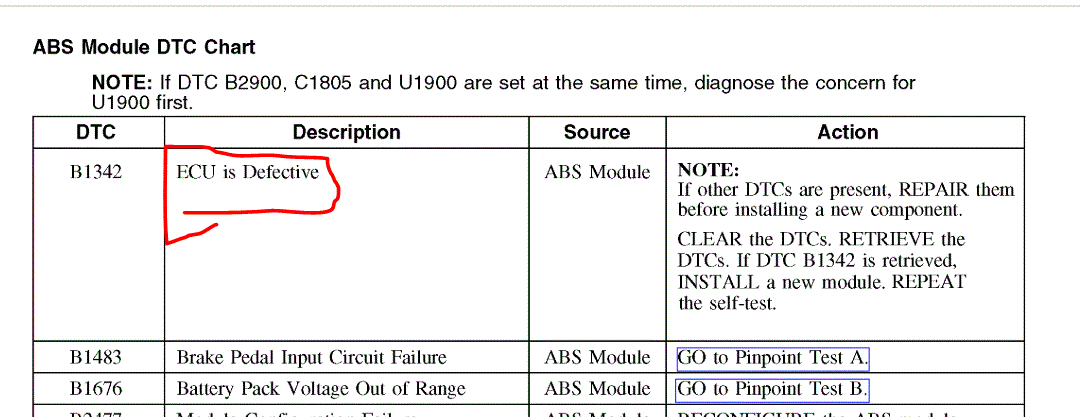
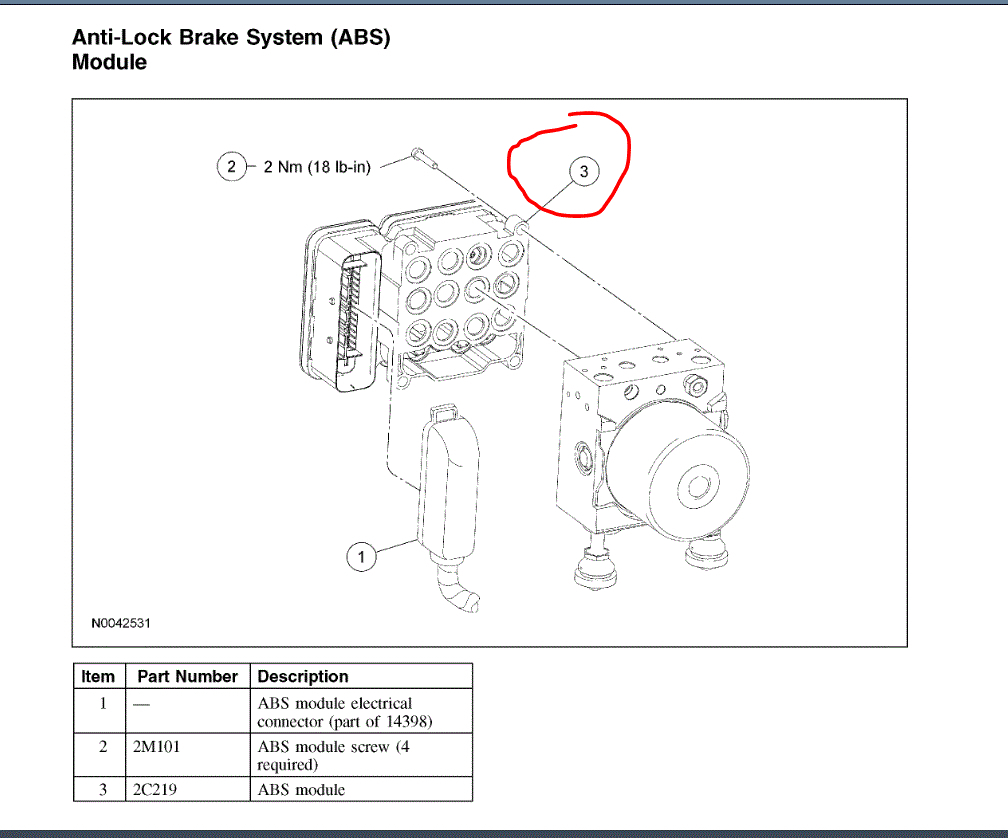
That is correct. If you are seeing that via a scan tool, then there are no connection issues. That leaves the module. I was afraid you were going to say that the sensors were working. The ABS module is bad. See the attached pic. Please note that if there are other codes than the B1342, I need to know before you replace the module.

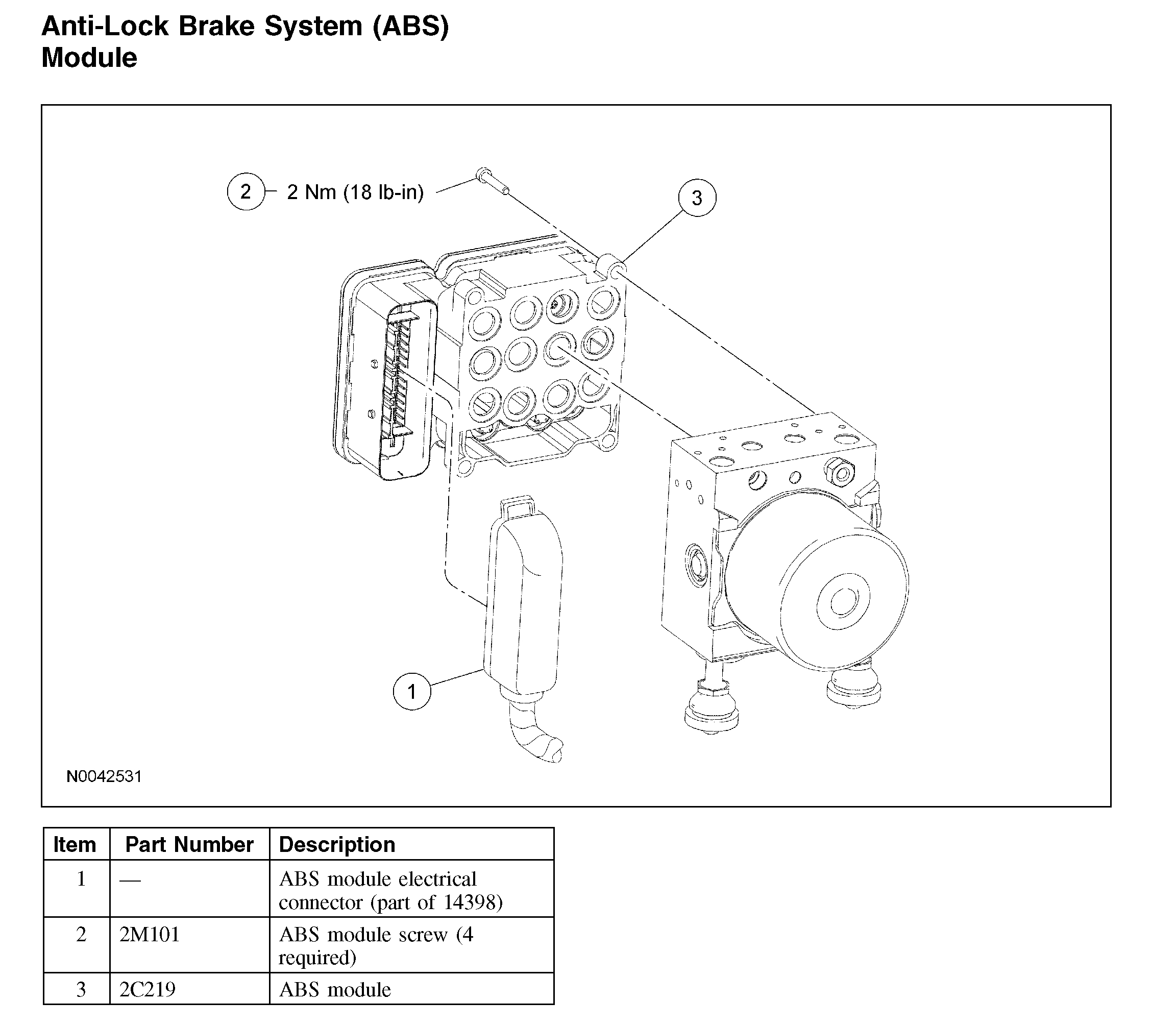
Here are the directions for replacing it. The attached pic (pic 2) correlates with the directions.

____________________

2008 Ford Truck Explorer 4WD V6-4.0L
Removal and Replacement
Vehicle Brakes and Traction Control Relays and Modules - Brakes and Traction Control Electronic Brake Control Module Service and Repair Removal and Replacement
REMOVAL AND REPLACEMENT
Anti-Lock Brake System (ABS) Module


Pic 2


Removal and Installation

CAUTION: Electronic modules are sensitive to electrical charges. The anti-lock brake system (ABS) module can be damaged if exposed to these charges.

NOTE: When installing a new ABS module, it must be configured (using vehicle as-built data) and calibrated. Follow the scan tool directions for the calibration procedures. For module configuration, refer to Programmable Module Installation in Information Bus (Module Configuration).

1. Remove the hydraulic control unit (HCU).
2. Remove the 4 screws and the ABS module.
^ To install, tighten to 2 Nm (18 lb-in).

3. CAUTION: Make sure that the anti-lock brake system (ABS) module is properly seated to the hydraulic control unit (HCU) and that the torque of the ABS module screws is correct, or damage to the components can occur.

To install, reverse the removal procedure.

____________________________________

Let me know if this helps or if you have other questions.

Take care,
Joe
Sep 30, 2020 at 5:12 PM (Merged)
Avatar
TYPE85
  • MEMBER
  • 24 POSTS
Thanks!
I don't have any other codes, the screenshot above shows the detail of the only code.
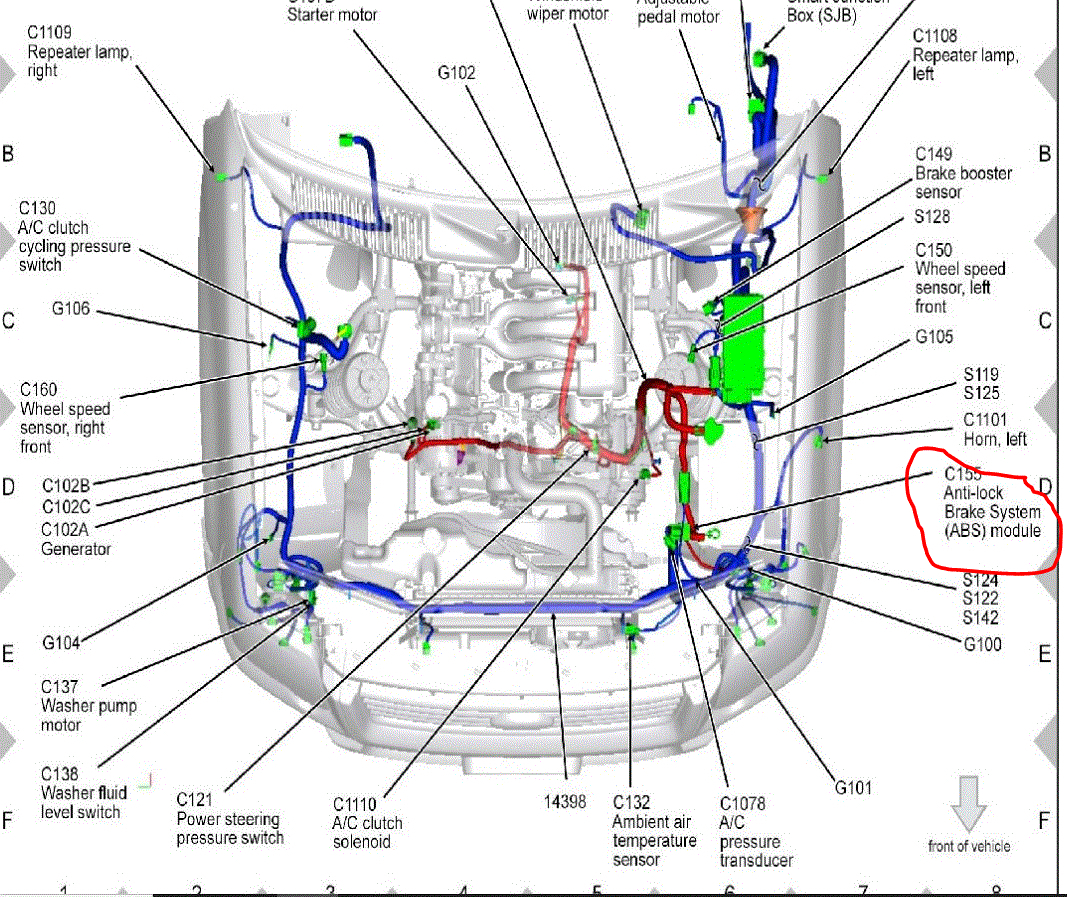
also, the ABS module is under the center console?

I'm looking at a used module:
https://www.car-part.com/cgi-bin/search.cgi?userSearch=int&userPID=1000&userLocation=California&userIMS=&userInterchange=BE%3F&userSide=&userDate=2008&userDate2=2008&dbModel=27.15.1.1&userModel=Ford%20Explorer&dbPart=591.1&userPart=Anti-Lock%20Brake%20Computer&sessionID=14000000066764207&sURL=www.car-part.com&userPreference=year&userZip=91602&userLat=34.1506000&userLong=-118.3666000&userIntSelect=857832&userVIN=1FMEU63E58U******&dbModel=27.15.1.1&vinSearch=1&userUID=0&userBroker=&userPage=1&iKey=

I assume I should by a 2008 Explorer module?
Does it need any kind of programming?
Thanks!
Sep 30, 2020 at 5:12 PM (Merged)
Avatar
JACOBANDNICKOLAS
  • CERTIFIED EXPERT
  • 110,175 POSTS
Hi,

It's under the hood. See the pic I attached pics.

As far as a replacement, make sure it has the same part number. Otherwise, there is a good chance it won't work. Have you checked online for one that is re manufactured? If not, try that. Also, when you install it, you will have to follow configured to work on your vehicle. That will require an upper level scan tool.

Also, when it is replaced, it will need bled using a scan tool as well. Here are the directions.

2008 Ford Truck Explorer 4WD V6-4.0L
ABS Hydraulic Control Unit (HCU) Bleeding
Vehicle Brakes and Traction Control Hydraulic System Brake Bleeding Service and Repair Procedures ABS Hydraulic Control Unit (HCU) Bleeding
ABS HYDRAULIC CONTROL UNIT (HCU) BLEEDING
ABS Hydraulic Control Unit (HCU) Bleeding

WARNING: Do not use any fluid other than clean brake fluid meeting manufacturer's specification. Additionally, do not use brake fluid that has been previously drained. Following these instructions will help prevent system contamination, brake component damage and the risk of serious personal injury.

WARNING: Carefully read cautionary information on product label. For EMERGENCY MEDICAL INFORMATION seek medical advice. In the USA or Canada on Ford/Motorcraft products call: 1-800-959-3673. For additional information, consult the product Material Safety Data Sheet (MSDS) if available. Failure to follow these instructions may result in serious personal injury.

WARNING: Do not allow the brake master cylinder to run dry during the bleeding operation. Master cylinder may be damaged if operated without fluid, resulting in degraded braking performance. Failure to follow this instruction may result in serious personal injury.

CAUTION: Brake fluid is harmful to painted and plastic surfaces. If brake fluid is spilled onto a painted or plastic surface, immediately wash it with water.

NOTE: This procedure is only required when a new hydraulic control unit (HCU) is installed.

NOTE: When any part of the hydraulic system is disconnected for repair or installation of new components, air can get into the system and cause spongy brake pedal action. This requires bleeding of the hydraulic system after it is correctly connected. The hydraulic system can be bled manually or with pressure bleeding equipment.

1. NOTE: Carrying out the System Bleed function drives trapped air from the HCU. Subsequent bleeding removes the air from the brake hydraulic system through the bleeder screws.

NOTE: Adequate voltage to the HCU module is required during the anti-lock control portion of the system bleed.

Connect the scan tool to the vehicle.
2. Access the ABS HCU bleed function and follow the directions on the scan tool.
3. Manually bleed the brake hydraulic system.
4. Repeat the procedure carrying out a total of 2 scan tool cycles and 2 manual bleed cycles

___________________________

Let me know if this helps or if you have other questions.

Take care,
Joe
Sep 30, 2020 at 5:12 PM (Merged)
Avatar
TYPE85
  • MEMBER
  • 24 POSTS
Apologies, I confused this with the "Yaw Rate Sensor", (it's under the center console).
I assume it isn't the issue?
It looks like I'll need to take it to a shop if I need to use a scan tool during the bleeding process, I have a pressure bleeder, so I can bleed the braked manually, but I don't think my scan tool can do the operation you described above.....
Sep 30, 2020 at 5:12 PM (Merged)
Avatar
DAVID MCCALL
  • MEMBER
  • 1 POST
When driving the RSC service lights flashes on and back off almost too quickly to read and the radio turns off and back on with it. What could be doing this?
Sep 30, 2020 at 5:12 PM (Merged)
Avatar
KASEKENNY
  • CERTIFIED EXPERT
  • 18,907 POSTS
Hi David,

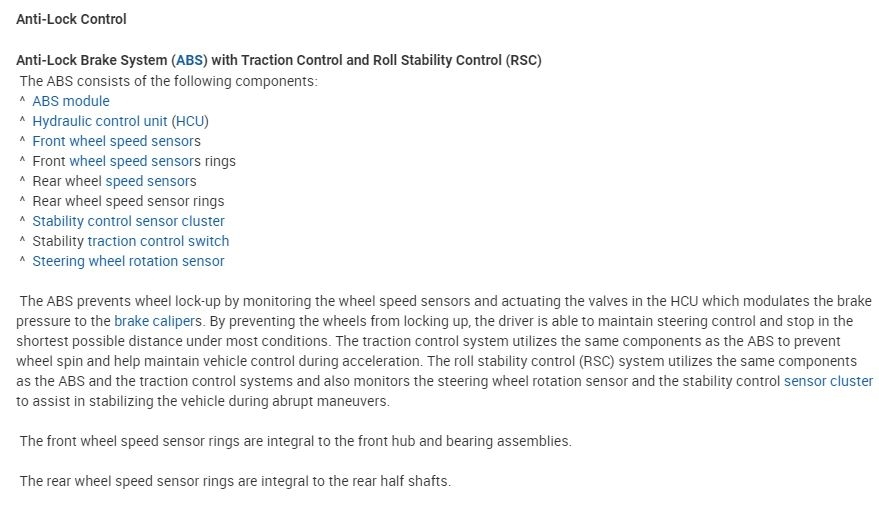
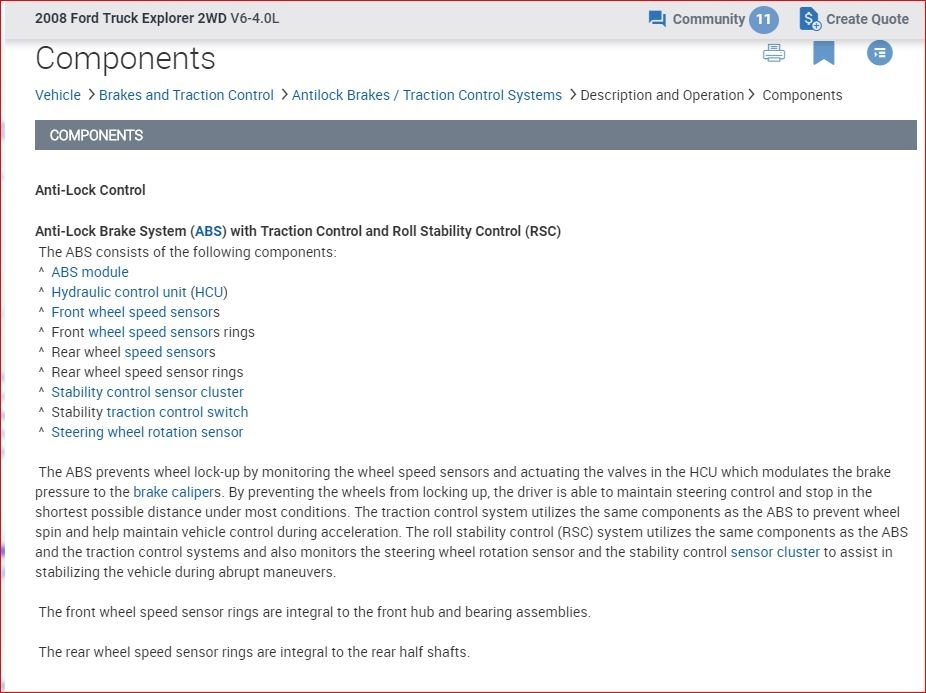
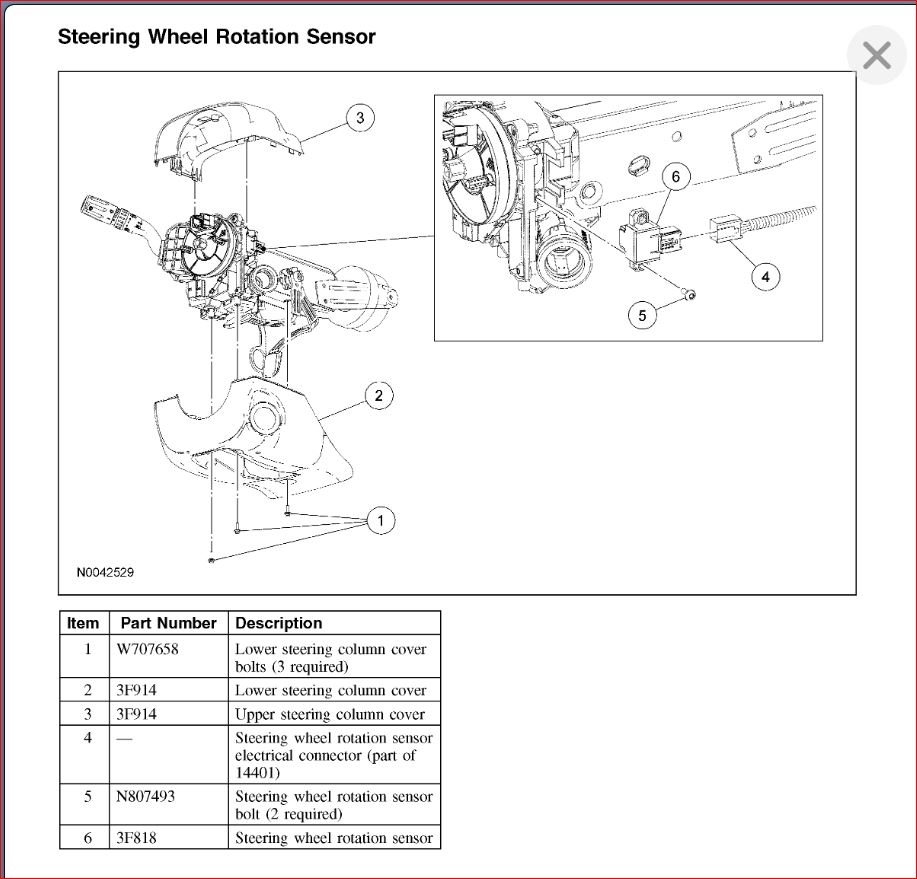
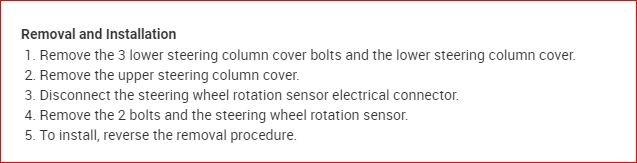
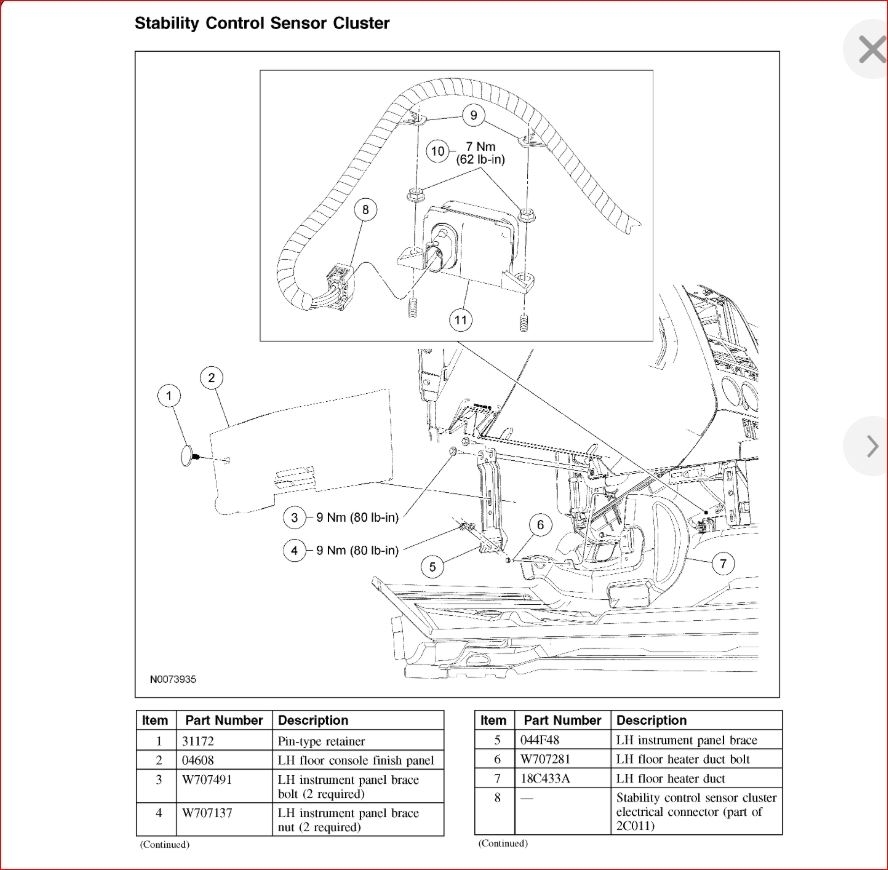
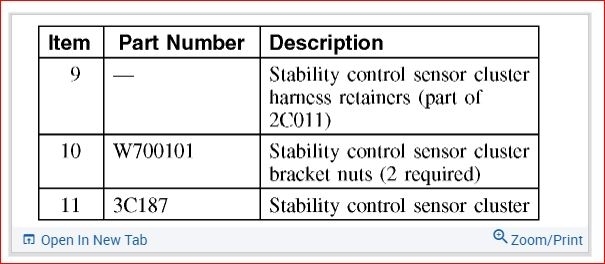
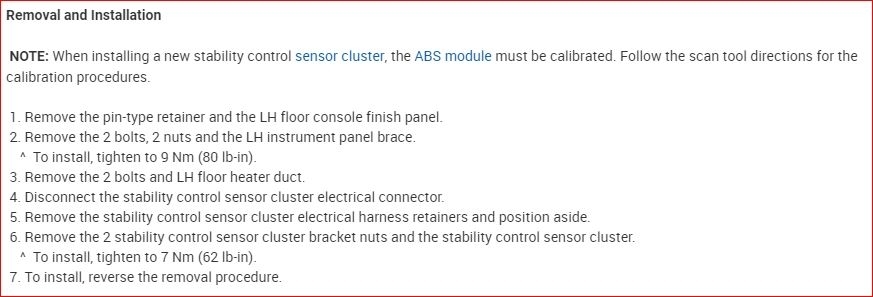
This is the Roll Stability Control system. This is part of the ABS and stability control system. Basically this portion of the system is looking primarily at the rotation of the steering wheel but it also looks at the stability control sensor cluster. However, the way this is happening it sounds like the steering rotation sensor is sending an erratic signal when you are turning the wheel. It happens so fast because as you turn the wheel it quickly recovers the proper signal.

The way to verify this is to monitor the sensor operation with a scan tool and see what it is saying. More than likely if you are able to graph it on a scan tool you will see when the light flashes the signal goes erratic at the same time.

Here is the material about this system. More than likely you have some diagnostic trouble codes in the computer so if you can pull those and send them I can give you more detail on on to test it.

Let me know if you can get the codes your self and if not, most parts stores will pull them for you for free. Let me know and we can go from there. Thanks
Sep 30, 2020 at 5:12 PM (Merged)
Avatar
JACOBANDNICKOLAS
  • CERTIFIED EXPERT
  • 110,175 POSTS
Hi,

I'm not familiar with the scan tool you have. I'm not sure if what it is capable of doing. Sorry about that.

Please let me know how things turn out or if you have other questions.

Take care,
Joe
Sep 30, 2020 at 5:12 PM (Merged)

Avatar
KEITH MUELLER
  • MEMBER
  • 6 POSTS
My wifes 2009 Explorer has been getting the same code, it is becoming more frequent. I have the Auto Enginuity scan tool with the total Ford Bundle, the only RSC/ABS code is B1342. I set up the live data meter screen to monitor wheel speeds, accel, yaw and steering angle. Was driving and lost comms to laptop. Stopped, reset everything, and noticed the steering angle was like 211 degrees when pointed straight ( it had been at basically zero before coms dropped, immediately upon reaching speed, the RSC alarm went off.
I stopped, cleared the code, restarted everything and the angle was basically zero again....drove until I lost comms again, and no problem. stopped with the wheel straight, again restarted everything, and it was showing -12....again, opon accel B1342. Stopped with comms still working, and showing steering angle at -12, reset everything, cleared code, restarted, hadn't touched the wheel, and it came up as basically zero, drove all way home with out alarm....could it be the sensor? or just the ECU not reading data right?
Sep 30, 2020 at 5:12 PM (Merged)
Avatar
JACOBANDNICKOLAS
  • CERTIFIED EXPERT
  • 110,175 POSTS
Hi,

Keith, sorry to ask this, but is it possible for you to copy and paste your entire thread to a new posting. We are trying to keep the posts specific to one topic. I'm sure someone will jump right on your question.

Again, sorry for asking, but I hope you understand.

Take care,
Joe
Sep 30, 2020 at 5:12 PM (Merged)
Avatar
SDELL40
  • MEMBER
  • 1 POST
The traction control light is staying lit up and the switch will not work to cut this option on or off. I've checked and nothing is unplugged. Could the remote start be causing a problem that I'm unaware off? Or is the switch bad that operates the traction control.?
Sep 30, 2020 at 5:12 PM (Merged)
Avatar
JACOBANDNICKOLAS
  • CERTIFIED EXPERT
  • 110,175 POSTS
Chances are there is a sensor that is the problem. What you need to do is take the vehicle to a nationally recognized parts store and have the computer scanned for codes. Most will do it for free.

Let me know what you find.

Joe
Sep 30, 2020 at 5:12 PM (Merged)
Avatar
W0RLR
  • MEMBER
  • 1 POST
while driving the abs light came on and stays on the information center flashes check advancetrac the traction control buton stays light off and 4x4 high flashes randomly any ideas where to start looking in to the problem
Sep 30, 2020 at 5:13 PM (Merged)
Avatar
JACOBANDNICKOLAS
  • CERTIFIED EXPERT
  • 110,175 POSTS
The two systems work together. Therefore, I would start by checking the ABS sensors. Since the lights are on, This video will show you how

https://youtu.be/rTtAnsOlZU4

Please run down this guide and report back.
Sep 30, 2020 at 5:13 PM (Merged)
Avatar
BILLROY24
  • MEMBER
  • 1 POST
Electrical problem
2005 Ford Explorer V6 Four Wheel Drive Automatic 23000 miles
----------------------------------------------------------------
My 2005 Explorer was in an accident and now the little Advance Trac symbol is lit up on the guages and in the information center, it says to "check advance trac". What would be causing this problem. Is there a sensor I need to replace?
Sep 30, 2020 at 5:13 PM (Merged)
Avatar
2CARPRO JACK
  • CERTIFIED EXPERT
  • 11,533 POSTS
Could very well be. To be sure the system will need to be scanned for codes.If a wheel sensor or some wiring was damaged, then the traction control/ABS system will turn on the light letting you know there is a problem
Sep 30, 2020 at 5:13 PM (Merged)
Avatar
BULLSEYE05
  • MEMBER
  • 1 POST
Today while driving my Explorer my abs light and my advan trac light went on and stayed on. In addition my 4x4 high light flashes on and off. I pulled over and turned off my car and turned it on right away but the same problem is occuring. I had trouble changing my back breaks about a month ago but never experienced the abs light or the 4x4 high light. What could be the problem?
Sep 30, 2020 at 5:13 PM (Merged)
Avatar
INTELLIGARD
  • MEMBER
  • 7 POSTS
I fixed the problem using the guide I had to replace my right front bearing hub and wheel speed sensor.
Sep 30, 2020 at 5:13 PM (Merged)
Avatar
CARAMEL
  • MEMBER
  • 1 POST
when i drive a certain speed i dont have control of the wheel and it makes a noise like it about to fall apart havnt been driving it do i have to take to shop and put it on the computer please help
Sep 30, 2020 at 5:13 PM (Merged)
Avatar
RIVERMIKERAT
  • CERTIFIED EXPERT
  • 6,110 POSTS
What do you mean by "I don't have control"? Is the steering wheel moving by itself, with no input from you? Is the engine stopping and starting with no input from you? Do the brakes spontaneously apply? What does the noise sound like? Where does it come from?
Sep 30, 2020 at 5:13 PM (Merged)