keypad keyless entry?

2010 FORD EXPLORER
43,500 MILES
Avatar
SLKGA
  • MEMBER
  • 1 POST
Purchased this used SUV from dealer (not a Ford dealer), it was owned by rental car company. No information held by the dealer.
Sep 20, 2011 at 6:34 PM
Advertisement
Avatar
ASEMASTER6371
  • CERTIFIED EXPERT
  • 52,796 POSTS
call your local ford dealer and give them your vin number and they can tell you where it is. some are on the module inside the lf door, some are in the trunk area, it all depends. you need a dealer to steer you in the right direction.

Roy
Sep 20, 2011 at 7:29 PM
Avatar
CJDUNBAR
  • MEMBER
  • 4 POSTS
One day last week the keyless entry remote quit working. I replaced the battery. No luck. I tried reprogramming the remote using the instructions in the manual. Here is where it gets odd. After turning the key on and off 8 times, the car responds by locking/unlocking. I then press a button on the remote, the car responds again by locking/unlocking. I then turn the key back off. Take the key out. Test the remote... doesnt work. Ive tried this several times with the same results. I am following the instructions exactly. Any idea where the problem is?
Dec 26, 2020 at 2:25 PM (Merged)
Advertisement
Avatar
KHLOW2008
  • CERTIFIED EXPERT
  • 41,814 POSTS
After turning the ignition off, does the locks cycle to end of programming mode?

Are all door and hood switches working correctly?
Dec 26, 2020 at 2:25 PM (Merged)
Avatar
CJDUNBAR
  • MEMBER
  • 4 POSTS
Yeah everything cycles like the manual says it will. All locks are working. Thanks for the reply.
Dec 26, 2020 at 2:25 PM (Merged)
Avatar
KHLOW2008
  • CERTIFIED EXPERT
  • 41,814 POSTS
You have programmed the remote correctly so it is something else that is is causing the system not to work.

Try pressing the button 2 times within 3 seconds and note if there are any response from the door locks or parking lights.

Does the panic button works?

Dec 26, 2020 at 2:25 PM (Merged)
Avatar
CJDUNBAR
  • MEMBER
  • 4 POSTS
Try pressing the button twice during the programming phase? Or after? If after, I tried that (out of frustration). Panic button doesnt work either.
Dec 26, 2020 at 2:25 PM (Merged)
Avatar
KHLOW2008
  • CERTIFIED EXPERT
  • 41,814 POSTS
After exiting programming phase.

Try waiting for at least 10 minutes after exiting programing phase before you try the remote.

Are you able to start the vehicle?
How many remotes did you program?

Try locking the doors manually and then using the remote to arm and disarm to see if it works.
Dec 26, 2020 at 2:25 PM (Merged)
Avatar
BOULDERSKIES
  • MEMBER
  • 20 POSTS
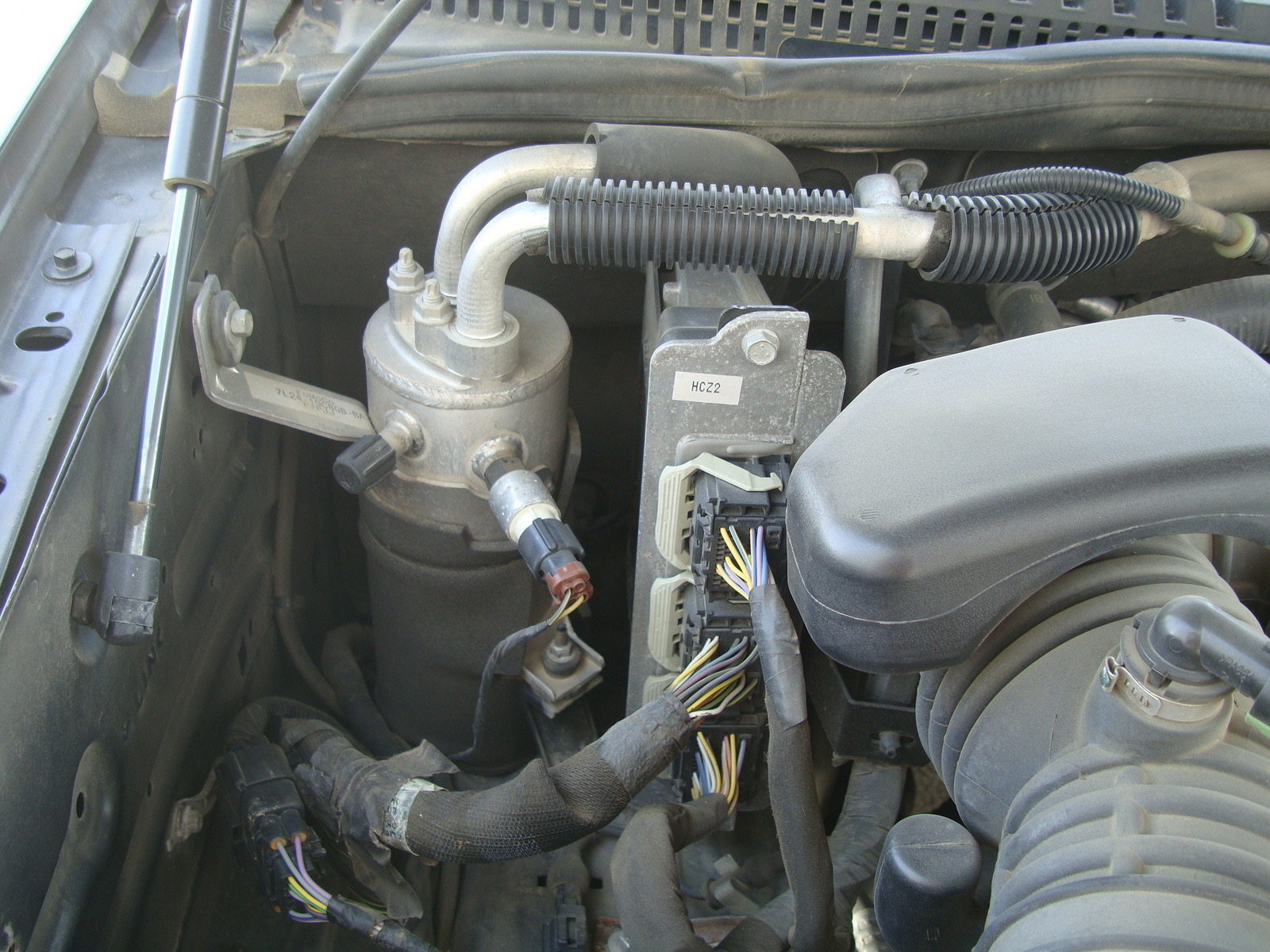
Trying to re-program the key-less entry on my friend's vehicle. I need the Factory Reset Code which is supposed to be on a card in the glove compartment and on the engine computer control module. The card doesn't exist and the code the Module is ZMN1. There are only numbers on the door.

Can you help?
Dec 26, 2020 at 2:25 PM (Merged)
Avatar
CJDUNBAR
  • MEMBER
  • 4 POSTS
Thanks alot! Waiting the 10 min worked. No clue why but who cares. The wife is happy now. Donation coming your way.
Dec 26, 2020 at 2:25 PM (Merged)
Avatar
KASEKENNY
  • CERTIFIED EXPERT
  • 18,907 POSTS
Hi

Attached is the process on how to reprogram it. Unfortunately, you need the factory code which is what you issue is. You can try the video attached to see if your vehicle is equipped with the same module. However, I think your vehicle has a PATS module and the video is showing a RAP module which is a different system.

https://youtu.be/vnmvjg9Pr60

If you cannot locate it, you can always stop into a Ford dealer and show them proof that you own the vehicle and they should be able to pull the info up in Ford's system.

Let me know how you make out and we can go from there. Thanks
Dec 26, 2020 at 2:25 PM (Merged)
Avatar
KHLOW2008
  • CERTIFIED EXPERT
  • 41,814 POSTS
Glad to know you have fixed the problem.

Have a great day.
Dec 26, 2020 at 2:25 PM (Merged)
Avatar
BOULDERSKIES
  • MEMBER
  • 20 POSTS
Thank you. I have the Owners Manual so I already know how to program the locks. The issue is the factory code.The manual states the code is the "computer module." There are two in this vehicle: one in the engine compartment, firewall, passenger side and a "engine transfer case control module" behind a panel, drivers side rear cargo area. The one in the engine compartment is silver, oriented vertically and has three or four large connectors plugged into it, each with a wiring harness attached. This is the one with the sticker on it with the symbols contained in my first note. It looks identical to the one shown in the photo below.

Could the code be on the transfer case control module instead of the engine computer?

Scott
Dec 26, 2020 at 2:25 PM (Merged)
Avatar
BMDOUBLE
  • CERTIFIED EXPERT
  • 1,139 POSTS
I can get you the code if you give me your VIN#.
Dec 26, 2020 at 2:25 PM (Merged)
Avatar
BOULDERSKIES
  • MEMBER
  • 20 POSTS
Thank you. It is a 2006 Ford Explorer, Eddie Bauer edition, VIN#1FMEU64EX6UB59981.
Dec 26, 2020 at 2:25 PM (Merged)
Avatar
KASEKENNY
  • CERTIFIED EXPERT
  • 18,907 POSTS
Thanks BMDOUBLE.

However, it is probably best if we let a dealer pull this information for security reasons. It is not something that we would want to post to this public site since the VIN is there and the factory code.

Plus, we have no way of verifying that BOULDERSKIES is the owner of the vehicle. In fact, he says that it is friends vehicle so this information should only be provided to the owner of the vehicle.

No offense BOULDERSKIES, I know you are just trying to help your friend but again, we are just an internet resource and this type of stuff needs to be verified. I am sure you can appreciate this because if it were your vehicle that we gave the info out to someone who posted to this site, I would think you would be upset. Again, I am sure you are on the up and up but this is just something I think we need to allow a dealer to verify before it gets provided.
Dec 26, 2020 at 2:25 PM (Merged)
Avatar
BOULDERSKIES
  • MEMBER
  • 20 POSTS
I understand completely. I am a close, family friend of the owner who is elderly and asks me for help when it comes to computer and vehicle tech type stuff like this. He bought the Explorer at a used car dealer and doesn't know who the seller was. It is in excellent condition and I've been helping him figure out the door locks, radio, HVAC, etc. So I can assure you this is on the up and up. So, if you change your mind and do have the code, you can always email it to me so its not posted publicly.

The engine computer module is identical to the one in the picture I posted above. Do you know what the symbols on it might mean and where the sticker with the code could be on it, perhaps behind it next to the firewall?

Scott
Dec 26, 2020 at 2:25 PM (Merged)
Avatar
MEPOWELL
  • MEMBER
  • 1 POST
I have a 2004 Ford explorer. I need the factory set code to reset my personal code for the keyless entry. The code is marked on the "computer module" Where is the computer module located?
Dec 26, 2020 at 2:25 PM (Merged)
Avatar
A2ZVP
  • MEMBER
  • 1 POST
I just bought an 04 same problem. The computer module is behind the panel in the back seat. Not the 3rd row seats. Passenger side. If you were sitting in this spot it would be about shoulder height. Pop of the top panel carefully than pull gently ouy on the bottom panel. With a flashlight you will see the sticker on the module. I was real scared at first that I might break something but it was real easy. Took 5 minutes. I got my information from serious explorations and It was right on Good luck
Dec 26, 2020 at 2:25 PM (Merged)
Avatar
KASEKENNY
  • CERTIFIED EXPERT
  • 18,907 POSTS
I totally understand. I think it would just be wise if this website does not cut out the dealer in this instance because Ford has established a process for providing these codes and I don't think having someone who has access to that information passing it out on a website like this, was part of that process. Thanks for understanding.

As for where the other places are for this code. Give this video a try and see if your friends code is in this location.

https://youtu.be/l8WVk-NnP0Q
Dec 26, 2020 at 2:25 PM (Merged)
Avatar
BOULDERSKIES
  • MEMBER
  • 20 POSTS
Totally understand. As always thanks everyone for your help on this one.
Scott
Dec 26, 2020 at 2:25 PM (Merged)
Avatar
KASEKENNY
  • CERTIFIED EXPERT
  • 18,907 POSTS
Hi,

Just checking in to see if that video helped. It showed the location of the factory code for your year, make, and model. Thanks
Dec 26, 2020 at 2:25 PM (Merged)
Avatar
BOULDERSKIES
  • MEMBER
  • 20 POSTS
Hi. Thank you so much for following up.

I attempted to access the fuse box in the drivers side quarter panel, just to the left of the emergency brake. Its an extremely difficult spot to get at. In addition, I could not remove the plastic fuse box cover. In short, if someone was trying to choose the most difficult location in this vehicle, this would be it.

So, I cant say whether or not the 5 digit access code is on the box or not.
I told my friend all this and he said, "the heck with it." And so do I. Its simply not worth it. I know he wont go to the dealer; he really doesn't care about the feature enough..

Again, thank you very much for the help and all you guys do on here. You really do provide a very valuable service.

Scott
Dec 26, 2020 at 2:25 PM (Merged)

Avatar
KASEKENNY
  • CERTIFIED EXPERT
  • 18,907 POSTS
Haha. That just about sums up a lot of shared frustrations out there in this industry. The cars were not designed with the people who work on them in mind.

Thanks for the update. Please let us know if you have more questions. Thanks
Dec 26, 2020 at 2:25 PM (Merged)

Avatar
BMDOUBLE
  • CERTIFIED EXPERT
  • 1,139 POSTS
I am the dealer, but you are absolutely right Kenny! I’m so used to giving out this information where I work but it’s usually to salesman. I can’t legally give it to anyone but that video actually is pretty good at explaining where to get the code. Just find you a young whipper snapper that can still bend upside down under the dash and get you that code! Apologies again!
Dec 26, 2020 at 2:26 PM (Merged)
Avatar
FLHTPI386
  • MEMBER
  • 2 POSTS
i only had one remote for my vehicle, so i bought another one, i tried to program it but did not work and now my working remote quit working, the key pad did not work also, a mech tried to reprgram it but says i have a bad pcm, traced to a bad eeprom, if the pcm is bad wouldnt that affect the rest of the car, goes the keyless entry have its own module?
Dec 26, 2020 at 2:26 PM (Merged)
Avatar
BLUELIGHTNIN6
  • CERTIFIED EXPERT
  • 16,542 POSTS
the keyless entry system uses the Central Security Module, not the Powertrain Control Module.
Dec 26, 2020 at 2:26 PM (Merged)
Avatar
FLHTPI386
  • MEMBER
  • 2 POSTS
would the bad EEprom prevent the tech from reprogramming the security system
Dec 26, 2020 at 2:26 PM (Merged)
Avatar
BLUELIGHTNIN6
  • CERTIFIED EXPERT
  • 16,542 POSTS
it is possible, the EEPROM is actually a computer chip inside of the main computer. the EEPROM is part of the receiving portion of the keyless entry, so if it fails then the transmitter's signals will not be read by the receiver (EEPROM).
Dec 26, 2020 at 2:26 PM (Merged)
Avatar
YOUNG1971
  • MEMBER
  • 1 POST
my keyless remotes rarely work. when they do it is usuallly while it is inside the vehicle near the ignition.i have walked around the vehicle and it does not appear to be a "deadspot" issue.i have replaced the batteries in the remotes and reprogrammed them. i would be grateful for any help.

thank you
Dec 26, 2020 at 2:26 PM (Merged)
Avatar
TTRAN
  • MEMBER
  • 45 POSTS
It seems to me that you have a problem with the sensitivity on the alarm receiver. You may locate the alarm module and check the antena wiring. To me, it seems you have a after market alarm. Look under the dash board to see if the module is there.
Tran
Dec 26, 2020 at 2:26 PM (Merged)
Avatar
JOSALYN ASUNCION
  • MEMBER
  • 1 POST
My boyfriend knows the factory reset code. Is there a way to disable the keyless code entry or change the factory code so he cant get inside?
Dec 26, 2020 at 2:26 PM (Merged)
Avatar
WRENCHTECH
  • CERTIFIED EXPERT
  • 20,761 POSTS
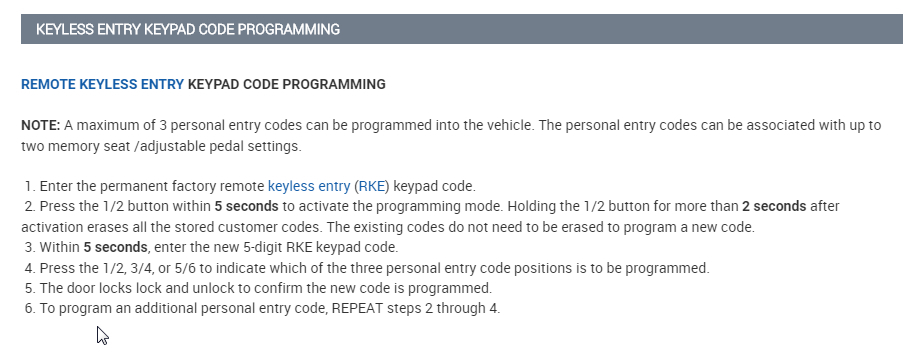
To create your own personal entry code:

Enter the factory-set code.
Press 1. • ...
Enter your personal 5-digit code. You must enter each number within five seconds of each other.
Press 1. • ...
The doors will lock and unlock to confirm that you have successfully programmed a personal entry code.
Dec 26, 2020 at 2:26 PM (Merged)
Avatar
OFFIONG
  • MEMBER
  • 14 POSTS
please where can i locate key-less entry system in ford explorer 2002
thanks
offiong edet
Dec 26, 2020 at 2:26 PM (Merged)
Avatar
JACOBANDNICKOLAS
  • CERTIFIED EXPERT
  • 110,175 POSTS
The keyless entry system has a central security module which is the primary brain behind the system regardless if you are using the key pad or a fob. This component is located at the base of the right C pillar.

Dec 26, 2020 at 2:26 PM (Merged)
Avatar
BRIGRANT
  • MEMBER
  • 3 POSTS
I have keyless entry and a keypad on the door. One day they decided both not to work i get not lighting up from the keypad on the door and no button works on my keyless entry. I would of thought to change the keyless entry battery but since they stopped working the same day i thought it was something else
Dec 26, 2020 at 2:26 PM (Merged)
Avatar
DAVE H
  • CERTIFIED EXPERT
  • 13,384 POSTS
Before performing individual component tests, check the following for possible cause of system malfunction. If no problems are found, go to SELF-DIAGNOSTIC SYSTEM.
Low Battery Charge
Blown Fuse(s) No. 20 (7.5-amp), No. 9 (20-amp), No. 18 (10-amp), No. 1 (60-amp) and No. 25 (7.5-amp)
Faulty Relays
Loose Or Corroded Connectors
Damaged Wiring
Damaged Transmitter(s)
Faulty Transmitter Batteries
Keyless Entry Keypad
Binding Locks Or Latches
Dec 26, 2020 at 2:26 PM (Merged)
Avatar
VIDEOGUY
  • MEMBER
  • 1 POST
Hi
I replaced battery in my 1997 Ford explorer. I found remote keyless entry stopped working. I press Lock/Unlock/Panic on my remote, the car doesn't respond. I am able to lock/unlock using the button inside the car, but not from the remote. I put new batteries in my remote. That didn't make any difference. I have two remotes. I tried another remote. That didn't work either.

I asked auto repair shop. The guy said the diag costs $90. If it is blown fuse, he will do it for $10.
I don't want to sign up for $90 job.

Is there anything I can try?
Dec 26, 2020 at 2:26 PM (Merged)
Avatar
LYNNENROB
  • MEMBER
  • 18 POSTS
im having the same problem, if i get and answer i will let you know, have you had any success yet?
Dec 26, 2020 at 2:26 PM (Merged)
Avatar
TAZDEV_001
  • MEMBER
  • 4 POSTS
i had the same problem with my 95 it ended up being the control module
Dec 26, 2020 at 2:27 PM (Merged)
Avatar
LYNNENROB
  • MEMBER
  • 18 POSTS
whats the control module, where is it?
Dec 26, 2020 at 2:27 PM (Merged)