key fob reprogram - not working?

2005 CHEVROLET SILVERADO
100,500 MILES
Avatar
01SCOOTER
  • MEMBER
  • 1 POST
In initiating the keyfob transmitter setup after the two key rotations and release of the drivers door unlock button then within a couple of seconds the locks cycle twice instead of once and the horn beeps.the keyfob does nothing even after simultaneously holding the fobs lock/unlock buttons well past 30 seconds. The Keyfob is new bought on ebay and the battery shows 3.07V metered while pressing a fob key (I am an electronics Tech). My understanding is the locks should cycle once then cycle once again when the keyfob transmitter is recognised.
Any Ideas????
Thankyou
Oct 30, 2011 at 10:11 PM
Advertisement
Avatar
MERLIN2021
  • CERTIFIED EXPERT
  • 17,250 POSTS
This is what I have follow it to the T. If not working, it's possible the remote you bought isnt for your truck.
Method 1 - No Tools Required, Program All Transmitters
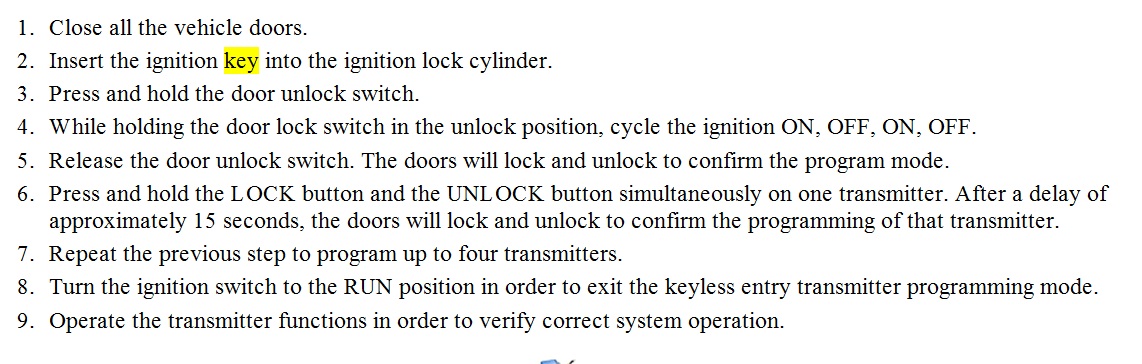
1. Close all the vehicle doors.
2. Insert the ignition key into the ignition lock cylinder.
3. Press and hold the door unlock switch.
4. While holding the door lock switch in the unlock position, cycle the ignition ON, OFF, ON, OFF.
5. Release the door unlock switch. The doors will lock and unlock to confirm the program mode.
6. Press and hold the LOCK button and the UNLOCK button simultaneously on one transmitter.
After a delay of approximately 15 seconds, the doors will lock and unlock to confirm the
programming of that transmitter.
7. Repeat the previous step to program up to 4 transmitters.
8. Turn the ignition switch to the RUN position in order to exit the keyless entry transmitter
programming mode.
9. Operate the transmitter functions in order to verify correct system operation.

IMPORTANT: All transmitters which are to be recognized by the PDM must be
programmed in a single programming sequence. When using this
program method, all previously programmed transmitters will be erased
upon the receipt of the programming signal from the first transmitter.
The order in which the transmitters are programmed will determine its
numbering position within the PDM memory. The first transmitter
programmed will be transmitter #1, and the second transmitter
programmed will be transmitter #2. The number stamped on the
transmitter case is for reference only; #2 can be programmed as #1, or
vice versa. Additional unnumbered transmitters are also available.

This guide can help as well

https://www.2carpros.com/articles/how-to-re-program-a-key-remote-fob

let us know
Oct 31, 2011 at 8:26 PM
Avatar
SAMCRAWFORD
  • MEMBER
  • 1 POST
i have a 03 chevy silverado, the key fob stopped working so i changed the battery, it still doesent work,is there something that needs to be reset?
May 13, 2021 at 8:11 PM (Merged)
Advertisement
Avatar
SATURNTECH9
  • CERTIFIED EXPERT
  • 30,869 POSTS
Hello,

Here is a guide to help you see how to reprogram your key fob.

https://www.2carpros.com/articles/how-to-re-program-a-key-remote-fob

Please let us know what happens.

Cheers,
May 13, 2021 at 8:11 PM (Merged)
Avatar
TYALLAN
  • MEMBER
  • 5 POSTS
I have been having an issue with my rig. This all started the other day when I could not unlock my truck with my key fob. I thought the battery was low because the day before I had to hit the button multiple times for it to unlock as I walked towards it. So I unlocked the door manually and tried to start it up and it would fire right up and the cut off after a second. Well during the holiday I did not have any time to look at it and Sunday I finally was tracing down the problem as I thought it was a bad ground to the BCM. This kind of was the problem because as soon as I grabbed the box down by the brake pedal on the floor by the kick panel the lights and everything looked to be working. Starts right up and everything. Now my only problem seems to be is that my stereo seems to working fine but no sound comes out of the speakers. Then other problem is that my heater control that switches from floor to defrost does not work, AC button does not light up, rear window defrost does not come on and on my dual zone temperature control one side is hot and the other is cold. Any Ideas on what this could be? I have tried to clean all the ground wires can find. Please let me know where the grounds are.

Thank you.
May 13, 2021 at 8:11 PM (Merged)
Avatar
ASEMASTER6371
  • CERTIFIED EXPERT
  • 52,796 POSTS
the BCM is a common denominator for all these issue except the radio.

have it scanned for codes first.

did you check the grounds at the battery?

Roy
May 13, 2021 at 8:11 PM (Merged)
Avatar
TYALLAN
  • MEMBER
  • 5 POSTS
The radio appears to be fully operational, just no sound. I have the stock Bose amp in the center console and I think it may not be getting power. I have an ODB2 scanner and no codes come up during a scan. I have cleaned every ground on the rig that I can find. Can I just replace the BCM or do I have to have a GM dealer install, something I read that it has the vin loaded in it form the dealer.
May 13, 2021 at 8:11 PM (Merged)
Avatar
ASEMASTER6371
  • CERTIFIED EXPERT
  • 52,796 POSTS
basic code scanner cannot read the BCM codes. a parts store can read them for free.

do not want to guess at this point. want to confirm before replacing anything.

the radio sounds like the issue for the speakers.

roy
May 13, 2021 at 8:11 PM (Merged)
Avatar
TYALLAN
  • MEMBER
  • 5 POSTS
What kind of scanner will read the BCM codes? So they know what I am talking about.
May 13, 2021 at 8:11 PM (Merged)
Avatar
ASEMASTER6371
  • CERTIFIED EXPERT
  • 52,796 POSTS
just ask them if they can read BCM codes

Roy
May 13, 2021 at 8:11 PM (Merged)
Avatar
TYALLAN
  • MEMBER
  • 5 POSTS
I ran my innova 3150 diagnostic tool on my truck and went to advanced dts and it gave me the following codes:

P1626: THEFT DETERRENT SYSTEM FUEL ENABLE CIRCUIT
U1026: LOSS OF ACTIVE TRANSFER CASE CONTROL MODULE COMMUNICATIONS
U041: LOSS OF VEHICLE THEFT DETERRENT COMMUNICATIONS
U1064: NO CMMUNICATIONS WITH BODY CONTROL MODULE
U1300: CLASS 2 CIRCUIT SHOT TO GROUND
U1300: CLASS 2 CIRCUIT SHORT TO POWER

Any ideas?
May 13, 2021 at 8:11 PM (Merged)
Avatar
CLYDE MISHLER
  • MEMBER
  • 3 POSTS
key fob quit. put new batteries in , nothing. Tried reprogramming, nothing. one quit a year ago, second quit last month. any help? fuse? something?
May 13, 2021 at 8:11 PM (Merged)
Avatar
JDL
  • CERTIFIED EXPERT
  • 16,098 POSTS
I don't know if you have tried the keyless entry resync procedure? It is below.
May 13, 2021 at 8:11 PM (Merged)
Avatar
ASEMASTER6371
  • CERTIFIED EXPERT
  • 52,796 POSTS
DTC U1300

CIRCUIT DESCRIPTION

DTC U1300 - U1305


Modules connected to the class 2 serial data circuit monitor for serial data communications during normal vehicle operation. Operating information and commands are exchanged among the modules. Node Alive messages are transmitted by each module on the class 2 serial data circuit about once every 2 seconds. When the module detects one of the following conditions on the class 2 serial data circuit for approximately 3 seconds , the setting of all other class 2 serial communication DTCs is inhibited and a DTC will set.

CONDITIONS FOR SETTING THE DTC s
No valid messages are detected on the class 2 serial data circuit.
The voltage level detected on the class 2 serial data circuit is under one of the following conditions:
High
Low
The above conditions are met for approximately 3 seconds.
ACTION TAKEN WHEN THE DTCS SETS
The module inhibits the setting of all other class 2 DTCs.
The module uses default values for all parameters received on the class 2 serial data circuit.
CONDITIONS FOR CLEARING THE DTC
A current DTC clears when the malfunction is no longer present.
A history DTC clears when the module ignition cycle counter reaches the reset threshold, without a repeat of the malfunction.
DIAGNOSTIC AIDS
These DTCs cannot be retrieved with a current status. Diagnosis of current DTCs is accomplished via the symptom. Refer to Scan Tool Does Not Communicate with Class 2 Device. See: Powertrain ManagementComputers and Control SystemsInformation BusTesting and InspectionSymptom Related Diagnostic Procedures
An intermittent condition is likely to be caused by a short or an open on the class 2 serial data circuit. Use the Scan Tool Does Not Communicate with Class 2 Device procedure in order to isolate an intermittent condition.

Circuit Description
Modules connected to the class 2 serial data circuit monitor for serial data communications during normal vehicle operation. Operating information and commands are exchanged among the modules. When a module receives a message for a critical operating parameter, the module records the identification number of the module which sent the message for state of health monitoring/node alive messages. A critical operating parameter is one which, when not received, requires that the module use a default value for that parameter. Once an identification number is learned by a module, it will monitor for that modules node alive message. Each module on the class 2 serial data circuit is required to send a Node Alive message every 2 seconds. When no message is detected from a learned identification number for 5 seconds, a DTC U1XXX. XXX is equal to the 3 digit identification number of the module.

The control module ID number list provides a method for determining which module is not communicating. A module with an internal class 2 serial data circuit malfunction or which loses power during the current ignition cycle would have a lost communication DTC set by other modules. Use the control module ID number list in order to determine which module is not communicating and the lost communications with XXX diagnostic table in order to diagnose the malfunction. When no message is detected from a learned identification number for 5 seconds, a DTC U1XXX is set.

Control Module ID Number
Powertrain Control Module (PCM) 016
Transmission Control Module (TCM) 024
Transfer Case Shift Control Module 026
Electronic Brake Control Module (EBCM) 041
Rear Wheel Steering Control Module 048
Body Control Module (BCM) 064
Inflatable Restraint Sensing and Diagnostic Module (SDM) 088
Instrument Panel Cluster (IPC) 096
Radio 128
Audio Amplifier 129
Remote Playback Device-CD Changer 130
Digital Audio Broadcast Module (DAB) 136
Digital Radio Receiver 137
Vehicle Communication Interface Module (VCIM) 151
HVAC Control Module 152
Rear Seat Audio Controller 154
Rear Seat Entertainment (RSE) Assembly 154
Driver Door Module (DDM) 160
Front Passenger Door Module (FPDM) 161
Memory Seat Module (MSM) 166
RSA/HVAC Control Module 167
Theft Deterrent Control Module 192
When more than one loss of communication DTC is set in a single module or among multiple modules, diagnose the DTCs in the following order:
Current DTCs before history DTCs except as specified in the diagnostic tables.
The DTC which is reported the most times.
From the lowest number DTC to the highest number DTC.
Conditions for Running the DTC
Voltage supplied to the module is in the normal operating voltage range of 9-16 volts.
DTCs U1300, U1301 or U1305 do not have a current status.
The vehicle power mode requires serial data communication to occur.
Conditions for Setting the DTC
A node alive message has not been received from a module with a learned identification number within the last 5 seconds.

Action Taken When the DTC Sets
The module uses a default value for the missing parameter.

Conditions for Clearing the DTC
A current DTC clears when the malfunction is no longer present.
A history DTC clears when the module ignition cycle counter reaches the reset threshold, without a repeat of the malfunction.
Diagnostic Aids
An intermittent open between a module and a star connector may cause this DTC to set.
A poor connection at a module or a star connector may cause this DTC to set.
An intermittent open in a star connector may cause this DTC to set.
An open voltage or ground circuit to a module may cause this DTC to set.
An internal module malfunction may cause this DTC to set.
Test Description
The number below refers to the step number on the diagnostic table.
The module which was not communicating on the class 2 serial data circuit may have set Loss of Communication DTCs for those modules that it was monitoring.

i think the u 1300 and 1604 are the key to your issues which basicly come down to the bcm. verify power and grounds to the unit.

try removing the battery cable and re attaching. if all comes back, then definite bcm

Roy
May 13, 2021 at 8:11 PM (Merged)

Avatar
CLYDE MISHLER
  • MEMBER
  • 3 POSTS
yes tried that several times. Is their a fuse? or computor master control? if so, where? i'll check the wiring.
May 13, 2021 at 8:11 PM (Merged)
Avatar
TYALLAN
  • MEMBER
  • 5 POSTS
Everything looks to have power and ground. Removing the battery cable and reattaching changes nothing. Can I replace the BCM or does it have to be done by GM?
May 13, 2021 at 8:11 PM (Merged)
Avatar
JDL
  • CERTIFIED EXPERT
  • 16,098 POSTS
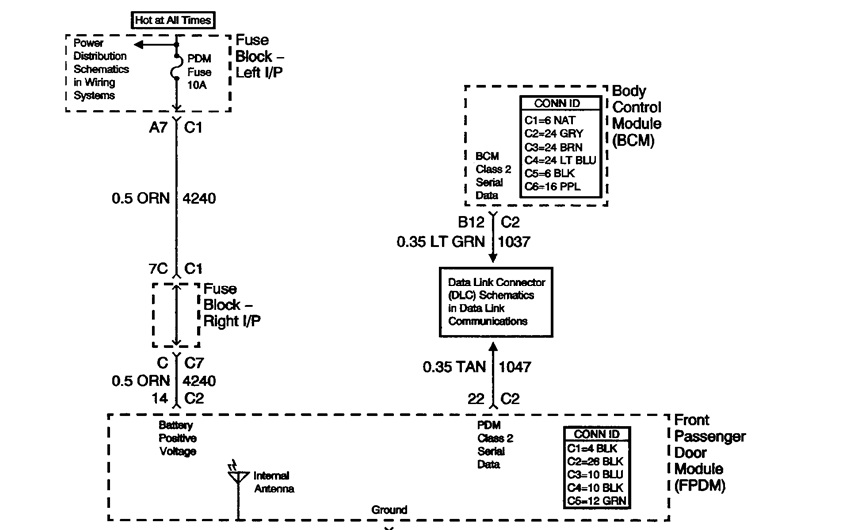
The transmitter sends a signal to the passenger door module, that module sends signal to bcm, the bcm performs its function.

Yes there is a fuse, diagram below.
May 13, 2021 at 8:11 PM (Merged)
Avatar
ASEMASTER6371
  • CERTIFIED EXPERT
  • 52,796 POSTS
you can do it, but get one from GM and have them flash it for you.

Roy
May 13, 2021 at 8:11 PM (Merged)

Avatar
CLYDE MISHLER
  • MEMBER
  • 3 POSTS
i tried the reprogram you suggested, no help. But my son suggested leaving the battery unhooked for 30 minutes or so, i tried that, to reset all the computors, and then tried your reprogramming procedure after i rehooked the battery. It worked. took 2 times, but the key fob works again. Thank you
May 13, 2021 at 8:11 PM (Merged)
Avatar
JDL
  • CERTIFIED EXPERT
  • 16,098 POSTS
Glad you got it going your way.
May 13, 2021 at 8:11 PM (Merged)
Avatar
DSHELTON
  • MEMBER
  • 3 POSTS
opened up the fob and cleaned contacts, all looked good. no corrosion, seal is in tact. it's just dead.
May 13, 2021 at 8:11 PM (Merged)
Avatar
WRENCHTECH
  • CERTIFIED EXPERT
  • 20,761 POSTS
You cannot program just one transmitter. All transmitters have to be programmed simultaneously.

Transmitter Programming Procedure (Method 1 - No Tools Required)

1. Close all the vehicle doors.
2. Insert the ignition key into the ignition lock cylinder.
3. Press and hold the door unlock switch.
4. While holding the door lock switch in the unlock position, cycle the ignition ON, OFF, ON, OFF.
5. Release the door unlock switch. The doors will lock and unlock to confirm the program mode.
6. Press and hold the LOCK button and the UNLOCK button simultaneously on one transmitter. After a delay of approximately 15 seconds , the doors will lock and unlock to confirm the programming of that transmitter.
7. Repeat the previous step to program up to four transmitters.
8. Turn the ignition switch to the RUN position in order to exit the keyless entry transmitter mode.
9. Operate the transmitter functions in order to verify correct system operation.
May 13, 2021 at 8:11 PM (Merged)
Avatar
DSHELTON
  • MEMBER
  • 3 POSTS
2001 silverado dead key fob follow up. followed the step by step reprogram you sent. bad keyfob worked! good one stopped working. tried reprogram again, each time, alternate fob dead, freshly programmed ok. still only one operational.
May 13, 2021 at 8:11 PM (Merged)
Avatar
WAY2COOLMOTORSPORTS
  • MEMBER
  • 1 POST
neither keyless entery fob will unlock the doors and i have replaced the batterys, what could be the problem?
May 13, 2021 at 8:11 PM (Merged)
Avatar
MERLIN2021
  • CERTIFIED EXPERT
  • 17,250 POSTS
To Program them without a scantool, follow these steps:1.) Turn igntion off, hold down the unlock button on the drivers door switch. Turn the ignition on then off twice.
Release the unlock button, the door locks should cycle once. 2.) Hold down lock and unlock buttons on the transmitter for 15 seconds. Door locks should cycle once. Repeat step 2 for the other transmitter, Turn ignition on to exit programming mode. To simply resynch the transmitters stand 5 feet from truck and press and hold lock and unlock for 7 seconds, this is the first thing to try before reprogramming...
May 13, 2021 at 8:11 PM (Merged)
Avatar
JOHNNY3793
  • MEMBER
  • 4 POSTS
When i try to put the alarm in program mode the way they show on YouTube my truck wont do it. i don't know why.
May 13, 2021 at 8:11 PM (Merged)
Avatar
ASEMASTER6371
  • CERTIFIED EXPERT
  • 52,796 POSTS
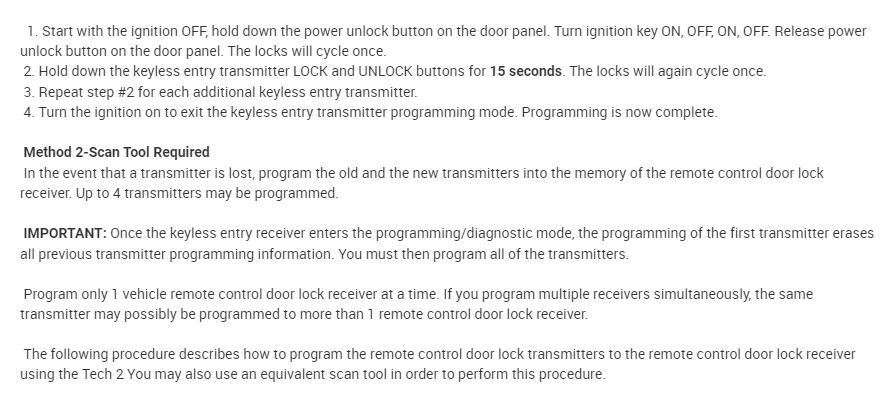
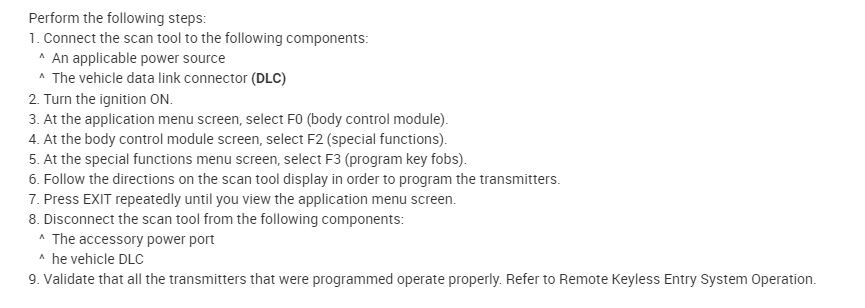
I attached the procedure for you. Try this and let me know.

Roy
May 13, 2021 at 8:11 PM (Merged)
Avatar
JOHNNY3793
  • MEMBER
  • 4 POSTS
Okay, will try it now.
May 13, 2021 at 8:11 PM (Merged)
Avatar
JOHNNY3793
  • MEMBER
  • 4 POSTS
Okay, I tried the first option and nothing today or yesterday and option 2 I don't have a tech2 2 device I only have the cen-Tech OBDII/EOBD device.
May 13, 2021 at 8:11 PM (Merged)
Avatar
ASEMASTER6371
  • CERTIFIED EXPERT
  • 52,796 POSTS
You will need to have someone with the TECH 2 scanner to program it for you.

A lot of private shops have the tool. Call around and see who can help you and how much to program it.

Roy
May 13, 2021 at 8:11 PM (Merged)
Avatar
JOHNNY3793
  • MEMBER
  • 4 POSTS
Okay, thank you.
May 13, 2021 at 8:11 PM (Merged)