Touch screen issues

2004 HONDA ACCORD
115,000 MILES
Avatar
ADAMLELO
  • MEMBER
  • 19 POSTS
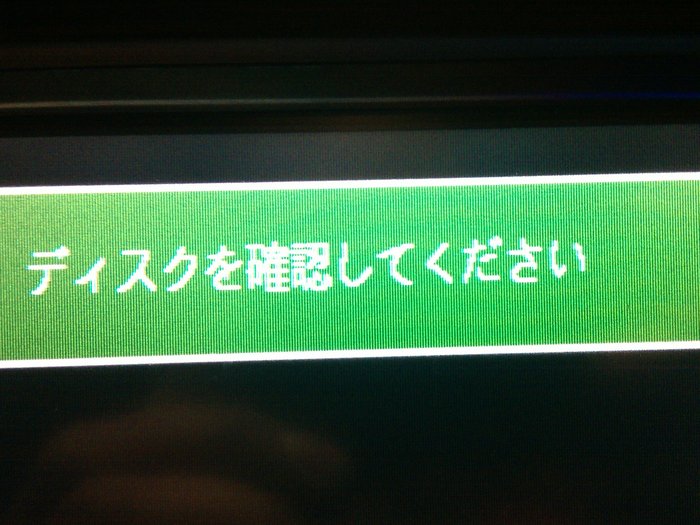
I have a 2004 Honda Accord 24 E station wagon. The issue I have is that the touch screen does not operate. I cannot change vent settings, cannot do anything. All that is displayed is a green box with Japanese writing in it. How can this be fixed?
Sep 1, 2012 at 3:23 AM
Advertisement
Avatar
KHLOW2008
  • CERTIFIED EXPERT
  • 41,814 POSTS
Check fuse # 30 (7.5 A) in underdash fuse/relay box.

Get a scan to check for trouble codes.
Sep 1, 2012 at 10:30 AM
Avatar
ADAMLELO
  • MEMBER
  • 19 POSTS
I have checked the fuses, and there are no fuses blown. With a scan tool connected, what do I look for
Sep 2, 2012 at 6:19 AM
Advertisement
Avatar
KHLOW2008
  • CERTIFIED EXPERT
  • 41,814 POSTS
Trouble codes. Check if you are able to communicate with the module and testings can be done with the scan tool, not a code reader.
Sep 2, 2012 at 12:07 PM
Avatar
ADAMLELO
  • MEMBER
  • 19 POSTS
I have connected a scan tool and no trouble codes are present. But there are a few options that say "model not supported" when selected. Can the DVD player be bypassed? The reason I say that is because when I unplugged the DVD player the touch screen turns off. Could there be a fault there making the touch screen inoperative. Could that be an issue ?
Sep 4, 2012 at 6:20 AM
Avatar
KHLOW2008
  • CERTIFIED EXPERT
  • 41,814 POSTS
Model not supported can either mean you have selected the wrong model or your scan tool is not compatible with the vehicle or does not have software the model listed.

Is your vehicle equipped with navagition system?
How many disc system is it?

Sep 4, 2012 at 12:08 PM
Avatar
ADAMLELO
  • MEMBER
  • 19 POSTS
Yes it has navigation system. In dash 6 disc CD player.
I have attached a photo of the screen.
Sep 5, 2012 at 7:20 AM
Avatar
KHLOW2008
  • CERTIFIED EXPERT
  • 41,814 POSTS
The wordings is requesting you to test and confirm, so it means something is wrong.

Try the following to see if you can come up with anything.

STARTING THE SELF-DIAGNOSTIC FUNCTION (WITH NAVIGATION)

1. Turn the ignition switch to ACC (I) or ON (II).

2. Turn the audio unit off.

3. While holding down the upper part of both the "CH/DISK" and "SEEK/SKIP" bars at the same time, press the VOL/PWR knob.

4. "DIAG" will appear on the audio-HVAC subdisplay/clock to indicate you have entered the self-diagnostic mode.

5. By pressing a button while "DIAG" is displayed, the input will trigger a mode that is assigned to that switch.

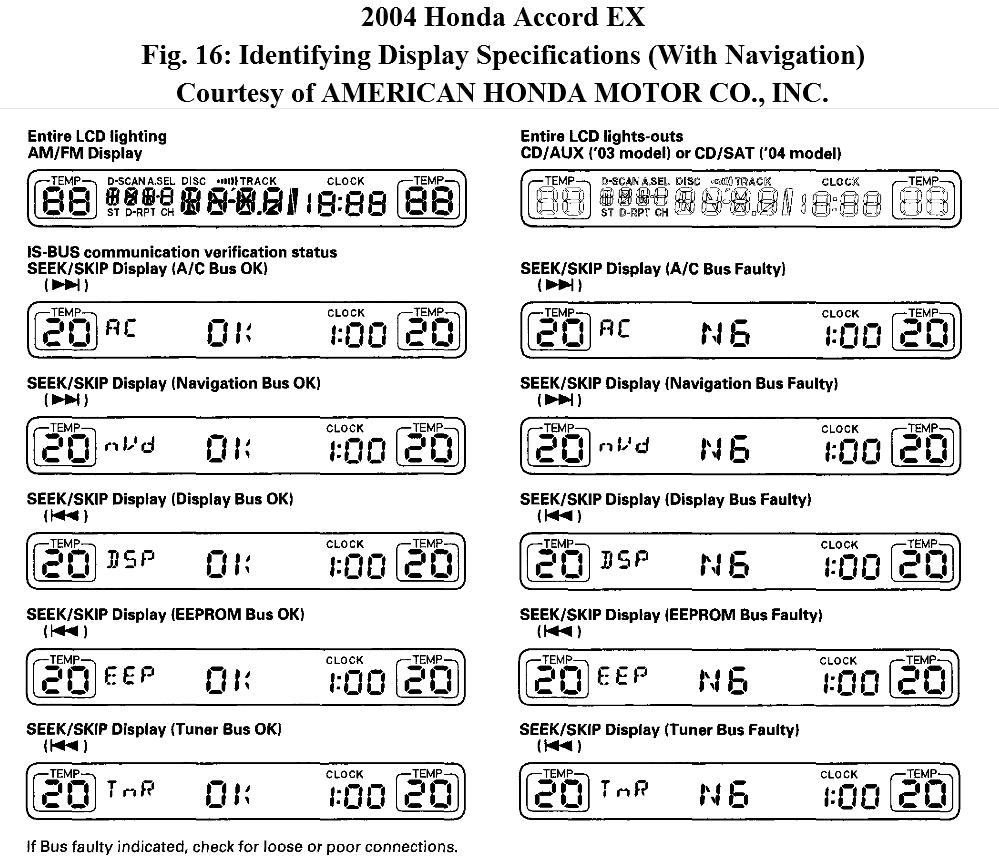
AM/FM button
Entire LCD lighting mode: Turns on the entire LCD to show the presence or absence of an LCD failure.

CD/AUX or CD/SAT button
Entire LCD light-out mode: Turns off the entire LCD to show the presence or absence of an LCD failure.

SEEK SKIP bar ("RTRIF" "RTRIF"|)
Display IS-BUS communication verification status: Displays the verification of the communication between the climate control unit and Navigation-display (toggles between "nVd" and "AC" every 5 seconds).

SEEK SKIP bar (|"LTRIF" "LTRIF")
Display 12C-BUS communication verification status: Displays the verification of the communication among the display, the EEPROM, and the tuner (toggles between "DSP", "EEP" and "TnR" every 5 seconds).

6. The self-diagnostic function will end when the audio unit is turned off, or the ignition switch is turned off.

Sep 5, 2012 at 12:41 PM
Avatar
ADAMLELO
  • MEMBER
  • 19 POSTS
Thanks for the info. I have done the self diagnostic and the only issue was AC bus faulty. NC was displayed on sub display. Would the next step be to check all connections to navigation unit and buttons around the touch screen ?
Sep 7, 2012 at 11:10 PM
Avatar
ADAMLELO
  • MEMBER
  • 19 POSTS
I was curious so I did the self diagnostic again after taking the car for a drive, Now everything checks ok.
Sep 8, 2012 at 6:10 AM
Avatar
KHLOW2008
  • CERTIFIED EXPERT
  • 41,814 POSTS
Is the screen working working now?
Sep 8, 2012 at 6:48 PM
Avatar
ADAMLELO
  • MEMBER
  • 19 POSTS
No the screen is still not working. Did another diagnostic check today, came up NC for AC bus faulty.
Sep 9, 2012 at 2:15 AM
Avatar
KHLOW2008
  • CERTIFIED EXPERT
  • 41,814 POSTS
Seems there is a fault with the control unit.

Can the radio be operated?

Was the scan tool you used able to detect B codes? They are related to the HVAC system.

Sep 9, 2012 at 10:11 AM
Avatar
ADAMLELO
  • MEMBER
  • 19 POSTS
Yes, the radio does work. I can only search for radio stations manually. Cannot store channels. I will have to have another look with the scan tool . I've been told there is a disc that can get to reset the touch screen . Would this work?
Sep 9, 2012 at 12:14 PM
Avatar
KHLOW2008
  • CERTIFIED EXPERT
  • 41,814 POSTS
If you have a wiring problm, the disc is not going to work and I have been researching on the radio which is not the problem.

Most likely it is a B-can fault and it could be the navigation unit that is faulty or there is a communication error somewhere. Go through the following to see if you can come up with anything.

FORCED STARTING OF DISPLAY

Special Tools Required

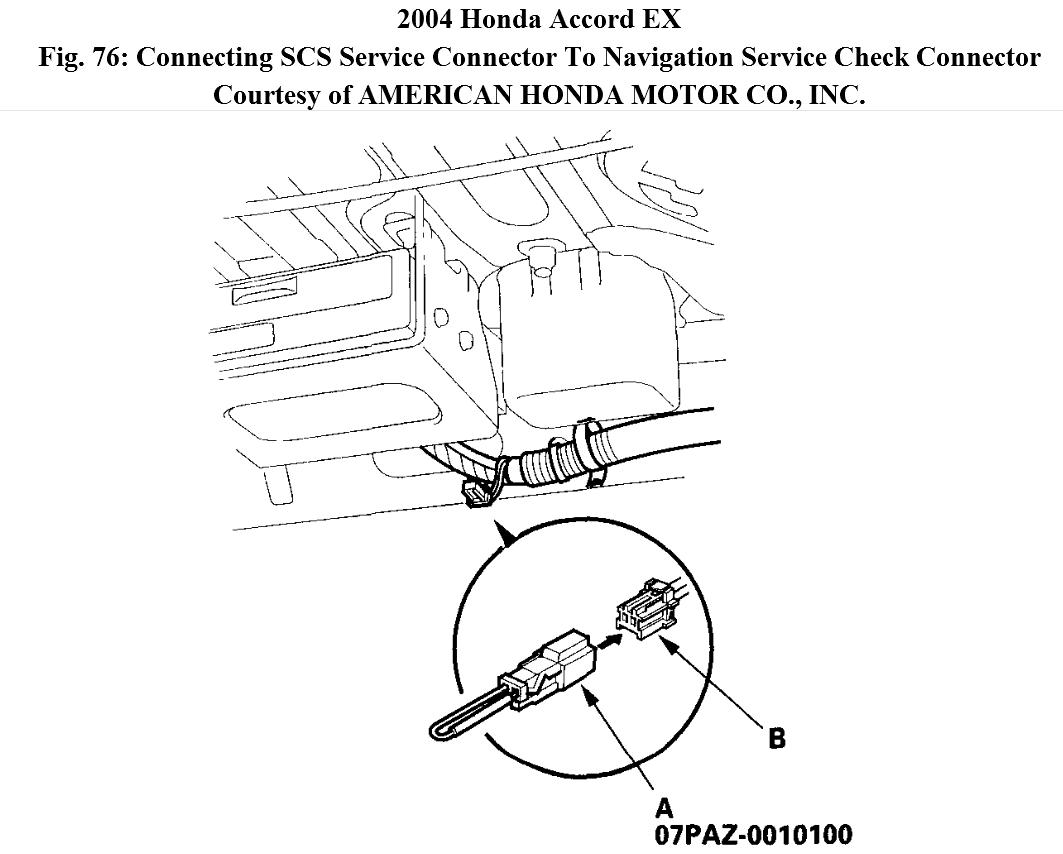
SCS service connector 07PAZ-0010100 ( A paper clip bent to bridge the terminals would do)

1. Connect the SCS service connector (A) to the navigation service check connector (B) located behind the navigation unit.

2. Turn the ignition switch ON (II).

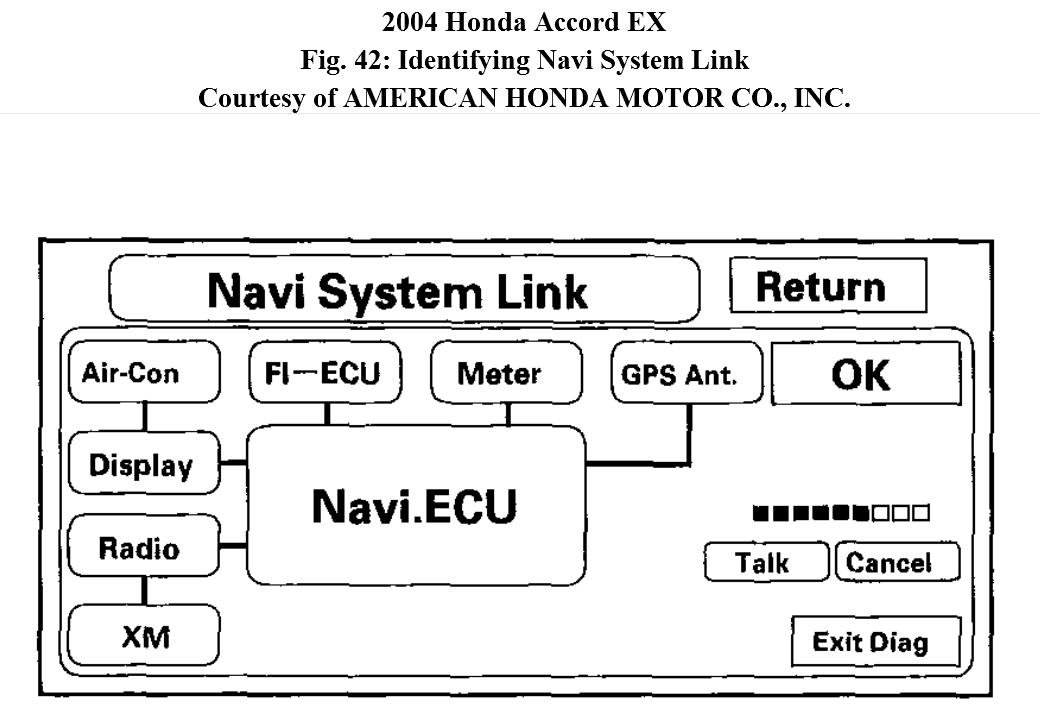
3. Check that the system starts up and then changes to the "Navi System Link" screen.


NAVI SYSTEM LINK

This diagnostic tests the cables connecting the navigation components. Ensure that the ignition switch is in the ON (II) position. When the diagnostic begins, a "bong" sound is heard. The system is in a "Detecting" mode, and is waiting for all items in
white to be tested. This includes the navigation voice control (TALK/BACK) buttons, and microphone. Press the navigation TALK button on the steering wheel, and in a normal voice, say "testing". The Talk indicator on the screen should become green, and the voice level indicator should move to at least the 6th bar to pass. Next,
press the navigation BACK button. This should cause the "Cancel" indicator to go green.

If all of the communication lines connecting the system components, and the navigation TALK/BACK buttons/microphone check out OK (all block diagram items green), then the "OK" indicator will become green.

If there is a problem with the system, the faulty system component item will change to red, and the screen will show "NG" in red. Use the troubleshooting index, and other diagnostic screens to help locate the problem.

The indication on the screen will not change until the ignition switch is cycled. After repairing the affected cable or system, repeat this diagnostic.

This navigation system is designed for use in the US or Canada market.
¡- US Market: English is the only language choice.

¡- Canada Market: On the disclaimer screen, English or French can be selected.

¡- Touch the "Chg Canada" or "Chg US" button to select the desired
choice.

Select "Return" to return to the Diagnosis Menu.


NOTE:
Green boxes and green "OK" indicate that the communications lines (cables) are intact. This diagnostic does not necessarily imply that the individual components are functioning properly. For instance, the GPS antenna wire may be crushed, but still show as "green". A road test, or other diagnostic may be necessary to find the
problem.
NOTE:
The mic level indicator must reach the 6th bar or greater to
pass the test.

If the XM link is red or flashing red, go to audio system symptom troubleshooting (see NAVIGATION CANNOT CONTROL XM RADIO).
Sep 9, 2012 at 1:30 PM
Avatar
ADAMLELO
  • MEMBER
  • 19 POSTS
I had another look with the scan tool, and looked at the HVAC system for codes. There was no codes present. Scan tool I was using is a Hanatech P2
Sep 10, 2012 at 6:16 AM
Avatar
KHLOW2008
  • CERTIFIED EXPERT
  • 41,814 POSTS
Did you try to comunicate with the various control modules?

Have you performed the tests in my last post?
Sep 10, 2012 at 7:49 AM
Avatar
ADAMLELO
  • MEMBER
  • 19 POSTS
Yes I tried to communicate with other modules and it still came up with model not supported. No I haven't tried the tests on the Navi Link System. Will let you know the results when done.
Sep 11, 2012 at 7:07 AM
Avatar
ADAMLELO
  • MEMBER
  • 19 POSTS
I have had a look under, behind and around the navigation unit and there is no 2 pin plug. There are 2 plugs by the gear selector 1 blue plug with 6 pins and 1 grey plug with 6 pins. Could it be anywhere else? What would the colors of the wiring for the SCS service connector? Below are the numbers on the nav unit.
P/N: 39050-SED-J410-M1
REF.NO: RG843JA
SERIAL: EDB26007220
Sep 18, 2012 at 7:11 PM
Avatar
KHLOW2008
  • CERTIFIED EXPERT
  • 41,814 POSTS
The link wire colors are Green/Yellow and Green/Red. It is attached to the wireharness in the middle of nowhere and is usually taped to the harness.
Check in trunk under right side of rear shelf.
Do you have the security code and have you tried inputting them?
Sep 19, 2012 at 1:18 PM
Avatar
ADAMLELO
  • MEMBER
  • 19 POSTS
My vehicle is a station wagon not a sedan therefore there is no rear shelf. No , do not have security code
Sep 20, 2012 at 5:41 AM
Avatar
KHLOW2008
  • CERTIFIED EXPERT
  • 41,814 POSTS
Check around your CD changer.
Sep 20, 2012 at 6:29 AM
Avatar
ADAMLELO
  • MEMBER
  • 19 POSTS
I am still unable to find the SCS connector . I have had a look behind navigation unit, DVD player, glove box and below the steering column. There are only 2 6 pin plugs not being used. One is blue the other is grey.
Sep 22, 2012 at 7:33 PM
Avatar
KHLOW2008
  • CERTIFIED EXPERT
  • 41,814 POSTS
Guess you would need a scan tool that is capable of communicating.
Sep 22, 2012 at 7:39 PM
Avatar
ADAMLELO
  • MEMBER
  • 19 POSTS
Thanks Ill look in to finding another scan tool.There is a slot for a PC card. That wouldn't have anything to do with it not working? If not what is it used for ?
Sep 22, 2012 at 7:42 PM
Avatar
KHLOW2008
  • CERTIFIED EXPERT
  • 41,814 POSTS
If it is for the radio/navigation unit, that is the security card slot.
Sep 22, 2012 at 7:46 PM
Avatar
ADAMLELO
  • MEMBER
  • 19 POSTS
It is part of the DVD player. So if there is no pc card installed. The radio/navigation unit will not operate ?
Sep 22, 2012 at 7:51 PM
Avatar
KHLOW2008
  • CERTIFIED EXPERT
  • 41,814 POSTS
If the radio is working, this should not be the problem. The SCS connector should be at rear of vehicle since it is a wagon, it could be somewhere under a panel/trim.

Try this

START UP PROCEDURE AND DIAGNOSIS MENU

There are two ways to enter the diagnostic mode:

1. Connect the SCS connector (see FORCED STARTING OF DISPLAY ) to the navigation service connector located in the trunk. Turn the ignition switch to the ON (II) position. The display will go directly to the diagnostic menu screen shown in Fig. 41.

2. Turn the ignition switch ON (II). Use the navigation display hard buttons as described in Fig. 41 :

A. If the battery has not been disconnected, then press and hold the 3 buttons (Menu, Map/ Guide, and Cancel), and keep them pressed for about 5 seconds. The display screen will go directly to the "Select Diagnosis Items" menu shown in Fig. 41.

B. If the battery was disconnected and reconnected prior to this test, hold down the Menu and Zoom Out buttons at the "Code" or "GPS Acquire" screen. The display will go to the "Navi System Link" screen. Push the joystick to go to the "Functional Setup menu," then touch the Return icon to get to the "Select Diagnosis Items" menu.

NOTE: This only allows access to the diagnostic screens. All other navigation functions are disabled.


3. After the display changes to the Select Diagnosis Items menu, select the item you want to check and the diagnostic will start. To return to the previous screen, select "RETURN".

Navi System (Link)
F-CAN (System link)
B-CAN (System link)
Monitor Check
Unit Check
Car Status
GPS Information
Yaw Rate
Tire Calibrate
Functional Setup
Version


Sep 23, 2012 at 5:13 AM
Avatar
ADAMLELO
  • MEMBER
  • 19 POSTS
I have tried the start up procedure from above. It did not work. I tried both options and pushed buttons for longer than 5 seconds and the screen does not change. Still displaying a black screen with a green box. I'm starting to think that maybe the touch screen/Navigation unit is faulty.
Sep 23, 2012 at 7:55 AM
Avatar
KHLOW2008
  • CERTIFIED EXPERT
  • 41,814 POSTS
Yup, I believe it is so but it culd be there wiring that is at fault causing no communications.
Sep 23, 2012 at 8:01 AM
Avatar
ADAMLELO
  • MEMBER
  • 19 POSTS
I have had a look at the connections to Touch Screen /Navigation unit , all look good. No damaged to pins in the connectors. I guess my next step is to trace and check the wiring for the touch screen/Navigation connectors. Thanks for assistance. Greatly appreciated.
Sep 23, 2012 at 8:31 AM
Avatar
KHLOW2008
  • CERTIFIED EXPERT
  • 41,814 POSTS
Good luck. If possible, check the printed circuit cable connections. Quite often they breaks, especially the soldered joints.
Sep 23, 2012 at 9:05 AM
Avatar
ADAMLELO
  • MEMBER
  • 19 POSTS
Just had a thought. The American version of the Touch Screen / Navigation unit is in English. Would it fit into a Japanese imported vehicle ? Would the connections be the same ?
Sep 24, 2012 at 7:54 AM
Avatar
KHLOW2008
  • CERTIFIED EXPERT
  • 41,814 POSTS
These have Body Control Modules in their systems and if they are of the correct match and can communicate with each other, it might work but no guarantee.
Sep 24, 2012 at 8:04 AM