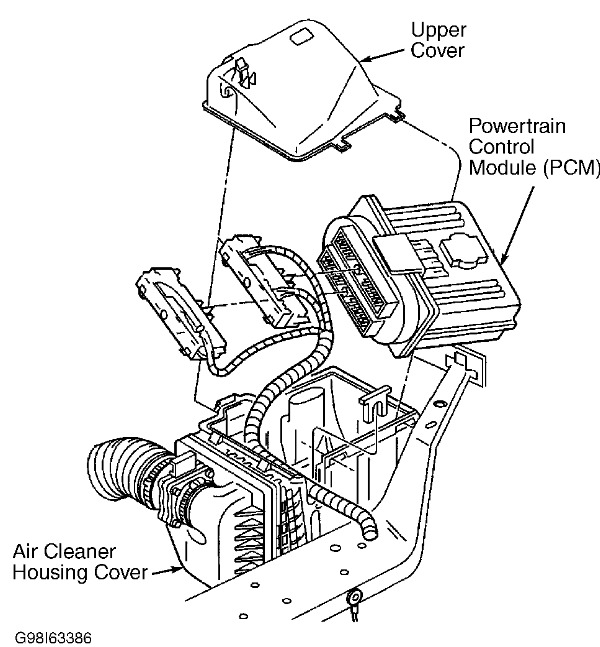
pcm location please

2002 CHEVROLET VENTURE
150,000 MILES
Avatar
DANNYA
  • MEMBER
  • 1 POST
where is pcm located on 2002 venture van?
Nov 6, 2014 at 11:23 AM
Advertisement
Avatar
HMAC300
  • CERTIFIED EXPERT
  • 48,601 POSTS
The PCM is located near the air filter housing. Check out the diagrams (Below). Please let us know if you need anything else to get the problem fixed...................................................................................

Cheers
Nov 6, 2014 at 12:27 PM
Avatar
C_CATRON
  • MEMBER
  • 28 POSTS
how change the engine control computer on my 1998 chevy venture?
Feb 8, 2021 at 12:34 PM (Merged)
Advertisement
Avatar
SATURNTECH9
  • CERTIFIED EXPERT
  • 30,869 POSTS
The computer has to be programed by the dealer unless you get one already programed.Whats wrong with your old computer?
Feb 8, 2021 at 12:34 PM (Merged)
Avatar
C_CATRON
  • MEMBER
  • 28 POSTS
it just seems like sometimes it gets good gas milage thenit dont. sometimes it seems like the engine i running rough. now my air bag light is on. i cant seem to fix the problem with the temperature gauge reading like its getting hot.the fans dont come on unless i turn the a/c on and back of then they cool it down and the fans will shut off on there own, but once they shut off they wont come back on unless i turn the a/c on and back off.
Feb 8, 2021 at 12:34 PM (Merged)

Avatar
SATURNTECH9
  • CERTIFIED EXPERT
  • 30,869 POSTS
For the fans i would check the coolant temp sensor to start with before replacing the ecm.The air bag light is a different computer then the ecm.Have you even checked for codes yet?
Feb 8, 2021 at 12:34 PM (Merged)
Avatar
SATURNTECH9
  • CERTIFIED EXPERT
  • 30,869 POSTS
Also a bad coolant temp sensor can make it run rough and effect gas mileage.
Feb 8, 2021 at 12:34 PM (Merged)
Avatar
C_CATRON
  • MEMBER
  • 28 POSTS
i have changed the coolant temperature sensor twice and the thermostat once. i had autozone hook it to there code reader yesturday and it didnt show anything.
Feb 8, 2021 at 12:34 PM (Merged)
Avatar
SATURNTECH9
  • CERTIFIED EXPERT
  • 30,869 POSTS
What color were the wires going to the coolant temp sensor you replaced?
Feb 8, 2021 at 12:34 PM (Merged)
Avatar
C_CATRON
  • MEMBER
  • 28 POSTS
i will have to look. i dont remember the colors, but i do know that it had three wires.
Feb 8, 2021 at 12:34 PM (Merged)
Avatar
SATURNTECH9
  • CERTIFIED EXPERT
  • 30,869 POSTS
I see only two wires in the wire diagram a black wire and yellow wire.
Feb 8, 2021 at 12:34 PM (Merged)
Avatar
C_CATRON
  • MEMBER
  • 28 POSTS
the plug has three wires and the coolant temperature sensor has three prongs.
Feb 8, 2021 at 12:34 PM (Merged)
Avatar
SATURNTECH9
  • CERTIFIED EXPERT
  • 30,869 POSTS
Your going to have to get a scan tool that can read live data so you can see what the sensor is reading back to the computer.There like 54 on amazon try this unplug the coolant temp sensor with it running see if the cooling fan comes on.
Feb 8, 2021 at 12:34 PM (Merged)
Avatar
C_CATRON
  • MEMBER
  • 28 POSTS
what is that tool called? are you just talking about a code reader(OBD11)?
Feb 8, 2021 at 12:34 PM (Merged)
Avatar
SATURNTECH9
  • CERTIFIED EXPERT
  • 30,869 POSTS
Iam talking about a obd2 code reader that can read some live engine data on obd2 cars.Which would include coolant temp just search for AL309.Have you unplugged the coolant temp sensor connector while its running to see if the cooling fan comes on?
Feb 8, 2021 at 12:34 PM (Merged)
Avatar
C_CATRON
  • MEMBER
  • 28 POSTS
no i have not. i will try that after work.
Feb 8, 2021 at 12:34 PM (Merged)
Avatar
SATURNTECH9
  • CERTIFIED EXPERT
  • 30,869 POSTS
Alright keep me posted.
Feb 8, 2021 at 12:34 PM (Merged)