Engine overheating?

2002 CHEVROLET VENTURE
13,400 MILES
Avatar
J.STIEG
  • MEMBER
  • 361 POSTS
Working on a overheating 2002 chevy venture 3400. Cooling fans do not come on. Fuses are good and the fan motors themselves are in working condition. Also the fan relay does not seem to be getting ground from computer. what can I try to further troubleshoot this problem? thanks
Apr 25, 2011 at 6:08 PM
Advertisement
Avatar
RASMATAZ
  • CERTIFIED EXPERT
  • 75,992 POSTS
Try checking the coolant temperature sensor, if it checks out could be a wiring or computer problem this guide can help us find the problem

https://www.2carpros.com/articles/engine-overheating-or-running-hot

Please run down this guide and report back.
Apr 25, 2011 at 6:16 PM
Avatar
JDL
  • CERTIFIED EXPERT
  • 16,098 POSTS
Any applicable trouble codes? Temp wise in degrees F, what is the temp reading? What about the coolant temp sensor? Did you use a voltage tester at the fan relay?
Apr 25, 2011 at 6:26 PM
Advertisement
Avatar
WRENCHTECH
  • CERTIFIED EXPERT
  • 20,761 POSTS
I don't believe there is anything wrong with the system. You are expecting it to come on before it is really supposed to. Low speed doesn't come on until 223 degrees and high speed at 230.
Apr 25, 2011 at 6:47 PM
Avatar
J.STIEG
  • MEMBER
  • 361 POSTS
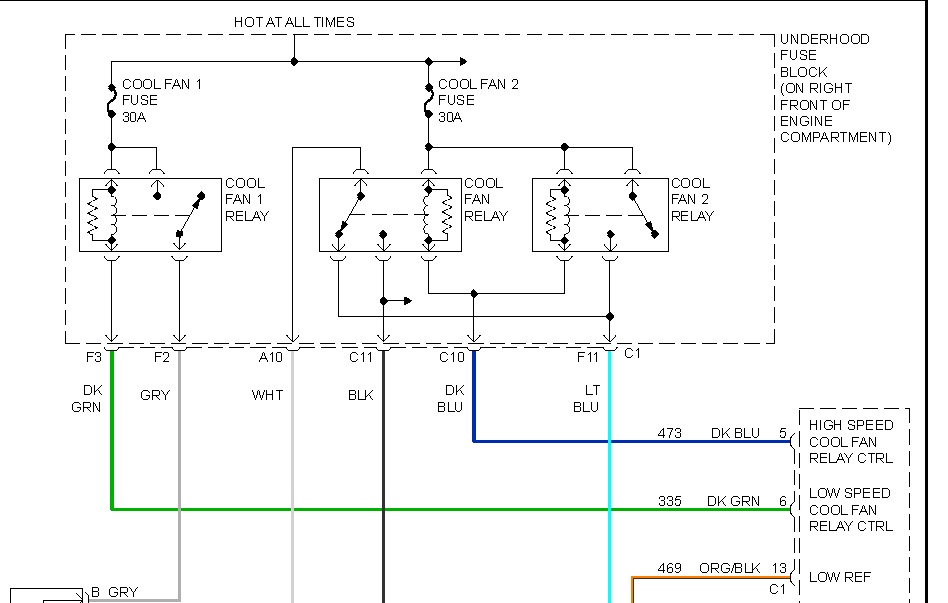
Yes, I checked voltage at the fan relay. All relays have +supply to them. I found out that the cooling fan relay 1 is clicking relay, but fan is not coming on, that would indicate the temp sensor and computer is working. I need more wiring diagrams. thanks
Apr 25, 2011 at 7:56 PM
Avatar
WRENCHTECH
  • CERTIFIED EXPERT
  • 20,761 POSTS
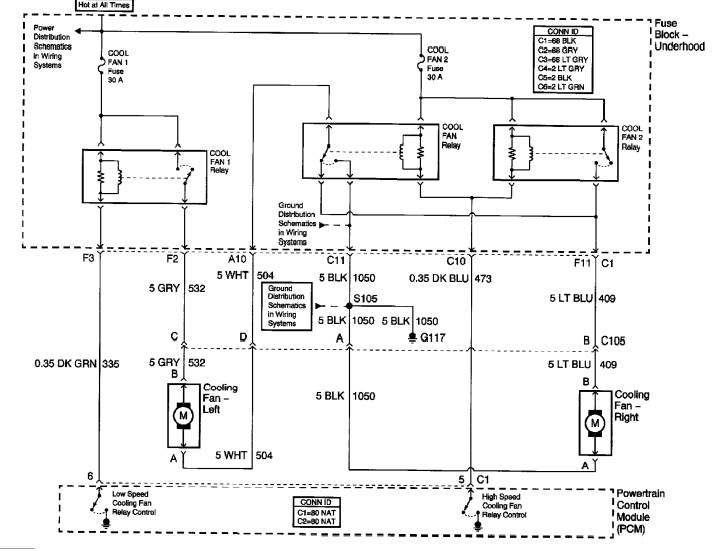
See if this is more complete.
Apr 25, 2011 at 8:00 PM
Avatar
JDL
  • CERTIFIED EXPERT
  • 16,098 POSTS
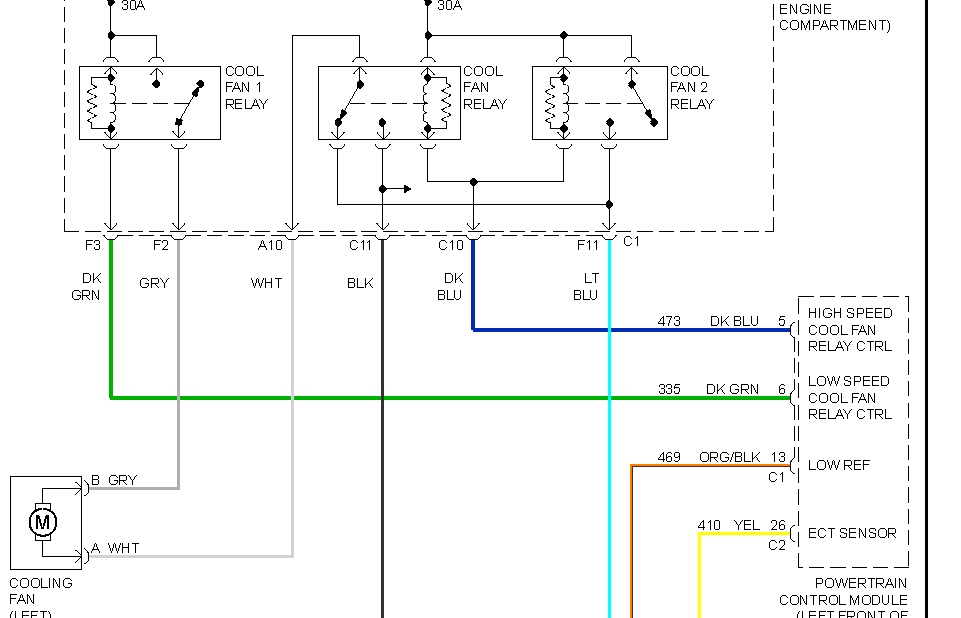
I can't get the whole diagram in one picture and make it readable.
To fan number one, gray wire is voltage, white wire is ground. You see the center relay, when that relay is not energized, the ground goes through that relay. See the blue wire, that goes through the second fan motor to chassis ground.
Apr 25, 2011 at 8:12 PM
Avatar
WRENCHTECH
  • CERTIFIED EXPERT
  • 20,761 POSTS
My post shows the complete diagram
Apr 25, 2011 at 8:15 PM
Avatar
J.STIEG
  • MEMBER
  • 361 POSTS
I have it working now and automatically responding. I found two things (not very common) that was keeping it from working. First I saw there was no ground at right cooling fan black wire. I think there should be ground there all the time. Second I found that there was a bad relay at cooling fan relay 1, bad contacts. Diagrams really helped.
Apr 26, 2011 at 12:17 AM
Avatar
WRENCHTECH
  • CERTIFIED EXPERT
  • 20,761 POSTS
No, there shouldn't be a ground there all the time. That is the trigger wire connected to the PCM which controls the relay through that wire. There is nothing wrong with your fan. Disconnect the wire and let it run. the fan will cycle on and off without it going into the red zone. that is the way it's supposed to work.
Apr 26, 2011 at 12:21 AM
Avatar
J.STIEG
  • MEMBER
  • 361 POSTS
I understand that the ground for the fan relay is completed by the -trigger ouput from PCM. I was talking about "5 BLK 1050" big thick black wire down by the right fan. It didn't have cotinuity to ground, so I tapped in and put a ground wire. Its responding automatically and shutting off. Just curious why that one big thick black wire was not grounded, its not like it went through a relay, I looked at the diagram. I followed that big BLK wire to the bottom of dist box and did not have cotinuety there ether.
Apr 26, 2011 at 3:33 AM
Avatar
WRENCHTECH
  • CERTIFIED EXPERT
  • 20,761 POSTS
If you look at the diagram, you will see that the ground for the left cooling fan is controlled by the #2 relay. That is how it gets 2 speeds. It runs the ground through the second fan to split the power between the 2 fans.
Apr 26, 2011 at 11:18 AM
Avatar
J.STIEG
  • MEMBER
  • 361 POSTS
Yes the ground goes through one of the relays
Apr 26, 2011 at 3:27 PM
Avatar
WRENCHTECH
  • CERTIFIED EXPERT
  • 20,761 POSTS
And then through the other motor when the relay is at rest.
Apr 26, 2011 at 4:52 PM
Avatar
KNIGHT2001
  • MEMBER
  • 3 POSTS
Engine Cooling problem
2002 Chevy Venture 4 cyl Two Wheel Drive Automatic

Van will redline when driving around town, but wont blow hot air through vents. If I speed up very rapidly the temp goes down and starts to blow hot air. None of this happens when driving on the highway. Checked for coolant in the oil(NONE Present) and no visible leaks. Any help would be MUCH APPRECIATED Thanks
Aug 21, 2020 at 11:47 AM (Merged)
Avatar
WRENCHTECH
  • CERTIFIED EXPERT
  • 20,761 POSTS
Is the cooling fan coming on and cycling back off.
Aug 21, 2020 at 11:47 AM (Merged)
Avatar
KNIGHT2001
  • MEMBER
  • 3 POSTS
yes the fan starts up when the temp increases and then shuts down when temp gauge returns to normal.
Aug 21, 2020 at 11:47 AM (Merged)
Avatar
WRENCHTECH
  • CERTIFIED EXPERT
  • 20,761 POSTS
The symptoms seem to be pointing toward a blown head gasket. You are getting combustion gases into the cooling system.
Aug 21, 2020 at 11:47 AM (Merged)
Avatar
KNIGHT2001
  • MEMBER
  • 3 POSTS
ok Thanks for your Help!!! I will check it out
Aug 21, 2020 at 11:47 AM (Merged)
Avatar
PAMELA1962
  • MEMBER
  • 1 POST
My temperature guage goes way up (3/4) when idling or in stop and go traffice. It remains normail (3/8) on the freeway. Is this normail or do I have problem ?

~Pam Freis
Aug 21, 2020 at 11:47 AM (Merged)
Avatar
DMHOOT
  • MEMBER
  • 10 POSTS
Sounds like a problem to me. I have the same year venture as you do. My Temp rarely goes past the 1/2 mark and I live in Phoenix. I would check a few things right off the bat.

1. Have you changed your coolent recently? What mixture % is it? Parts store sell testers cheap to test your coolent.

2. Check the 2 fans that are attached to the radiator to make sure their running. I'm thinking if the fan's are not working properly, you would see the overheating issue idle/parked/stopped. But when driving on the freeway their may be enough airflow from your speed to keep the engine cool.

I would start their. A bad thermostat possible as well, but i would expect that to make the eninge overheat after a few minutes of driving and not cool back down unless it's sticking.
Aug 21, 2020 at 11:47 AM (Merged)
Avatar
BMRFIXIT
  • CERTIFIED EXPERT
  • 19,053 POSTS
Check if low on coolant and if so suspect and check lower intake manifold
Aug 21, 2020 at 11:47 AM (Merged)
Avatar
NORAMAE
  • MEMBER
  • 1 POST
The temp guage on my 2002 chey venture says that its overheating. I have changed the thermastat, and the water pump. Also the heater just stop working..
Aug 21, 2020 at 11:47 AM (Merged)
Avatar
MIKE H R
  • CERTIFIED EXPERT
  • 3,094 POSTS
If it is overheating and the heater stopped working look for a blockage. Most times I suggest back flushing the system, getting the old coolant and cleaning the system. Take the thermsatat out first. Kits to clean out the collant system are sold at local automotive stores. After you have cleaned out the system and reinstalled the thermstat then fill with water. Make sure the thermastat is in correctly with the spring pointing into the engine. Fill the system with water and start it up. let it run, you will see when the thermastat opens the fluid will drop down. check the temp and the heater. If the temp is in the normal range. Most times overheating is from a bad thermastat , a clogged radiator or clogged heater core.
Aug 21, 2020 at 11:47 AM (Merged)
Avatar
2CP-ARCHIVES
  • MEMBER
  • 4,540 POSTS
Need advice regarding repair or replace?
Van is 10 yrs., 84300 miles. Just spent $3000 on repairs, now its overheating & being towed to mechanic. Found 6 recalls, already paid for, did not know about recalls. How to get money back? Help with making decision to keep or replace.
Aug 21, 2020 at 11:47 AM (Merged)
Avatar
GMTECH
  • CERTIFIED EXPERT
  • 537 POSTS
If you have paid for the recalls, GM should pay you back. I would call GM customer service on that. I guess if it is a head gasket that will cost a lot more money
Aug 21, 2020 at 11:47 AM (Merged)
Avatar
GIRLFRIEND795
  • MEMBER
  • 1 POST
Engine Cooling problem
2002 Chevy Venture 6 cyl 128500 miles

i had an intake gasket down and my car still overheats, why?
Aug 21, 2020 at 11:47 AM (Merged)
Avatar
RHALL77
  • CERTIFIED EXPERT
  • 3,361 POSTS
did you have the intake replaced? you may have air in the cooling system causing air pocket in the the anitfreeze causing it to overheat. have it checked right away before you crack the cylinder heads
Aug 21, 2020 at 11:47 AM (Merged)
Avatar
JEDIKNIGHT2
  • MEMBER
  • 18 POSTS
Because it probably was a head gasket...the gaskets SUCK on Ventures...at least until you replace them with the ones GM had to redesign...
Aug 21, 2020 at 11:47 AM (Merged)
Avatar
RUSSEL FINEHOUT
  • MEMBER
  • 2 POSTS
Last April my van overheated it was the thermostat. I did an overhaul and replaced all the tubes, water pump, temperature sensor, sending unit, and thermostat. After this it was still overheating and I noticed I had bubbles in my overflow tank. I changed the head gaskets the bubbles went away and it seemed to be doing better for about a day.
The van was still getting hot 200°f-250°f. I could run the heater and it would cool down fairly easily and it seemed to heat up the most at highway speeds so this lead me to believe it was also a clogged radiator. This last weekend I put in a new radiator and thermostat (to be safe) and I am having The same issues.
The van operates at highway speeds at 203°f at a 60° ambient air temperature and 212° At 90° ambient air temp. At road speeds (35-45 mph) 198°f at both 60° and 90° ambient air temperature. My father in law is insistent that you cannot mix max strength dex-cool and distilled water 50/50 when adding new coolant. Which is what I did after changing my head gaskets. Is this the case and do I just need to get my system flushed and refilled to fix this issue?
Anything helps, thanks.
Aug 21, 2020 at 11:47 AM (Merged)

Avatar
HMAC300
  • CERTIFIED EXPERT
  • 48,601 POSTS
All antifreeze whether it is dex- cool or glycol should be at a 50/50 mix especially with aluminum because it etches away the metal if stronger. your temperatures seem to be fairly normal except for the 250 which is on the hot side. check the radiator cap as it may not be holding enough pressure. Remember coolant on an engine is under pressure so what may seem hot is where it is supposed to be. if it continues at 250 then there may be a partial blockage in engine maybe.
Aug 21, 2020 at 11:47 AM (Merged)

Avatar
RUSSEL FINEHOUT
  • MEMBER
  • 2 POSTS
Also have replaced the radiator cap. Forgot to add that. Would a flush possibly help clear a blockage? And in the Phoenix summer it tends to run a little hotter at what point should I be concerned temperature wise?
Aug 21, 2020 at 11:48 AM (Merged)
Avatar
HMAC300
  • CERTIFIED EXPERT
  • 48,601 POSTS
if it stays at 250 then be concerned. i am not sure that a flush will help, but if you do go that route get something like radiator cleaner and not flush. also, check radiator for cold spots when hot/warm if you feel any cold spots it is not working. also are your fans kicking on as well? when you turn your A/C on at least one should work. that is also another problem child at low speeds/idling.
Aug 21, 2020 at 11:48 AM (Merged)
Avatar
BEANJ00
  • MEMBER
  • 1 POST
I bought a 2002 Chevy Venture used with 94,000 k. I had put about 6,000 k on it when I was driving on the highway and it over heated. I shut the van off and about 2 hours later I had to drive the vehicle 3klm to a service station while it was over heated.

The vehicle was 3 liters low in coolant and the head gaskets where gone. The station said it was very rare to see this in such a new vehicle with low kilometers. Anyway, I was worried about the long term affects of my engine now that it had over heated and I had to drive 3 kilometers with the engine in this state. Can you tell me what I may expect in the future with this vehicle?
Aug 21, 2020 at 11:48 AM (Merged)
Avatar
RASMATAZ
  • CERTIFIED EXPERT
  • 75,992 POSTS
Could be an early cylinders wear and tear and engine bearing failures. It depends on the circumstances.

Just make sure they find out why the headgasket got blown away.
Aug 21, 2020 at 11:48 AM (Merged)
Avatar
ED ARMES
  • CERTIFIED EXPERT
  • 129 POSTS
3.4 is prone to head gasket failures and/or intake gasket failures. I have seen several of these includeing my own in the past year. GM has new design on these gaskets. Mine were replaced last year and I have no problems. These heads are aluminum and will probably need to be milled when they are removed.as they warp when over heated. If they are not checked for warpage, they me start to leak again. If your engine is still quiet and you change your oil on schedule, you are probably in the clear.
Aug 21, 2020 at 11:48 AM (Merged)
Avatar
TEACH59
  • MEMBER
  • 1 POST
2002 chevrolet venture 3.4 L engine, 60000mls
the temperature gauge rises rapidly close to the red range and then drops back to the normal range
Aug 21, 2020 at 11:57 AM (Merged)
Avatar
RASMATAZ
  • CERTIFIED EXPERT
  • 75,992 POSTS
Start by replacing the thermostat and flush the engine cooling system. Don't work come on back, I'll give you detail instructions is how to locate the problem.
Aug 21, 2020 at 11:57 AM (Merged)