cant get a remote to work

1998 FORD EXPLORER
Avatar
LYNNENROB
  • MEMBER
  • 18 POSTS
hi i recently purchased a central locking remote for my Ford Explorer 1998 4x4 and i have followed the steps to try and get it to work, but i cant, my doors arent doing the lock cycle. The button to lock all doors on the inside of the car works to lock all doors i just cant get a remote to work
Nov 30, 2011 at 3:47 AM

Advertisement
Avatar
RIVERMIKERAT
  • CERTIFIED EXPERT
  • 6,110 POSTS
Is the battery in the remote and is it in good condition?
Nov 30, 2011 at 4:28 AM
Avatar
LYNNENROB
  • MEMBER
  • 18 POSTS
hi, the remote is brand new and so is the battery
Nov 30, 2011 at 10:00 AM
Advertisement
Avatar
RIVERMIKERAT
  • CERTIFIED EXPERT
  • 6,110 POSTS
Ok. Sometimes you have to program the remote to work with the controller. Check through the instructions to see if this is the case. There should also be a troubleshooting section at the back of the manual.

Make sure all electrical connections between the control unit and the vehicle's lock system were done correctly. Make sure you connected those wires to the proper relays and to the proper position on those relays.
Nov 30, 2011 at 5:29 PM
Avatar
LYNNENROB
  • MEMBER
  • 18 POSTS
hi, i actually didnt install the central locking, it came with the car, it just didnt come with a remote, so i ordered a remote and i cant get it to work, i am turning the ignition from off to on 8 times and then pushing the remote button but nothing is happening.
Nov 30, 2011 at 11:17 PM
Avatar
LYNNENROB
  • MEMBER
  • 18 POSTS
ok, ive checked all fuses, tried all the steps to get it to work. i have tried the off to run 8 times leaving it in on position and the locks dont lock then unlock (cycle)
Dec 1, 2011 at 2:18 AM
Avatar
JACOBANDNICKOLAS
  • CERTIFIED EXPERT
  • 110,175 POSTS
Return the fob and request a new one. It sounds like the one you have may be defective. It sounds like you have followed the directions. Make sure to recheck wiring if you haven't already.
Dec 1, 2011 at 2:40 AM
Avatar
LYNNENROB
  • MEMBER
  • 18 POSTS
whats FOB?? i dont know what wiring to check as i didnt put it in its the factory locks etc on it
Dec 1, 2011 at 3:10 AM
Avatar
RIVERMIKERAT
  • CERTIFIED EXPERT
  • 6,110 POSTS
FOB is key fob. The remote. As my colleague states, it sounds like either the remote or the receiver is defective.
Dec 1, 2011 at 3:14 AM
Avatar
LYNNENROB
  • MEMBER
  • 18 POSTS
where would the reciever be? Thanks for all this help guys i just bought the car and was told it had central locking but i didnt realise it didnt have a remote :-(
Dec 1, 2011 at 3:22 AM
Avatar
JACOBANDNICKOLAS
  • CERTIFIED EXPERT
  • 110,175 POSTS
Is it a factory alarm?
Dec 1, 2011 at 3:25 AM
Avatar
LYNNENROB
  • MEMBER
  • 18 POSTS
yep
Dec 1, 2011 at 3:32 AM
Avatar
RIVERMIKERAT
  • CERTIFIED EXPERT
  • 6,110 POSTS
The passive anti-theft system module is located behind the top right side of the dash.

Your vehicle may be equipped with electric door locks, but not necessarily remote door locks. That may also be why the remote isn't working. There's nothing to receive the signals from the remote.
Dec 1, 2011 at 3:38 AM
Avatar
LYNNENROB
  • MEMBER
  • 18 POSTS
oh ok.. how can i tell if it does have remote door locks? what does the anti theft module look like
Dec 1, 2011 at 3:45 AM
Avatar
RIVERMIKERAT
  • CERTIFIED EXPERT
  • 6,110 POSTS
It's a box with wires going to it. Some are black, some silver, others may be white. There may be a label on the bottom of it identifying its purpose.

The easiest way is to have a Ford dealer look up the installed factory options for the VIN.
Dec 1, 2011 at 4:14 AM
Avatar
RIVERMIKERAT
  • CERTIFIED EXPERT
  • 6,110 POSTS
Just because there are buttons to lock and unlock the doors inside the vehicle doesn't mean that a remote entry system is installed.
Dec 1, 2011 at 4:15 AM
Avatar
LYNNENROB
  • MEMBER
  • 18 POSTS
ok thanks is the box inside or outside the car
Dec 1, 2011 at 4:18 AM
Avatar
RIVERMIKERAT
  • CERTIFIED EXPERT
  • 6,110 POSTS
Inside. Behind the glove box/passenger airbag module.
Dec 1, 2011 at 4:24 AM
Avatar
LYNNENROB
  • MEMBER
  • 18 POSTS
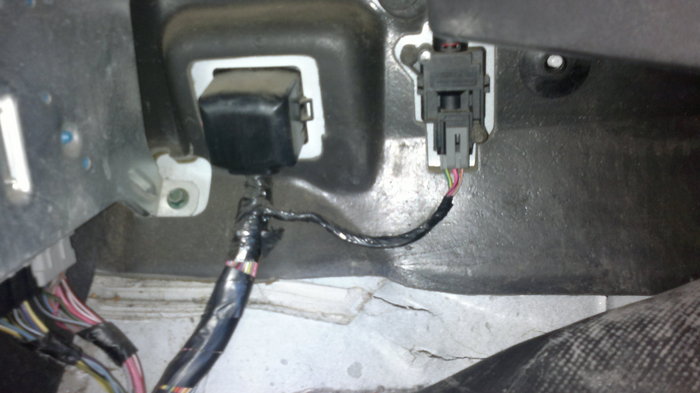
ok i went to my Ford Dealer and they said they couldnt use my Vin and look up the fastory settings. so they werent helpful at all.. i took a picture of what is under my glove box can i upload it and you can tell me if its what im looking for?
Dec 1, 2011 at 5:33 AM
Avatar
RIVERMIKERAT
  • CERTIFIED EXPERT
  • 6,110 POSTS
Yes. There is the option to attach an image. It should be just below the reply box. I can't guarantee whether we'll be able to tell anything from the picture, though.
Dec 1, 2011 at 6:50 AM
Avatar
LYNNENROB
  • MEMBER
  • 18 POSTS
hi this is under my glove box
Dec 1, 2011 at 8:23 AM
Avatar
RIVERMIKERAT
  • CERTIFIED EXPERT
  • 6,110 POSTS
Neither of those items looks like a remote locking receiver.
Dec 1, 2011 at 6:51 PM
Avatar
CJ MEDEVAC
  • CERTIFIED EXPERT
  • 11,004 POSTS
A LOT OF INFO IN MITCHELL I....TESTS AND PROGRAMMING, ETC

IF I COULD SNAP-SHOT IT ALL, I WOULD---I'M TOO SLOW TO COPY ALL OF THAT DOWN, AND DO NOT KNOW WHAT IS RELEVANT OR NOT.

SORTA NOT WHAT I AM CAPABLE OF (YET) NOR DO I UNDERSTAND IT MYSELF--MUCH LESS GIVE AWAY A BUNCH OF MIS-INFORMATION TO ANOTHER


I DID SEE THAT THE "RAP MODULE" (REMOTE ANTI-THEFT/ PERSONALITY MODULE) IS LOCATED AT THE ----LEFT REAR QUARTER PANEL!!!......DID NOT SAY WHETHER IT WAS ACCESSIBLE FROM THE INSIDE OR OUTSIDE

THERE WAS NOT A DIAGRAM

MAYBE IT JUST CAME LOOSE OR SOMETHING

SORRY I AM USELESS NOW.....GET A JEEP CJ, I WILL HELP YOU FOREVER!

THE MEDIC

Dec 1, 2011 at 7:29 PM
Avatar
LYNNENROB
  • MEMBER
  • 18 POSTS
ok so im guessing that my car doesnt have a RAP module thats why my remote isnt working
Dec 1, 2011 at 10:33 PM
Avatar
CJ MEDEVAC
  • CERTIFIED EXPERT
  • 11,004 POSTS
NOT WHAT I SAID!

ACCORDING TO "MIT I", IT'S IN THE DRIVERS SIDE REAR QUARTER PANEL

THAT'S ABOUT ALL I KNOW ABOUT

rivermikerat MAY BE ABLE TO CONTINUE ON

I AM SORRY I AM NOT ANYMORE HELP

THE MEDIC
Dec 2, 2011 at 1:08 AM
Avatar
LYNNENROB
  • MEMBER
  • 18 POSTS
ok, sorry i wasnt implying thats what you said sorry.. i will check where you said a nd hopefully there is something there.

And everyone has been a great help to me Thank you i will post when i check
Dec 2, 2011 at 1:20 AM
Avatar
RIVERMIKERAT
  • CERTIFIED EXPERT
  • 6,110 POSTS
CJ, I'll message you on how to copy/paste information from Mitchell-1 to here.
Dec 2, 2011 at 3:11 AM