No fuel pressure or Fuel Injector pulse

1988 FORD BRONCO
V8 • 4WD • AUTOMATIC
Avatar
PCHEFSONYA
  • MEMBER
  • 31 POSTS
I just installed new engine but have no start. There is no fuel pressure or fuel injector pulse. Checked fuel pump relay and all fuses and they are all good. Im at a loss what to check next.
Jul 30, 2011 at 4:12 PM

Advertisement
Avatar
JDL
  • CERTIFIED EXPERT
  • 16,098 POSTS
Do you have spark at the plugs, engine cranking? If you don't have anything, Check for rpm/pip signal, comes from the tfi module. I can't say the module is faulty. With the key on or cranking do you have primary voltage at the coil?

Any applicable trouble codes?
Jul 30, 2011 at 6:18 PM
Avatar
PCHEFSONYA
  • MEMBER
  • 31 POSTS
Yes I have spark and when I spray carb. cleaner in the throttle plate the truck will run. As soon as I stop spraying the truck shuts off. I power probed the fuel pump and the pump came on, but still will not run, no power going to the fuel injectors.
Jul 31, 2011 at 4:43 PM
Advertisement
Avatar
JDL
  • CERTIFIED EXPERT
  • 16,098 POSTS
You may have two fuel pumps, low pressure pump in the tank, high pressure pump along driver side frame rail, under the hood.

With engine cranking, check voltage to and from the inertia switch. Engine cranking use a noid lite for injector plug, does it pulse? Voltage to the injector/s is a red wire, goes hot with the key on.

Any applicable trouble codes?
Jul 31, 2011 at 5:47 PM
Avatar
PCHEFSONYA
  • MEMBER
  • 31 POSTS
Yep I already tried and no injector pulse. No trouble codes come up.
Jul 31, 2011 at 6:24 PM
Avatar
JDL
  • CERTIFIED EXPERT
  • 16,098 POSTS
Any voltage on that red wire at injectors, key on? Saying no pulse can mean either no voltage or no ground, which is it?

With two fuel pumps, did you check both?
Jul 31, 2011 at 6:28 PM
Avatar
PCHEFSONYA
  • MEMBER
  • 31 POSTS
I have voltage on both wires, going to the injectors.Both pumps are good. I checked power on both sides of the inertia switch and no power either side.I disconnected the connector and checked it with a test light. Before installing the engine I had communication with computer, after installation no communication at all.
Jul 31, 2011 at 7:00 PM
Avatar
JDL
  • CERTIFIED EXPERT
  • 16,098 POSTS
Is the engine and computer compatible? Same year--make--model-- engine size? If not, it may not work?
Jul 31, 2011 at 7:28 PM
Avatar
PCHEFSONYA
  • MEMBER
  • 31 POSTS
Its the original computer from the engine I switched over, it came with the truck.
Jul 31, 2011 at 7:31 PM
Avatar
JDL
  • CERTIFIED EXPERT
  • 16,098 POSTS
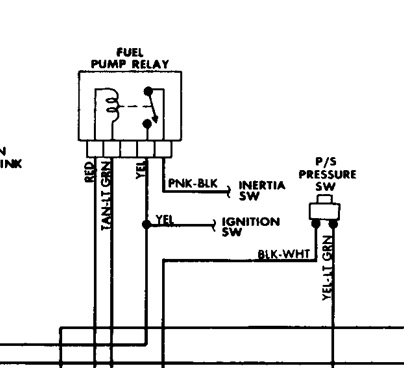
Fuel pump relay diagram below. Yellow wire is voltage from ignition switch. When the relay is energized, that line with the arrowhead moves to the yellow wire terminal, voltage then flows to inertia switch. The coil side of relay has to have voltage and ground in order to energize. The red wire is voltage, same voltage that goes to injector/s. The tan wire with white tracer is ground for the coil side of relay, controlled by the computer.
Jul 31, 2011 at 7:44 PM
Avatar
JDL
  • CERTIFIED EXPERT
  • 16,098 POSTS
You may have to check all voltage and grounds at the computer.
Jul 31, 2011 at 7:46 PM
Avatar
PCHEFSONYA
  • MEMBER
  • 31 POSTS
I have power going to the relay on the yellow wire, but have no power going to the inertia switch. Is it possible to reground the computer?
Jul 31, 2011 at 8:22 PM
Avatar
JDL
  • CERTIFIED EXPERT
  • 16,098 POSTS
What about voltage on the red wire?
Jul 31, 2011 at 8:35 PM
Avatar
PCHEFSONYA
  • MEMBER
  • 31 POSTS
When I turn the key on I have voltage going to the red wire. When I uplug injector plugs I have voltage on both sides.
Jul 31, 2011 at 8:39 PM
Avatar
JDL
  • CERTIFIED EXPERT
  • 16,098 POSTS
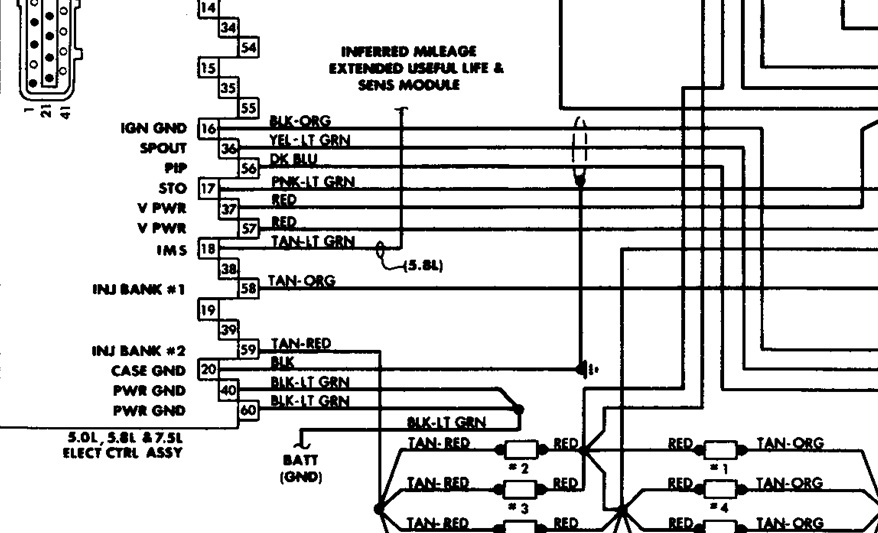
Make sure battery has a full charge and fuses are all ok. Take the computer connector loose, check that no pins are bent or pushed back in the connector. Yellow wire pin #1 is voltage from ignition switch. In the diagram are ground pins and v-power. I don't know what else to tell you.
Jul 31, 2011 at 9:03 PM
Avatar
PCHEFSONYA
  • MEMBER
  • 31 POSTS
Thanks , I will check out the connectors to the computer as you suggested....I'm with you, I don't know what else to check. Thanks for your help.
Jul 31, 2011 at 10:06 PM
Avatar
JDL
  • CERTIFIED EXPERT
  • 16,098 POSTS
I'd hate to see you replace the computer and it turn out to be something else.
Aug 1, 2011 at 3:03 PM